Hi. Today we will create a drag and drop game using jQuery drag drop functions. We will create two boxes. From one box we need to drag the content box and drop it to another box. We will use a sortable function and its events. I hope you will like this game.
Please see this article in my blog.
Background
For the last Independence day for India, I thought to create a game related to the word “India”. I created and hosted it in my website.
Play the game
You can play the game here.
Using the code
First we will create an html5 page as follows.
- <!DOCTYPE html>
- <html>
- <head>
- <title>Find INDIA Game - Sibeesh Passion</title>
- </head>
- <body id="body">
- </body>
- </html>
And now we will set style to the body. To set the background image fit to the screen we will use the following styles.
- #body {
- background: url("http://sibeeshpassion.com/content/images/indian%20flag%20banner.jpg") no-repeat center center fixed;
- -webkit-background-size: cover;
- -moz-background-size: cover;
- -o-background-size: cover;
- background-size: cover;
- }
Now we can see the page as follows.

Fit the Image To The Screen
Since we will create a client-side game, it is necessary to load the jQuery and jQuery UI reference.
- <script src="jquery-2.0.2.min.js"></script>
- <script src="jquery-ui.js"></script>
Next we will create the dragable contents as follows.
- <div class="dragDiv">
- <div id="dragDivInner">
- <div myid="1" class="droppable" myval="I"></div>
- <div myid="2" class="droppable"></div>
- <div myid="3" class="Notdroppable"></div>
- <div myid="6" class="droppable"></div>
- <div myid="7" class="droppable"></div>
- <div myid="8" class="Notdroppable"></div>
- <div myid="9" class="droppable" myval="N"></div>
- <div myid="10" class="Notdroppable"></div>
- <div myid="11" class="droppable"></div>
- <div myid="12" class="droppable"></div>
- <div myid="17" class="droppable"></div>
- <div myid="18" class="Notdroppable"></div>
- <div myid="19" class="droppable"></div>
- <div myid="20" class="Notdroppable" myval="A"></div>
- <div myid="21" class="droppable"></div>
- <div myid="22" class="droppable"></div>
- <div myid="23" class="Notdroppable"></div>
- <div myid="24" class="droppable"></div>
- <div myid="25" class="Notdroppable" myval="I"></div>
- <div myid="26" class="droppable"></div>
- <div myid="27" class="droppable"></div>
- <div myid="28" class="Notdroppable"></div>
- <div myid="29" class="droppable"></div>
- <div myid="30" class="Notdroppable"></div>
- <div myid="31" class="Notdroppable" myval="D"></div>
- <div myid="32" class="droppable"></div>
- <div myid="33" class="droppable"></div>
- <div myid="34" class="Notdroppable"></div>
- <div myid="35" class="droppable"></div>
- <div myid="40" class="Notdroppable"></div>
- </div>
- </div>
Now we need to set a div where we can drag contents to it.
- <div class="dropDiv">
- <div id="draggedContent" style="display: none;"></div>
- </div>
Since it is a game, we must set the game rules also, right?
- <div id="gamerules">
- <ul>
- <li class="caption">Find "INDIA" Game Rules </li>
- <li>You can drag and drop any boxes. </li>
- <li>We have set each letters from "INDIA" in the boxes. It is hidden</li>
- <li>The game is, you need to find out the letters of "INDIA" by drag and drop the boxes to nearest box</li>
- <li>Let us play the game now...</li>
- </ul>
- </div>
And we will set some styles for those elements.
- .dropDiv {
- border: 1px solid#ccc;
- width: 25 % ;
- height: auto;
- padding: 10px;
- display: inline;
- position: absolute;
- margin - left: 5px;
- min - height: 265px;
- }.dragDiv {
- border: 1px solid#ccc;
- width: 27 % ;
- height: auto;
- padding: 10px;
- float: left;
- margin - left: 5px;
- min - height: 265px;
- }#parent {
-
- height: 307px;
- width: 70 % ;
- padding: 20px;
- }.droppable {
- width: 25px;
- height: 28px;
- padding: 5px;
- background - color: green;
- margin: 3px;
- float: left;
- cursor: move;
- }.Notdroppable {
- width: 25px;
- height: 28px;
- padding: 5px;
- background - color: red;
- margin: 3px;
- float: left;
- }#countdiv {
- margin - top: 10px;
- float: left;
- }#gamerules {
- border: 1px solid#ccc;
- width: 250px;
- height: 280px;
- padding: 5px;
- float: right;
- margin - left: 5px;
- }.caption {
- list - style: none;
- color: green;
- padding: 5px;
- font - weight: bold;
- }
So our page will look such as follows.
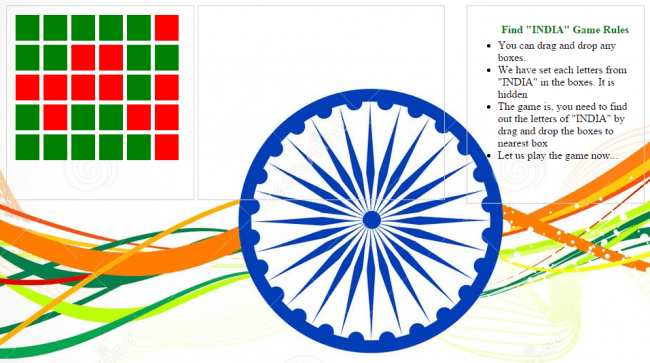
Drag And Drop Game
The next thing to do is to add sortable functionality using jQuery sortable to the div that has the class dropDiv.
- $(".dropDiv").sortable({
- connectWith: '.dropDiv',
- forcePlaceholderSize: true,
- forceHelperSize: true,
- opacity: 0.60,
- placeholder: 'placeholder',
- tolerance: 'touch',
- scroll: false,
- cancel: '.dropDiv',
- start: function (event, ui) {
- },
- stop: function (event, ui) {
- },
- update: function (event, ui) {
- },
- receive: function (event, ui) {
- }
- });
Please note that we have provided the connectWith property as follows to make the dragable div to be dropped only in the div that has the class dropDiv.
We have also set the property cancel as follows to make the dropped div not dragable from dropDiv.
Next we will set draggable for our inner divs.
- $('.Notdroppable,.droppable').draggable({
- connectToSortable: '.dropDiv',
- containment: "#dropDiv",
- helper: 'clone',
- revert: 'invalid'
- });
Game Insights
As you can see in the HTML of the our dragDiv, we have set an attribute myval for some of the div. So what we will do is, when a user drags a div we will check whether that specific div has that attribute and if it has, the user gets a letter. In this way the user needs to collect 5 letters from the dragDiv.
So in the stop function of sortable we will write some scripts as follows.
- stop: function (event, ui) {
- ++count;
- if (ui.item.attr('myval')) {
- $('#draggedContent').show().append(ui.item.attr('myval'));
- }
- $(".dragDiv div[myid=" + ui.item.attr('myid') + "]").remove();
- var res = maxTrial - count;
- if (res == 0) {
- $('#countdiv').show().html('Sorry, you have no more chances left!!!. Please refresh to start the game again');
- $('.dragDiv .droppable, .dragDiv .Notdroppable').remove();
- }
- else {
- $('#countdiv').show().html('You still have ' + res + ' tries');
- }
- $('.dropDiv .droppable, .dropDiv .Notdroppable').remove();
- if ($('#draggedContent').html().length == 5) {
- alert('You have won the game!!!. Please collect the prize from somewhere ;)');
- $('#countdiv').show().html('You have won the game!!!. Please collect the prize from somewhere ;)!. Please refresh to start the game again');
- $('.dragDiv .droppable, .dragDiv .Notdroppable').remove();
- }
- }
We are
checking whether the inner div has a specific attribute as follows and once we find it, we are removing that from dragDiv.
- if (ui.item.attr('myval')) {
- $('#draggedContent').show().append(ui.item.attr('myval'));
- }
- $(".dragDiv div[myid=" + ui.item.attr('myid') + "]").remove();
If a user has already has those five letters, we must alert the user, right? We will do this validation in the start function.
- start: function (event, ui) {
- if (count > maxTrial) {
- $('#countdiv').show().html('Sorry, you have no more chances left!!!. Please refresh to start the game again');
- }
- else
- {
- }
- }
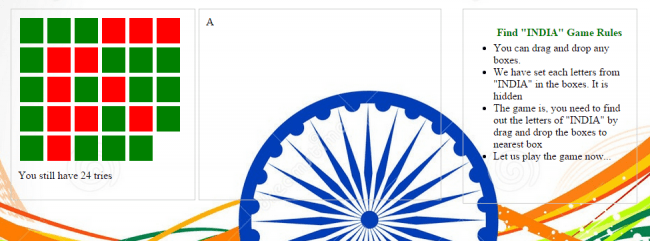
Drag And Drop Game
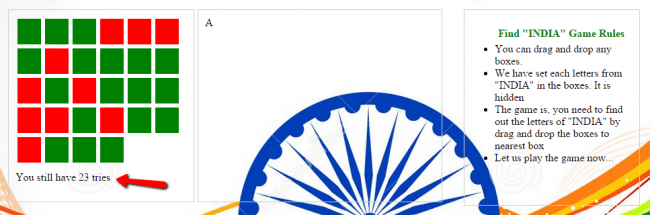
Drag And Drop Game
If there is no chances left, the user will get a message as follows.
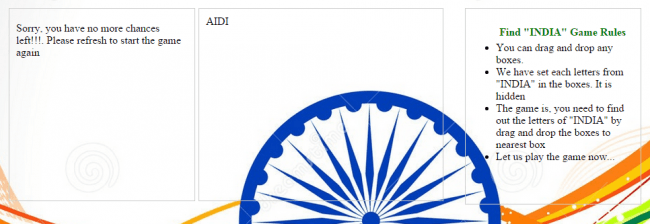
Drag And Drop Game
Now what to do next? Yes, we need to shuffle the div contents or else the user may find it easy when the tiles are in the same order and the same place.
To shuffle the divs dynamically we will add some scripts as follows.
- var parent = $("#dragDivInner");
- var divs = parent.children();
- while (divs.length) {
- parent.append(divs.splice(Math.floor(Math.random() * divs.length), 1)[0]);
- }
Next we will disable the right-click and mouse events as follows.
- document.onmousedown = function (event) {
- event = (event || window.event);
- if (event.keyCode == 123) {
- return false;
- }
- }
- document.onkeydown = function (event) {
- event = (event || window.event);
- if (event.keyCode == 123) {
- return false;
- }
- }
- $(document).on("contextmenu", function (e) {
- return false;
- });
We will also disable the F12 key of the keyboard.
- document.onkeypress = function (event) {
- event = (event || window.event);
- if (event.keyCode == 123) {
- return false;
- }
- }
As every game has some settings, we will also provide some settings.
- <div id="gameSettings">
- <br />
- Select Game Level :
- <select id="selectGameLevel">
- <option value="Easy">Easy</option>
- <option value="Medium">Medium</option>
- <option value="Hard">Hard</option>
- </select>
- </div>
And in the drop down option change, we will decrease the maximum trials allowed.
- $("#selectGameLevel").change(function (e) {
- var selected = $("#selectGameLevel option:selected").val();
- if (selected == "Easy") {
- maxTrial = 25;
- } else if (selected == "Medium") {
- maxTrial = 15;
- } else if (selected == "Hard") {
- maxTrial = 10;
- }
- } );
So our complete page will look like this.
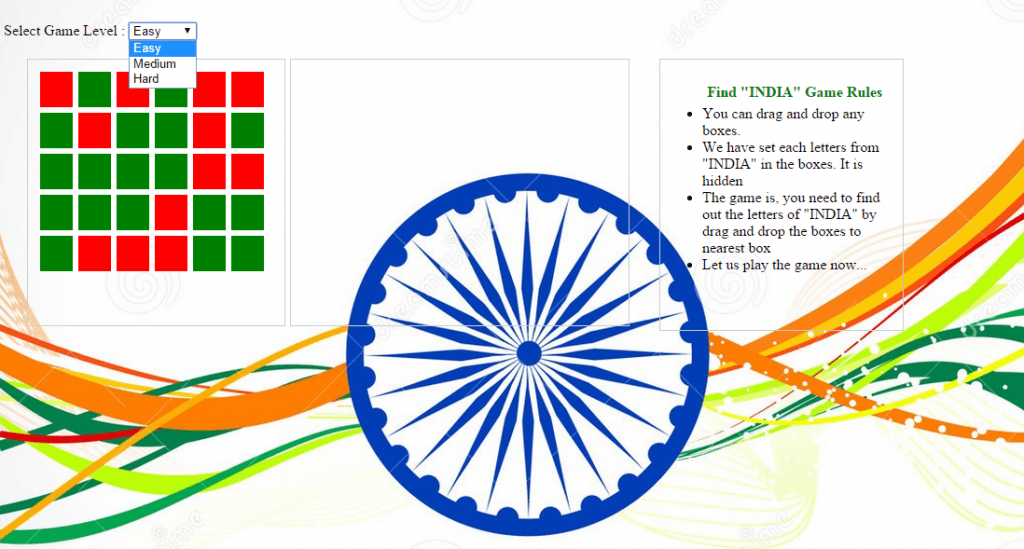
Drag And Drop Game
Our complete code is as follows.
Complete Code
- <!DOCTYPE html>
- <html>
- <head>
- <title>Find INDIA Game - Sibeesh Passion</title>
- <script src="jquery-2.0.2.min.js"></script>
- <script src="jquery-ui.js"></script>
- <style>
- #body {
- background: url("http://sibeeshpassion.com/content/images/indian%20flag%20banner.jpg") no - repeat center center fixed; - webkit - background - size: cover; - moz - background - size: cover; - o - background - size: cover;
- background - size: cover;
- }.dropDiv {
- border: 1px solid#ccc;
- width: 25 % ;
- height: auto;
- padding: 10px;
- display: inline;
- position: absolute;
- margin - left: 5px;
- min - height: 265px;
- }.dragDiv {
- border: 1px solid#ccc;
- width: 27 % ;
- height: auto;
- padding: 10px;
- float: left;
- margin - left: 5px;
- min - height: 265px;
- }#parent {
-
- height: 307px;
- width: 70 % ;
- padding: 20px;
- }.droppable {
- width: 25px;
- height: 28px;
- padding: 5px;
- background - color: green;
- margin: 3px;
- float: left;
- cursor: move;
- }.Notdroppable {
- width: 25px;
- height: 28px;
- padding: 5px;
- background - color: red;
- margin: 3px;
- float: left;
- }#countdiv {
- margin - top: 10px;
- float: left;
- }#gamerules {
- border: 1px solid#ccc;
- width: 250px;
- height: 280px;
- padding: 5px;
- float: right;
- margin - left: 5px;
- }.caption {
- list - style: none;
- color: green;
- padding: 5px;
- font - weight: bold;
- }#gameSettings {
- width: auto;
- }
- </style>
- < script >
- var count = 0;
- var maxTrial = 25;
- document.onkeypress = function(event) {
- event = (event || window.event);
- if (event.keyCode == 123) {
- return false;
- }
- }
- document.onmousedown = function(event) {
- event = (event || window.event);
- if (event.keyCode == 123) {
- return false;
- }
- }
- document.onkeydown = function(event) {
- event = (event || window.event);
- if (event.keyCode == 123) {
- return false;
- }
- }
- $(function() {
- $(document).on("contextmenu", function(e) {
- return false;
- });
- var parent = $("#dragDivInner");
- var divs = parent.children();
- while (divs.length) {
- parent.append(divs.splice(Math.floor(Math.random() * divs.length), 1)[0]);
- }
- $("#selectGameLevel").change(function(e) {
- var selected = $("#selectGameLevel option:selected").val();
- if (selected == "Easy") {
- maxTrial = 25;
- } else if (selected == "Medium") {
- maxTrial = 15;
- } else if (selected == "Hard") {
- maxTrial = 10;
- }
- });
- $('.Notdroppable,.droppable').draggable({
- connectToSortable: '.dropDiv',
- containment: "#dropDiv",
- helper: 'clone',
- revert: 'invalid'
- });
- $(".dropDiv").sortable({
- connectWith: '.dropDiv',
- forcePlaceholderSize: true,
- forceHelperSize: true,
- opacity: 0.60,
- placeholder: 'placeholder',
- tolerance: 'touch',
- scroll: false,
- cancel: '.dropDiv',
- start: function(event, ui) {
- if (count > maxTrial) {
- $('#countdiv').show().html('Sorry, you have no more chances left!!!. Please refresh to start the game again');
- } else {}
- },
- stop: function(event, ui) {
- ++count;
- if (ui.item.attr('myval')) {
- $('#draggedContent').show().append(ui.item.attr('myval'));
- }
- $(".dragDiv div[myid=" + ui.item.attr('myid') + "]").remove();
- var res = maxTrial - count;
- if (res == 0) {
- $('#countdiv').show().html('Sorry, you have no more chances left!!!. Please refresh to start the game again');
- $('.dragDiv .droppable, .dragDiv .Notdroppable').remove();
- } else {
- $('#countdiv').show().html('You still have ' + res + ' tries');
- }
- $('.dropDiv .droppable, .dropDiv .Notdroppable').remove();
- if ($('#draggedContent').html().length == 5) {
- alert('You have won the game!!!. Please collect the prize from somewhere ;)');
- $('#countdiv').show().html('You have won the game!!!. Please collect the prize from somewhere ;)!. Please refresh to start the game again');
- $('.dragDiv .droppable, .dragDiv .Notdroppable').remove();
- }
- },
- update: function(event, ui) {},
- receive: function(event, ui) {}
- });
- }); < /script>
- </head>
- <body id="body">
- <div id="gameSettings">
- <br />
- Select Game Level :
-
- <select id="selectGameLevel">
- <option value="Easy">Easy</option>
- <option value="Medium">Medium</option>
- <option value="Hard">Hard</option>
- </select>
- </div>
- <div id="parent" style="float: left;">
- <div class="dragDiv">
- <div id="dragDivInner">
- <div myid="1" class="droppable" myval="I"></div>
- <div myid="2" class="droppable"></div>
- <div myid="3" class="Notdroppable"></div>
- <div myid="6" class="droppable"></div>
- <div myid="7" class="droppable"></div>
- <div myid="8" class="Notdroppable"></div>
- <div myid="9" class="droppable" myval="N"></div>
- <div myid="10" class="Notdroppable"></div>
- <div myid="11" class="droppable"></div>
- <div myid="12" class="droppable"></div>
- <div myid="17" class="droppable"></div>
- <div myid="18" class="Notdroppable"></div>
- <div myid="19" class="droppable"></div>
- <div myid="20" class="Notdroppable" myval="A"></div>
- <div myid="21" class="droppable"></div>
- <div myid="22" class="droppable"></div>
- <div myid="23" class="Notdroppable"></div>
- <div myid="24" class="droppable"></div>
- <div myid="25" class="Notdroppable" myval="I"></div>
- <div myid="26" class="droppable"></div>
- <div myid="27" class="droppable"></div>
- <div myid="28" class="Notdroppable"></div>
- <div myid="29" class="droppable"></div>
- <div myid="30" class="Notdroppable"></div>
- <div myid="31" class="Notdroppable" myval="D"></div>
- <div myid="32" class="droppable"></div>
- <div myid="33" class="droppable"></div>
- <div myid="34" class="Notdroppable"></div>
- <div myid="35" class="droppable"></div>
- <div myid="40" class="Notdroppable"></div>
- </div>
- <div id="countdiv" style="display: none;"></div>
- </div>
- <div class="dropDiv">
- <div id="draggedContent" style="display: none;"></div>
- </div>
- <div id="gamerules">
- <ul>
- <li class="caption">Find "INDIA" Game Rules </li>
- <li>You can drag and drop any boxes. </li>
- <li>We have set each letters from "INDIA" in the boxes. It is hidden</li>
- <li>The game is, you need to find out the letters of "INDIA" by drag and drop the boxes to nearest box</li>
- <li>Let us play the game now...</li>
- </ul>
- </div>
- </div>
- </body>
- </html>
Now let us play the game.
Conclusion
I hope you liked my article. Now please share me your feedback. Thanks in advance.
Kindest Regards,
Sibeesh Venu




Sibeesh VenuPosted Sep 7, 2015, 7:01 AM
Jacob Robinson Thank you :)
Sibeesh VenuPosted Sep 7, 2015, 7:01 AM
Santhakumar Munuswamy Thank you :)
Sibeesh VenuPosted Sep 7, 2015, 7:01 AM
Nilesh Jadav Thank you :)
Sibeesh VenuPosted Sep 7, 2015, 7:00 AM
Mohammed Ibrahim Thank you :)
Jacob RobinsonPosted Sep 7, 2015, 5:16 AM
Nice One..
Santhakumar MunuswamyPosted Aug 22, 2015, 7:06 AM
Good Article. Thanks for sharing
Nilesh JadavPosted Aug 21, 2015, 9:48 AM
Great Work sir
Mohammed IbrahimPosted Aug 21, 2015, 9:13 AM
nice article
Sibeesh VenuPosted Aug 21, 2015, 5:00 AM
Sumit Joshi Thank you :)
Sibeesh VenuPosted Aug 21, 2015, 5:00 AM
Ankit Bansal Thank you :)
Sibeesh VenuPosted Aug 21, 2015, 5:00 AM
Gowtham K Thank you :)
Sumit JoshiPosted Aug 21, 2015, 4:40 AM
Its good...Thanks for share
Ankit BansalPosted Aug 21, 2015, 4:39 AM
good share...
Gowtham KPosted Aug 21, 2015, 4:00 AM
Good one
Sibeesh VenuPosted Aug 21, 2015, 3:34 AM
Shaili Dashora Thank you :)
Shaili DashoraPosted Aug 21, 2015, 3:13 AM
Nice one...
Sibeesh VenuPosted Aug 21, 2015, 2:41 AM
Upendra Pratap Shahi Thank you
Upendra Pratap ShahiPosted Aug 21, 2015, 1:52 AM
nice and very needful sir....thanks for sharing..
Sibeesh VenuPosted Aug 21, 2015, 12:45 AM
Vaikesh K P Thank you
Vaikesh K PPosted Aug 21, 2015, 12:44 AM
Great work
Sibeesh VenuPosted Aug 21, 2015, 12:43 AM
Rakesh Chavda Thanks buddy
Sibeesh VenuPosted Aug 21, 2015, 12:43 AM
Gopi Chand Thank you
RakeshPosted Aug 21, 2015, 12:04 AM
Good work buddy
Gopi ChandPosted Aug 20, 2015, 11:42 PM
Excellent Sibeesh...
Karthikeyan KPosted Aug 20, 2015, 11:14 PM
Good one sir...Thanks for share
Syed ShanuPosted Aug 20, 2015, 11:06 PM
Nice one Sibeesh.Like it lot.Game rule similar to my Windows Mobile game http://www.c-sharpcorner.com/UploadFile/asmabegam/vs2015-rc-windows-universal-app-for-name-puzzle-game/