

In this article, I would like to show the most commonly used case expression in SQL Server. CASE is the special scalar expression or conditional statement in the SQL language which returns a single value based on the evaluation of a statement. Case statements can be used in Select and Where clauses and even an Order By clause. A Case expression is mostly used in SQL stored procedures or as a formula for a particular column, which optimizes the SQL statements. So let's take a look at a practical example of how to use a case statement in SQL Server 2012. The example is developed in SQL Server 2012 using the SQL Server Management Studio.
We'll start by walking through a simple case statement. The Case statement can be used in two forms in SQL Server:
- Case statement with simple expression.
- Case statement with comparison or searched expression.
Case statement with simple expression
The Simple Case expression checks only for equivalent values and cannot contain Boolean expressions. A Simple Case Expression looks for the first expression in the list of all when the clause that matches expression_1 and evaluates the corresponding when clause. If there is no match, then the else clause is evaluated. The general syntax of the Simple CASE expression is:
CASE expression
WHEN exp_1 THEN result_1
[WHEN exp_2 THEN result_2]
[..................]
[WHEN exp_n THEN result_n]
[ELSE expression]
END
Example
- DECLARE @Name varchar(50)
- SET @Name = 'Rohatash'
- SELECT
- Case @Name
- WHEN 'Deepak' THEN 'Name Deepak'
- WHEN 'Manoj' THEN 'Name Found Manoj'
- WHEN 'Rohatash' THEN 'Name Found Rohatash'
- ELSE 'Name not Found'
- END
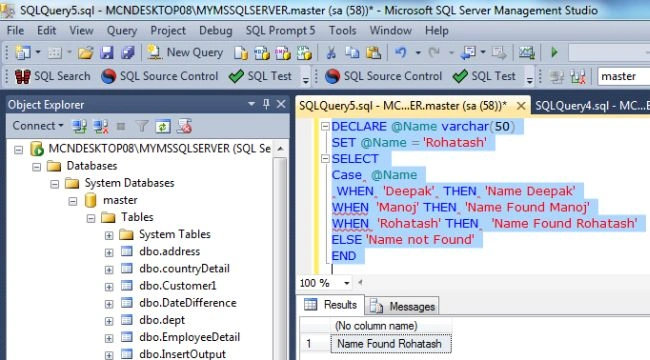
Now replace the name Rohatash kumar in place of Rohatash.
Example
- DECLARE @Name varchar(50)
- SET @Name = 'Rohatash'
- SELECT
- Case @Name
- WHEN 'Deepak' THEN 'Name Found Deepak'
- WHEN ' Manoj' THEN 'Name Found Manoj'
- WHEN 'Rohatash Kumar' THEN 'Name Found Rohatash'
- ELSE 'Name not Found'
- END
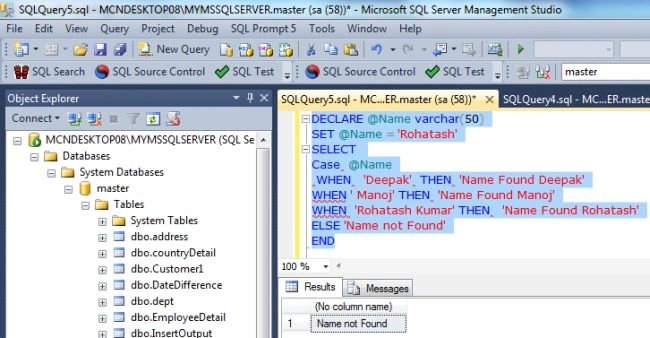
Case statement with comparison or searched expression
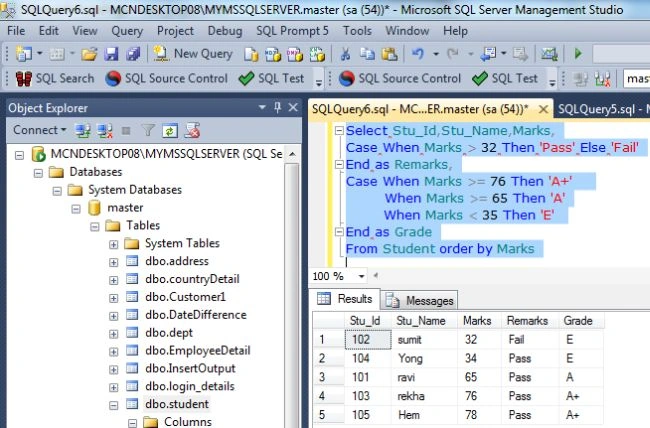
The Searched Case expression contains Boolean expressions or comparison operators. In the following example we will see how to use a searched expression with comparison operators.
The general syntax of the searched CASE expression is:
CASE
WHEN condition_1 THEN result_1
[WHEN condition_2 THEN result_2]
[..................]
[WHEN condition_n THEN result_n]
[ELSE expression]
[else result_n]
END
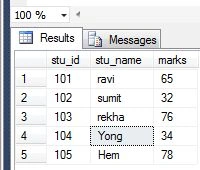
Creating a table in SQL Server
- create table student
- (
- stu_id int,
- stu_name varchar(20),
- marks int
- );
- Insert into student values('101','ravi','65');
- Insert into student values('102','sumit','32');
- Insert into student values('103','rekha','76');
- Insert into student values('104','Yong','34');
- Insert into student values('105','Hem','78');
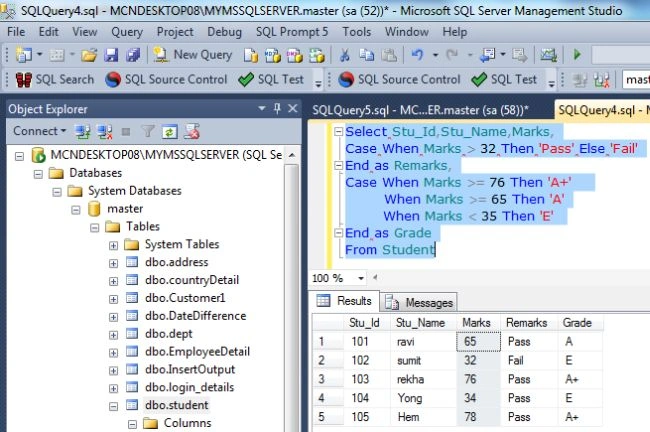

Sridhar YelagandhulaPosted Sep 1, 2019, 7:25 AM
Nice explanation.
Pravas RanjanPosted Nov 9, 2018, 4:43 AM
Nice Article Kumar Sir
Jaygovind ChauhanPosted Mar 30, 2016, 7:31 AM
gd dear