
In this article, we take an introductory look at the various components of jQuery.
What is it
JQuery is a JavaScript library that simplifies javascript
programming.
In their own words, as quoted on the jQuery.com website - "jQuery is a fast and
concise JavaScript Library that simplifies HTML document traversing, event
handling, animating, and Ajax interactions for rapid web development."
Why do I need to know about it
Whether you work with Asp.net or SharePoint or any other web technologies,
chances are that JQuery will be available to make life easier and your site
user-friendly, more appealing and functionally rich.
Short and Simple overview
To describe what you can do with jQuery in a single line, the essence is that
you select DOM elements and you manipulate them. Majority of jQuery core
consists of selectors to easily find/reference DOM elements and events which
enable manipulation of the DOM elements in your code.
First and foremost, you need a reference to the jquery library which can either be downloaded to your server and referenced or you can reference the jquery library available on the major CDNs which are free and available for public use.
You just need to reference this jquery.js library to start using the jQuery APIs.
Next, in your code, the most common task is to access the DOM elements. To ensure this occurs after the document is ready, we register a ready event for the document.
Selectors
jQuery offers a wide range of selectors - these tools enable you to select one
or more DOM elements matching your criteria. I feel this is the heart of jQuery.
Everything you do gets driven from this point. Various choices of selector
elments are available to match every need. Some examples are
- Select all button elements
- Select all elements of class "heading"
- Select an element with name=Author
- Select all elements where <attribute> begins with <value>
And so on
Hierarchical selectors allow you to traverse parent/child/siblings etc.
Events
Events enable you to take action on selected elements in reaction to user interaction or system occurences. If selectors are the heart of jQuery, events are the soul :) All the action is in the events. Several events are available for use such as click, focus, bind, keyup etc.
Example
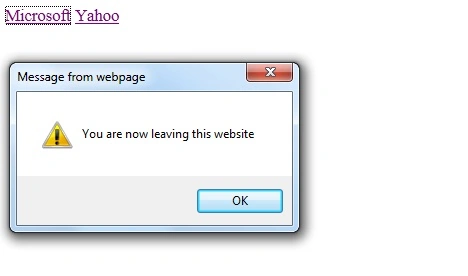
In the following code sample, we are going to attach a click event to all the
anchor tags in the document - the event will basically display an alert message
to the user before the navigating. Note the selector will register the event to
all of the anchor tags. Also, note that I am using a public CDN instead of
hosting jQuery locally. (There are pros and cons for both approaches, local as
well as CDN)
<!DOCTYPE html> |
Code: Save as jq.html and open it in your browser to see it run.
Some browsers may pose a confirmation to the user. If
you are prompted, click yes to allow blocked content.
Image: Sample in action
Plugins
A large system of plug-ins is available. you can have a
choice of plug-ins for tables, calendars, tooltips, template engine, progress
bars etc. The system of plug-ins makes the jQuery architecture extend to include
new features.
You can use the vast pool of resources that is available and if you want, you
can also author your own plug-ins.
Incidentally, at the time of writing this article, the plug-ins site is being revamped. You can follow the progress on GitHub https://github.com/jquery/plugins.jquery.com
Resources
JQuery Project -
http://jquery.org/
jQuery Project manages all of teh JQuery projects including jQuery code, jQuery
UI, Sizzle and QUnit
jQuery - http://jquery.com
jQuery UI - http://jqueryui.com/
jQuery Mobile - http://jquerymobile.com/
Discussion Forum - http://docs.jquery.com/Discussion
Twitter - twitter.com/jQuery
Documentation - http://docs.jquery.com
More to explore
jQuery UI
Definition from the jQuery UI site:
"jQuery UI provides abstractions for low-level interaction and animation,
advanced effects and high-level, themeable widgets, built on top of the jQuery
JavaScript Library, that you can use to build highly interactive web
applications."
jQuery Mobile
As defined on the jQuery Mobile site:
A unified, HTML5-based user interface system for all popular mobile device
platforms, built on the rock-solid jQuery and jQuery UI foundation.
Conclusion
In this article we explored the basics of jQuery and took a glimpse at it's
working. We also got to know a little bit about it's advanced capabilities and
resources where to look for, when you are ready to take this to the next level
in your daily life.
Happy Coding!
Akash AhlawatPosted Jan 3, 2012, 10:44 AM
This article provides the good insight of the jquery..Thanks
Vineet Kumar SainiPosted Jan 2, 2012, 12:29 AM
Very Good article for jQuery beginner...
Emmy DickensPosted Dec 29, 2011, 11:52 PM
Thankss very much for sharing it..
Vijay PrativadiPosted Dec 29, 2011, 11:49 PM
Thanks for Sharing!!!
Sonakshi SinghPosted Dec 29, 2011, 11:20 PM
well explained
Bharat BhushanPosted Dec 29, 2011, 10:18 AM
Helpfully Topic Thanks
Dipal ChoksiPosted Dec 29, 2011, 9:44 AM
Thanks for the feedback comments!
Amit MaheshwariPosted Dec 29, 2011, 5:00 AM
It's really a helpful article great effort and thanks to share.
Abhi KumarPosted Dec 29, 2011, 4:18 AM
Thanks for sharing.
Adam McartneyPosted Dec 29, 2011, 4:14 AM
jQuery has always been my fav. one. Thanks for writing.
Daisy KrausePosted Dec 29, 2011, 4:14 AM
Very useful article for those who want to learn Jquery.