

Introduction
In this article, we are going to learn about absolute layout in xamarin.froms. There are many layouts in xamarin.forms that include Stack Layout, Grid Layout, Absolute Layout, and Relative Layout. If you want to learn more about layouts and U.I elements of Xamarin.Forms, then read this article: 38 Different Xamarin.Forms UI Controls
Absolute Layout
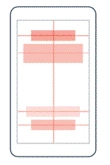
Absolute layout is used to position its child elements at the absolute requested position. Absolute layouts are used when you want to move away from all the layout restrictions and make layout totally different. We can use absolute and proportional values to set height, width, X-Axis and Y-Axis of an element. As shown in the figure blow,
Example
Let’s go through practical implementation of absolute layout. In this example we are going to make boxes and place them where ever we want by setting their x-axis and y-axis.
Let’s make a box and set it on background of our page.
This is as simple as ABC but you need to keep few things in your mind.
In absolute layout we set layout bounds and layout flags.
Layout Bounds
In layout bounds we will set the values of height, width, x-axis and y-axis in the sequence of X-Axis, Y-Axis, Width and Height. First value you set in layout bound would become the values of x-axis and so on.
Layout Flags
In layout flags we will declare whether of the value in bound layout is proportional or not. The minimum of proportional value is 0 and maximum is 1.
Xaml
- <AbsoluteLayout>
- <BoxView
- AbsoluteLayout.LayoutBounds="0,0,1,1"
- AbsoluteLayout.LayoutFlags="HeightProportional, WidthProportional"
- BackgroundColor="Black">
- </BoxView>
- </AbsoluteLayout>
Code Explanation
Hope you get an idea of layout bounds and layout flags. In the code above we set height and width to the maximum and declare that these values are proportional in layout flags. Now our box will cover the whole area and act as a background of our app.
Output

Here you see that works perfectly fine. We make a box and set it to the background of our app.
Now make another box and place it in the center of page.
Xaml
- <AbsoluteLayout>
- <BoxView
- AbsoluteLayout.LayoutBounds="0,0,1,1"
- AbsoluteLayout.LayoutFlags="HeightProportional, WidthProportional"
- BackgroundColor="Black"></BoxView>
- <BoxView
- AbsoluteLayout.LayoutBounds="0.5,0.5,100,100"
- AbsoluteLayout.LayoutFlags="XProportional,YProportional"
- BackgroundColor="Gray"></BoxView>
- </AbsoluteLayout>
Code Explanation
First box is already there, now another box is added in which the proportional value of X-Axis and Y-Axis is set to 0.5. Which means the 50% and our new box is in the center of page. You can change the values of x and y-axis to see the box moving.
Output
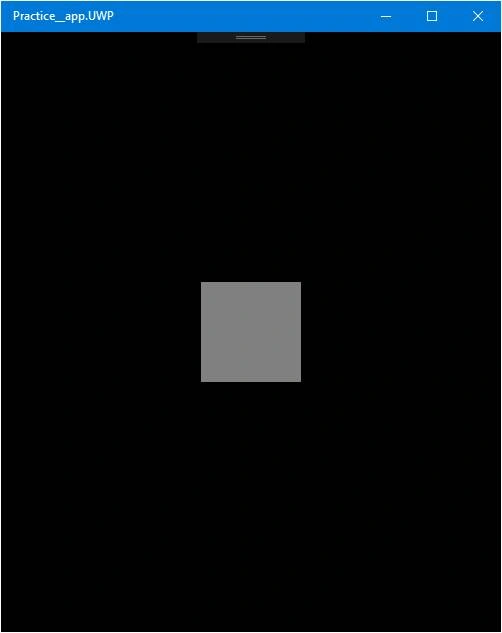
Here we go. A new box is created in the center of our page.
Let’s create a label and place it on bottom of page.
Xaml
- <AbsoluteLayout>
- <BoxView
- AbsoluteLayout.LayoutBounds="0,0,1,1"
- AbsoluteLayout.LayoutFlags="HeightProportional, WidthProportional"
- BackgroundColor="Black"></BoxView>
- <BoxView
- AbsoluteLayout.LayoutBounds="0.5,0.5,100,100"
- AbsoluteLayout.LayoutFlags="XProportional,YProportional"
- BackgroundColor="Gray"></BoxView>
- <Label Text="Get Started."
- AbsoluteLayout.LayoutBounds="0,1,1,40"
- AbsoluteLayout.LayoutFlags="XProportional,YProportional,WidthProportional"
- BackgroundColor="Gray"></Label>
- </AbsoluteLayout>
Code Explanation
In this label we set absolute value for its height and proportional value for x-axis, y-axis and width. Y-axis is set to 1 so it is shown on the bottom of page.
Output
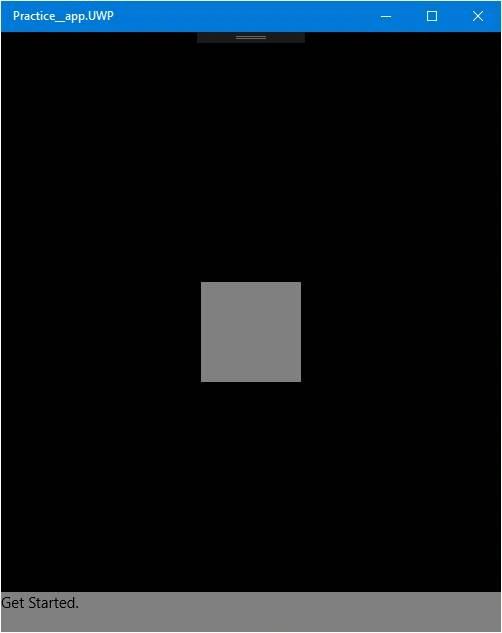
It works perfectly. Hope this small demo helps you to learn about absolute layout. Comment below for any question, queries and suggestions.
Laxmidhar SahooPosted Dec 11, 2019, 10:46 PM
Thanks for the usefull article
Seenuvasan MPosted Sep 23, 2019, 12:26 AM
Absolute layout is fixed background should run on Xamarin
Costas AletrariPosted Jan 5, 2018, 4:29 PM
Thank you for your simple demo. I've been using an Image to cover the whole background using an absolute layout, but i find that the very top of the image is hidden by the status bar at the top, I was thinking of usuing Margin to push it down a little but that does not seem to be a good option. How would not allow the absolute layout to go behind the status bar at the top. This is mainly android atm still have to test the IOS