
Introduction
- Open Visual Studio 2012.
- Then click on "File"
- Then select "New".
- Then select "Project..."
- Then select HTML Application with TypeScript.
STEP 2
After this, a new window is opened and on the right side a Solution Explorer window is opened which contains the .ts file, .js file, .css file, and .html file.
getelement.ts
CODING
- class sum {
- constructor(public i: number, public j: number) {}
- greet() {
- return (this.i + this.j)
- }
- }
- var button = document.createElement('button')
- button.innerText = "SUM"
- button.onclick = function() {
- var v = parseFloat(( < HTMLInputElement > document.getElementById("Text1")).value);
- var v1 = parseFloat(( < HTMLInputElement > document.getElementById("Text2")).value);
- var v2 = new sum(v, v1);
- alert(v2.greet().toString())
- }
- document.body.appendChild(button)
getelementexample.html
- <!DOCTYPE html>
- <html lang="en"
- xmlns="http://www.w3.org/1999/xhtml">
- <head>
- <meta charset="utf-8" />
- <title>Get element in TypeScript</title>
- <link rel="stylesheet" href="app.css" type="text/css"/>
- </head>
- <body>
- <input id="Text1" type="text" />
- <br />
- <input id="Text2" type="text" />
- <br />
- <script src="app.js"></script>
- </body>
- </html>
get.js
- var sum = (function() {
- function sum(i, j) {
- this.i = i;
- this.j = j;
- }
- sum.prototype.greet = function() {
- return (this.i + this.j);
- };
- return sum;
- })();
- var button = document.createElement('button');
- button.innerText = "SUM";
- button.onclick = function() {
- var v = parseFloat((document.getElementById("Text1")).value);
- var v1 = parseFloat((document.getElementById("Text2")).value);
- var v2 = new sum(v, v1);
- alert(v2.greet().toString());
- };
- document.body.appendChild(button);
Output
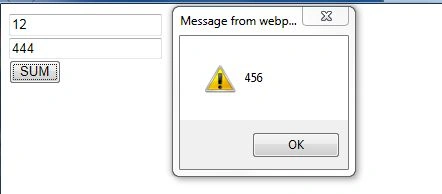 Summary
In this article, I described how to manipulate and access an element of HTML in TypeScript. I hope that this article has helped you to understand this topic.
Summary
In this article, I described how to manipulate and access an element of HTML in TypeScript. I hope that this article has helped you to understand this topic.
Maneesh NishadPosted Dec 6, 2012, 12:56 PM
good maneesh
Maneesh NishadPosted Dec 6, 2012, 12:56 PM
good maneesh
Maneesh NishadPosted Dec 6, 2012, 12:56 PM
good maneesh