

SharePoint 2016 general availability has been announced in the Future Of SharePoint conference in May 2016. The series that discusses the installation of SharePoint 2016 in Azure can be found at C# Corner at the below links:
- SharePoint 2016 installation in Azure-Part 1
- SharePoint 2016 installation in Azure-Part 2
- SharePoint 2016 installation in Azure-Part 3
In this article, we will see how to add and remove SharePoint Users from Security Groups in SharePoint 2016, using REST API. As an initial prerequisite, ensure that the user running the below scripts must have Site Collection administrator privileges.
We will use REST to connect to the SharePoint for performing the user operations. The Scope of the article involves the following operations, using REST:
- Add user to a SharePoint Group
- Remove existing user from the Group
Add Users to SharePoint Group
We can add users to the SharePoint Group by issuing a POST AJAX request. The REST URL endpoint used for the operation, is:
/_api/web/sitegroups/getbyname('Employee')/users
We will be creating a key value pair of the information which will be used to add the user to the SharePoint Group. The user addition information property is as shown below. It will be sent as JSON in the ‘data’ attribute of the AJAX REST call.
- var metadata = {
- __metadata: {
- 'type': 'SP.User'
- },
- LoginName: 'i:0#.w|SharePointHOL\\Priyaranjan'
- };
- headers: {
- "accept": "application/json;odata=verbose",
- "X-RequestDigest": $("#__REQUESTDIGEST").val(),
- "content-Type": "application/json;odata=verbose"
- },
Output
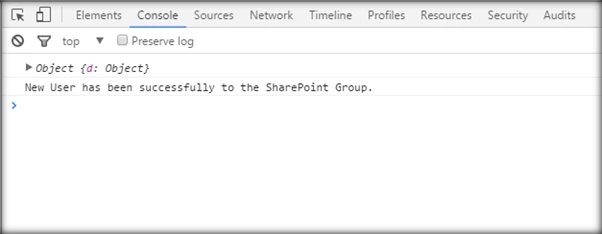
The user has successfully been added to the SharePoint Group and the notification has come up in the console.
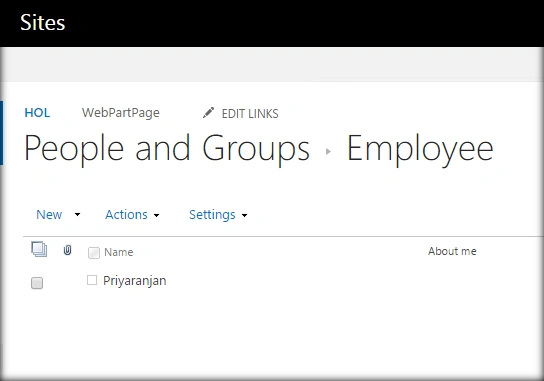
Going to the Group page, we can see the newly added user.
Full Code
The full code for user addition to the Group is, as shown below:
- <script language="javascript" type="text/javascript" src="//ajax.googleapis.com/ajax/libs/jquery/1.8.1/jquery.min.js"></script>
- <script language="javascript" type="text/javascript">
- $(document).ready(function() {
- var newUserUrl = "/_api/web/sitegroups/getbyname('Employee')/users";
- var metadata = {
- __metadata: {
- 'type': 'SP.User'
- },
- LoginName: 'i:0#.w|SharePointHOL\\Priyaranjan'
- };
- addNewUser(newUserUrl, metadata)
- });
- function addNewUser(newUserUrl, metadata) {
- $.ajax({
- url: _spPageContextInfo.webAbsoluteUrl + newUserUrl,
- type: "POST",
- headers: {
- "accept": "application/json;odata=verbose",
- "X-RequestDigest": ("#__REQUESTDIGEST").val(),
- "content-Type": application / json;odata = verbose "
- },
- data: JSON.stringify(metadata),
- success: function(data) {
- console.log(data);
- console.log("New User has been successfully to the SharePoint Group.");
- },
- error: function(error) {
- alert(JSON.stringify(error));
- }
- });
- }
- </script>
We can remove the user from the SharePoint group by issuing a POST AJAX request. The REST URL endpoint, used for the operation, is
/_api/web/sitegroups/getbyname('Employee')/users/removeByLoginName
We will be creating a key value pair of the information which will be used to delete the user from the SharePoint Group. The user deletion information property is, as shown below. It will be sent as JSON in the ‘data’ attribute of the AJAX REST call.
- var metadata = {
- 'loginName': 'i:0#.w|SharePointHOL\\Priyaranjan'
- };
- headers: {
- "accept": "application/json;odata=verbose",
- "X-RequestDigest": $("#__REQUESTDIGEST").val(),
- "content-Type": "application/json;odata=verbose"
- },
Output
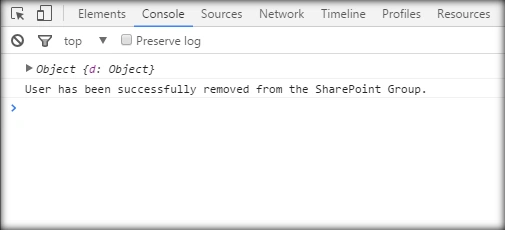
After running the script, the user will be removed from the SharePoint Group and we will get the notification in the console.
Full Code
The full code for the user removal operation is, as shown below:
- <script language="javascript" type="text/javascript" src="//ajax.googleapis.com/ajax/libs/jquery/1.8.1/jquery.min.js"></script>
- <script language="javascript" type="text/javascript">
- $(document).ready(function() {
- var removeUserUrl = "/_api/web/sitegroups/getbyname('Employee')/users/removeByLoginName";
- var metadata = {
- 'loginName': 'i:0#.w|SharePointHOL\\Priyaranjan'
- };
- removeUser(removeUserUrl, metadata)
- });
- function removeUser(removeUserUrl, metadata) {
- $.ajax({
- url: _spPageContextInfo.webAbsoluteUrl + removeUserUrl,
- type: "POST",
- headers: {
- "accept": "application/json;odata=verbose",
- "X-RequestDigest": $("#__REQUESTDIGEST").val(),
- "content-Type": "application/json;odata=verbose"
- },
- data: JSON.stringify(metadata),
- success: function(data) {
- console.log(data);
- console.log("User has been successfully removed from the SharePoint Group.");
- },
- error: function(error) {
- alert(JSON.stringify(error));
- }
- });
- }
- </script>
SharePoint Implementation
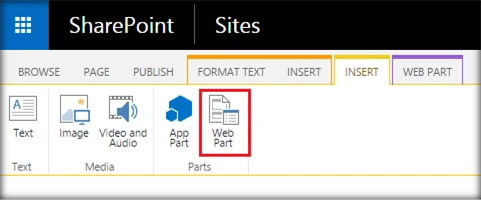
- Go to the edit settings of the SharePoint page and click on Web part from the Insert tab.
- Add Content Editor Web part.
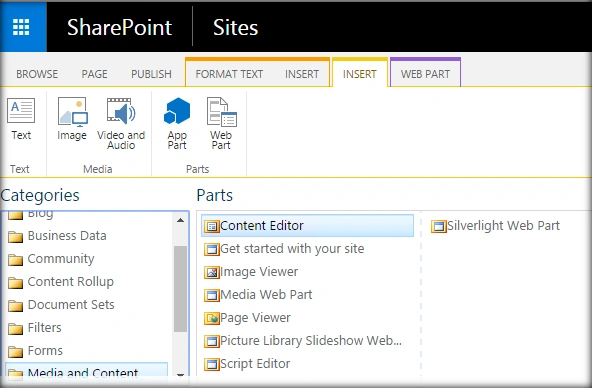
- Click on Edit Web part from Content Edit Web part. Assign the URL of the script text file and click on Apply.
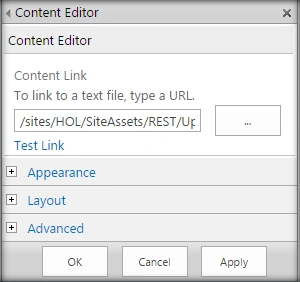
- Click on Apply and we can see the successful user removal message from the console.
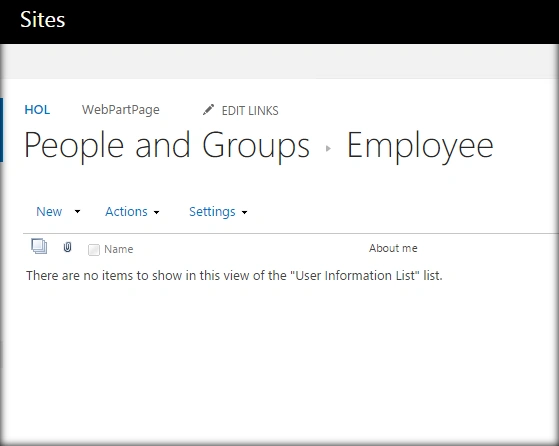
Going to the Group where the user was added earlier, we can see that the Group is now empty. That indicates the removal of the user.
Summary
Thus, we saw how to add a user to a SharePoint Group and remove existing users from the security group in SharePoint 2016, by using the REST API.
Kaviya BalasubramanianPosted Dec 6, 2017, 8:48 AM
Hi priyaranjan, Thanks for your article .. 1. can we add user by id using rest api? 2. can we add multiple users at same time in rest api?
Prasanna MuraliPosted Jul 25, 2016, 9:17 PM
Nice share
kalu singh raoPosted Jul 25, 2016, 2:16 PM
Nice sharing