

Implementation
In my previous two articles you saw, how to:
- Create Site Columns On Host Web From App Web Using JavaScript In SharePoint 2013.
- Create Site Content Type In SharePoint 2013 using JSOM.
So, if you open the created Content type, you only see ‘Name’ and ‘Title’ fields there, which are basically added from Parent Content Types, now we will see how to add Site Columns to this Site Content Type present on Host Web from App Web.
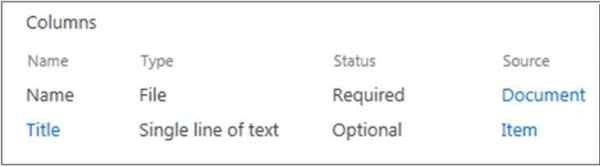
We will perform following operations to achieve this:
- Get Host Web Context using App Web.
- Fetch already created Site Columns.
- Get the required Content Type from Host Web Content Type collection.
- Add Site Columns to this Content Type and update the Content Type.
Get Started:
- Add a button on page to ‘Add Columns to Content Type’.
- <%-- The markup and script in the following Content element will be placed in the <body> of the page --%>
- <asp:Content ContentPlaceHolderID="PlaceHolderMain" runat="server">
- <div>
- <input type="button" id="btnAddColumns" value="Add Columns to Content Type" onclick="addColumnsToContentType()"/>
- </div>
- </asp:Content>
- Update App.js and add the following code.
- 'use strict';
- var context = SP.ClientContext.get_current();
- var hostWebUrl, hostWebContext;
- // This code runs when the DOM is ready and creates a context object which is
- // needed to use the SharePoint object model
- $(document).ready(function() {
- hostWebUrl = decodeURIComponent(getQueryStringParameter("SPHostUrl"));
- hostWebContext = new SP.AppContextSite(context, hostWebUrl);
- });
- // Retrieve a query string value
- function getQueryStringParameter(paramToRetrieve) {
- var params = document.URL.split("?")[1].split("&");
- for (var i = 0; i < params.length; i = i + 1) {
- var singleParam = params[i].split("=");
- if (singleParam[0] == paramToRetrieve) return singleParam[1];
- }
- }
- //Add Site Columns to Content Type
- var hostWebContentTypes;
- var contentTypeName = 'Employee'; // Name of the Content Type where Colums will be added
- var columnsInternalName = ["EmployeeId", "EmployeeName"]; //Internal Names of the Site Columns
- var createdColumns = new Array();
- function addColumnsToContentType() {
- var hostWeb = hostWebContext.get_web();
- //Get the columns that need to be added to Content type and store the objects in an Array.
- for (var iCreatedFieldsCounter = 0; iCreatedFieldsCounter < columnsInternalName.length; iCreatedFieldsCounter++) {
- createdColumns[iCreatedFieldsCounter] = hostWeb.get_fields().getByInternalNameOrTitle(columnsInternalName[iCreatedFieldsCounter]);
- context.load(createdColumns[iCreatedFieldsCounter]);
- }
- //Get Host Web Content type Collection
- hostWebContentTypes = hostWeb.get_contentTypes();
- context.load(hostWebContentTypes);
- context.executeQueryAsync(
- function() {
- //Call function to add columns to Content Type
- addColumns(contentTypeName, columnsInternalName, createdColumns);
- },
- function onItemsRefetchedFail(sender, args) {
- alert('Failed to fetch columns and Content Type. Error:' + args.get_message() + '\n' + args.get_stackTrace());
- });
- }
- // Add columns
- function addColumns(ctypeName, fieldsInternalName, createdFields) {
- //Find the Content Type and then add Fields to it
- var createdContentType;
- var contentTypeEnumerator = hostWebContentTypes.getEnumerator();
- while (contentTypeEnumerator.moveNext()) {
- var contentType = contentTypeEnumerator.get_current();
- if (contentType.get_name() === ctypeName) {
- createdContentType = contentType;
- var fieldRef = new Array();
- for (var iAddFieldsCounter = 0; iAddFieldsCounter < createdFields.length; iAddFieldsCounter++) {
- fieldRef[iAddFieldsCounter] = new SP.FieldLinkCreationInformation();
- fieldRef[iAddFieldsCounter].set_field(createdFields[iAddFieldsCounter]);
- createdContentType.get_fieldLinks().add(fieldRef[iAddFieldsCounter]);
- createdContentType.update(true);
- }
- context.load(createdContentType);
- context.executeQueryAsync(onAddFieldToContentTypeSuccess, onAddFieldToContentTypeFail);
- }
- }
- }
- function onAddFieldToContentTypeSuccess() {
- alert('Site Columns added to Content Type.');
- }
- function onAddFieldToContentTypeFail(sender, args) {
- alert('Failed to add Site Columns to Content Type. Error:' + args.get_message() + '\n' + args.get_stackTrace());
- }
- //End
- Build and Deploy the solution and click ‘Add Columns to Content Type’ button. Site Columns will be added to Content Type.
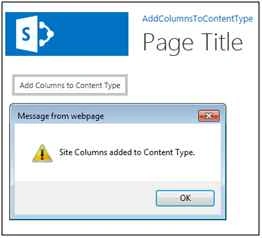
- Navigate to Host Web Site Content Type and you can see the newly added columns there.

Conclusion
Using this JSOM approach, you can add Site Columns to Content type on Host Web from App Web. You can use this approach to add columns to App web Content Type too.
Santhakumar MunuswamyPosted Oct 18, 2015, 5:39 AM
Good one
Ankit BansalPosted Oct 8, 2015, 12:51 AM
nice one..
Nilesh JadavPosted Oct 7, 2015, 9:45 PM
Good Article Sir
Priyaranjan K SPosted Oct 7, 2015, 1:27 PM
Good One Anit Kumar