

In Windows Phone 8 or 8.1 we can put icon/pin to show the location at any coordinate. Adding MapIcon object will do for that. But sometimes we have to show more details about that location or coordinate at that time adding grid, text block helps to show more data in map. Putting controls over map is easy if we do not have to show those controls on coordinate (lat/long) basis. But if we have to show those controls in exact location, then we have to do more exercise.
In map control you can add any object that inherits from DependencyObject to the children collection. You can add location (coordinate) and position using SetLocation and SetNomalizedAnchorPoint properties. So here is the code:
- protected override async void OnNavigatedTo(NavigationEventArgs e)
- {
- var MyPosition = new Geopoint(new BasicGeoposition() { Latitude = 27.6838761, Longitude = 85.33530139 });
- var MyCustomPin = createPin();
- MyMap.Children.Add(MyCustomPin);
- MapControl.SetLocation(MyCustomPin, MyPosition);
- MapControl.SetNormalizedAnchorPoint(MyCustomPin, new Point(0.0, 1.0));
- await MyMap.TrySetViewAsync(MyPosition, 15, 0, 0, MapAnimationKind.Bow);
- }
- private DependencyObject createPin()
- {
- //Creating a Grid element.
- var myGrid = new Grid();
- myGrid.Height = 140;
- myGrid.Width = 210;
- myGrid.Background = new ImageBrush() { ImageSource = new BitmapImage(new Uri("ms-appx:///Assets/box.png")) };
- //adding stackpanel
- var mystack = new StackPanel();
- var img = new Image();
- img.Height = 25;
- img.Width = 35;
- img.Stretch = Stretch.UniformToFill;
- img.Source = new BitmapImage(new Uri("ms-appx:///Assets/plane1.png"));
- img.HorizontalAlignment = HorizontalAlignment.Center;
- mystack.Children.Add(img);
- var flightcs = new TextBlock()
- {
- FontSize = 15,
- Foreground = new SolidColorBrush(Colors.Red),
- HorizontalAlignment = HorizontalAlignment.Center,
- Text = "G9-345"
- };
- mystack.Children.Add(flightcs);
- var ngrid = new Grid();
- ngrid.Margin = new Thickness(5, 0, 5, 0);
- ngrid.RowDefinitions.Add(new RowDefinition());
- ngrid.RowDefinitions.Add(new RowDefinition());
- ngrid.ColumnDefinitions.Add(new ColumnDefinition());
- ngrid.ColumnDefinitions.Add(new ColumnDefinition());
- var alttb = new TextBlock() { FontSize = 15, Foreground = new SolidColorBrush(Colors.Black), Text = "Altitude" };
- alttb.SetValue(Grid.RowProperty, 0);
- alttb.SetValue(Grid.ColumnProperty, 0);
- ngrid.Children.Add(alttb);
- var alttb1 = new TextBlock() { FontSize = 15, Foreground = new SolidColorBrush(Colors.Black), Text="15000 ft" };
- alttb1.SetValue(Grid.RowProperty, 0);
- alttb1.SetValue(Grid.ColumnProperty, 1);
- ngrid.Children.Add(alttb1);
- var sptb = new TextBlock() { FontSize = 15, Foreground = new SolidColorBrush(Colors.Black), Text = "Speed" };
- sptb.SetValue(Grid.RowProperty, 1);
- sptb.SetValue(Grid.ColumnProperty, 0);
- ngrid.Children.Add(sptb);
- var sptb1 = new TextBlock() { FontSize = 15, Foreground = new SolidColorBrush(Colors.Black), Text="500 Knt" };
- sptb1.SetValue(Grid.RowProperty, 1);
- sptb1.SetValue(Grid.ColumnProperty, 1);
- ngrid.Children.Add(sptb1);
- mystack.Children.Add(ngrid);
- var nstack = new StackPanel() { Orientation = Orientation.Horizontal, Margin = new Thickness(5, 5, 5, 0) };
- var ntb = new TextBlock() { FontSize = 15, Foreground = new SolidColorBrush(Colors.Black), Text = "2017-07-07" };
- nstack.Children.Add(ntb);
- var ntb1 = new TextBlock() { FontSize = 15, Foreground = new SolidColorBrush(Colors.Black), Margin = new Thickness(20, 0, 0, 0), Text = "9:00:00 AM" };
- nstack.Children.Add(ntb1);
- mystack.Children.Add(nstack);
- myGrid.Children.Add(mystack);
- return myGrid;
- }
Here is how it looks:
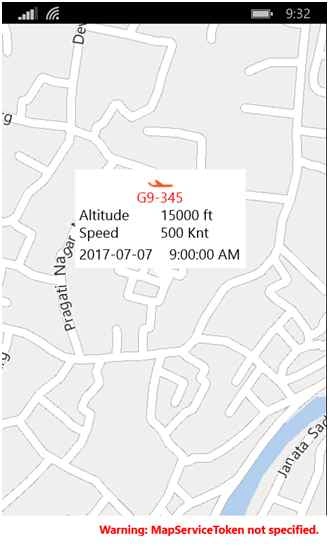
Above image is the small part of my project where I have shown the details of particular plane in map dynamically (because of changing lat/long). Writing controls in Xaml and adding over map is not possible because the controls that we write in Xaml is already added in the children collection of Page Control which holds maps control too. So as mentioned above the writing controls in C# (Grid, Rectangle whatever), wrapping it as DependencyObject type and passing it to the children collection of map control will help to achieve our goal.
Tip: Do not forgot to check location capabilities in AppxManifest file. Full source code is here.
Happy Coding.
Harshad PansuriyaPosted Sep 11, 2015, 6:24 AM
Nice One
Van LaiPosted Sep 6, 2015, 9:45 PM
Thanks for sharing.
Pankaj Kumar ChoudharyPosted Sep 6, 2015, 7:03 PM
Nice Share Sir.........
Karthikeyan KPosted Sep 6, 2015, 1:29 PM
Good one sir...Thanks for sharing
Rajeesh MenothPosted Sep 6, 2015, 1:25 PM
Nice One, Thanks for sharing..
Santhakumar MunuswamyPosted Sep 6, 2015, 1:21 PM
Good one. Thanks for sharing