

Introduction
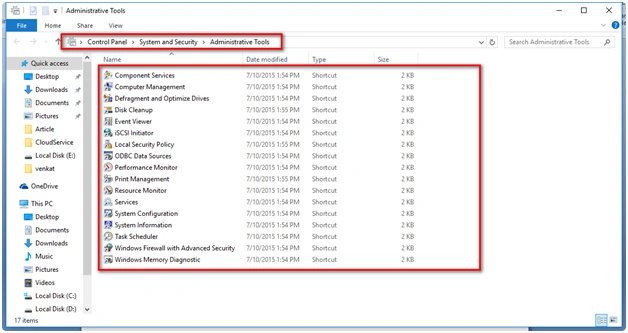
Here are the steps to identify Administrative Tools in Windows 10. Under Administrative Tools, options for Event Viewer, Disk Management, Services, Task Scheduler, etc are provided to the users.
Step 1
Go to Settings Option in Windows 10.

Step 2
Under the "Settings" tab go to "System" Icon.

Step 3
Go to Settings, System, About, then click "Additional administrative tools".

Step 4
On clicking the "Additional administrative tools" you can see the possible Administrative tools in Windows 10. Enjoy using it.
Read more articles on Windows 10:
Summary
In this article, we learned about Administrative Tools In Windows 10.
Gowtham KPosted Feb 20, 2016, 12:10 PM
Thanks for sharing
Sibeesh VenuPosted Feb 20, 2016, 1:39 AM
Nice Share
Ehsan SajjadPosted Feb 19, 2016, 3:38 PM
descriptive
Mohammed IbrahimPosted Feb 19, 2016, 2:46 PM
nice
Debasis SahaPosted Feb 19, 2016, 1:03 PM
Thanks for nice article..
Shubham KumarPosted Feb 19, 2016, 2:55 AM
nice