

This time rather than jumping directly into the topic, first, let's have a look at the Login form code which you must have definitely seen while working on an MVC application.
- <section id="loginForm">
- @using (Html.BeginForm("Login", "Account", new { ReturnUrl = ViewBag.ReturnUrl }, FormMethod.Post, new { @class = "form-horizontal", role = "form" }))
- {
- @Html.AntiForgeryToken()
- <h4>Use a local account to log in.</h4>
- <hr />
- @Html.ValidationSummary(true, "", new { @class = "text-danger" })
- <div class="form-group">
- @Html.LabelFor(m => m.Email, new { @class = "col-md-2 control-label" })
- <div class="col-md-10">
- @Html.TextBoxFor(m => m.Email, new { @class = "form-control" })
- @Html.ValidationMessageFor(m => m.Email, "", new { @class = "text-danger" })
- </div>
- </div>
- <div class="form-group">
- @Html.LabelFor(m => m.Password, new { @class = "col-md-2 control-label" })
- <div class="col-md-10">
- @Html.PasswordFor(m => m.Password, new { @class = "form-control" })
- @Html.ValidationMessageFor(m => m.Password, "", new { @class = "text-danger" })
- </div>
- </div>
- <div class="form-group">
- <div class="col-md-offset-2 col-md-10">
- <div class="checkbox">
- @Html.CheckBoxFor(m => m.RememberMe)
- @Html.LabelFor(m => m.RememberMe)
- </div>
- </div>
- </div>
- <div class="form-group">
- <div class="col-md-offset-2 col-md-10">
- <input type="submit" value="Log in" class="btn btn-default" />
- </div>
- </div>
- <p>
- @Html.ActionLink("Register as a new user", "Register")
- </p>
- @* Enable this once you have account confirmation enabled for password reset functionality
- <p>
- @Html.ActionLink("Forgot your password?", "ForgotPassword")
- </p>*@
- }
- </section>
What do you think about the above code snippet?
- <section>
- <form asp-controller="Account" asp-action="Login" method="post">
- <h4>Use a local account to log in.</h4>
- <hr />
- <div asp-validation-summary="All" class="text-danger"></div>
- <div class="form-group">
- <label asp-for="Input.Email"></label>
- <input asp-for="Input.Email" class="form-control" />
- <span asp-validation-for="Input.Email" class="text-danger"></span>
- </div>
- <div class="form-group">
- <label asp-for="Input.Password"></label>
- <input asp-for="Input.Password" class="form-control" />
- <span asp-validation-for="Input.Password" class="text-danger"></span>
- </div>
- <div class="form-group">
- <div class="checkbox">
- <label asp-for="Input.RememberMe">
- <input asp-for="Input.RememberMe" />
- @Html.DisplayNameFor(m => m.Input.RememberMe)
- </label>
- </div>
- </div>
- <div class="form-group">
- <button type="submit" class="btn btn-default">Log in</button>
- </div>
- <div class="form-group">
- <p>
- <a asp-page="./ForgotPassword">Forgot your password?</a>
- </p>
- <p>
- <a asp-page="./Register" asp-route-returnUrl="@Model.ReturnUrl">Register as a new user</a>
- </p>
- </div>
- </form>
- </section>
The above code looks much cleaner. Isn’t it? If it looks interesting to you, we should learn more about it.
What are Tag Helpers?
Tag Helpers are classes written in C# but are attached to HTML elements in order to run server-side code from Razor view. In other words, view created in HTML has its presentation logic defined in C#, which is ultimately executed on the web server. Examples of common built-in Tag Helpers are Anchor tag, Environment tag, Cache tag, etc. Understood ... Not Understood ... Confused?
No worries. As we proceed further, things will be much clearer.
Using Tag Helpers
So, how do we go about using Tag Helpers? In order to use the inbuilt or custom Tag Helpers, one has to first reference Tag Helper library named Microsoft.AspNetCore.Mvc.TagHelpers. It can also be taken from Nuget. Once referenced, import it using @AddTagHelper directive as shown below inside _ViewImports.cshtml,
- @addTagHelper *,Microsoft.AspNetCore.Mvc.TagHelpers
Where can I use Tag Helpers?
The majority of Tag Helper use cases fall into one of these categories: 1) Take existing HTML elements and customize their output 2) Define totally new elements with custom or not output, i.e. Environment
Creating Custom Tag Helpers
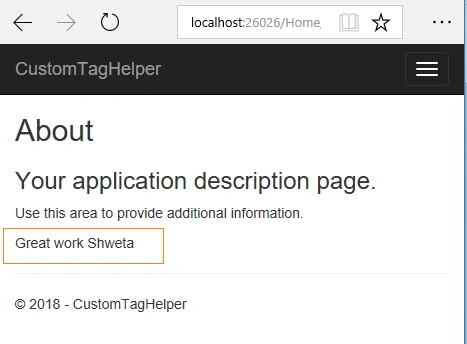
Now we have a basic idea of what Tag Helper is, so how about creating our own Tag Helper. Let's go ahead and quickly create our own Tag Helper step by step. I'll take a very simple scenario, in which we will introduce a simple tag named 'Appreciate' which will take the value as a person name's and it will be displayed on the screen.
Create a new class named AppreciateTagHelper and add the code as shown below,- public class AppreciateTagHelper: TagHelper {
- private
- const string appreciationText = "Great work";
- public string PersonName {
- get;
- set;
- }
- public override async Task ProcessAsync(TagHelperContext context, TagHelperOutput output) {
- output.TagName = "Appreciation";
- string message = $ "{appreciationText}, {PersonName}";
- var attribute = new TagHelperAttribute(name: "Label", value: message);
- output.Attributes.Add(attribute);
- output.Content.SetContent(message);
- }
- }
- @addTagHelper *,CustomTagHelper
- <appreciate person-name="Shweta"></appreciate>
Takeaways
- One has the benefit of getting away from the @ symbol in Razor view and the code looks cleaner, and is more maintainable and readable.
- Tag Helpers are not a replacement for HTML helpers.
References
IMAD AYOUBPosted May 25, 2020, 12:25 PM
Excellent article. Thanks so much.
Maq SaidPosted Jun 27, 2018, 10:06 PM
Do we have custom tag helper for checkbox.
Tridip BhattacharjeePosted Apr 17, 2018, 5:23 AM
Please answer this question....<a asp-page="./Register" asp-route-returnUrl="@Model.ReturnUrl">Register as a new user</a> can't we use asp-route-returnUrl inside <form> tag? it is used in anchor tag.
Rajesh GamiPosted Apr 14, 2018, 1:57 AM
Please write article for Encrypt connectionString in As.net Core 2.0.
Rajesh GamiPosted Apr 14, 2018, 1:55 AM
Superb info... Well Explained
Tridip BhattacharjeePosted Apr 13, 2018, 5:04 AM
<a asp-page="./Register" asp-route-returnUrl="@Model.ReturnUrl">Register as a new user</a> can't we use asp-route-returnUrl inside <form> tag? it is used in anchor tag.
Tridip BhattacharjeePosted Apr 13, 2018, 3:46 AM
It will be really helpful if you discuss about all built-in tag helper. anyway nice article. thanks
Tridip BhattacharjeePosted Apr 13, 2018, 3:21 AM
Html helper still works in asp.net core v2?
Thiago VivasPosted Apr 11, 2018, 2:14 PM
Great job, nice article