The GOF Template pattern coupled with .NET 2.0 Framework generics provides an awesome synergistic alliance. This article demonstrates how to drastically reduce the amount of code required in building a data access layer. Less code to debug... less code to break... less code to maintain... what could be better?
Introduction to the Template Pattern
To get started, let's talk about the GOF Template pattern. As with all GOF patterns, its primary purpose is to separate out what changes in your code from what does not change. The Template pattern deals with repetitive coding within a class. If you find yourself coding the same thing over-and-over (and over), you can get rid of the repetition of code using the Template pattern.
Here is an example. A perfect opportunity is if you have a ton of classes where you are doing similar logic as in GetTheFancyNumber() below
- public class DoSomething
- {
- private int m_number;
- public int GetTheFancyNumber()
- {
- int theNumber = m_number;
-
- return theNumber;
- }
- }
- public class DoSomethingElse
- {
- private int m_number;
- public int GetTheFancyNumber()
- {
- int theNumber = m_number;
-
- return theNumber;
- }
- }
If the logic is similar in the classes and you can identify what changes, you can encapsulate it. You take the code shared by the classes and put it in a base class and make the parent class responsible for what changes. In this example we would pub the "GetTheFancyNumber()" method in a base class and encapsulate setting the "theNumber" variable (the first line of the method), forcing the parent classes to take care of it.
This would be our Template:
- public abstract class DoSometingBase
- {
- protected abstract int GetTheNumber();
- public int GetTheFancyNumber()
- {
- int theNumber = GetTheNumber();
-
- return theNumber;
- }
- }
Then when we create the parent classes, we use the logic encapsulated by the template and implement the things that change (getting the number):
- public class DoSomethingElse : DoSometingBase
- {
- private int m_number;
- protected override int GetTheNumber()
- {
- return m_number;
- }
- }
- public class DoSomething : DoSometingBase
- {
- private int m_number;
- protected override int GetTheNumber()
- {
- return m_number;
- }
- }
So, that's the Template pattern in a nut-shell. Where it really shines is when we couple it with generics.
Template Pattern + Generics = Mapping Synergy
Where is the one place where we all do the same thing over-and-over (and over) again? You guess it! – accessing a database and getting objects built from the data. This is where we'll implement the Template pattern to create an elegant DAL (Data Access Layer).
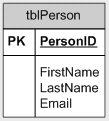
First, let's build a simple table to use in this example that will hold some data for a person.
- CREATE TABLE [tblPerson] (
- [PersonID] [int] IDENTITY (1, 1) NOT NULL ,
- [FirstName] [nvarchar] (50),
- [LastName] [nvarchar] (50),
- [Email] [nvarchar] (50) ,
- CONSTRAINT [PK_tblPerson] PRIMARY KEY CLUSTERED
- (
- [PersonID]
- ) ON [PRIMARY]
- ) ON [PRIMARY]
So now we have this exciting table to hold our data. :
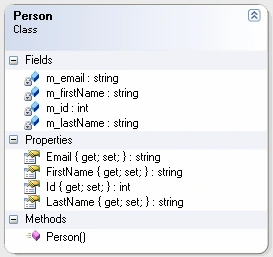
Now, we will build a class to hold the data (the code is in the project files – I won't bore you with it here).
There are two things we do repeatedly when accessing data. First we have to access the database, issue a command, and get the results. Second, we have to map those results to our objects. Both of these steps are candidates for templatizing (templatizing(?)... that's a real word, right?).
Let's look at the mapping part first because it's the easier one of the two. (The mapper pattern is an awesome enterprise pattern introduced in a book by Fowler.)
In this example we'll be coding to the IDataReader and IDataRecord interfaces in order to map our data to objects (IDataReader basically inherits from and iterates through IDataRecords).
I would always recommend coding to existing framework interfaces wherever possible so your code is more flexible (check out my article on interface based development here:
By coding to these interfaces, we are only tightly coupled to the database where we actually create the connection. This makes our code easily portable to any database so when someone says "Hey, this is great! Let's move it to MySQL!" you don't have to pull your hair out.
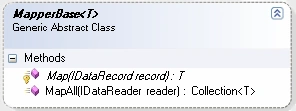
So anyways... back to the subject. Here is our mapper base object. The parent class will take care of the mapping specifics. The base class will take care of taking each mapped object and putting it in a collection. Because generics allow us to specify logic for any type the template can be used for all of our objects pulled from the DAL, not just the Person.
- abstract class MapperBase<T>
- {
- protected abstract T Map(IDataRecord record);
- public Collection<T> MapAll(IDataReader reader)
- {
- Collection<T> collection = new Collection<T>();
- while (reader.Read())
- {
- try
- {
- collection.Add(Map(reader));
- }
- catch
- {
- throw;
-
-
-
- }
- }
- return collection;
- }
- }
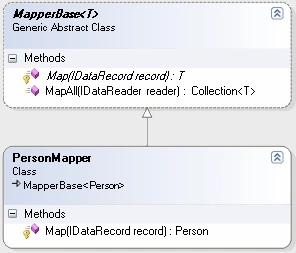
When we inherit the MapperBase to actually map to a Person object we only have to implement the specifics of creating an object and mapping the data from the IDataRecord to the object's properties.
- class PersonMapper: MapperBase<Person>
- {
- protected override Person Map(IDataRecord record)
- {
- try
- {
- Person p = new Person();
- p.Id = (DBNull.Value == record["PersonID"]) ?
- 0 : (int)record["PersonID"];
- p.FirstName = (DBNull.Value == record["FirstName"]) ?
- string.Empty : (string)record["FirstName"];
- p.LastName = (DBNull.Value == record["LastName"]) ?
- string.Empty : (string)record["LastName"];
- p.Email = (DBNull.Value == record["Email"]) ?
- string.Empty : (string)record["Email"];
- return p;
- }
- catch
- {
- throw;
-
-
-
- }
- }
- }
Can you see how easy it would be to create a new mapper for any class we have defined that pulls data from a table? If you see the possibilities, I imagine you are getting a bit excited right about now. Hold on though, we aren't even to the good part yet.
Template Pattern + Generics = DataAccess Synergy
The other thing we have to do is actually hit the database with a request and get the IDataReader back.
Here is what changes for each table we are hitting and each object we are creating:
- Getting the connection.
- Getting the Sql Command
- Getting the Sql Command Type
- Getting the mapper (from part II)
- IDbConnection GetConnection();
- string CommandText { get; }
- CommandType CommandType { get; }
- Collection<IDataParameter> GetParameters(IDbCommand command);
- MapperBase<T> GetMapper();
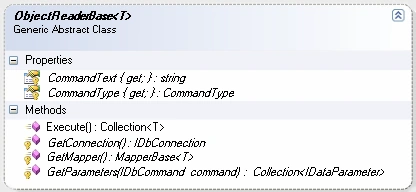
Here is what stays the same which we'll encapsulate in an Execute() method that will return a collection of our objects.
- public Collection<T> Execute()
- {
- Collection<T> collection = new Collection<T>();
- using (IDbConnection connection = GetConnection())
- {
- IDbCommand command = connection.CreateCommand();
- command.Connection = connection;
- command.CommandText = this.CommandText;
- command.CommandType = this.CommandType;
- foreach(IDataParameter param in this.GetParameters(command))
- command.Parameters.Add(param);
- try
- {
- connection.Open();
- using (IDataReader reader = command.ExecuteReader())
- {
- try
- {
- MapperBase<T> mapper = GetMapper();
- collection = mapper.MapAll(reader);
- return collection;
- }
- catch
- {
- throw;
-
-
-
-
- }
- finally
- {
- reader.Close();
- }
- }
- }
- catch
- {
- throw;
-
-
-
- }
- finally
- {
- connection.Close();
- }
- }
- }
So, here is the class we end up with:
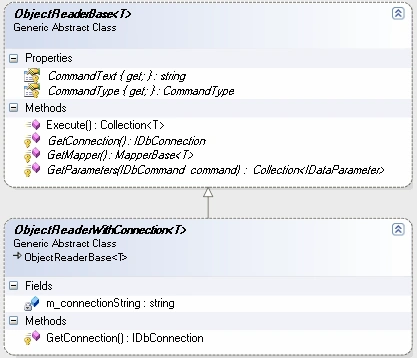
One of the things that will be the same for all of the objects inheriting from ObjectReaderBase is getting the connection: "GetConnection()". We'll put this in an abstract object implementing the ObjectReaderBase<T>.
- abstract class ObjectReaderWithConnection<T> : ObjectReaderBase<T>
- {
- private static string m_connectionString =
- @"Data Source=DATA_SOURCE_NAME;Initial Catalog=Test;Integrated Security=True";
- protected override System.Data.IDbConnection GetConnection()
- {
-
- IDbConnection connection = new SqlConnection(m_connectionString);
- return connection;
- }
- }
So we have:
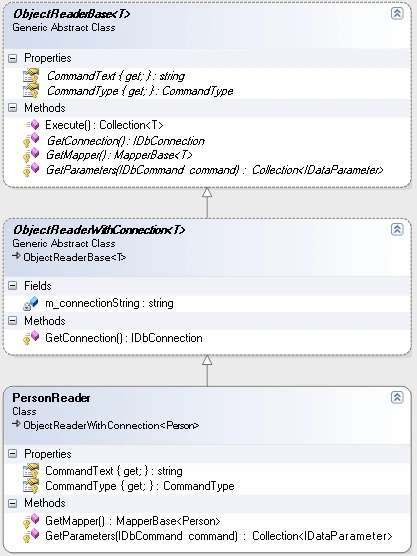
Here is the implementation of a PersonReader which handles things specific to reading a person from the database and building a collection of Person objects.
- class PersonReader: ObjectReaderWithConnection<Person>
- {
- protected override string CommandText
- {
- get { return "SELECT PersonID, FirstName, LastName, Email FROM tblPerson"; }
- }
- protected override CommandType CommandType
- {
- get { return System.Data.CommandType.Text; }
- }
- protected override Collection<IDataParameter> GetParameters(IDbCommand command)
- {
- Collection<IDataParameter> collection = new Collection<IDataParameter>();
- return collection;
-
-
-
-
-
-
- }
- protected override MapperBase<Person> GetMapper()
- {
- MapperBase<Person> mapper = new PersonMapper();
- return mapper;
- }
- }
So now we have:
Once you have the general concept, you will probably have many ideas on how you can tweak this base reader object for improvements or to fit your specific projects needs.
Also, you will have to create a different base object for each "type" of data access you'll be performing. For example you may need other abstract base classes for when you will be executing IDbCommand.ExecuteNonQuery() or IDbCommand.ExecuteScalar() requests against the database.
Mapping Synergy + DataAccess Synergy = Elegant Code
The important thing to realize is that we have completely separated out normally repetitive code which will make for much easier maintenance because of a smaller code base. For each new table-class relationship you have in your project you only have to specify the things that are different. So, while this approach may look like more classes and complexity upfront, once you understand and implement this approach you'll actually save a lot of time as the number of "data holding" classes in your project grows and you'll have fewer places to look when debugging because of all the shared-code-synergy.
This is how we'll use our framework to retrieve everyone from the database and print them to the console:
- static voidMain(string[] args)
- {
- PersonReader reader = new PersonReader();
- Collection<Person> people = reader.Execute();
- foreach (Person p in people)
- Console.WriteLine(string.Format("{0}, {1}: {2}",
- p.LastName, p.FirstName, p.Email));
- Console.ReadLine();
- }
Conclusion
So now you have the general idea you can use it as a base to build a DAL. There are many places to improve upon this approach such as using an identity map (yet another awesome Fowler pattern) to avoid unnecessary database hits or a better way to get the IDbConnection, such as using the strategy pattern and maybe using a factory, or how about a facade pattern to expose all of this functionality through one object.... anyways the possibilities are (almost) endless depending on your project.
You will most likely have to make changes to have this approach work for any specific project, but as you can see, it is possible to have less code to debug... less code to break... less code to maintain... what could be better? We can synergize our code by combining the Template Pattern with generics.
Until next time,
Happy coding

Neil HattinghPosted Dec 1, 2021, 2:01 PM
Great article! Thank you for making the time to do this, much appreciated!
Richard DavisonPosted Jun 22, 2021, 2:37 AM
Awesome, especially when you consider the new code Generator possibilities. all tables, procs and views can be easily retrieved into specific classes...... I am going to use this pattern for sure
Dinesh GabhanePosted Nov 13, 2019, 12:15 AM
Good One. Thanks
Dan HamplemanPosted Jan 25, 2013, 5:46 AM
I had to declare ObjectReaderWithConnection and MapperBase as abstract public to get it to compile
snh snhPosted Sep 4, 2012, 1:57 AM
Hi, it is a good design pattern, But my question is, how we have to deal with this pattern when we want to retrive data on the basis of some parameters? And what would be the modifications required in this pattern for saving data?
arun prasatheditedPosted Apr 20, 2012, 8:04 AMEdited Apr 20, 2012, 8:04 AM
Thanks
Joe WolterPosted Aug 10, 2011, 10:44 AM
The ObjectReader and associated files work great. Is there any chance there is an ObjectWriterBase, ObjectWriterWithConnection similar to the object reader classes?
Joe WoltereditedPosted Feb 11, 2011, 10:23 AMEdited Feb 21, 2011, 12:40 PM
Problem Solved: <?xml version="1.0" encoding="utf-8" ?> <configuration> <startup useLegacyV2RuntimeActivationPolicy="true"> <supportedRuntime version="v4.0"/> </startup> </configuration> Original Problem: I've created an application that generates my table classes using your approach by reading the sql I use to create all of my database tables in CreateDatabase.sql. Your framework works great in .net 2.0!!! But when I try to build my application in .Net 4 Client Profile it get this exception in the "public abstract class ObjectReaderBase<T>" in "using (IDbConnection connection = GetConnection())" "Mixed mode assembly is built against version 'v2.0.50727' of the runtime and cannot be loaded in the 4.0 runtime without additional configuration information." What am I missing? Thanks, Joe
JonPosted Oct 29, 2010, 12:41 PM
Hi Matt, This is an excellent article, well done! It's such a common scenario in any application, and I can't tell you the number of times I've written a complete ExecuteReader() method for different domain objects. This solution really takes advantage of generics and the end result is indeed elegant. Good job! Jon
Christophe MignotPosted Aug 25, 2010, 6:53 AM
Hello Mathew, Can you tell me how to implement when i want return multiple record set in one Stored procedure.... -Thanks and regards Chris
Shaun SharplesPosted Aug 8, 2010, 10:06 PM
I am currently trying this example out, but I have an issue where I am only getting one record back from the database where I know there is two, (I have debugged the command.CommandText attribute and put that into a SQL statement within SQL Server, and it does return the two records). Now I have attempted to debug the Reader.Execute, however at the point it attempts to do a MapAll, if I am debugging, the reader object returns zero records. However if I let it run its course, without debugging, at the end it returns one record. Being the first in the table. Thanks very much.
Biplab BanerjeePosted Jul 1, 2010, 3:01 AM
Hi Matthew, First of all thank you for writing such a wonderful article. I have considered using your approach for the DAL but I have a question. In section III at the bottom of the section you wrote "Also, you will have to create a different base object for each "type" of data access you'll be performing. For example you may need other abstract base classes for when you will be executing IDbCommand.ExecuteNonQuery() or IDbCommand.ExecuteScalar() requests against the database." Now if I create other abstract base classes for different type of data access, how will the reader (e.g. PersonReader) inherit from all of them - I mean they can't inherit from multiple abstract base. Do we end up creating different classes on the reader instead of a single PersonReader? Appreciate your response on my query. Thanks, Biplab banerjee
Giorgio BozioPosted Oct 13, 2008, 6:45 AM
Hi there, Nice article! Suppose I'm separating Dal and business logic layers on two different assemblies and let both depend on on a third assembly containing interfaces for abstracting dependencies. Where would the PersonMapper class be? It seems to me that the business logic layer would be the correct place but how would the class PersonMapper be instantiated by the dal class without breaking separation of the layers?
Prashant DevkotaPosted Aug 20, 2008, 8:40 PM
Hi, I like this article. Taking basic ideas from the DataAccess, I have created a simple framework. I might be posting the framework soon. Pras
Prashant DevkotaPosted Aug 20, 2008, 8:40 PM
Hi, I like this article. Taking basic ideas from the DataAccess, I have created a simple framework. I might be posting the framework soon. Pras
Nivitha VasudevanPosted Jan 15, 2008, 5:08 AM
Hi, This article has been very useful to me. Can you please give an example to perform Insert, Update, Delete operations?
Tom AshPosted Aug 7, 2007, 5:57 AM
Hello, I find this piece of code indeed an elegant but it lacks of usability or am I missing something? I need to parametrise Readers. Lets take PersonReader. I need to make method like: Person person = personReaderInstance.getPerson(personId); And I wish to have couple of methods like this per reader with different parameters. What then? I'm trying to walk around this issue but my conceptions violate the elegancy :/
csharpcornerPosted Nov 13, 2006, 12:51 AM
If the names of your data class properties are the same as the data table column names, you can use the following implementation of the Map method in the MapperBase class to avoid having to write manual mapping code for each data class. using System.Reflection; public abstract class MapperBase<T> where T : new() protected T Map(IDataRecord record) { T instance = new T(); string fieldName; PropertyInfo[] properties = typeof(T).GetProperties(); for (int i = 0; i < record.FieldCount; i++) { fieldName = record.GetName(i); foreach (PropertyInfo property in properties) { if (property.Name == fieldName) { property.SetValue(instance, record[i], null); } } } return instance; }
Stephen LongPosted Aug 7, 2006, 9:57 AM
Wouldn't it make sense to use a BindingList collection so that you can throw the events for when items are added/deleted/changed?
ChristofferPosted Jul 26, 2006, 7:17 PM
I have implemented your approach for reading data, and it works like a charm. But I have som thougts about updating and inserting (where you don't need generics) Does this look like a reasonable approach?: ---------- CODE ----------- class CustomerUpdater : DataUpdaterBase { private Customer _customer; private string _commandText; public CustomerUpdater(Customer customer) { _customer = customer; } protected override string CommandText { set { _commandText = value; } get { return _commandText; } } protected override System.Data.CommandType CommandType { get { return System.Data.CommandType.StoredProcedure; } } protected override Collection<IDataParameter> GetParameters(IDbCommand command) { Collection<IDataParameter> collection = new Collection<IDataParameter>(); IDataParameter custGuid = command.CreateParameter(); custGuid.ParameterName = "GUID"; custGuid.DbType = DbType.Guid; custGuid.Direction = ParameterDirection.Input; custGuid.Value = _customer.GUID; collection.Add(custGuid); return collection; } }
MrMMeditedPosted May 29, 2006, 10:03 AMEdited May 30, 2006, 9:59 AM
Hi there, First I have to say, great article !! could you give me an example how to let this example communicate with MySQL And what would you have to do if you want to use stored procedures. thanks already Greets