What Is WCF?
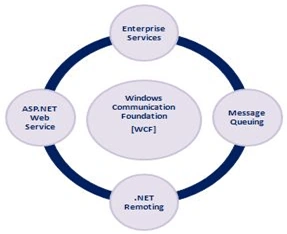
WCF stands for Windows Communication Foundations.
WCF combines the functionality from ASP.NET Web Services, .NET Remoting, Message
Queuing and Enterprise Services.
WCF provides the following features:
- Hosting For Component and Services
A WCF Service can be hosted in ASP.NET Runtime, a Windows Service, a COM+ Component or just a Windows Forms application for peer-to-peer computing.
- Declarative Behavior
Similar to ASP.NET Web Services, attributes can be used for WCF Services, for example, ServiceContract(), OperationContract, DataContract and DataMember.
- Communication Channels
Similar to .NET Remoting WCF Services are flexible in changing the channels. WCF offers multiple channels to communicate using HTTP, TCP or an IPC channel.
- Security
- Extensibility
Understanding WCF
These days we are creating the software/application that should be capable of
communication with other applications as well. Communication with other
application simply means either sharing/exchanging the data or sharing the
logic.
Now, this communication may be one of the following two kinds:
- Over an intranet (the same Network/Platform, in other words, .NET application to .NET application)
- Over the internet (cross-platform maybe ASP.NET to J2EE application)
Suppose we are writing a .NET Software with n-tier architecture
in which a Windows Forms client needs to communicate with the server in the same
network. In such case we may go for .NET Remoting for communication between
client and server.
Suppose, once our software mentioned above is ready, we need to expose some
business logic to another J2EE application. This J2EE application is supposed to
use our .NET application's logic over the WWW. In such a case we will need to
write a new ASP.NET Web Service to expose the logic.
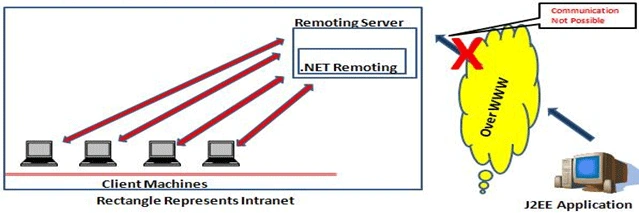
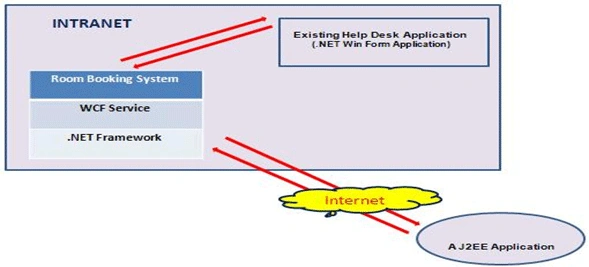
The following picture shows the limitation of .NET Remoting:
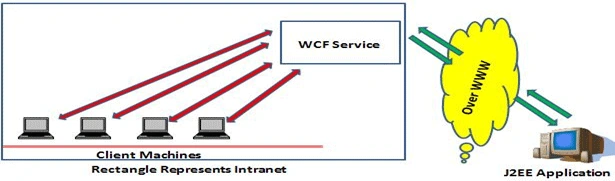
WCF helps us to overcome this kind of scenario since a WCF Service can be used
as a .NET Remoting Component and ASP.NET Web Services as well.
WCF in Real-Time Scenario
Suppose a 7 Star hotel has contacted you for software that will help the
organization to managing the hotel's room booking for a "Room Booking System".
Apart from its own features software should be capable of the following:
- Communication with software already running within the hotel's network for help desk purposes. (.NET Windows Forms application.)
- Communication with software already running for the Tourism Office for booking of rooms. (A J2EE application supposed to access the application over the WWW.)
Of course we are supposed to implement the application using
Microsoft .NET Technology.
Now, since we know that in order to communicate with another .NET application
within the same network .NET Remoting is the best option. But based on our
requirements our application should be capable of interaction with another J2EE
application over the WWW. So we can't use .NET Remoting. ASP.NET web services
may work fine but the correct option, for now, would be a WCF Service.
Differences between WCF and ASP.NET Web ServicesAtomic
Transactions
| Windows Communication Foundation (WCF) |
ASP.NET Web Service |
| WCF supports multiple bindings HTTP, WSHTTP, TCP, MSMQ. |
ASP.NET Web Services supports only HTTP binding. |
| WCF supports Atomic Transactions*. |
ASP.NET Web Services does not support Atomic Transactions*. |
| By default, WCF uses SOAP for sending and receiving the messages. But WCF can support any kind of message format, not just SOAP. |
ASP.NET Web Services can send and receive messages via the SOAP only. |
| The System.Runtime.Serialization.DataContract and System.Runtime.Serialization.DataMember attributes of the WCF's System.Runtime.Serialization assembly can be added for .NET types to indicate that instances of the type are to be serialized into XML, and which specific fields or properties of the type are to be serialized. |
ASP.NET Web Services uses XmlSerializer to translate the XML data (Message Send or received) into .NET objects. |
The following example describes what is meant by "Atomic Transactions".
Consider that Bank A and Bank B want to interact with someone's account at the same time. Both banks want to withdraw from the account and the account has $10.00 in it. If Bank A takes $7.00 and at the same time Bank B tries to get $5.00 then what will happen? When they start the transaction each bank believes there is $10.00 available in the account. When one of them finishes the other one will find there is not enough money to finish the transaction.
This scenario is common for computer systems and you can see it many times in memory management, IO operations and database interactions.
Atomic transactions are a way to avoid this problem. They simply lock on a transaction and do not allow any other transaction to interact with the resource. If anything fails during the Atomic transaction then everything will return to the state before the transaction started.
WCF
Communication Model
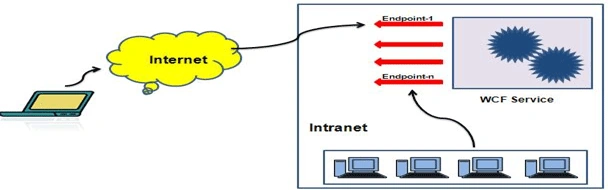
WCF follows a Client-Server Architecture. Communication between Client and
Server are established using Endpoints exposed by the WCF Service. Endpoints are
nothing but the locations defined by a service through which a message can be
sent and received. The service may have multiple end points.
Know some terms/ Keywords
- ServiceContract
Service contracts describe the operations supported by a service, the message exchange pattern they use, and the format of each message. The service contract may be an interface or class for generating a service description. A service must implement at least one service contract. An interface or class to be exposed as a service should be decorated with ServiceContractAttribute.
- OperationContract
Methods in the interface or class that are supposed to be exposed as a service should be decorated with OperationContractAttribute.
- DataContract
Data contracts describe how a CLR type maps to a schema. A data contract may be understood as a class or interface that is mapped to a database and is supposed to be exploited by a WCF Service. This class or interface needs to be decorated with DataContract attribute.
- DataMember
Properties or database table columns in the DataContract class that are supposed to be used by WCF Service should be decorated with the DataMember attribute.
WCF Binding Comparisons
As we explained in Point 4, WCF supports multiple bindings, for
example HTTP, TCP and so on. The following table describes the various
bindings supported by WCF. Bindings are configurable and can be achieved by
changing the web.config file
| Binding Class Name |
Transport |
Message Encoding |
Message Version |
Security Mode |
RM |
Tx Flow* |
| BasicHttpBinding |
HTTP |
Text |
SOAP 1.1 |
None |
X |
X |
| WSHttpBinding |
HTTP |
Text |
SOAP 1.2
WS-A 1.0 |
Message |
Disabled |
WS-AT |
| WSDualHttpBinding |
HTTP |
Text |
SOAP 1.2
WS-A 1.0 |
Message |
Enabled |
WS-AT |
| WSFederationHttpBinding |
HTTP |
Text |
SOAP 1.2
WS-A 1.0 |
Message |
Enabled |
WS-AT |
| NetTcpBinding |
TCP |
Binary |
SOAP 1.2 |
Transport |
Disabled |
Ole Tx |
| NetPeerTcpBinding |
P2P |
Binary |
SOAP 1.2 |
Transport |
X |
X |
| NetNamedPipesBinding |
Named Pipes |
Binary |
SOAP 1.2 |
Transport |
X |
Ole Tx |
| NetMsmqBinding |
MSMQ |
Binary |
SOAP 1.2 |
Message |
X |
X |
| MsmqIntegrationBinding |
MSMQ |
X** |
X |
Transport |
X |
X |
| CustomBinding |
You decide |
You decide |
You decide |
You decide |
You decide |
You decide |
Where,
- X = Not Supported
- X = Not Supported
- WS-A = WS-Addressing
- WS-AT = WS-AtomicTransaction
- OleTx = OleTransactions
- * Transaction flow is always disabled by default, but when you enable it, these are the default tx protocols
- * This binding doesn't use a WCF message encoding; instead it lets you choose a pre-WCF serialization format
How to Create a Sample WCF application with VS2008?
Create/ Manage database
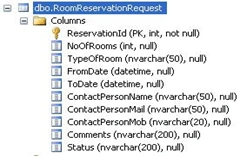
Before proceeding toward the WCF Service Creation, we need to create a database
say, "WCF" with one table having the following schema:
Where, ReservationId is an auto-generated Primary Key column.
Note: You may also restore the backup of the database given along with
the sample application.
Create WCF Service
- Open Visual Studio
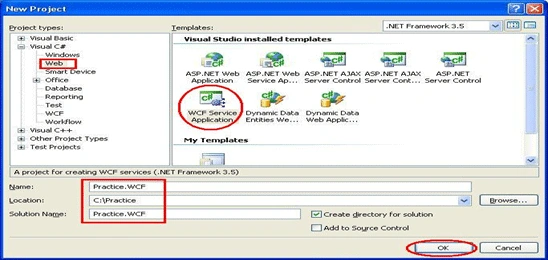
- Select "File" -> "New" -> "Project..."
- From the left panel, select Web node of your language VB.NET/C#.NET
- Now among the templates you will see "WCF Service Application"
- Select the same (WCF Service Application)
- Provide Suitable Name (Say Practice.WCF) and click on the "OK" button.
- Modify the connection strings section of the web.config file of the WCF Service.
- <connectionStrings
- addname="con"connectionString="Data Source=PRODSK0542;Initial Catalog=WCF;User
- Id=sa;Password=Swayam1;" providerName="System.Data.SqlClient"/>
- </connectionStrings>
- By default, Visual Studio will create a Service and an Interface Service1.svc and IService1.cs
- Add a new class, "RoomReservationRequest.cs" (DataContract)
- Import the namespace System.Runtime.Serialization; if not imported
- Create a property with the same data type for each column present in the RoomReservationRequest table. Decorate the "RoomReservationRequest" class with the "[DataContract]" attribute and each property with "[DataMember]".
- namespace Practice.WCF
- {
- [DataContract]
- publicclassRoomReservationRequest
- {
- [DataMember]
- public int ReservationId
- {
- get; set;
- }
-
- [DataMember]
- public int NoOfRooms
- {
- get; set;
- }
-
- [DataMember]
- public string TypeOfRoom
- {
- get; set;
- }
-
- [DataMember]
- publicDateTime FromDate
- {
- get; set;
- }
-
- [DataMember]
- publicDateTime ToDate
- {
- get; set;
- }
-
- [DataMember]
- public string ContactPersonName
- {
- get; set;
- }
-
- [DataMember]
- public string ContactPersonMail
- {
- get; set;
- }
-
- [DataMember]
- public string ContactPersonMob
- {
- get; set;
- }
-
- [DataMember]
- public string Comments
- {
- get; set;
-
- }
-
- [DataMember]
- public string Status
- {
- get; set;
- }
- }
- }
- Add a new class "RoomReservationData" and write two methods, such as ReserveRoom and GeReservations.
- namespace Practice.WCF
- {
- internalclassRoomReservationData
- {
- private string connectionString =ConfigurationManager.ConnectionStrings["con"].ConnectionString;
- internal bool ReserveRoom(RoomReservationRequest roomReservationReq)
- {
- SqlConnection connection = GetConnection();
- string sqlCommand ="INSERT INTO RoomReservationRequest(NoOfRooms, TypeOfRoom, FromDate, ToDate, ContactPersonName, " +
- "ContactPersonMail, ContactPersonMob, Comments, Status) VALUES (" +
- "@NoOfRooms, @TypeOfRoom, @FromDate, @ToDate, @ContactPersonName, " +
- "@ContactPersonMail, @ContactPersonMob, @Comments, @Status)";
-
- SqlCommand command = connection.CreateCommand();
- command.CommandText = sqlCommand;
- command.Parameters.Add("@NoOfRooms", System.Data.SqlDbType.Int);
- command.Parameters.Add("@TypeOfRoom", System.Data.SqlDbType.NVarChar, 20);
- command.Parameters.Add("@FromDate", System.Data.SqlDbType.DateTime );
- command.Parameters.Add("@ToDate", System.Data.SqlDbType.DateTime);
- command.Parameters.Add("@ContactPersonName", System.Data.SqlDbType.NVarChar, 50);
- command.Parameters.Add("@ContactPersonMail", System.Data.SqlDbType.NVarChar, 50);
- command.Parameters.Add("@ContactPersonMob", System.Data.SqlDbType.NVarChar, 20);
- command.Parameters.Add("@Comments", System.Data.SqlDbType.NVarChar, 200);
- command.Parameters.Add("@Status", System.Data.SqlDbType.NVarChar, 200);
-
- command.Parameters["@NoOfRooms"].Value = roomReservationReq.NoOfRooms;
- command.Parameters["@TypeOfRoom"].Value = roomReservationReq.TypeOfRoom;
- command.Parameters["@FromDate"].Value = roomReservationReq.FromDate;
- command.Parameters["@ToDate"].Value = roomReservationReq.ToDate;
- command.Parameters["@ContactPersonName"].Value = roomReservationReq.ContactPersonName;
- command.Parameters["@ContactPersonMail"].Value = roomReservationReq.ContactPersonMail;
- command.Parameters["@ContactPersonMob"].Value = roomReservationReq.ContactPersonMob;
- command.Parameters["@Comments"].Value = roomReservationReq.Comments;
- command.Parameters["@Status"].Value = roomReservationReq.Status;
-
- int rowsEffected =0;
- try
- {
- rowsEffected = command.ExecuteNonQuery();
- }
- finally
- {
- if (connection !=null)
- {
- connection.Close();
- connection.Dispose();
- }
- }
-
- return rowsEffected > 0;
- }
-
- internalRoomReservationRequest[] GetReservations(DateTime fromDate, DateTime toDate)
- {
- List<RoomReservationRequest> reservedRooms = newList<RoomReservationRequest>();
- SqlConnection connection = GetConnection();
- SqlCommand command = connection.CreateCommand();
-
- command.CommandText ="SELECT ReservationId, NoOfRooms, TypeOfRoom, FromDate" +
- ",ToDate, ContactPersonName, ContactPersonMail, ContactPersonMob, Comments, Status "+
- "FROM RoomReservationRequest "+
- "WHERE FromDate > @FromDate AND ToDate<@ToDate";
-
- command.Parameters.Add("@FromDate", System.Data.SqlDbType.DateTime);
- command.Parameters.Add("@ToDate", System.Data.SqlDbType.DateTime);
-
- command.Parameters["@FromDate"].Value = fromDate;
- command.Parameters["@ToDate"].Value = toDate;
-
- SqlDataReader reader =null;
-
- try
- {
- reader = command.ExecuteReader(CommandBehavior.CloseConnection);
- while (reader.Read())
- {
- RoomReservationRequest roomReservationRequest = newRoomReservationRequest();
- roomReservationRequest.ReservationId =Convert.ToInt16(reader[0]);
- roomReservationRequest.NoOfRooms =Convert.ToInt16(reader[1]);
- roomReservationRequest.TypeOfRoom = reader[2].ToString();
- roomReservationRequest.FromDate =Convert.ToDateTime(reader[3]);
- roomReservationRequest.ToDate =Convert.ToDateTime(reader[4]);
- roomReservationRequest.ContactPersonName = reader[5].ToString();
- roomReservationRequest.ContactPersonMail = reader[6].ToString();
- roomReservationRequest.ContactPersonMob = reader[7].ToString();
- roomReservationRequest.Comments = reader[8].ToString();
- roomReservationRequest.Status = reader[9].ToString();
-
- reservedRooms.Add(roomReservationRequest);
- }
- }
- finally
- {
- if (reader !=null)
- {
- reader.Close();
- reader.Dispose();
- }
-
- if (connection != null)
- {
- connection.Close();
- connection.Dispose();
- }
- }
- return reservedRooms.ToArray();
-
- privateSqlConnection GetConnection()
- {
- SqlConnection connection = newSqlConnection(connectionString);
- try
- {
- connection.Open();
- }
- finally
- {
- }
- return connection;
- }
- }
- }
- Declare two methods for the interface IService1, such as ReserveRoom and GetReservations.
- namespace Practice.WCF
- {
- [ServiceContract]
- publicinterfaceIService1
- {
- [OperationContract]
- bool ReserveRoom(RoomReservationRequest reservationRequest);
-
- [OperationContract]
- RoomReservationRequest[] GetReservations(DateTime fromDate, DateTime toDate);
- }
- }
- Implement the Interface ISErvice1 in the Service1.svc.cs file. Create an instance of the class "RoomReservationData" that we implemented in Step 12 and use it in the implemented methods.
- namespace Practice.WCF
- {
- publicclassService1 :IService1
- {
-
- #region IService1 Members
- privateRoomReservationData roomReservationData = newRoomReservationData();
- public bool ReserveRoom(RoomReservationRequest reservationRequest)
- {
- return roomReservationData.ReserveRoom(reservationRequest);
- }
-
- public RoomReservationRequest[] GetReservations(DateTime fromDate, DateTime toDate)
- {
- return roomReservationData.GetReservations(fromDate, toDate);
- }
- #endregion
- }
- }
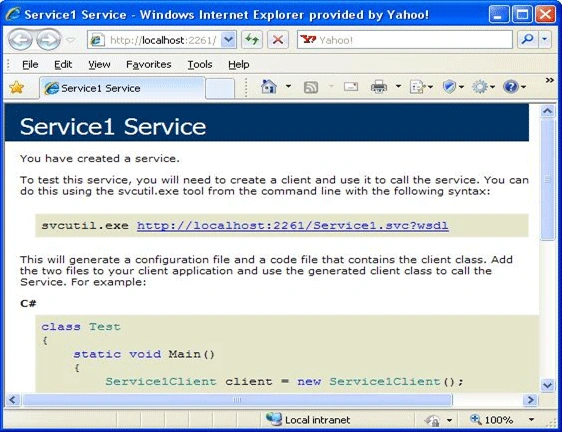
- Now we are done with the implementation of WCF Service. Set the Service1 as the Startup page. Run your WCF application. The following screen should be the result.
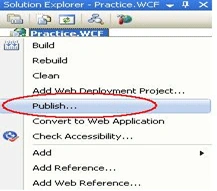
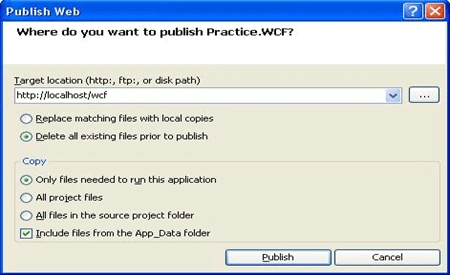
- Publish the WCF Service.
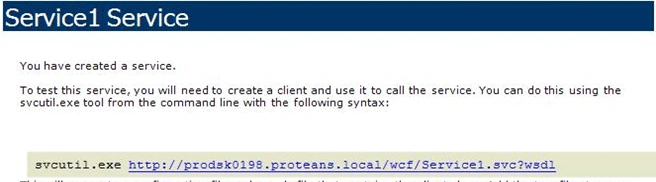
- You may check the published WCF Service by typing the URL into browser,
for example, http://localhost/wcf/Service1.svc: a page the same as in Step 14 will appear.
How to Consume the WCF Service?
Generate the Class and Config File using svcutil.exe
You might have noticed the message displayed while browsing the service as in
the following:
We now need to generate the classes that our Client application will use to
consume the service.
We may generate the classes/configuration using the tool svcutil.exe. Use the
following procedure to generate the Class/Config file.
- Open the command prompt and go to the location where svcutil.exe is placed. You may find it at the following location: "C:\Program Files\Microsoft SDKs\Windows\v6.0A\bin".
- Write the following command and press the Enter key to generate the Class/Config files.

- This will generate the Service1.cs and output.config files at the same location where svcutil.exe is placed, in other words "C:\Program Files\Microsoft SDKs\Windows\v6.0A\bin".
- The class generated and the config file we need to include into our client application for consuming the service.
Create Client to Consume Service
- Open Visual Studio
- Select "File" -> "New" -> "Project..."
- Select "Windows Forms application"
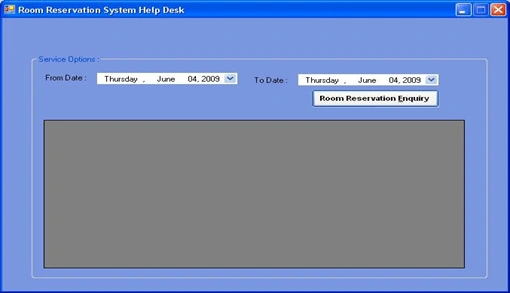
- Create a Form similar to the following:
- Include the class generated by Step iii of Section 8.1
- Right-click on the project and select the option "Add Service Reference".
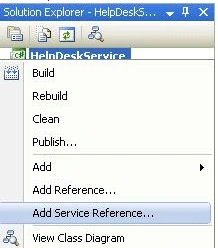
- Enter the URL/ Address where the service is hosted and click the "Go" button to find the service. You may see the Services Methods/Logic exposed by WCF Service
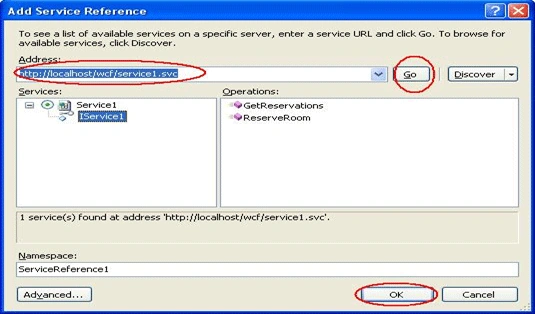
- Click "OK" to add the service.
- Double-click the "Room Reservation Enquiry" button to write the logic. Ensure that you have imported the
- private void btnEnquiry_Click(object sender, EventArgs e)
- {
- Service1Client client = newService1Client();
- RoomReservationRequest[] reservationEnquiry =null;
- reservationEnquiry = client.GetReservations(dateFromDate.Value, dateToDate.Value);
- if (reservationEnquiry.Length > 0)
- {
- gvReservationData.DataSource = reservationEnquiry;
- gvReservationData.Visible = true;
- }
- else
- {
- gvReservationData.Visible = false;
- lblMessage.Text = "Sorry data not available.";
- }
- }
- When we added the reference of the Service to the client project, one configuration file would also have been added to the application, in other words App.Config. Replace the <system.serviceModel> node of this file by the <system.serviceModel> node of the output.config file generated into "Step- 3" of "Section 7.1".
- Run the client application. Enter the "From Date" and "To Date" then click the "Enquiry" button to test the application.
How to Use the Source
Unzip the file WCF.zip, you may find the following files:
- DBBackup.zip
- Source.zip
Restore / Create Database
Unzip the file DBBackup.zip and restore the WCF.bak file to SQL Server Database
or you may create the database as suggested in Step 8.1.
Now, unzip the file Source.zip, you may find:
- WCFService
- WCFClient
Publish/Host Client
- Open the directory WCFService.
- Double-click the "Practice.WCF.sln" file to open the solution.
- Modify the web.config file of the Service as suggested in Step-7 of Section-8.2.
- Publish the service as suggested in Step-16 of Section-8.2.
Use WCF Client to consume the services
- Open the WCFClient directory.
- Double-click the "HelpDeskService.sln" file to open the solution.
- Run the solution.
- Select the dates and hit the "Enquiry" button.
Note: You may need to
modify the App.Config file if you have not published the WCF Service to the
local machine.


Jithil JohnPosted Mar 1, 2016, 6:51 AM
Good one
nguyenlong tranhuuPosted Mar 29, 2014, 11:30 AM
I did not find DBBackup inside attached files above.
psr sudhakarPosted Feb 28, 2012, 4:51 AM
excellent article for beginners it really helps a lot...
Amruta AgnihotriPosted Oct 12, 2011, 7:54 AM
Hi Ashish, Amruta here. I am fresher.I need your help for developing Asp.Net web app with layers (Business,Data,UI etc) using WCF. Please do help. Thanks in advance.. Regards, Amruta Agnihotri
Anil KumarPosted Jun 2, 2011, 7:22 AM
just can say WOW !!!
RajaPosted May 20, 2011, 8:40 AM
Hi could you please Explain how to do the same using net.tcp protocol. because i am quite confused by surfing through net.
Pradip PatelPosted Mar 4, 2011, 5:49 AM
I receive below error after successfully created wcf service and wcf client. The server was unable to process the request due to an internal error. For more information about the error, either turn on IncludeExceptionDetailInFaults (either from ServiceBehaviorAttribute or from the <serviceDebug> configuration behavior) on the server in order to send the exception information back to the client, or turn on tracing as per the Microsoft .NET Framework 3.0 SDK documentation and inspect the server trace logs. I am running on Windows XP SP3, VS2008 Professional with 3.5 Framework SP1 and VS2010 Professional.
Gobi GPosted Feb 26, 2011, 6:25 AM
Good Article for Beginers
Amit MPosted Nov 9, 2010, 1:34 AM
Great article, easy to understood for new persons. Thanks for this.
arockia rajPosted Nov 8, 2010, 5:08 AM
great job i youdid. hands off you.nice. it is nice to work for beginners.tc.bye
SreekanthPosted Oct 8, 2010, 6:27 AM
:)
anamika singhPosted Jul 13, 2010, 6:21 AM
I have hardcoded the code,means i have filled the data table directly in the database.when i run the program i am not getting data,i am getting "sorry data not available".
madhur bhoraliPosted Jun 17, 2010, 8:49 AM
Great walkthrough on WCF
Harbans HeerPosted Jan 28, 2010, 5:49 AM
Very informative, very clear and concise - Thank you so much
Amit MPosted Dec 25, 2009, 1:23 AM
This is a great article for fresher as well experience persons, those are not familiar with Windows Communication Foundation. Thanks.
ajay singhPosted Nov 22, 2009, 2:36 PM
System.ServiceModel.FaultException: The server was unable to process the request due to an internal error. For more information about the error, either turn on IncludeExceptionDetailInFaults (either from ServiceBehaviorAttribute or from the <serviceDebug> configuration behavior) on the server in order to send the exception information back to the client, or turn on tracing as per the Microsoft .NET Framework 3.0 SDK documentation and inspect the server trace logs. <?xml:namespace prefix = o ns = "urn:schemas-microsoft-com:office:office" /><o:p> </o:p> Server stack trace: at System.ServiceModel.Channels.ServiceChannel.ThrowIfFaultUnderstood(Message reply, MessageFault fault, String action, MessageVersion version, FaultConverter faultConverter) at System.ServiceModel.Channels.ServiceChannel.HandleReply(ProxyOperationRuntime operation, ProxyRpc& rpc) at System.ServiceModel.Channels.ServiceChannel.Call(String action, Boolean oneway, ProxyOperationRuntime operation, Object[] ins, Object[] outs, TimeSpan timeout) at System.ServiceModel.Channels.ServiceChannel.Call(String action, Boolean oneway, ProxyOperationRuntime operation, Object[] ins, Object[] outs) at System.ServiceModel.Channels.ServiceChannelProxy.InvokeService(IMethodCallMessage methodCall, ProxyOperationRuntime operation) at System.ServiceModel.Channels.ServiceChannelProxy.Invoke(IMessage message) <o:p> </o:p> Exception rethrown at [0]: at System.Runtime.Remoting.Proxies.RealProxy.HandleReturnMessage(IMessage reqMsg, IMessage retMsg) at System.Runtime.Remoting.Proxies.RealProxy.PrivateInvoke(MessageData& msgData, Int32 type) at IService1.GetReservations(DateTime fromDate, DateTime toDate) at Service1Client.GetReservations(DateTime fromDate, DateTime toDate) in C:\Documents and Settings\Ajay\Desktop\WCF\Source\WCFClient\Service1.cs:line 242 at HelpDeskService.HelpDesk.btnEnquiry_Click(Object sender, EventArgs e) in C:\Documents and Settings\Ajay\Desktop\WCF\Source\WCFClient\HelpDesk.cs:line 30
kurt jacksonPosted Nov 18, 2009, 10:00 PM
Ashish Tripathi Ashish, thanks for this very informative , useful and clear tutorial. I really appriciate it especially I'm a new in WCF. I hope to see more post from you regarding to this topic (WCF). Ashish Tripathi
Blocked AccountPosted Nov 3, 2009, 12:03 AM
Very informative article. Keep writing!
Ajay ChauhanPosted Oct 23, 2009, 3:19 AM
Could not find default endpoint element that references contract 'ServiceReference1.IService1' in the ServiceModel client configuration section. This might be because no configuration file was found for your application, or because no endpoint element matching this contract could be found in the client element.
rupaliPosted Sep 22, 2009, 3:31 AM
Very Informative....
Lalithashankar mamidiPosted Sep 14, 2009, 2:22 PM
Thanks Ashish , Really this is a nice article, any body who knows basic .net can understand the concept. thanks and regards shankar.
ashish ashishPosted Sep 11, 2009, 12:39 AM
its great artical about WCF
prabhat vermaPosted Sep 6, 2009, 3:32 AM
Excellent
William PerkinsPosted Aug 6, 2009, 1:45 PM
Wonderful article -- keep writing!!!! I'll be back
Jorge L FernandezPosted Jul 17, 2009, 12:11 PM
If it is possible I think would be great if some example of comunication with another architecture (said J2EE) is provided here just to reflect the power on cross-architecture of WCF. Thanks for the article.
Abul HasaneditedPosted Jul 13, 2009, 6:31 AMEdited Jul 13, 2009, 6:34 AM
Service running locally without publishing.. gives error 404.17 NOT FOUND when I publish it on my local IIS. here is the problem detail (Copied from the error page): " HTTP Error 404.17 - Not Found The requested content appears to be script and will not be served by the static file handler. Most likely causes: The request matched a wildcard mime map. The request is mapped to the static file handler. If there were different pre-conditions, the request will map to a different handler. Things you can try: If you want to serve this content as a static file, add an explicit MIME map." Regards, Abul Hasan Lakhani. MCPD - Web Developer
Ram ChauhanPosted Jul 13, 2009, 1:58 AM
looks very informative and helpful :) -thanks
Preeti DhagePosted Jun 30, 2009, 9:21 AM
There is a closed bracket missing next to array in the RoomReservationData.cs class
GrahamePosted Jun 17, 2009, 8:26 PM
As someone just starting to explore WCF, I found your article to be of great help. Thanks again!