

When you work on relational databases, you find many scenarios where you need to use “one to many relationships” or “Many to many relationships” or “one to one relationships” into your model. Though entity framework is the most recommended choice by experienced programmers, while working on your project when you choose code first approach, it’s very easy to build relationships in code classes. So let’s get started.
Installation and Configuration of Entity framework
If you don’t know how to install entity framework see my previous article Entity framework from Scratch, where I wrote about Installation of Entity framework and how to perform simple CRUD operation using Entity framework Code First Approach.
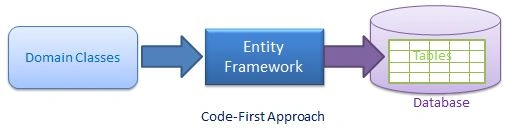
Make a new project in visual studio with the name “One to Many relationship in EF”. Entity framework supports the following types of relationships. We shall discuss one to many relationship here.
- One to many relationship
- Many to many relationship
- One to one relationship
Workflow and Example
Let’s take a simple example of Student and Class. Let’s assume for a moment that one student belongs to one class at a time, but one class has more than one student at the same time. So this is a simple example of a one to many relationship.
[Note: we are using a simple console application to let you understand the things on very beginner level and easily.]
So these are the steps you need to follow in order to learn the “building one to many relationship” using entity framework code first.
- Make a simple console application.
- Add two classes with the name “Student” and “Grade”.
Making a relationship between both class (we’ll use navigation properties) - Add a Context class with name “StudentGradeDb”.
- Add a connection string to force entity framework to create the database into our local SQL Server (otherwise we would not be able to see the one to many relationship clearly).
- Write code to take input for both tables from user into main() function and show the data of both to the user.
- Build and Run the project.
- Open SQL Server and analyze the database.
Let’s Add a Student class to program.
- public class Student
- {
- public int StudentID { get; set; }
- public string StudentName { get; set; }
- public Grade Grade { get; set; }
- }
- public class Grade
- {
- public int GradeId { get; set; }
- public string GradeName { get; set; }
- public virtual List<Student> Students { get; set; }
- }
Now add a Context class for database as below.
- public class StudentGradeDB : DbContext
- {
- public DbSet<Grade> Grades { get; set; }
- public DbSet<Student> Students { get; set; }
- }
- static void Main(string[] args)
- {
- Console.WriteLine("Enter Student name = ");
- string stu_name = Console.ReadLine();
- try
- {
- using(vardb = newStudentGradeDB())
- {
- Student stu = newStudent();
- stu.StudentName = stu_name;
- db.Students.Add(stu);
- db.SaveChanges();
- Console.WriteLine(" Data Inserted...");
- Console.WriteLine("-----------( All Students )--------------");
- // Fetching data from Database
- var queryreslut = (from s indb.Students select s).ToList();
- // Display Data
- foreach(var item inqueryreslut)
- {
- Console.WriteLine(item.StudentName);
- }
- }
- }
- catch (Exception ex)
- {
- Console.WriteLine("\n Error : \n" + ex.Message);
- }
- Console.ReadLine();
- }
- <connectionStrings>
- <add name="StudentGradeDb"connectionString="Data Source=localhost;
- Initial Catalog=StudentGradeDb; user id=sa;password=12345;"
- providerName="System.Data.SqlClient" />
- </connectionStrings>
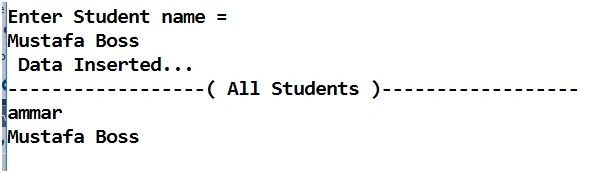
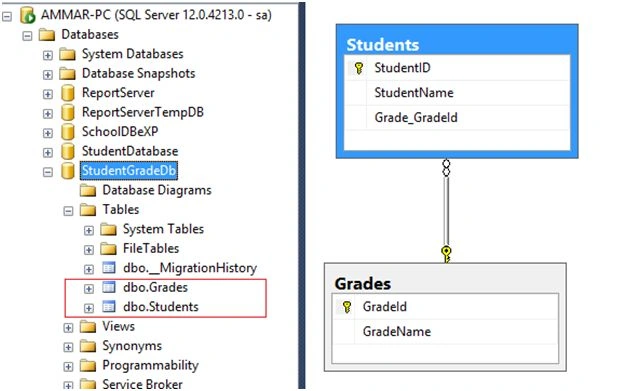
After that if you open your SQL Server, you will see the database has been created there with two tables and both tables has one to many relationship over there.
Create a database diagram of both tables, you’ll notice that relations is already existing between both tables as I’ve shown in the following screenshot:
Read more articles on Entity Framework:
Prasanna MuraliPosted Jun 3, 2016, 10:14 PM
Nice one..
Mobeen SarwarPosted Mar 28, 2016, 12:27 PM
Good job..
Ammar ShaukatPosted Mar 24, 2016, 3:13 AM
thanks Kumaresh Rajalingam
Ammar ShaukatPosted Mar 24, 2016, 3:13 AM
thanks Jaipal Reddy
Jaipal ReddyPosted Mar 23, 2016, 11:58 PM
Nice One. .
Kumaresh RajalingamPosted Mar 23, 2016, 9:11 PM
Nice one
Debasis SahaPosted Mar 23, 2016, 1:20 PM
Nice one..
Shaili DashoraPosted Mar 23, 2016, 6:03 AM
Nice one..
Ammar ShaukatPosted Mar 23, 2016, 3:47 AM
Humayun Kabir Mamun thanks.
Humayun Kabir MamunPosted Mar 23, 2016, 2:59 AM
Nice...
Ammar ShaukatPosted Mar 22, 2016, 1:54 PM
thanks Saillesh Pawar
Ammar ShaukatPosted Mar 22, 2016, 1:53 PM
thanks Vignesh Mani
Ammar ShaukatPosted Mar 22, 2016, 1:53 PM
thanks Mohammed Ibrahim
Ammar ShaukatPosted Mar 22, 2016, 1:53 PM
thanks Aqib Shehzad
Vignesh ManiPosted Mar 22, 2016, 9:11 AM
Good
Saillesh PawarPosted Mar 22, 2016, 8:50 AM
Nice share
Mohammed IbrahimPosted Mar 22, 2016, 8:47 AM
nice
Muhammad Aqib ShehzadPosted Mar 22, 2016, 7:34 AM
nice one