Introduction
Angular 2 library contains eight TypeScript custom controls. Each control has its label and its validations. Grid and dropdown get the data dynamically using the API name. All the eight controls are listed below.
- textBox
- textbox-multiline
- date-picker
- dropdown
- grid
- checkbox
- radio.
- radio list
Also, the library contains base classes and common HTTP services.
- base-control-component
- base-form-component
- http-common-service
Prerequisites
- Visual Studio Community 2015 with Update 3 – Free
- .NET Core 1.1 SDK - Installer (dotnet-dev-win-x64.1.0.0-preview2-1-003177.exe)
- Typescript for visual studio 2015 (TypeScript_Dev14Full_2.1.4.0.exe)
- Node js 6.9
- Install node_modules in client folder in the project.
Open cmd.exe and then open client folder.
D:\> cd D:\ Angular2WithAspNetCoreWebAPI\src\Angular2WithAspNetCoreWebAPI\client
D:\ Angular2WithAspNetCoreWebAPI\src\Angular2WithAspNetCoreWebAPI\client> npm install
- Start page
http://localhost:56245/client/index.html
Using the code
Examples for using the custom form controls.
Create a new component for student form client\app\components\student\student-form.component.ts that inherits from baseFormComponent to use, save, and load methods from it.
Then, pass ASP.NET Core API name to the base form constructor to use it in get and post data. In this example, we pass "Students" as API name.
- import { Component, OnDestroy,OnInit } from '@angular/core';
- import { FlashMessagesService } from 'angular2-flash-messages';
- import { HttpCommonService } from '../../shared/services/http-common.service';
- import { BaseFormComponent } from '../../shared/controls/base/base-form.component';
- import { ActivatedRoute } from '@angular/router';
-
-
- @Component({
- moduleId: module.id,
- selector: 'student-form',
- templateUrl: 'student-form.template.html',
- providers: [HttpCommonService]
- })
- export class StudentFormComponent extends BaseFormComponent{
-
-
- constructor( _httpCommonService: HttpCommonService,
- flashMessagesService: FlashMessagesService,
- route: ActivatedRoute) {
- super(_httpCommonService, flashMessagesService, route, "Students"
Add custom controls to a form template client\app\components\student\student-form.template.html. In this template, we add form tag then call "Save" method in base form compnent on ngSubmit event and set form alias name #from="ngForm.
For each custom form input contros, we set its id, label value, required, and ngModelName using two way binding. For radio list and dropdown controls, we pass extra properties apiName to fill the list, valueFieldName, and textFieldName to set text and value fields for the list elements. Set disable property for submit button to be [disabled]="!from.form.valid".
- <div class="container">
- <div>
- <!--[hidden]="submitted"-->
- <h1>Student</h1>
- <form (ngSubmit)="save()" #from="ngForm">
-
- <textbox id="txtFirstMidName" name="txtFirstMidName" label="First-Mid Name" [(ngModel)]="model.firstMidName" required="true"></textbox>
-
- <textbox id="txtLastName" name="txtLastName" label="Last Name" [(ngModel)]="model.lastName" required="true"></textbox>
-
- <date-picker name="dpEnrollmentDate" id="dpEnrollmentDate" label="EnrollmentDate" [(ngModel)]="model.enrollmentDate" required="true"></date-picker>
-
- <dropdown name="ddlCourse" id="ddlCourse" label="Course" [(ngModel)]="model.course1ID" apiName="Courses" valueFieldName="courseID" textFieldName="title" required="true"></dropdown>
-
- <textbox-multiline id="txtStudentDescription" name="txtStudentDescription" label="Description" [(ngModel)]="model.description" required="true"></textbox-multiline>
-
- <radio-list name="elStudentType" id="studentType" [(ngModel)]="model.course2ID" valueFieldName="courseID" textFieldName="title" apiName="Courses" required="true"></radio-list>
-
- <radio id="rbMale" label="Male" name="rbgender" [(ngModel)]="model.gender" checked="true" val="1"></radio>
-
- <radio id="rbFemale" label="Female" name="rbgender" [(ngModel)]="model.gender" val="0"></radio>
-
- <checkbox id="chkHasCar" label="HasCar" name="chkHasCar" [(ngModel)]="model.hasCar"></checkbox>
-
- <button type="submit" class="btn btn-default" [disabled]="!from.form.valid">Save</button>
-
- <button type="button" class="btn btn-default" [disabled]="model.id>0" (click)="from.reset()">New</button>
-
- </form>
- </div>
-
- </div>
- <button type="submit" class="btn btn-default" [disabled]="!from.form.valid">Save</button>
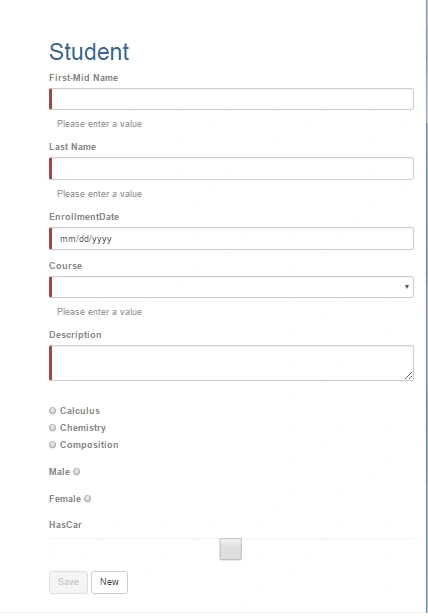
When the controls are empty and required, the Save button will be disabled and red sign will appear in the control.
Note - textType property in text box could be number, email, URL, tel.
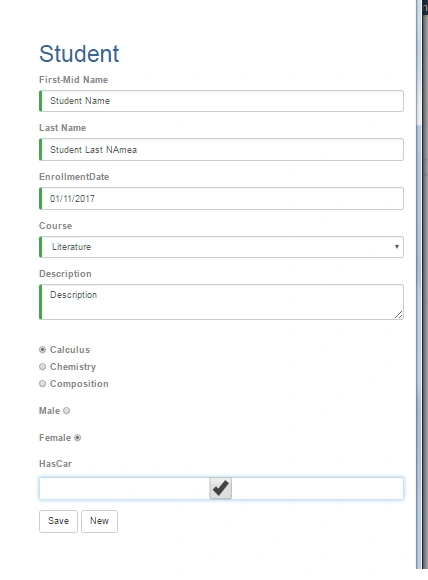
When the controls are not empty, the "Save" button will be enabled and a green sign will appear in the control.
All these controls have common properties which are included in
client\app\shared\controls\base\base-control.component.ts.- label
- name
- id
- required
- hidden
- textType
- minLength
- maxLength
Example for using custom grid
Create a new component for students list client\app\components\student\student-list.component.ts.
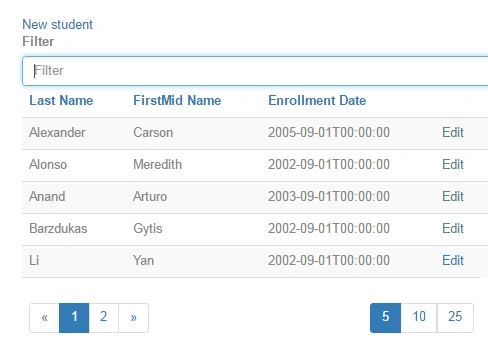
Then, add grid columns array. Each column has name, modelName, and label properties. Sorting, paging, and filtering features are included in the grid component.
- import { Component, Input } from '@angular/core';
- import { GridColumnModel } from '../../shared/controls/grid/grid-column.model';
-
-
- @Component({
- moduleId: module.id,
- selector: 'student-list',
- templateUrl: 'student-list.template.html'
- })
- export class StudentListComponent {
- @Input() columns: Array<GridColumnModel>;
- constructor() {
-
- this.columns = [
- new GridColumnModel({ name: 'LastName', modelName: 'lastName', label: 'Last Name' }),
- new GridColumnModel({ name: 'FirstMidName', modelName: 'firstMidName', label: 'FirstMid Name' }),
- new GridColumnModel({ name: 'EnrollmentDate', modelName: 'enrollmentDate', label: 'Enrollment Date' }),
- ]
- }
-
- }
Add the custom grid to a list template client\app\components\student\student-list.template.html and then set APIname and column property (it will get it from the StudentListComponent component).The grid control has sorting, paging, and filtering features.
- <grid [columns]="columns" apiName="Students" label="Student" name="student"></grid>
 Controls Source code
BaseControlComponent
All custom controls inherit from BaseControlComponent to get common properties such as label, name, id, required, hidden, texttype, which are used for fixing nested controls' ngmodel binding issue in validation using steps in
http://blog.rangle.io/angular-2-ngmodel-and-custom-form-components/
It also contains pattern objects for regular expression validations for email and url or any extra validations by adding regular expression for each textType (emial, URL, tel) which will be used in child controls html template.
- <input type="{{textType}}" pattern="{{patterns[textType]}}">
- import { Component, Optional,Inject,OnInit, Output, Input, AfterViewInit, AfterViewChecked, EventEmitter } from '@angular/core';
- import { NgModel } from '@angular/forms';
- import { Observable } from 'rxjs/Observable';
- import { ValueAccessorBase } from './value-accessor';
- import {
- AsyncValidatorArray,
- ValidatorArray,
- ValidationResult,
- message,
- validate,
- } from './validate';
-
- @Component({
-
- })
- export abstract class BaseControlComponent<T> extends ValueAccessorBase<T> implements OnInit{
-
- protected abstract model: NgModel;
-
- @Input() label: string;
- @Input() name: string;
- @Input() id: string;
- @Input() required: boolean = false;
- @Input() hidden: boolean = false;
- @Input() textType: string;
- @Input() minLength: string;
- @Input() maxLength: string;
-
- public patterns = {
- email: "([a-zA-Z0-9_\.\-])+\@(([a-zA-Z0-9\-])+\.)+([a-zA-Z0-9]{2,4})+",
- url: "(https?)://[-a-zA-Z0-9+&@#/%?=~_|!:,.;]*[-a-zA-Z0-9+&@#/%=~_|]"
- };
base-form.component
All input forms should be inherited from BaseFormComponent to get all CRUD operations, such as save [create or update], delete, reset form data to be in new mode and load model in edit mode if router has id param.
- import { Component, OnDestroy, OnInit ,Input} from '@angular/core';
- import { ActivatedRoute } from '@angular/router';
- import { HttpCommonService } from '../../services/http-common.service';
- import { FlashMessagesService } from 'angular2-flash-messages';
-
-
- @Component({
- moduleId: module.id,
- providers: [HttpCommonService]
- })
- export class BaseFormComponent {
- public apiName:string
- protected model = {};
- protected submitted = false;
- private sub: any;
- id: number;
-
-
-
-
-
-
- constructor(private _httpCommonService: HttpCommonService,
- private flashMessagesService: FlashMessagesService,
- private route: ActivatedRoute, _apiName: string) {
- this.apiName = _apiName;
- this.sub = this.route.params.subscribe(params => {
- this.id = +params['id'];
- if (this.id > 0) {
- this._httpCommonService.getItem(this.apiName, this.id).subscribe(data => {
- this.model = data
- this.model["enrollmentDate"] = this.model["enrollmentDate"].substring(0, 10);
- });
- }
-
- });
- }
- ngOnInit() {
-
-
-
-
-
-
-
- }
- ngOnDestroy() {
- this.sub.unsubscribe();
- }
- reset() {
- this.id = 0;
- this.model = {};
- }
- save() {
- alert(JSON.stringify(this.model));
- if (this.id > 0) {
- this._httpCommonService.update(this.apiName, this.model).subscribe();
-
- }
- else {
- this._httpCommonService.create(this.apiName, this.model).subscribe();
-
- }
-
- this.flashMessagesService.show('success', { cssClass: 'alert-success' });
-
- this.submitted = true;
-
- }
- delete () {
- this._httpCommonService.delete(this.apiName, this.model["id"]);
- }
- }
http-common.service
It is used to centralize all http methods and to be an entry point for any request. It contains create, update, delete, getlist, and getItem methods. We have to set apiBaseUrl property to use it for all these methods.
- import { Injectable } from "@angular/core";
- import { Http, Response, ResponseContentType, Headers, RequestOptions, RequestOptionsArgs, Request, RequestMethod, URLSearchParams } from "@angular/http";
-
-
- import { Observable } from 'rxjs/Rx'
-
-
-
- @Injectable()
- export class HttpCommonService {
- public apiBaseUrl: string;
-
- constructor(public http: Http) {
- this.http = http;
- this.apiBaseUrl = "/api/";
- }
-
- PostRequest(apiName: string, model: any) {
-
- let headers = new Headers();
- headers.append("Content-Type", 'application/json');
- let requestOptions = new RequestOptions({
- method: RequestMethod.Post,
- url: this.apiBaseUrl + apiName,
- headers: headers,
- body: JSON.stringify(model)
- })
-
- return this.http.request(new Request( requestOptions))
- .map((res: Response) => {
- if (res) {
- return [{ status: res.status, json: res.json() }]
- }
- });
- }
-
- requestOptions()
- {
- let contentType = 'application/json';
- let headers = new Headers({ 'Content-Type': contentType});
- let options = new RequestOptions({
- headers: headers,
-
-
-
-
- });
- return options;
-
- }
- stringifyModel(model: any)
- {
- return JSON.stringify(model);
- }
- create(apiName: string, model: any) {
-
-
-
-
- return this.http.post(this.apiBaseUrl + apiName,
- this.stringifyModel(model),
- this.requestOptions())
- .map(this.extractData)
- .catch(this.handleError)
-
- ;
-
- }
- update(apiName:string,model: any) {
- let headers = new Headers({ 'Content-Type': 'application/json' });
- let options = new RequestOptions({ headers: headers });
- let body = JSON.stringify(model);
- return this.http.put(this.apiBaseUrl + apiName + '/' + model.id, body, options).map((res: Response) => res.json());
- }
- delete(apiName:string,id:any) {
- return this.http.delete(this.apiBaseUrl + apiName + '/' + id);
- }
-
- getList(apiName: string) {
- return this.http.get(this.apiBaseUrl + apiName, { search: null })
- .map((responseData) => responseData.json());
- }
- getItem(apiName: string,id:number) {
-
- return this.http.get(this.apiBaseUrl + apiName + "/" + id, { search: null })
- .map((responseData) => responseData.json());
- }
-
- getLookup(lookupName: string, parentId: number, parentName: string) {
- var params = null;
- if (parentId != null) {
- params = new URLSearchParams();
- params.set(parentName, parentId.toString());
- }
- return this.http.get(this.apiBaseUrl +"lookup/" + lookupName, { search: params })
- .map((responseData) => responseData.json());
- }
-
-
- private extractData(res: Response) {
- let body = res.json();
- return body || {};
- }
- private handleError(error: Response | any) {
-
- let errMsg: string;
- if (error instanceof Response) {
- const body = error.json() || '';
- const err = body.error || JSON.stringify(body);
- errMsg = `${error.status} - ${error.statusText || ''} ${err}`;
- } else {
- errMsg = error.message ? error.message : error.toString();
- }
-
-
-
- return Observable.throw(errMsg);
- }
-
- }
Add Route Configuration for the new component (studeint form, student list).
The page routes should be added in app.routes for add, edit and list. In edit, we path the id in the url
client\app\app.routes.ts
- import { ModuleWithProviders } from '@angular/core';
- import { Routes, RouterModule } from '@angular/router';
-
- import { StudentFormComponent } from './components/student/student-form.component';
- import { StudentListComponent } from './components/student/student-list.component';
-
-
-
- export const routes: Routes = [
- { path: 'student', component: StudentFormComponent },
- { path: 'student/:id', component: StudentFormComponent },
- { path: 'students', component: StudentListComponent},
- ];
-
- export const routing: ModuleWithProviders = RouterModule.forRoot(routes);
Add pages Links for the new component (student form, student list) in app component template.
Add new pages links to app component client\app\app.component.template.html using [routerLink].
- <div id="wrapper">
- <!-- Sidebar -->
- <div id="sidebar-wrapper">
- <nav class="mdl-navigation">
- <ul class="sidebar-nav">
- <li class="sidebar-brand">
- <!--<a href="#">-->
- Student System
- <!--</a>-->
- </li>
-
- <li>
- <a class="mdl-navigation__link" [routerLink]="['/']">Dashboard</a>
- </li>
- <li>
- <a class="mdl-navigation__link" [routerLink]="['/student']">Add Student</a>
- </li>
- <li>
- <a class="mdl-navigation__link" [routerLink]="['/students']">List Students</a>
- </li>
-
- </ul>
- </nav>
- </div>
- <!-- /#sidebar-wrapper -->
- <!-- Page Content -->
- <div id="page-content-wrapper">
- <div class="container-fluid">
- <div class="row">
- <div class="col-lg-12">
-
- <router-outlet></router-outlet>
-
-
- </div>
- </div>
- </div>
- </div>
- <!-- /#page-content-wrapper -->
- </div>
Note
Edit link will be in list form in the grid control.
- <td><a class="mdl-navigation__link" [routerLink]="['/'+name+'',item.id]">Edit</a></td>
- <td><a class="mdl-navigation__link" [routerLink]="['/'+name+'Details',item.id]">Details</a></td>
Adding controls and forms components to the main module client\app\app.module.ts.
- import { NgModule } from '@angular/core';
- import { BrowserModule } from '@angular/platform-browser';
- import { FormsModule, ReactiveFormsModule, NG_VALIDATORS, NG_ASYNC_VALIDATORS, FormControl } from '@angular/forms';
- import { HttpModule, JsonpModule } from '@angular/http';
- import { InMemoryWebApiModule } from 'angular-in-memory-web-api';
- import { requestOptionsProvider } from './shared/services/default-request-options.service';
- import { FlashMessagesModule } from 'angular2-flash-messages';
- import { DataTableModule } from "angular2-datatable";
- import { routing } from './app.routes';
-
-
-
- import { DropdownComponent } from './shared/controls/dropdown/dropdown.component';
- import { RadioListComponent } from './shared/controls/radio/radio-list.component';
-
- import { TextboxComponent } from './shared/controls/textbox/textbox.component';
- import { TextboxMultilineComponent } from './shared/controls/textbox/textbox-multiline.component';
-
- import { DatePickerComponent } from './shared/controls/date/date-picker.component';
-
- import { CheckboxComponent } from './shared/controls/checkbox/checkbox.component';
- import { RadioComponent } from './shared/controls/radio/radio.component';
-
- import { GridComponent } from './shared/controls/grid/grid.component';
-
- import { ValidationComponent } from './shared/controls/validators/validation';
-
-
- import { StudentFormComponent } from './components/student/student-form.component';
- import { StudentListComponent } from './components/student/student-list.component';
-
- import { AppComponent } from './app.component';
-
- @NgModule({
- imports: [
- BrowserModule,
- FormsModule,
- ReactiveFormsModule,
- HttpModule,
- JsonpModule,
- routing,
- FlashMessagesModule,
- DataTableModule,
-
- ],
- declarations: [
- AppComponent,
- TextboxComponent,
- TextboxMultilineComponent,
- DatePickerComponent,
- CheckboxComponent,
- DropdownComponent,
- RadioListComponent,
- RadioComponent,
- GridComponent,
- ValidationComponent,
-
- StudentFormComponent,
- StudentListComponent,
- ],
- providers: [requestOptionsProvider],
- bootstrap: [AppComponent]
- })
- export class AppModule { }
Textbox control
TextboxComponent overrides NgModel to pass the validation from custom control to the original input.
- import { Component, ViewChild, Optional, Inject} from '@angular/core';
- import { BaseControlComponent } from '../base/base-control.component'
-
- import { NG_VALUE_ACCESSOR, NgModel, NG_VALIDATORS, NG_ASYNC_VALIDATORS} from '@angular/forms';
- import { animations } from '../validators/animations';
-
- @Component({
- moduleId: module.id,
- selector: 'textbox',
- templateUrl: 'textbox.template.html'
- , animations
- , providers: [
- { provide: NG_VALUE_ACCESSOR, useExisting: TextboxComponent, multi: true}
- ]
- })
-
- export class TextboxComponent extends BaseControlComponent<string> {
-
- @ViewChild(NgModel) model: NgModel;
-
- constructor(
- @Optional() @Inject(NG_VALIDATORS) validators: Array<any>,
- @Optional() @Inject(NG_ASYNC_VALIDATORS) asyncValidators: Array<any>,
- ) {
- super(validators, asyncValidators);
- }
- }
textbox.template.html has label, input and required, maxlength, minlength, and paterrn validations.
- <div class="form-group">
- <label for="{{name}}">{{label}}</label>
- <input type="{{textType}}" class="form-control" id="{{name}}"
- required="{{required}}"
- [(ngModel)]="value" name="{{name}}"
- #txt="ngModel"
- pattern="{{patterns[textType]}}"
- maxlength="{{maxLength}}"
- minlength="{{minLength}}"
- hidden="{{hidden}}">
-
- <div *ngIf="txt.errors && (txt.dirty || txt.touched)"
- class="alert alert-danger">
- <div [hidden]="(!txt.errors.required)">
- {{label}} is required
-
- </div>
- <div [hidden]="!txt.errors.minlength">
- {{label}} must be at least 4 characters long.
- </div>
- <div [hidden]="!txt.errors.maxlength">
- {{label}} cannot be more than 24 characters long.
- </div>
- </div>
- <validation [@flyInOut]="'in,out'"
- *ngIf="invalid | async"
- [messages]="failures | async">
- </validation>
- </div>
Textbox Multiline control
TextboxMultilineComponent overrides NgModel to pass the validation from custom control to the original input.
- import { Component, ViewChild, Optional, Inject} from '@angular/core';
- import { NgModel, NG_VALUE_ACCESSOR, NG_VALIDATORS, NG_ASYNC_VALIDATORS} from '@angular/forms';
- import { BaseControlComponent } from '../base/base-control.component'
-
- @Component({
- moduleId: module.id,
- selector: 'textbox-multiline',
- templateUrl: 'textbox-multiline.template.html', providers: [
- { provide: NG_VALUE_ACCESSOR, useExisting: TextboxMultilineComponent, multi: true }
- ]
- })
- export class TextboxMultilineComponent extends BaseControlComponent<string> {
- @ViewChild(NgModel) model: NgModel;
-
- constructor(
- @Optional() @Inject(NG_VALIDATORS) validators: Array<any>,
- @Optional() @Inject(NG_ASYNC_VALIDATORS) asyncValidators: Array<any>,
- ) {
- super(validators, asyncValidators);
- }
-
- }
textbox-multiline.template.html has label ,textarea, to support multi line text and required, maxlength, minlength, and pattern validations.
- div class="form-group"><!--#txt="ngModel" (blur)="setValid(txt)"-->
- <label for="{{name}}">{{label}}</label>
- <textarea class="form-control" id="{{name}}"
- required="{{required}}"
- [(ngModel)]="value" name="{{name}}"
- pattern="{{patterns[textType]}}"
- #txt="ngModel"
- maxlength="{{maxLength}}"
- minlength="{{minLength}}"
- ></textarea>
-
- <div *ngIf="txt.errors && (txt.dirty || txt.touched)"
- class="alert alert-danger">
- <div [hidden]="(!txt.errors.required)">
- {{label}} is required
- </div>
- <div [hidden]="!txt.errors.minlength">
- {{label}} must be at least {{minlength}} characters long.
- </div>
- <div [hidden]="!txt.errors.maxlength">
- {{label}} cannot be more than {{maxlength}} characters long.
- </div>
- </div>
- </div>
Drop Down control
DropdownComponent is used to override NgModel to pass the validation from custom control to the original input. It has apiName for the WebAPI service which will be used to load the select options, field name for option value, and field name for option text. On component init, it calls http common service and fills items arrays which is used in the template to load the select options.
- import { Component, OnInit, Inject, Output, Optional,Input, AfterViewInit, AfterViewChecked, EventEmitter, ViewChild} from '@angular/core';
- import { HttpCommonService } from '../../services/http-common.service';
- import { BaseControlComponent } from '../base/base-control.component'
- import { DropdownModel } from './dropdown.model';
- import { NgModel, NG_VALUE_ACCESSOR, NG_VALIDATORS, NG_ASYNC_VALIDATORS} from '@angular/forms';
- import { animations } from '../validators/animations';
-
- @Component({
- moduleId: module.id,
- selector: 'dropdown',
- templateUrl: 'dropdown.template.html', animations,
- providers: [ {
- provide: NG_VALUE_ACCESSOR,
- useExisting: DropdownComponent,
- multi: true
- },HttpCommonService]
-
- })
- export class DropdownComponent extends BaseControlComponent<string> {
- @ViewChild(NgModel) model: NgModel;
- items: DropdownModel[];
dropdown.template.html has label, select, required, and tho logic for filling select options from items array, and to bind value and text, using valueFieldName and textFieldName.
- <div class="form-group">
-
- <label for="{{name}}">{{label}} </label>
-
- <select class="form-control" id="{{ name}}"
- name="{{ name}}"
- [(ngModel)]="value"
- hidden="{{hidden}}"
- #ddl="ngModel"
- required="{{required}}">
- <option value="">--Select--</option>
- <ng-content></ng-content>
- <option *ngFor="let item of items" [value]="item[valueFieldName]">{{item[textFieldName]}}</option>
- </select>
- <div [hidden]="(ddl.valid || ddl.pristine)" class="alert alert-danger">
- {{name}} is required
- </div>
- <validation [@flyInOut]="'in,out'"
- *ngIf="invalid | async"
- [messages]="failures | async">
- </validation>
- </div>
Radio List
RadioListComponent is used to override NgModel to pass the validation from custom control to the original input. It has apiName for the WebAPI service which will used to load the radio list, field name for its value, and field name for its text. On component init, it calls http common service and fills items arrays which is used in the template to load the radio list.
- import { Component, OnInit, Optional, Input, ViewChild, Inject} from '@angular/core';
- import { HttpCommonService } from '../../services/http-common.service';
- import { RadioListModel } from './radio-list.model';
- import { BaseControlComponent } from '../base/base-control.component'
- import { NgModel, NG_VALUE_ACCESSOR, NG_VALIDATORS, NG_ASYNC_VALIDATORS } from '@angular/forms';
- @Component({
- moduleId :module.id ,
- selector: 'radio-list',
- templateUrl: 'radio-list.template.html',
- providers: [{
- provide: NG_VALUE_ACCESSOR,
- useExisting: RadioListComponent,
- multi: true
- },HttpCommonService]
- })
- export class RadioListComponent extends BaseControlComponent<string>{
- @ViewChild(NgModel) model: NgModel;
- items: RadioListModel[];
- @Input() apiName: string;
- @Input() valueFieldName: string;
- @Input() textFieldName: string;
-
- constructor(private _httpCommonService: HttpCommonService,
- @Optional() @Inject(NG_VALIDATORS) validators: Array<any>,
- @Optional() @Inject(NG_ASYNC_VALIDATORS) asyncValidators: Array<any>,
- ) {
- super(validators, asyncValidators);
- }
-
- ngOnInit() {
- super.ngOnInit();
- if (this.apiName != null) {
- this._httpCommonService.getList(this.apiName).subscribe(data => {
- this.items = data
- });
- }
- }
-
- }
- export class RadioListModel {
- constructor(public id: number, public name: string,public checked:boolean) { }
-
- }
radio-list.template.html has label, inputs of type radio, required, and the logic for filling the radio list from items array, and binds value and text, using valueFieldName and textFieldName.
- <div class="form-group"> <!--#rbl="ngModel"-->
- <label for="{{name}}">{{label}} </label>
- <div *ngFor="let item of items">
- <label>
- <input type="radio" id="{{name}}"
- name="{{name}}"
- [value]="item[valueFieldName]"
- [(ngModel)]="value"
- required="{{required}}"
- [checked]="item[valueFieldName] === value"
- #rbl="ngModel"
- >
- <span>{{ item[textFieldName] }}</span>
- </label>
- <div [hidden]="rbl.valid || rbl.pristine" class="alert alert-danger">
- {{name}} is required
- </div>
- </div>
-
- </div>
Grid control
GridComponent has apiName for the WebAPI service which issued to load the data in the grid and array of grid columns and each column has name, label, model name properties. On component init, it calls http common service and fills data in the grid. Also, it handles the filtering feature using query property and getdata method.
- import { Component, OnInit, Output, Input, AfterViewInit, AfterViewChecked, EventEmitter } from '@angular/core';
- import { HttpCommonService } from '../../services/http-common.service';
- import { GridColumnModel } from './grid-column.model';
-
- @Component({
- moduleId: module.id,
- selector: 'grid',
- templateUrl: 'grid.template.html',
- providers: [HttpCommonService]
- })
- export class GridComponent implements OnInit {
- data: any;
- @Input() name: string;
- @Input() apiName: string;
- @Input() columns: Array<GridColumnModel>;
-
- @Input() enableFilter = true;
- query = "";
- filteredList:any;
-
- constructor(private _httpCommonService: HttpCommonService) {
- }
-
- getData() {
- if (this.query !== "") {
- return this.filteredList;
- } else {
- return this.data;
- }
- }
-
- filter() {
- this.filteredList = this.data.filter(function (el:any) {
- var result = "";
- for (var key in el) {
- result += el[key];
- }
- return result.toLowerCase().indexOf(this.query.toLowerCase()) > -1;
- }.bind(this));
- }
-
-
- ngOnInit() {
- if (this.columns == null)
- {
- this.columns = [
- new GridColumnModel({ name: 'name', modelName: 'name', label: 'name' }),
- ]
- }
- this._httpCommonService.getList(this.apiName).subscribe(data => {
- this.data = data
- });
- }
-
- }
- export class GridColumnModel {
-
- name: string;
- label: string;
- order: number;
- modelName: string;
-
-
- constructor(options: {
-
- name?: string,
- label?: string,
- order?: number,
- modelName?: string,
-
- } = {}) {
-
- this.name = options.name || '';
- this.label = options.label || '';
- this.order = options.order === undefined ? 1 : options.order;
- this.modelName = options.modelName || '';
- }
- }
grid.template.html has name for module which is used in edit and new link, input for filter data, and table for display data on. It uses angular2-datatable from https://www.npmjs.com/package/angular2-data-table which handles sorting and paging. mfData property gets its data from getData() method, then loop on column array to load grid header. Then, loop on grid data to draw the grid rows.
- <div>
- <a class="mdl-navigation__link" [routerLink]="['/'+name]">New {{name}}</a>
- </div>
-
- <label for="filter">Filter</label>
- <input name="filter" id="filter" type="text" class="form-control" *ngIf=enableFilter [(ngModel)]=query
-
- (keyup)=filter() placeholder="Filter" />
-
- <table class="table table-striped" [mfData]="getData()" #mf="mfDataTable" [mfRowsOnPage]="5" hidden="{{hidden}}">
- <thead>
- <tr>
- <th *ngFor="let colum of columns">
- <mfDefaultSorter by="{{colum.modelName}}">{{colum.label}}</mfDefaultSorter>
- </th>
- </tr>
- </thead>
- <tbody>
- <tr *ngFor="let item of mf.data">
-
- <td *ngFor="let colum of columns">
- {{item[colum.modelName] ? (item[colum.modelName].name? item[colum.modelName].name : item[colum.modelName]): 'N/A'}}
- </td>
- <td><a class="mdl-navigation__link" [routerLink]="['/'+name+'',item.id]">Edit</a></td>
- </tr>
- </tbody>
- <tfoot>
- <tr>
- <td colspan="4">
- <mfBootstrapPaginator [rowsOnPageSet]="[5,10,25]"></mfBootstrapPaginator>
- </td>
- </tr>
- </tfoot>
- </table>
datepicker control
DatePickerComponent overrides NgModel to pass the validation from custom control to the original input.
- import { Component, Optional, Inject, OnInit, ViewChild} from '@angular/core';
- import { BaseControlComponent } from '../base/base-control.component'
- import { NgModel, NG_VALIDATORS, NG_ASYNC_VALIDATORS, NG_VALUE_ACCESSOR } from '@angular/forms';
-
-
- @Component({
- moduleId: module.id,
- selector: 'date-picker',
- templateUrl: 'date-picker.template.html' ,
- providers: [
- { provide: NG_VALUE_ACCESSOR, useExisting: DatePickerComponent, multi: true }
- ]
- })
- export class DatePickerComponent extends BaseControlComponent<string> {
-
-
-
- @ViewChild(NgModel) model: NgModel;
-
-
- constructor(
- @Optional() @Inject(NG_VALIDATORS) validators: Array<any>,
- @Optional() @Inject(NG_ASYNC_VALIDATORS) asyncValidators: Array<any>,
- ) {
- super(validators, asyncValidators);
- }
- }
date-picker.template.html has label, input, and required. The input type is data and it should be in string yyyy-MM-dd format.
- <div class="form-group" >
-
- <label for="name">{{label}}</label>
- <input type="date" class="form-control" id="{{name}}"
- required="{{required}}"
- [(ngModel)]="value" name="{{name}}"
-
- >
-
- </div>
Radio control
RadioComponent overrides NgModel to pass the validation from custom control to the original input and it contains checked and val properties.
- import { Component, Optional,Inject,ViewChild, OnInit, Output, Input, AfterViewInit, AfterViewChecked, EventEmitter } from '@angular/core';
- import { BaseControlComponent } from '../base/base-control.component'
- import { NgModel, NG_VALIDATORS, NG_ASYNC_VALIDATORS, NG_VALUE_ACCESSOR} from '@angular/forms'
-
- @Component({
- moduleId: module.id,
- selector: 'radio',
- templateUrl: 'radio.template.html',
- providers: [
- { provide: NG_VALUE_ACCESSOR, useExisting: RadioComponent, multi: true }
- ]
- })
- export class RadioComponent extends BaseControlComponent<string>{
- @ViewChild(NgModel) model: NgModel;
- @Input() checked: boolean = false;
- @Input() val:string
- constructor(
- @Optional() @Inject(NG_VALIDATORS) validators: Array<any>,
- @Optional() @Inject(NG_ASYNC_VALIDATORS) asyncValidators: Array<any>,
- ) {
- super(validators, asyncValidators);
- }
- }
radio.template.html has label, input with radio type. It has val property to pass value the the original control through original value property and checked property.
Note
When I set the val property name to be value, it returns on, instead of the right value, so I changed its name to be val.
- <div class="form-group">
- <label for="{{name}}">{{label}}</label>
-
-
- <input #rb
- id="{{id}}"
- name="{{name}}"
- [value]="val"
- type="radio"
- [checked]="value == rb.value"
- (click)="value = rb.value"
-
- >
- </div>
Checkbox control
CheckboxComponent overrides NgModel to pass the validation from custom control to the original input and it contains checked property.
- import { Component, OnInit, Inject,Optional,Output, ViewChild, Input, AfterViewInit, AfterViewChecked, EventEmitter } from '@angular/core';
- import { BaseControlComponent } from '../base/base-control.component'
- import { NgModel, NG_VALIDATORS, NG_ASYNC_VALIDATORS, NG_VALUE_ACCESSOR} from '@angular/forms'
-
- @Component({
- moduleId: module.id,
- selector: 'checkbox',
- templateUrl: 'checkbox.template.html',
- providers: [
- { provide: NG_VALUE_ACCESSOR, useExisting: CheckboxComponent, multi: true }
- ]
- })
- export class CheckboxComponent extends BaseControlComponent<string>{
-
- @ViewChild(NgModel) model: NgModel;
- constructor(
- @Optional() @Inject(NG_VALIDATORS) validators: Array<any>,
- @Optional() @Inject(NG_ASYNC_VALIDATORS) asyncValidators: Array<any>,
- ) {
- super(validators, asyncValidators);
- }
- }
checkbox.template.html has label, input with checkbox type. It has checked property.
- <div class="form-group">
- <label for="{{name}}">{{label}}</label>
- <input type="checkbox"
- id="{{name}}"
- [(ngModel)]="value" name="{{name}}"
- #chk="ngModel"
- hidden="{{hidden}}"
- >
- <div [hidden]="chk.valid || chk.pristine"
- class="alert alert-danger">
- {{name}} is required
- </div>
-
- </div>
For Server side
The ASP.NET Core Web API is used by following the steps in https://docs.microsoft.com/en-us/aspnet/core/data/ef-mvc/intro and changing MVC Controllers to Web API Controllers and add the below configurations to Startup.cs.
- public void ConfigureServices(IServiceCollection services)
- {
-
- services.AddDbContext<SchoolContext>(options =>
- options.UseSqlServer(Configuration.GetConnectionString("DefaultConnection")));
-
-
- public void Configure(IApplicationBuilder app, IHostingEnvironment env, ILoggerFactory loggerFactory, SchoolContext context)
- {
-
-
- app.UseStaticFiles(new StaticFileOptions()
- {
- FileProvider = new PhysicalFileProvider(
- Path.Combine(Directory.GetCurrentDirectory(), @"client")),
- RequestPath = new PathString("/client")
- });
-
-
-
-
- DbInitializer.Initialize(context);
Note - The connection string is in appsettings.json.
"ConnectionStrings": { "DefaultConnection": "Server=(localdb)\\mssqllocaldb;Database= Angular2WithAspNetCoreWebAPI;Trusted_Connection=True;MultipleActiveResultSets=true" }
DbInitializer.Initialize used add dummy data in database to test the grid
The source code for the project is attached on top .
Points of Interest
Using TypeScript and Angular 2 to build custom controls library that will be easier than writing label and validation message for each control on the screen. Also, use the inheritance concept by adding base control and base form. In addition, fixing binding issue in base control, and adding crud operations once in base form, fill grid by setting its API name and its columns list, as well as fill dropdown list by setting its API name, textFieldName, and valueFieldName.
References
The Tour of Heroes tutorial takes you through the steps of creating an Angular application in Typescript.
- https://angular.io/docs/ts/latest/tutorial/
- https://angular.io/docs/ts/latest/tutorial/toh-pt1.html
Passing data to and from a nested component in Angular 2,
- http://blog.rangle.io/angular-2-ngmodel-and-custom-form-components/
- https://www.themarketingtechnologist.co/building-nested-components-in-angular-2/
TWO-WAY DATA BINDING IN ANGULAR
- https://blog.thoughtram.io/angular/2016/10/13/two-way-data-binding-in-angular-2.html
Table component with sorting and pagination for Angular2
- https://github.com/mariuszfoltak/angular2-datatable

George VighPosted May 16, 2017, 6:15 AM
I get this: TypeError: this._rootRenderer.document.querySelector is not a functionat DomRenderer.selectRootElement
Muhammad Aqib ShehzadPosted Feb 1, 2017, 1:51 AM
Nice piece of article and good sharing