

Introduction
Azure Functions is an efficient solution to run small pieces of code, or "functions," easily in the cloud. We can write just the code we need for the problem without worrying about a whole application or the infrastructure to run it. Functions can make development even more productive and we can use our development language of choice, such as C#, F#, Node.js, Java, or PHP.
We pay only for the time our code runs and trust Azure to scale as needed. Azure Functions lets you develop serverless applications on Microsoft Azure. We will create our Azure function in Visual Studio for testing purpose. We can publish this function to the Azure portal very easily. We will use Cosmos DB to store and retrieve the data. Cosmos DB is the most demanding No SQL database in current days. For testing purpose, we will use local Cosmos DB emulator. We will create an Angular 8 Employee application and consume these Azure functions as a REST API service.
Create Cosmos DB database and collection in local emulator.
You can download Cosmos DB free emulator from this URL. After downloading and installing the emulator you can run it. This will be opened in the browser.
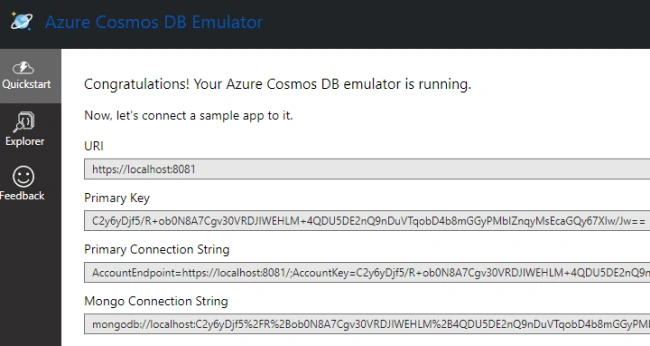
We will later use the URI and Key in our Azure function app to connect with Cosmos DB.
We can click the “Explorer” tab and create a new Cosmos DB database and collection.
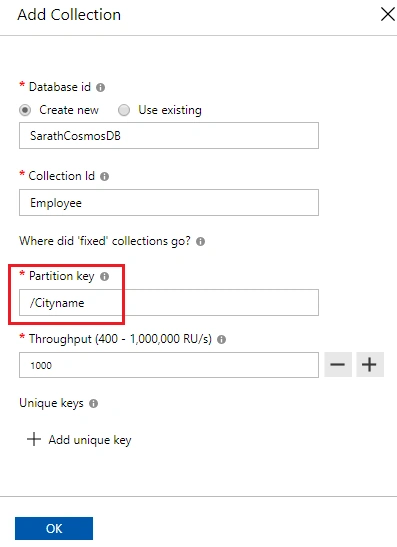
We must give a valid name for the database and collection. Please give partition key as well. Partition key is very important in Cosmos DB. We cannot change the partition key once we have created the collection. So, we must be very careful to choose the partition key. All the data is stored based on the partition key.
Create Azure Function in Visual Studio
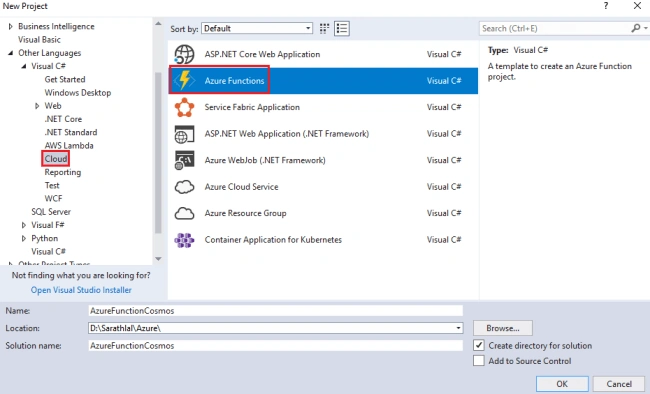
We can open Visual Studio 2017 or later version and choose Azure function template. You must install Azure SDK to get this template. You can even install Azure function extension separately too. Choose “Azure Functions” template from the “Cloud” tab.
Various trigger types are supported in Azure Function. We can choose "Http trigger" for our purposes.
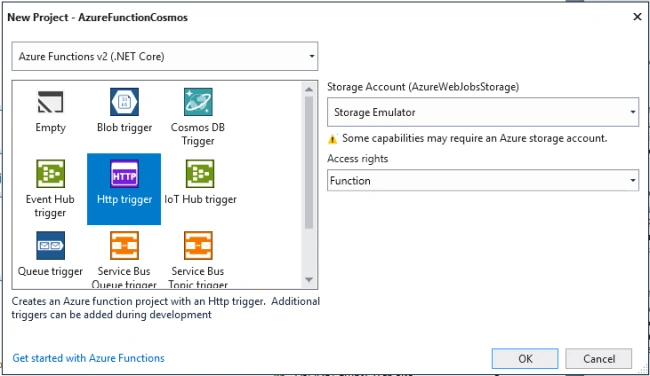
A static "Function1" class will be created automatically with our function. We can rename this file to "CosmosFunctions". We can remove the default code lines from this class file. We will add separate functions for CRUD actions inside this file later.
As I mentioned earlier, we are creating an Employee app. Hence, we can create “Employee” model class inside a new “Data” folder.
Employee.cs
- using Newtonsoft.Json;
- namespace AzureFunctionCosmos.Data
- {
- public class Employee
- {
- [JsonProperty(PropertyName = "id")]
- public string Id { get; set; }
- public string Name { get; set; }
- public string Address { get; set; }
- public string Gender { get; set; }
- public string Company { get; set; }
- public string Designation { get; set; }
- public string Cityname { get; set; }
- }
- }
I have added all the field names required for our Cosmos DB collection. Also, note that I have added a “JsonProperty” attribute for “Id” property. Because, Cosmos DB automatically creates an “id” field for each record.
We can install “Microsoft.Azure.DocumentDB.Core” NuGet package in our project. This will be used to connect with Cosmos DB. You can install the latest version.

We can create an “IDocumentDBRepository” interface inside it. This interface contains all the methods declaration for our Cosmos DB repository. We will implement this interface in the “DocumentDBRepository” class.
IDocumentDBRepository.cs
- using Microsoft.Azure.Documents;
- using System;
- using System.Collections.Generic;
- using System.Linq.Expressions;
- using System.Threading.Tasks;
- namespace AzureFunctionCosmos.Data
- {
- public interface IDocumentDBRepository<T> where T : class
- {
- Task<Document> CreateItemAsync(T item, string collectionId);
- Task DeleteItemAsync(string id, string collectionId, string partitionKey);
- Task<IEnumerable<T>> GetItemsAsync(Expression<Func<T, bool>> predicate, string collectionId);
- Task<IEnumerable<T>> GetItemsAsync(string collectionId);
- Task<Document> UpdateItemAsync(string id, T item, string collectionId);
- }
- }
I have added all the methods declaration for CRUD actions for Azure functions in the above interface.
We can implement this interface in the “DocumentDBRepository” class.
DocumentDBRepository.cs
- using Microsoft.Azure.Documents;
- using Microsoft.Azure.Documents.Client;
- using Microsoft.Azure.Documents.Linq;
- using System;
- using System.Collections.Generic;
- using System.Linq;
- using System.Linq.Expressions;
- using System.Threading.Tasks;
- namespace AzureFunctionCosmos.Data
- {
- public class DocumentDBRepository<T> : IDocumentDBRepository<T> where T : class
- {
- private readonly string Endpoint = "https://localhost:8081/";
- private readonly string Key = "C2y6yDjf5/R+ob0N8A7Cgv30VRDJIWEHLM+4QDU5DE2nQ9nDuVTqobD4b8mGGyPMbIZnqyMsEcaGQy67XIw/Jw==";
- private readonly string DatabaseId = "SarathCosmosDB";
- private DocumentClient client;
- public DocumentDBRepository()
- {
- client = new DocumentClient(new Uri(Endpoint), Key);
- }
- public async Task<IEnumerable<T>> GetItemsAsync(Expression<Func<T, bool>> predicate, string collectionId)
- {
- IDocumentQuery<T> query = client.CreateDocumentQuery<T>(
- UriFactory.CreateDocumentCollectionUri(DatabaseId, collectionId),
- new FeedOptions { MaxItemCount = -1 })
- .Where(predicate)
- .AsDocumentQuery();
- List<T> results = new List<T>();
- while (query.HasMoreResults)
- {
- results.AddRange(await query.ExecuteNextAsync<T>());
- }
- return results;
- }
- public async Task<IEnumerable<T>> GetItemsAsync(string collectionId)
- {
- IDocumentQuery<T> query = client.CreateDocumentQuery<T>(
- UriFactory.CreateDocumentCollectionUri(DatabaseId, collectionId),
- new FeedOptions { MaxItemCount = -1 })
- .AsDocumentQuery();
- List<T> results = new List<T>();
- while (query.HasMoreResults)
- {
- results.AddRange(await query.ExecuteNextAsync<T>());
- }
- return results;
- }
- public async Task<Document> CreateItemAsync(T item, string collectionId)
- {
- return await client.CreateDocumentAsync(UriFactory.CreateDocumentCollectionUri(DatabaseId, collectionId), item);
- }
- public async Task<Document> UpdateItemAsync(string id, T item, string collectionId)
- {
- return await client.ReplaceDocumentAsync(UriFactory.CreateDocumentUri(DatabaseId, collectionId, id), item);
- }
- public async Task DeleteItemAsync(string id, string collectionId, string partitionKey)
- {
- await client.DeleteDocumentAsync(UriFactory.CreateDocumentUri(DatabaseId, collectionId, id),
- new RequestOptions() { PartitionKey = new PartitionKey(partitionKey) });
- }
- private async Task CreateDatabaseIfNotExistsAsync()
- {
- try
- {
- await client.ReadDatabaseAsync(UriFactory.CreateDatabaseUri(DatabaseId));
- }
- catch (DocumentClientException e)
- {
- if (e.StatusCode == System.Net.HttpStatusCode.NotFound)
- {
- await client.CreateDatabaseAsync(new Database { Id = DatabaseId });
- }
- else
- {
- throw;
- }
- }
- }
- private async Task CreateCollectionIfNotExistsAsync(string collectionId)
- {
- try
- {
- await client.ReadDocumentCollectionAsync(UriFactory.CreateDocumentCollectionUri(DatabaseId, collectionId));
- }
- catch (DocumentClientException e)
- {
- if (e.StatusCode == System.Net.HttpStatusCode.NotFound)
- {
- await client.CreateDocumentCollectionAsync(
- UriFactory.CreateDatabaseUri(DatabaseId),
- new DocumentCollection { Id = collectionId },
- new RequestOptions { OfferThroughput = 1000 });
- }
- else
- {
- throw;
- }
- }
- }
- }
- }
I have implemented all the CRUD actions inside the above class. We can use these methods inside our Azure functions.
Create a “GetAll” function to get all Cosmos DB employee collection data. We will create this function as HTTP Trigger.
- public static class GetAll
- {
- [FunctionName("GetAll")]
- public static async Task<IEnumerable<Employee>> Run([HttpTrigger(AuthorizationLevel.Function, "get", Route = "Get")]HttpRequest req, TraceWriter log)
- {
- log.Info("C# HTTP trigger function to get all data from Cosmos DB");
- IDocumentDBRepository<Employee> Respository = new DocumentDBRepository<Employee>();
- return await Respository.GetItemsAsync("Employee");
- }
- }
Create remaining functions for other CRUD actions in the same file as Http trigger functions.
We have created the same function ”CreateOrUpdate” for POST and PUT HTTP methods.
CosmosFunctions.cs
- using AzureFunctionCosmos.Data;
- using Microsoft.AspNetCore.Http;
- using Microsoft.Azure.WebJobs;
- using Microsoft.Azure.WebJobs.Extensions.Http;
- using Microsoft.Azure.WebJobs.Host;
- using Newtonsoft.Json;
- using System.Collections.Generic;
- using System.IO;
- using System.Threading.Tasks;
- namespace AzureFunctionCosmos
- {
- public static class GetAll
- {
- [FunctionName("GetAll")]
- public static async Task<IEnumerable<Employee>> Run([HttpTrigger(AuthorizationLevel.Function, "get", Route = "Get")]HttpRequest req, TraceWriter log)
- {
- log.Info("C# HTTP trigger function to get all data from Cosmos DB");
- IDocumentDBRepository<Employee> Respository = new DocumentDBRepository<Employee>();
- return await Respository.GetItemsAsync("Employee");
- }
- }
- public static class GetSingle
- {
- [FunctionName("GetSingle")]
- public static async Task<Employee> Run([HttpTrigger(AuthorizationLevel.Function, "get", Route = "Get/{id}/{cityName}")]HttpRequest req, TraceWriter log, string id, string cityName)
- {
- log.Info("C# HTTP trigger function to get a single data from Cosmos DB");
- IDocumentDBRepository<Employee> Respository = new DocumentDBRepository<Employee>();
- var employees = await Respository.GetItemsAsync(d => d.Id == id && d.Cityname == cityName, "Employee");
- Employee employee = new Employee();
- foreach (var emp in employees)
- {
- employee = emp;
- break;
- }
- return employee;
- }
- }
- public static class CreateOrUpdate
- {
- [FunctionName("CreateOrUpdate")]
- public static async Task<bool> Run([HttpTrigger(AuthorizationLevel.Function, "post", "put", Route = "CreateOrUpdate")]HttpRequest req, TraceWriter log)
- {
- log.Info("C# HTTP trigger function to create a record into Cosmos DB");
- try
- {
- IDocumentDBRepository<Employee> Respository = new DocumentDBRepository<Employee>();
- string requestBody = await new StreamReader(req.Body).ReadToEndAsync();
- var employee = JsonConvert.DeserializeObject<Employee>(requestBody);
- if (req.Method == "POST")
- {
- employee.Id = null;
- await Respository.CreateItemAsync(employee, "Employee");
- }
- else
- {
- await Respository.UpdateItemAsync(employee.Id, employee, "Employee");
- }
- return true;
- }
- catch
- {
- log.Info("Error occured while creating a record into Cosmos DB");
- return false;
- }
- }
- }
- public static class Delete
- {
- [FunctionName("Delete")]
- public static async Task<bool> Run([HttpTrigger(AuthorizationLevel.Function, "delete", Route = "Delete/{id}/{cityName}")]HttpRequest req, TraceWriter log, string id, string cityName)
- {
- log.Info("C# HTTP trigger function to delete a record from Cosmos DB");
- IDocumentDBRepository<Employee> Respository = new DocumentDBRepository<Employee>();
- try
- {
- await Respository.DeleteItemAsync(id, "Employee", cityName);
- return true;
- }
- catch
- {
- return false;
- }
- }
- }
- }
We have completed all the functions for CRUD actions. We can run the function and test using Postman or any other tool.
When we start the Azure function app, Microsoft Azure Emulator will be loaded automatically.
You can also notice that a “func.exe” will be executed and showing below details.
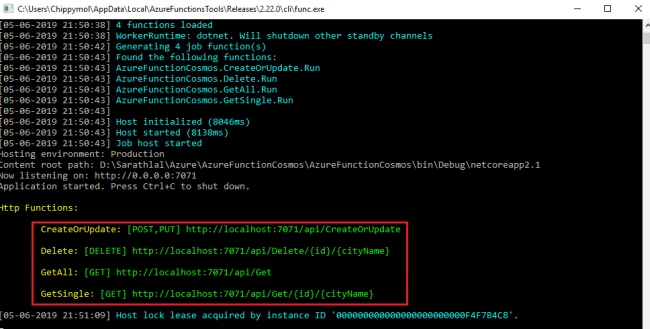
We can see endpoints for all four functions in the console screen. We can test these functions in the same way we test Web APIs.
We are going to consume these functions inside our Angular 8 application. Hence, we must enable CORS (Cross-Origin Resource Sharing) in “local.settings.json” file.
local.settings.json
- {
- "IsEncrypted": false,
- "Values": {
- "AzureWebJobsStorage": "UseDevelopmentStorage=true",
- "FUNCTIONS_WORKER_RUNTIME": "dotnet"
- },
- "Host": {
- "CORS": "*"
- }
- }
We have successfully completed the Azure functions and connected with Cosmos DB. We can create an Angular 8 Employee application now.
Create Angular 8 Application using CLI
Please ensure that you have already installed Angular CLI version 8 and node.js version 12 or later in your machine before creating the Angular application.
- ng new Angular8Cosmos
Above command will create a new Angular 8 application and create all node dependencies.
We are using some bootstrap classes and font awesome icons. Hence, we can install both packages for our project.
We can import these libraries inside the styles.css file.
styles.css
- /* You can add global styles to this file, and also import other style files */
- @import "~bootstrap/dist/css/bootstrap.css";
- @import "~font-awesome/css/font-awesome.css";
Now, these classes and icons can be used anywhere in the project without further references.
We can create a header, footer, and layout components using below commands.
- ng g component ui/header
- ng g component ui/footer
- ng g component ui/layout
Copy the below code and paste into corresponding files.
header.component.html
- <nav class="navbar navbar-dark bg-dark mb-5">
- <a class="navbar-brand" href="/">Employee App</a>
- <div class="navbar-expand mr-auto">
- <div class="navbar-nav">
- <a class="nav-item nav-link active" routerLink="home" routerLinkActive="active">Home</a>
- <a class="nav-item nav-link" routerLink="employees">Employee</a>
- </div>
- </div>
- <div class="navbar-expand ml-auto navbar-nav">
- <div class="navbar-nav">
- <a class="nav-item nav-link" href="https://github.com/sarathlalsaseendran" target="_blank">
- <i class="fa fa-github"></i>
- </a>
- <a class="nav-item nav-link" href="https://twitter.com/sarathlalsasee1" target="_blank">
- <i class="fa fa-twitter"></i>
- </a>
- <a class="nav-item nav-link" href="https://codewithsarath.com" target="_blank">
- <i class="fa fa-wordpress"></i>
- </a>
- </div>
- </div>
- </nav>
footer.component.html
- <nav class="navbar navbar-dark bg-dark mt-5 fixed-bottom">
- <div class="navbar-expand m-auto navbar-text">
- Developed with <i class="fa fa-heart"></i> by <a href="https://codewithsarath.com" target="_blank">Sarath Lal</a>
- </div>
- </nav>
layout.component.html
- <app-header></app-header>
- <div class="container">
- <ng-content></ng-content>
- </div>
- <app-footer></app-footer>
Please copy below code and paste in the file.
app.component.html
- <app-layout>
- <router-outlet></router-outlet>
- </app-layout>
We can create a Home component using the below command.
- ng g component home
We can modify the corresponding template file with the below code.
home.component.html
- <div style="text-align:center">
- <h2>
- Angular 8 App with Azure Function and Cosmos DB
- </h2>
- <p>
- Welcome to our new single-page application build with below technologies.
- </p>
- <img width="700" alt="Angular Logo"
- src="../../assets/angular-function-cosmos.png">
- </div>
We can create a GenericValidator class for validating Employee Name and City using the below command.
- ng g class shared/genericvalidator
genericvalidator.ts
- import { FormGroup } from '@angular/forms';
- export class GenericValidator {
- constructor(private validationMessages: { [key: string]: { [key: string]: string } }) {
- }
- processMessages(container: FormGroup): { [key: string]: string } {
- const messages = {};
- for (const controlKey in container.controls) {
- if (container.controls.hasOwnProperty(controlKey)) {
- const c = container.controls[controlKey];
- // If it is a FormGroup, process its child controls.
- if (c instanceof FormGroup) {
- const childMessages = this.processMessages(c);
- Object.assign(messages, childMessages);
- } else {
- // Only validate if there are validation messages for the control
- if (this.validationMessages[controlKey]) {
- messages[controlKey] = '';
- if ((c.dirty || c.touched) && c.errors) {
- Object.keys(c.errors).map(messageKey => {
- if (this.validationMessages[controlKey][messageKey]) {
- messages[controlKey] += this.validationMessages[controlKey][messageKey] + ' ';
- }
- });
- }
- }
- }
- }
- }
- return messages;
- }
- getErrorCount(container: FormGroup): number {
- let errorCount = 0;
- for (const controlKey in container.controls) {
- if (container.controls.hasOwnProperty(controlKey)) {
- if (container.controls[controlKey].errors) {
- errorCount += Object.keys(container.controls[controlKey].errors).length;
- console.log(errorCount);
- }
- }
- }
- return errorCount;
- }
- }
We can create an Employee interface inside the Employee folder using the below command.
- ng g interface employee/employee
employee.ts
- export interface Employee {
- id: string,
- name: string,
- address: string,
- gender: string,
- company: string,
- designation: string,
- cityname: string
- }
Let us create Employee service now. This is the very important service class in our project. We can add all the logic for calling Azure functions inside this service.
- ng g service employee/employee
employee.service.ts
- import { Injectable } from '@angular/core';
- import { HttpClient, HttpHeaders } from '@angular/common/http';
- import { Observable, throwError, of } from 'rxjs';
- import { catchError, map } from 'rxjs/operators';
- import { Employee } from './employee';
- @Injectable()
- export class EmployeeService {
- private employeesUrl = 'http://localhost:7071/api/';
- constructor(private http: HttpClient) { }
- getEmployees(): Observable<Employee[]> {
- return this.http.get<Employee[]>(this.employeesUrl + 'Get')
- .pipe(
- catchError(this.handleError)
- );
- }
- getEmployee(id: string, cityName: string): Observable<Employee> {
- if (id === '') {
- return of(this.initializeEmployee());
- }
- const url = `${this.employeesUrl + 'Get'}/${id}/${cityName}`;
- return this.http.get<Employee>(url)
- .pipe(
- catchError(this.handleError)
- );
- }
- createEmployee(employee: Employee): Observable<Employee> {
- const headers = new HttpHeaders({ 'Content-Type': 'application/json' });
- return this.http.post<Employee>(this.employeesUrl + 'CreateOrUpdate', employee, { headers: headers })
- .pipe(
- catchError(this.handleError)
- );
- }
- deleteEmployee(id: string, cityname: string): Observable<{}> {
- const headers = new HttpHeaders({ 'Content-Type': 'application/json' });
- const url = `${this.employeesUrl + 'Delete'}/${id}/${cityname}`;
- return this.http.delete<Employee>(url, { headers: headers })
- .pipe(
- catchError(this.handleError)
- );
- }
- updateEmployee(employee: Employee): Observable<Employee> {
- const headers = new HttpHeaders({ 'Content-Type': 'application/json' });
- const url = this.employeesUrl + 'CreateOrUpdate';
- return this.http.put<Employee>(url, employee, { headers: headers })
- .pipe(
- map(() => employee),
- catchError(this.handleError)
- );
- }
- private handleError(err) {
- let errorMessage: string;
- if (err.error instanceof ErrorEvent) {
- errorMessage = `An error occurred: ${err.error.message}`;
- } else {
- errorMessage = `Backend returned code ${err.status}: ${err.body.error}`;
- }
- console.error(err);
- return throwError(errorMessage);
- }
- private initializeEmployee(): Employee {
- return {
- id: null,
- name: null,
- address: null,
- gender: null,
- company: null,
- designation: null,
- cityname: null
- };
- }
- }
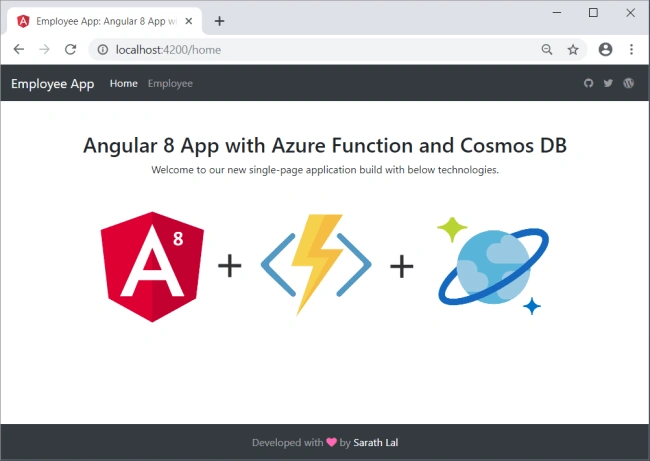
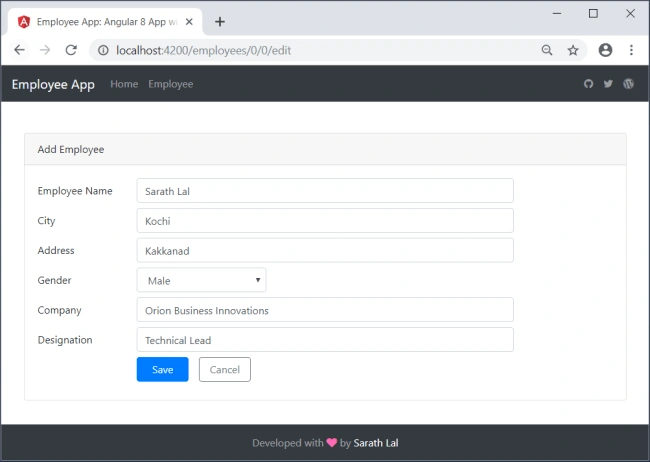
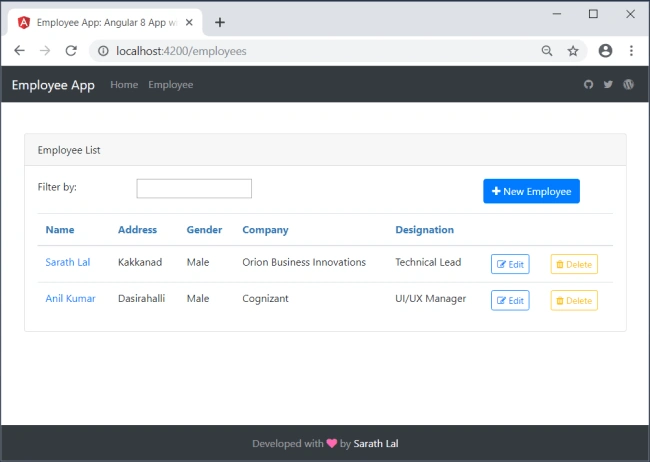
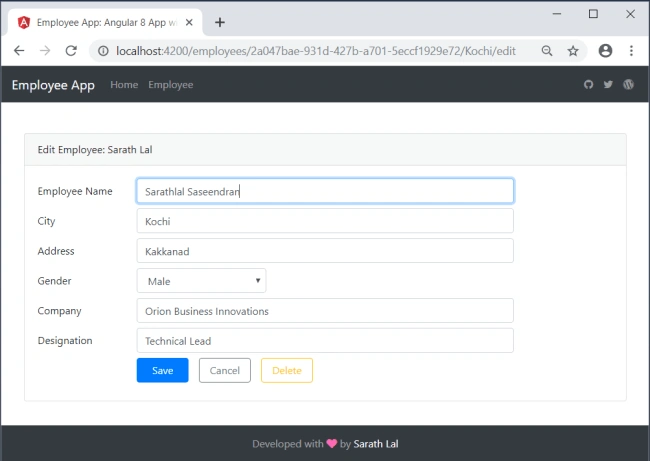
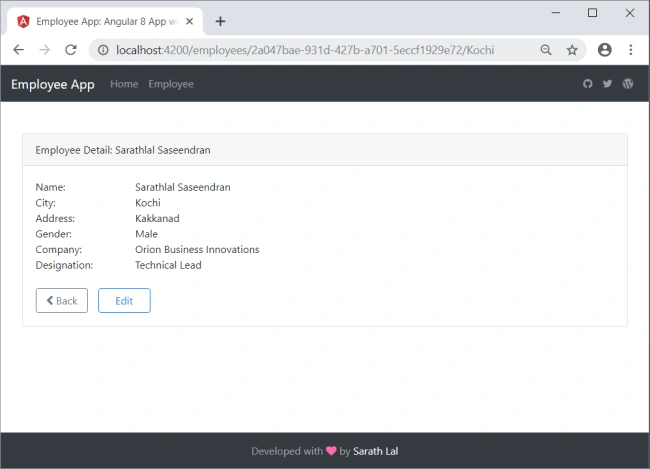
thd_99Posted May 27, 2020, 2:13 PM
The app seems to be able to update every property but the City? I downloaded your project(s) and the problem is there as well.. error: {{ "code": "NotFound", "message": "Message: {\"Errors\":[\"Resource Not Found\"]}\r\nActivityId: 910c43d3-506d-4091-8b4a-d52c9adac951, Request URI: /apps/DocDbApp/services/DocDbServer13/partitions/a4cb4959-38c8-11e6-8106-8cdcd42c33be/replicas/1p/, RequestStats: \r\nRequestStartTime: 2020-05-27T19:00:39.5727099Z, RequestEndTime: 2020-05-27T19:00:39.5742060Z, Number of regions attempted:1\r\nResponseTime: 2020-05-27T19:00:39.5742060Z, StoreResult: StorePhysicalAddress: rntbd://127.0.0.1:10253/apps/DocDbApp/services/DocDbServer13/partitions/a4cb4959-38c8-11e6-8106-8cdcd42c33be/replicas/1p/, LSN: 12, GlobalCommittedLsn: -1, PartitionKeyRangeId: 0, IsValid: True, StatusCode: 404, SubStatusCode: 0, RequestCharge: 1.24, ItemLSN: -1, SessionToken: -1#12, UsingLocalLSN: False, TransportException: null, ResourceType: Document, OperationType: Replace\r\n, SDK: Microsoft.Azure.Documents.Common/2.11.0"}}
Prajeesh TsPosted Oct 30, 2019, 11:13 PM
for deleting a document we need the partition key as well Await client.DeleteDocumentAsync(UriFactory.CreateDocumentUri(DatabaseId, collectionId, id), new RequestOptions() { PartitionKey = new PartitionKey(partitionKey) });
Pablo FerreiraPosted Sep 13, 2019, 3:03 PM
Poste como criar report com Asp.net core + Angular 8. Seria Obrigado!
Ashish DubeyPosted Jun 14, 2019, 2:28 AM
Yet another excellent post Sarathlal Saseendran. Thanks a ton.
Humayun Kabir MamunPosted Jun 10, 2019, 4:45 AM
Thanks for this detail project
Ankur MistryPosted Jun 9, 2019, 11:04 PM
Nice detailed article Sarathlal Saseendran
Ano MepaniPosted Jun 8, 2019, 10:16 PM
Very nice article
Hadshana KamalanathanPosted Jun 8, 2019, 7:33 PM
Nice one, Thanks for sharing