

Introduction
In my previous article, we saw an overview of Token based authentication using ASP.NET web API and OWIN with the AngularJS application. In that post, we had created SPA (single page application) using AngularJS and authentication is done by using OWIN. This flow returns the authorization token and token will expire after certain time, after that user needs to login again. In this post, I will explain how can we alive the token long time using refresh token flow? With the refresh token the user does not need to login again and they use refresh token to request a new authorization token.
Here, idea of using refresh token is to issue short lived access token (around 20-30 minute) at the first time and then use refresh token to obtain new access token. In this idea user need to authenticate himself by providing user name and password and if the information provided by the client is valid, the response contains the short lived access token along with long lived refresh token. The refresh token is not access token but it is just identifier to the refresh token. Now after certain fixed time period, we can use this refresh token identifier and try to obtain another short lived access token. This new access token will use the further communication with server (Web API).
Using the refresh token to a Web API has several advantages:
- The client does not required to hold the user name and password after the token has been generated i.e. the users do not required to re-enter their credentials for the lifetime of the token.
- The back-end need not to validate password on every request.
- The Credential validation is done at the authorization server.
Why are we not issuing long lived access token at the first place instead of adding this complexity
As we know, access tokens are self-descriptive; they contain all claims identity (user information) about the authenticated user once they are issued. Once the user obtaining the long lived token, s/he will be able to access the server resources as long as her/his token is not expire. There is no way to revoke access token unless we implement any custom logic which enforce us to store issued tokens in to the cache or database check with each request. With refresh tokens, a system can be revoked the access token by deleting the token from the cache or database and now Authorization Server will reject the request because the refresh token is no longer available. Refresh token allows us to ask the user name and password to user once for the authentication first time and then Authorization server can issue long lived refresh token and user will stay logged in all this period unless refresh token is not revoked.
Refresh token
Refresh tokens must bound with the client. Client is identity and with help of the client, application is attempting to communicate with the server (back-end API). Every client should have the client id and secret and usually Client Id/Secret is hard coded and it validates at the time of login.
Normally client id is unique public identifiers of our application when other application also use same web API. So this means that we need to authenticate our client first.
My post "Token Based Authentication Using ASP.Net Web API, OWIN and Identity " (step -5) explained, how we can configure the OAuth Authorization Server. ValidateClientAuthentication method is used to validate client credentials and make the client ID available in the pipeline for later processing. GrantResourceOwnerCredentials method is a method where we actual validate the user credential and generate the token.
Here we need to add one more method to the authorization server provider called "GrantRefreshToken". This method is called when refresh token request comes in. In this method, first we need to validate the client and we have chance to modify the outgoing access token and user claims.
- public override Task GrantRefreshToken(OAuthGrantRefreshTokenContext context)
- {
- //validate your client
- //var currentClient = context.ClientId;
- //if (Client does not match)
- //{
- // context.SetError("invalid_clientId", "Refresh token is issued to a different clientId.");
- // return Task.FromResult<object>(null);
- //}
- // Change authentication ticket for refresh token requests
- var newIdentity = new ClaimsIdentity(context.Ticket.Identity);
- newIdentity.AddClaim(new Claim("newClaim", "newValue"));
- var newTicket = new AuthenticationTicket(newIdentity, context.Ticket.Properties);
- context.Validated(newTicket);
- return Task.FromResult<object>(null);
- }
Here we need to create a secure handle to the refresh token and need to store data which associate the authentication ticket. In this article I have used Concurrent Dictionary to store generated refresh token and authentication ticket data.
So, Refresh Token class definition becomes as the following:
- using Microsoft.Owin.Security;
- using Microsoft.Owin.Security.Infrastructure;
- using System;
- using System.Collections.Concurrent;
- using System.Threading.Tasks;
- namespace WebAPI
- {
- public class RefreshTokenProvider : IAuthenticationTokenProvider
- {
- private static ConcurrentDictionary<string, AuthenticationTicket> _refreshTokens = new ConcurrentDictionary<string, AuthenticationTicket>();
- public async Task CreateAsync(AuthenticationTokenCreateContext context)
- {
- var guid = Guid.NewGuid().ToString();
- // copy all properties and set the desired lifetime of refresh token
- var refreshTokenProperties = new AuthenticationProperties(context.Ticket.Properties.Dictionary)
- {
- IssuedUtc = context.Ticket.Properties.IssuedUtc,
- ExpiresUtc = DateTime.UtcNow.AddMinutes(60)//DateTime.UtcNow.AddYears(1)
- };
- var refreshTokenTicket = new AuthenticationTicket(context.Ticket.Identity, refreshTokenProperties);
- _refreshTokens.TryAdd(guid, refreshTokenTicket);
- // consider storing only the hash of the handle
- context.SetToken(guid);
- }
- public void Create(AuthenticationTokenCreateContext context)
- {
- throw new NotImplementedException();
- }
- public void Receive(AuthenticationTokenReceiveContext context)
- {
- throw new NotImplementedException();
- }
- public async Task ReceiveAsync(AuthenticationTokenReceiveContext context)
- {
- AuthenticationTicket ticket;
- string header = context.OwinContext.Request.Headers["Authorization"];
- if (_refreshTokens.TryRemove(context.Token, out ticket))
- {
- context.SetTicket(ticket);
- }
- }
- }
- }
- Here, we are using a unique identifier for the refresh token. Guid is enough for generating the refresh token key. We can use any other strong algorithm to generate refresh token key.
- After that we are generating refresh token properties by reading context ticket properties and set it’s expiry time.
- After adding all context properties, we are generating refresh token authentication ticket and adding it to the Concurrent Dictionary.
- Finally, call the context.SetToken method.
Now we need to register the token provider in the starting.
- OAuthAuthorizationServerOptions OAuthServerOptions = new OAuthAuthorizationServerOptions()
- {
- AllowInsecureHttp = true,
- TokenEndpointPath = new PathString("/token"),
- AccessTokenExpireTimeSpan = TimeSpan.FromMinutes(30),
- Provider = new AuthorizationServerProvider(),
- RefreshTokenProvider = new RefreshTokenProvider()
- };
In this post, I have used same example which was used in my previous post. Once above described code is completed, we will obtain refresh token along with the access token. Now, this generated refresh token need to be stored somewhere in client side memory, either the client window session or local storage.
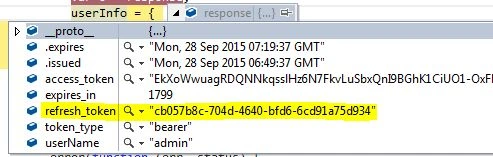
In this example, we obtain the refresh token and store it in user info object on windows session. So some changes are required in login method and the definition of login method becomes the following:
“Login” method in loginservice.js file:
- this.login = function (userName, password) {
- deferred = $q.defer();
- var data = "grant_type=password&username=" + userName + "&password=" + password;
- $http.post(loginServiceURL, data, {
- headers:
- { 'Content-Type': 'application/x-www-form-urlencoded' }
- }).success(function (response) {
- var o = response;
- userInfo = {
- accessToken: response.access_token,
- userName: response.userName,
- refreshToken: response.refresh_token
- };
- authenticationService.setTokenInfo(userInfo);
- authData.authenticationData.IsAuthenticated = true;
- authData.authenticationData.userName = response.userName;
- deferred.resolve(null);
- })
- .error(function (err, status) {
- authData.authenticationData.IsAuthenticated = false;
- authData.authenticationData.userName = "";
- deferred.resolve(err);
- });
- return deferred.promise;
- }
To check and validate refresh token code I have made the following changes in my code.
- Add one link called “Refresh Token” in Index.html.
- <li data-ng-hide="!authentication.IsAuthenticated"><a href="" data-ng-click="refreshToken()">Refresh Token</a></li>
- Add the following function to AuthenticationService.js. This method is used to refresh the token.
- this.refreshToken = function() {
- var loginServiceURL = serviceBase + 'token';
- var deferred = $q.defer();
- var token = this.getTokenInfo();
- var data = "grant_type=refresh_token&refresh_token=" + token.refreshToken + "&client_id=";
- $http.post(loginServiceURL, data).success(function (response) {
- var o = response;
- var userInfo = {
- accessToken: response.access_token,
- userName: response.userName,
- refreshToken: response.refresh_token
- };
- AuthenticationService.setTokenInfo(userInfo);
- AuthenticationService.setHeader($http);
- hasHttpRequest = false;
- deferred.resolve(null);
- }).error(function (err, status) {
- deferred.resolve(err);
- });
- return deferred.promise;
- }
- Add refresh token method to indexController.js.
- (function () {
- 'use strict';
- app.controller('indexController', ['$scope', '$location', 'authData', 'LoginService', 'AuthenticationService', function ($scope, $location, authData, loginService, authenticationService) {
- $scope.logOut = function () {
- loginService.logOut();
- $location.path('/home');
- }
- $scope.authentication = authData.authenticationData;
- $scope.refreshToken = function () {
- authenticationService.refreshToken();
- }
- }]);
- })();
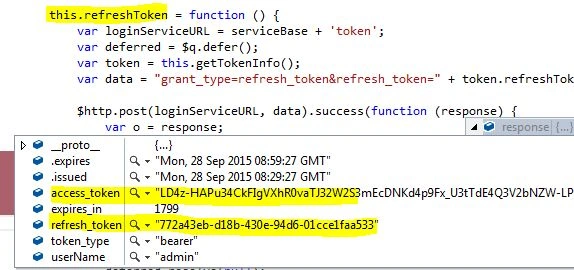
Output:

Summary
Hopefully this post is useful for implementing refresh token. Here I have called refresh token method manually (by clicking the link button) but it should be automated i.e. it should be called after specific time period just before expire access token.
Atul PrajapatiPosted May 4, 2020, 1:25 AM
Sir, Refresh token not working even access_token is expired.only refresh token works till access token expired.please look the above code
Tridip BhattacharjeePosted May 21, 2018, 6:55 AM
Sorry not very much clear the objective of refresh token usage. suppose my access token life is 30 minute. so when it will expire then again we send credential to get new access token. so why refresh token is required? what kind of security refresh token provide? i saw in this article access token is also passing back and forth along with refresh token....why? please reply to drive out my confusion. thanks
tauseef mukhtarPosted Apr 13, 2018, 8:39 AM
Hello Sir, how can I make the response in XML? Many thanks in advance. e.g <access_token>AccessTokenValue</access_token> <token_type>bearer</token_type>........
ashish fPosted May 23, 2017, 1:42 AM
We have mobile application which uses Twitter Digits which gives OTP for user and generate client id for that user, now I want to create Web API which will use client Id and want to generate bearer and refresh token to authenticate that user with client id , how can I achieve this? where I can define grants ? for every user there is unique client id so in my case client id is associated with user not application.guide me on this. Also I'm not using Asp.net Identity. I'm confused with Client Id concept because in my case every user has its userId and clientid , its not a application client id pls help me to understand this.
Bimal DasPosted May 5, 2017, 9:30 AM
Hello sir , Two simple question : 1) If I have a short Live Access Token(for 1 min) and a refresh token ::: If I log off user (deleting refresh token from database and deleting access token from browser) and after logOff successfully , If I use fiddler with my Access token and RefreshToken to invoke some authenticated action method of some Controller before access token gets expired(before 1 min to expire), will it allow access for the user ? 2) As I am creating an application for "Banking Solution" (with No multiple instance for same user) LogOff should work immediately and even after few seconds , user should not allow to access any information from bank server. Is Token Based Authentication good for Banking solution ? If not , then what is the alternative for any secure project Need help!!!
Bikesh SrivastavaPosted Dec 27, 2016, 9:00 AM
Ok i'll try my best,Thanks
Bikesh SrivastavaPosted Dec 27, 2016, 6:23 AM
Very nice article,but i have one query "Firstly i entered user credentials and login then get a access token,and its working fine ,but when i again login create a new access token its also fine ,but problem is both access token is valid to authorize." Please give me best suggestion how can replace ,only latest access token should be used not old.
Jawand SinghPosted Aug 30, 2016, 1:23 AM
Thanks a lot sir :)
Rahul JainPosted Jul 25, 2016, 7:57 AM
Hi, I am using local storage to store the access_token and refresh_token when user logs in. At the time of login 3 parameters, grant_type = password, username = username and password = password are passed in "ValidateClientAuthentication" function in ApplicationOAuthProvider class. I have used above example. I've created another call from my controller and passed 3 parameters: grant_type = 'refresh_token', refresh_token = refreshtokenValue_fromlocalStorage, client_id=''. I've put a button to call the refreshToken function. It calls the "ValidateClientAuthentication" function in ApplicationOAuthProvider class but the paramerters received are null, thus it does not process anything. Also when is the "GrantRefreshToken" function called? What am I doing wrong?
Naveen KumarPosted Apr 19, 2016, 2:34 AM
i am initially getting the token and storing in local storage and reusing the same. i had kept 1 hour as expire time to kill the token in startup class. if user actively send a request to service . i want to increment the lifetime of token. how to implement this. do i need to request for new token based on expire time ?
Bon FranklinPosted Dec 5, 2015, 1:33 PM
Ah! I finally see what is happening, why my refresh tokens are expiring. It finally clicked that you're just keeping them in a static object in memory instead of also persisting to a database of some kind. And that means when my app pool closes, those tokens are lost forever. It also explains why this was longer than the 30 minute length of the access tokens. Please tell me this makes sense and that I am not still under mistaken impressions about how this functions.
Jignesh TrivediPosted Oct 20, 2015, 12:09 AM
Hi, Refresh token can invalidate by datetime. In above example you need to write some custom code to invalidate token.
Bon FranklinPosted Oct 19, 2015, 9:48 AM
How would one invalidate the refresh token?
Priyaranjan K SPosted Oct 6, 2015, 1:14 PM
Thanks for the share ..
Sibeesh VenuPosted Oct 6, 2015, 9:45 AM
Nice Share
Harshad PansuriyaPosted Oct 6, 2015, 8:49 AM
Nice one
Ankit BansalPosted Oct 6, 2015, 3:15 AM
nice..
Santhakumar MunuswamyPosted Oct 5, 2015, 11:48 PM
Nice Share
Nilesh JadavPosted Oct 5, 2015, 9:28 PM
Good one sir