

Overview
Today, in this article, we are going to see how we can use the ng-repeat directive in Angular JS and also the nesting of the ng-repeat directive. Kindly refer to my previous article for more.
- Overview Of AngularJS
- Modules And Controller In AngularJS
- Controllers in AngularJS
- AngularJS ng src Directive
Let's start,
Introduction
Here, I want to display EmployeeName, Address, Phone number, and their respective salaries.
Suppose I want to display five records and the ng-repeat directive is similar to the for loop in C#. We will understand, that we need to build a model first and need to add an employee array. Thus, switch to VS.
I created an array called employees, given below.
var mypartone = angular.module("mymodule", []).controller("myController", function($scope) {
    var employees = [];
});
Now, in it, we will add FirstName, Address, PhoneNumber, and Salaries.
Created objects employees
{ "firstName": "Akshay", "Address": "Mumbai", "PhoneNumber": "12345", "Salary": "1234" },
{ "firstName": "Hari", "Address": "Mumbai", "PhoneNumber": "1234533", "Salary": "12345" },
{ "firstName": "Milind", "Address": "Mumbai", "PhoneNumber": "1234556", "Salary": "123477" },
{ "firstName": "Raghavan", "Address": "Pune", "PhoneNumber": "69874", "Salary": "8888" },
{ "firstName": "Hari", "Address": "Mumbai", "PhoneNumber": "2525", "Salary": "5555" }
Thus, our final code is.
var mypartone = angular.module("mymodule", []).controller("myController", function($scope) {
    var employees = [
        {
            firstName: "Akshay",
            Address: "Mumbai",
            PhoneNumber: "12345",
            Salary: "1234"
        },
        {
            firstName: "Hari",
            Address: "Mumbai",
            PhoneNumber: "1234533",
            Salary: "12345"
        },
        {
            firstName: "Milind",
            Address: "Mumbai",
            PhoneNumber: "1234556",
            Salary: "123477"
        },
        {
            firstName: "Raghavan",
            Address: "Pune",
            PhoneNumber: "69874",
            Salary: "8888"
        },
        {
            firstName: "Hari",
            Address: "Mumbai",
            PhoneNumber: "2525",
            Salary: "5555"
        }
    ];
    $scope.employees = employees;
});
Now, we want to present this data in a tabular format.
In this table, I added a <thead> section and respective tr and td to display the details, given below.
<thead>
    <tr>
        <td>FirstName :</td>
        <td>Address :</td>
        <td>PhoneNumber :</td>
        <td>Salary :</td>
    </tr>
</thead>
I am going to add a <tbody> section and in this <tbody>, we will display the records.
In this <tbody> section, we will add a <tr> and <td> section.
In this <tr> section, we will add the ng-repeat directive as,
<tr ng-repeat="employee in employees">
Thus, read it as an employee in our model, which is called employees.
Hence, our <tbody> section code is,
<tbody>
    <tr ng-repeat="employee in employees">
        <td>{{employee.firstName}}</td>
        <td>{{employee.Address}}</td>
        <td>{{employee.PhoneNumber}}</td>
        <td>{{employee.Salary}}</td>
    </tr>
</tbody>
The final ASPX page is given below.
<%@ Page Language="C#" AutoEventWireup="true" CodeBehind="Angular.aspx.cs" Inherits="Angular_JS.Angular" %>
<!DOCTYPE html>
<html ng-app="mymodule">

<head runat="server">
    <title>Overview Angular </title>
    <script src="Scripts/angular.js"></script>
    <script src="Scripts/mytest.js"></script>
</head>

<body ng-controller="myController">
    <form id="form1" runat="server">
        <div>
            <table>
                <thead>
                    <tr>
                        <td>FirstName :</td>
                        <td>Address :</td>
                        <td>PhoneNumber :</td>
                        <td>Salary :</td>
                    </tr>
                </thead>
                <tbody>
                    <tr ng-repeat="employee in employees">
                        <td>{{employee.firstName}}</td>
                        <td>{{employee.Address}}</td>
                        <td>{{employee.PhoneNumber}}</td>
                        <td>{{employee.Salary}}</td>
                    </tr>
                </tbody>
            </table> <br /><br /><br /> </div>
    </form>
</body>

</html>
Now, just run the solution and you will see the output.
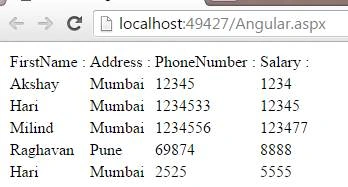
As you can see from the output, given above, we got the desired result.
Thus, in creating a simple ng-repeat directive, we will see, how can we do nesting of the ng-repeat directive.
Nesting ng-repeat directive
In the earlier part, we had seen how the ng-repeat directive works. In nesting ng-repeat directive, suppose you want to display an ordered list of elements on the page here, you have to use nesting ng-repeat directive.
Let's see, how can we do this with an example.
Now, here I want to see MCA FirstSem, SecondSem, and ThirdSem subjects.
First, we will create an array.
Here, I created an array called semester.
var mypartone = angular.module("mymodule", []).controller("myController", function($scope) {
    var semester = [];
});
Now, we need to create semesters and their respective subjects.
Thus, in this array, kindly add.
{
    name: "FirstSem",
    Test: [
        {
            name: "LetsUsC"
        },
        {
            name: "DiscreteMaths"
        }
    ]
}
As you can see in the screenshot, shown above, I created a name called FirstSem and also created another array called Test to display various subjects. In the Test array, I had passed various subjects. Create two more arrays for the second sem and third sem and our model will be.
/// <reference path="angular.min.js" />
// Create a module
var mypartone = angular.module("mymodule", []).controller("myController", function($scope) {
    var semester = [
        {
            name: "FirstSem",
            Test: [
                {
                    name: "LetsUsC"
                },
                {
                    name: "DiscreteMaths"
                }
            ]
        },
        {
            name: "SecondSem",
            Test: [
                {
                    name: "PNS"
                },
                {
                    name: "OOPS"
                }
            ]
        },
        {
            name: "ThirdSem",
            Test: [
                {
                    name: "Java"
                },
                {
                    name: "DCN"
                }
            ]
        }
    ];
    $scope.semester = semester;
});
Now, let's understand how we are going to display these details in our view section.
As we want to display those in list items, first, create a <ul> tag inside <ul> tag write <li> tag in that <li tag>, and write.
<li ng-repeat="sem in semester">
We are going to display the semester first in the following manner.
<ul>
    <li ng-repeat="sem in semester">
        {{sem.name}}
    </li>
</ul>
Now, just run the solution. We will see the output as,
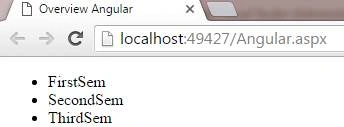
We have various semesters now. We will display the subjects and now create another <ul> list as shown below.
<ul>
    <li ng-repeat="student in sem.Test">
        {{student.name}}
    </li>
</ul>
In <li> tag, I had written student in sem.test as our Test array contains the various subjects and bound it with the student. name
You can see in our final code, that we had nested ng-repeat, as given below.
<ul>
    <li ng-repeat="sem in semester">
        {{sem.name}}
        <ul>
            <li ng-repeat="student in sem.Test">
                {{student.name}}
            </li>
        </ul>
    </li>
</ul>
Now, just run the solution.
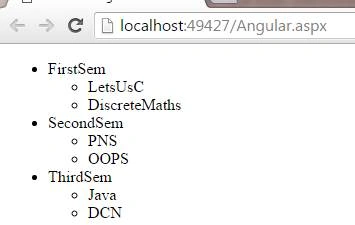
You can see, that we got the output. We nested the ng-repeat directive here.
Now, if you want to find out an index, the procedure for it is shown.
How to find an index?
To find an index, just write this in front of the binding expression.
{{sem.name}} Index = {{$index}}
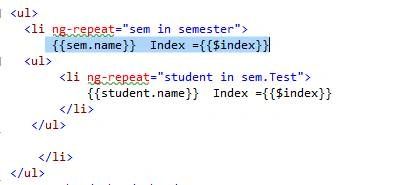
Now, run the solution.
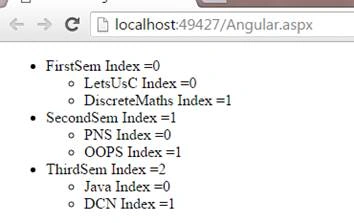
You can see, that we got the index positions.
Now, I had to find out the parent index positions. Here, in this example, we have only one parent index and these are the subjects. Thus, write as.
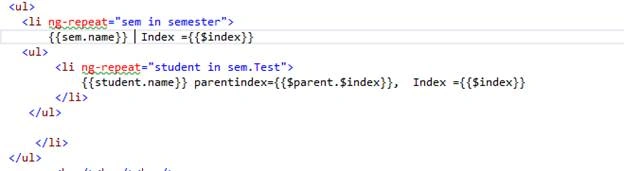
<ul>
   <li ng-repeat="sem in semester">
       {{sem.name}}  Index = {{$index}}
   <ul>
        <li ng-repeat="student in sem.Test">
            {{student.name}} parentindex={{$parent.$index}},  Index = {{$index}}
        </li>
    </ul>

   </li>
</ul>
Now, run the solution.
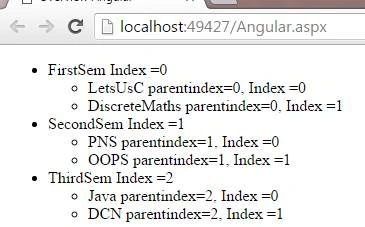
You got the parent index.
The other way to find out the parent index is to use the ng-init directive and initialize a variable to it.
Thus, let's see it also.
Just add ng-init, write any name =$index and just assign the name to the binding expression, shown below.
<li ng-repeat="sem in semester" ng-init="ParentIndex=$index">
Assigning to binding expression is shown below.
{{student.name}} parentindex={{ParentIndex}}, Index = {{$index}}
Hence, our final code is.
<ul>
    <li ng-repeat="sem in semester" ng-init="ParentIndex=$index">
        {{sem.name}} Index = {{$index}}
        <ul>
            <li ng-repeat="student in sem.Test">
                {{student.name}} parentindex={{ParentIndex}}, Index = {{$index}}
            </li>
        </ul>
    </li>
</ul>
Thus, let's run our solution and see.
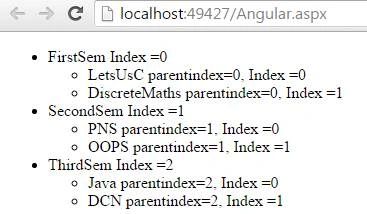
We got an output. Thus, you can use either of the two ways to find out the parent index.
Conclusion
This was all about the ng-repeat directive in AngularJS.
Vignesh ManiPosted Jul 21, 2016, 4:45 PM
Nice
kalu singh raoPosted Jul 21, 2016, 1:50 AM
Useful Article
VenkatPosted Jul 20, 2016, 9:14 PM
Very informative article