

Before reading this article, I highly recommend reading the previous parts of the series.
In Windows 10 Anniversary update, Microsoft has allowed context menu features in the Action Center. The application can give more options to the user to get the specific input and one more advantage for this is that without activating a foreground app, we can process the input into the background.
Note: This article has a required background task concept knowledge, if you don’t have any idea about the Background task, I highly recommend you read the BackgroundTask complete series.
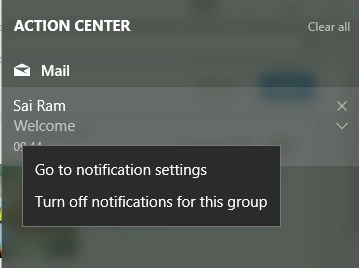
The image, given below, with default context menu, is available in the Action Center for all the Applications notifications. If app contains a custom context menu, it will be placed on the top of the menu.
Overall concept
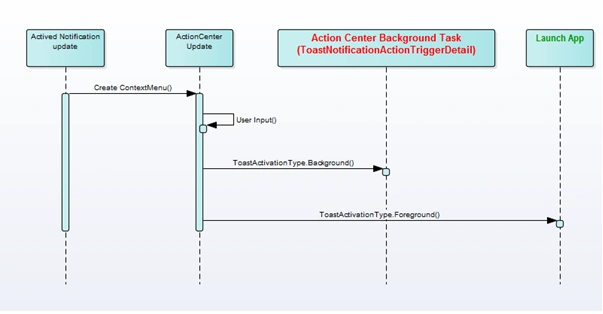
- Any notification will create the Action Center notification toast message with the custom action menu.
- To create a custom menu, the menu prepares with the Background or Foreground activation type.
- If the custom menu contains a background type, register the ToastNotificationAction TriggerDetails background task to handle the background task request.
- Foreground activation is required to type launch the Application.
- public void IsTimeClassRegister()
- {
- var bgTimerReg = new SystemTrigger(SystemTriggerType.TimeZoneChange, false);
- var bgTimeTask = HandlingBgTask.CreateBgTask("TimerRegister", "BGProcess.BgTask", bgTimerReg);
- if (bgTimeTask != null) bgTimeTask.Completed += BgTask_Completed;
- }
Note
HandlingBgTask is a user defined class source code, which is available at the end of the article.
- public static void RunBackGroundTask(IBackgroundActivatedEventArgs args)
- {
- var bgInstance = args.TaskInstance;
- if (bgInstance == null) return;
- _appServiceDeferral = bgInstance.GetDeferral();
- bgInstance.Canceled += BgInstance_Canceled;
- HandlingMenu();
- _appServiceDeferral.Complete(); }
- protected override void OnBackgroundActivated(BackgroundActivatedEventArgs args)
- {
- RunBackGroundTask(args);
- }
As we have seen previous articles that ToastNotification has updated by making a use of XML template, instead of the template. In this article, we are going to use the UWPToolkit to create toast notification.
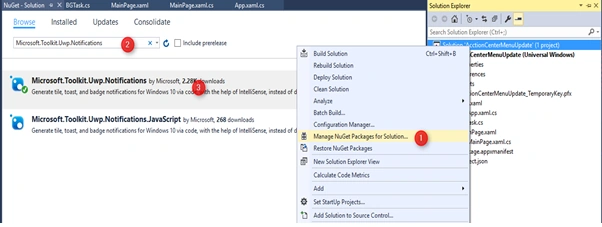
Go to Manage NuGet Packages for the solutions -> go to Browse -> Search “Microsoft.Toolkit.Uwp.Notifications” & Install.
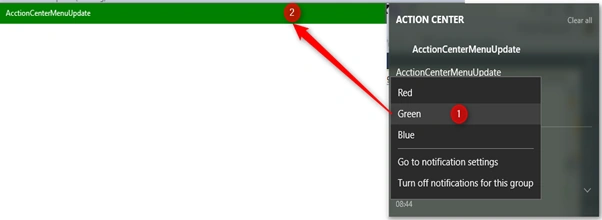
Its id is used to change the Window Title bar color, which is based on the user input, which is clicked by the Action Center context menu.
ToastContextMenuItem
ToastContextMenuItem class is used to create the context menu. Three properties are used to create a menu item, which are shown below.
- Name of the context menu
- Arguments (Input) to the application.
- Activation type.
Menu click ActivationType: ActivationType property is used to how the Application should react, which is based on the menu click activated.

- Background
Execute the code into the background task and the user interaction is not required. - Foreground
Default behavior, where an Application is launched. - Protocol
Launch the different Application.
Create Context Menu & Menu handing code
Create a Context menu function, as shown below.
- public static ToastContextMenuItem CreateMenuItem(string menuName, string args,ToastActivationType activationType)
- {
- ToastContextMenuItem menuItem = new ToastContextMenuItem(menuName, args)
- {
- ActivationType = activationType
- };
- return menuItem;
- }
- public static void HandlingMenu()
- {
- var toastCustom = new ToastActionsCustom()
- {
- ContextMenuItems =
- {
- CreateMenuItem("Red", "1",ToastActivationType.Background),
- CreateMenuItem("Green", "2",ToastActivationType.Background),
- CreateMenuItem("Blue", "3",ToastActivationType.Background)
- }
- };
- var tostVisual = new ToastVisual { BindingGeneric = new ToastBindingGeneric() };
- var toastMenu = new ToastContent
- {
- Visual = tostVisual,
- Actions = toastCustom
- };
- ToastNotification toastNotification = new ToastNotification(toastMenu.GetXml());
- ToastNotificationManager.CreateToastNotifier().Show(toastNotification);
- }
ToastNotificationActionTriggerDetail arguments : It is required to find which contextmenu command is triggered by the user.
- private static async void ExecuteMenuCmd(ToastNotificationActionTriggerDetail toatInfo)
- {
- if (toatInfo == null) return;
- var cmdId = Convert.ToInt32(toatInfo.Argument);
- switch (cmdId)
- {
- case 1:
- _toastColor = Colors.Red;
- break;
- case 2:
- _toastColor = Colors.Green;
- break;
- case 3:
- _toastColor = Colors.Blue;
- break;
- }
- var strColor = _toastColor.ToString();
- var dialog = new MessageDialog("You Clicked " + strColor, "Information");
- await dialog.ShowAsync();
- }
- public void IsToastClassRegister()
- {
- var bgToastReg = new ToastNotificationActionTrigger();
- var bgToastTask = HandlingBgTask.CreateBgTask("ToastRegister", "BGProcess.BgTask1", bgToastReg);
- if (bgToastTask != null) bgToastTask.Completed += BgToastTask_Completed;
- }
- public static void RunBackGroundTask(IBackgroundActivatedEventArgs args)
- {
- var bgInstance = args.TaskInstance;
- if (bgInstance == null) return;
- _appServiceDeferral = bgInstance.GetDeferral();
- bgInstance.Canceled += BgInstance_Canceled;
- var bgTaskInstance = bgInstance.TriggerDetails as ToastNotificationActionTriggerDetail;
- if (bgTaskInstance != null)
- {
- ExecuteMenuCmd(bgTaskInstance);
- }
- else
- {
- HandlingMenu();
- }
- _appServiceDeferral.Complete();
- }
- private void Current_LeavingBackground(object sender, LeavingBackgroundEventArgs e)
- {
- var titleBar = ApplicationView.GetForCurrentView().TitleBar;
- titleBar.BackgroundColor = _toastColor; }
Handling BG Task code is shown.
- public static class HandlingBgTask
- {
- private static IBackgroundTaskRegistration _backgroundTask;
- private static IBackgroundTrigger _setTrigger;
- public static IBackgroundTaskRegistration CreateBgTask(string bgTaskName, string bgEntryPoint,
- IBackgroundTrigger bgTigger)
- {
- _setTrigger = bgTigger;
- _backgroundTask = RegisterBgTask(bgTaskName);
- return _backgroundTask;
- }
- private static async Task<bool> IsAppHasPermission()
- {
- var bgStatus = await BackgroundExecutionManager.RequestAccessAsync();
- return IsBackgroundAccessValid(bgStatus);
- }
- private static bool IsBackgroundAccessValid(BackgroundAccessStatus bgStatus)
- {
- var status = default(bool);
- switch (bgStatus)
- {
- case BackgroundAccessStatus.DeniedBySystemPolicy:
- case BackgroundAccessStatus.DeniedByUser:
- break;
- case BackgroundAccessStatus.AllowedSubjectToSystemPolicy:
- case BackgroundAccessStatus.AlwaysAllowed:
- status = true;
- break;
- }
- return status;
- }
- private static IBackgroundTaskRegistration RegisterBgTask(string bgTaskName)
- {
- try
- {
- if (!IsAppHasPermission().Result) return null;
- var bgRegister = IsBackgroundRegister(bgTaskName);
- if (bgRegister != null) return bgRegister;
- var objBg = new BackgroundTaskBuilder()
- {
- Name = bgTaskName
- };
- objBg.SetTrigger(_setTrigger);
- bgRegister = objBg.Register();
- return bgRegister;
- }
- catch (Exception exception)
- {
- }
- return null;
- }
- private static IBackgroundTaskRegistration IsBackgroundRegister(string bgTaskName)
- {
- var bgTask = BackgroundTaskRegistration.AllTasks.Where(taskReg => taskReg.Value.Name == bgTaskName)
- .Select(bgTask1 => bgTask1.Value).FirstOrDefault();
- return bgTask;
- }
- }
Join the conversation! Your thoughts help the community grow.