

Question Arises: What is Announcement Service in WCF?
Endpoints can be announcement as a collection which is available for the client who is consuming the service will be able to listen when comes online/offline Events. Let's get this concept implemented such that we will have a better idea on this
So, let's get it started off now.
The Complete Code of IService1.cs looks like this:
using
System;
using
System.Collections.Generic;
using
System.Linq;
using
System.Runtime.Serialization;
using
System.ServiceModel;
using
System.ServiceModel.Web;
using
System.Text;
namespace
WcfService2
{
// NOTE: You can use the "Rename" command on the "Refactor"
menu to change the interface name "IService1" in both code and config file
together.
[ServiceContract]
public interface
IService1
{
[OperationContract]
string Hello(string
val);
[OperationContract]
string Bye(string
val);
}
}
The Complete Code of Service1.svc.cs looks like this:
using
System;
using
System.Collections.Generic;
using
System.Linq;
using
System.Runtime.Serialization;
using
System.ServiceModel;
using
System.ServiceModel.Web;
using
System.Text;
namespace
WcfService2
{
// NOTE: You can use the "Rename" command on the "Refactor"
menu to change the class name "Service1" in code, svc and config file together.
public class
Service1 : IService1
{
public
string Hello(string
val)
{
return val;
}
public
string Bye(string
val)
{
return val;
}
}
}
The Complete Code of Web.Config looks like this:
<?xml
version="1.0"?>
<configuration>
<system.web>
<compilation
debug="true"
targetFramework="4.0"
/>
</system.web>
<system.serviceModel>
<behaviors>
<serviceBehaviors>
<behavior
name="Application">
<serviceDiscovery>
<announcementEndpoints>
<endpoint
kind="udpAnnouncementEndpoint"></endpoint>
</announcementEndpoints>
</serviceDiscovery>
<!-- To avoid
disclosing metadata information, set the value below to false and remove the
metadata endpoint above before deployment
-->
<serviceMetadata
httpGetEnabled="true"/>
<!--
To receive exception details in faults for debugging purposes, set the value
below to true. Set to false before deployment to avoid disclosing exception
information -->
<serviceDebug
includeExceptionDetailInFaults="false"/>
</behavior>
</serviceBehaviors>
</behaviors>
<serviceHostingEnvironment
multipleSiteBindingsEnabled="true"
/>
<services>
<service
name="WcfService2.Service1"
behaviorConfiguration="Application">
<endpoint
address="/Simple"
binding="basicHttpBinding"
contract="WcfService2.IService1"></endpoint>
<endpoint
kind="udpDiscoveryEndpoint"></endpoint>
<host>
<baseAddresses>
<add
baseAddress="http://localhost:52429/Service1.svc"/>
</baseAddresses>
</host>
</service>
</services>
</system.serviceModel>
<system.webServer>
<modules
runAllManagedModulesForAllRequests="true"/>
</system.webServer>
</configuration>
The Complete Code of Program.cs looks like this
using
System;
using
System.Collections.Generic;
using
System.Linq;
using
System.Text;
using
ConsoleApplication1.ServiceReference1;
using
System.ServiceModel.Discovery;
using
System.ServiceModel;
namespace
ConsoleApplication1
{
class Program
{
static void
Main(string[] args)
{
// Create an AnnouncementService instance
AnnouncementService announcementService =
new AnnouncementService();
//
Subscribe the announcement events
announcementService.OnlineAnnouncementReceived +=
OnOnlineEvent;
announcementService.OfflineAnnouncementReceived += OnOfflineEvent;
//
Create ServiceHost for the AnnouncementService
using (ServiceHost
announcementServiceHost = new
ServiceHost(announcementService))
{
// Listen for the announcements sent
over UDP multicast
announcementServiceHost.AddServiceEndpoint(new
UdpAnnouncementEndpoint());
announcementServiceHost.Open();
Service1Client obj = new
Service1Client();
Console.WriteLine("The Online is " +
obj.Hello("Vijay prativadi"));
Console.WriteLine("The
Offline is " + obj.Bye("Vijay prativadi"));
Console.WriteLine("Press <ENTER> to terminate.");
Console.ReadLine();
announcementServiceHost.Close();
}
}
static void
OnOnlineEvent(object sender,
AnnouncementEventArgs e)
{
Console.WriteLine("Received an online
announcement from {0}",
e.EndpointDiscoveryMetadata.Address);
Console.WriteLine("Received
an online announcement from {0}",
e.EndpointDiscoveryMetadata.ContractTypeNames.ToString());
Console.WriteLine("Received
an online announcement from {0}",
e.EndpointDiscoveryMetadata.ListenUris.ToString());
Console.WriteLine("Received
an online announcement from {0}", e.EndpointDiscoveryMetadata.Version);
}
static
void OnOfflineEvent(object
sender, AnnouncementEventArgs e)
{
Console.WriteLine("Received
an offline announcement from {0}",
e.EndpointDiscoveryMetadata.Address);
Console.WriteLine("Received
an offline announcement from {0}",
e.EndpointDiscoveryMetadata.ContractTypeNames.ToString());
Console.WriteLine("Received
an offline announcement from {0}",
e.EndpointDiscoveryMetadata.ListenUris.ToString());
Console.WriteLine("Received
an offline announcement from {0}", e.EndpointDiscoveryMetadata.Version);
}
}
}
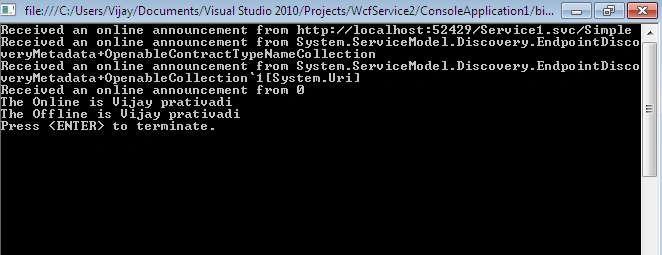
The Output of the Application looks like this:
I hope this article is useful for you.
Marcous OsewelleeditedPosted Feb 21, 2013, 7:59 PMEdited Feb 24, 2013, 1:57 PM
Good work. However you could consider taking advantage of the announcement service by invoking service1 within the OnOnlineEvent event handler as follows: private void OnOnlineEvent(object sender, AnnouncementEventArgs e) { ContractDescription service1ContractDescription = ContractDescription.GetContract(typeof(IService1)); XmlQualifiedName service1XmlQualifiedName = new XmlQualifiedName(service1ContractDescription.Name, service1ContractDescription.Namespace); Uri service1ScopeUri = new Uri(string.Format("urn:{0}", service1XmlQualifiedName)); ContractDescription metadataExchangeContractDescription = ContractDescription.GetContract(typeof(IMetadataExchange)); XmlQualifiedName metadataExchangeXmlQualifiedName = new XmlQualifiedName(metadataExchangeContractDescription.Name, metadataExchangeContractDescription.Namespace); foreach (XmlQualifiedName contractTypeXmlQualifiedName in e.EndpointDiscoveryMetadata.ContractTypeNames) { if (metadataExchangeXmlQualifiedName == contractTypeXmlQualifiedName) { foreach (Uri scope in e.EndpointDiscoveryMetadata.Scopes) { if (scope == service1ScopeUri) { ServiceEndpointCollection serviceEndpointCollection = MetadataResolver.Resolve(typeof(IService1), e.EndpointDiscoveryMetadata.Address); if (serviceEndpointCollection.Count > 0) { ChannelFactory<IService1> service1ChannelFactory = new ChannelFactory<IService1>(serviceEndpointCollection[0].Binding, serviceEndpointCollection[0].Address); IService1 service1Channel = service1ChannelFactory.CreateChannel(); string response = service1Channel.Hello("Marcous"); Console.WriteLine(response); ((IChannel)service1Channel).Close(); } } } } } }
Arjun PanwarPosted Jan 30, 2012, 6:01 PM
Thanks for your good work
Sonakshi SinghPosted Jan 30, 2012, 1:31 AM
God Implementation Vijay