An interactive website requires interactive components in it for target audience to interact in a more user-friendly way. Getting long rich content kind of text from the target audience adds a responsibility towards the Website to do half of the work for the user e.g. auto spell checker, allowing the user to place inline images or the links, and content indentation etc. These features can be provided individually, but, it will become more cumbersome for the website developers to develop each and every single feature from scratch. In regards to such matter, many amazing affordable rich text editor plugins are available for the commercial use.
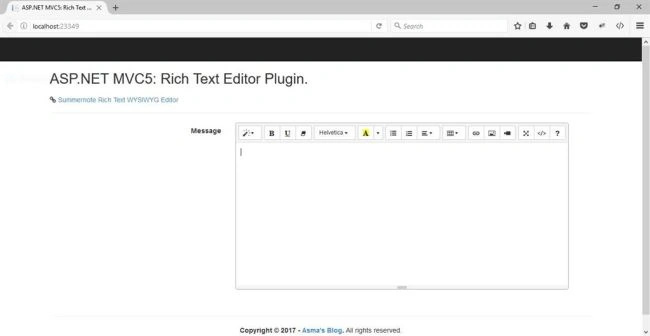
Today, I shall be demonstrating how to integrate a rich text editor into
ASP.NET MVC5 environment. I will be using
Summernote Rich Text (WYSIWYG) Editor. This particular plugin is simple to use and the best part I like about it is that it allows the inline images, which so far, I am at least unable to find free of cost, simple to use and with working inline image media in different plugins.
The prerequisites include the knowledge about the technologies given below.
- ASP.NET MVC 5
- HTML
- JavaScript
- Bootstrap
- jQuery
- C# Programming
The running working solution source code is being developed in Microsoft Visual Studio 2015 Enterprise.
Now, let's begin.
- Create new MVC Web project, name it "RichTextEditor".
- In "Model" folder, create "RichTextEditorViewModel.cs" file and place the code given below in it i.e.
...
    public class RichTextEditorViewModel {
    [AllowHtml]
    [Display(Name = "Message")]
    public string Message {
        get;
        set;
    }
 ...
In the code given above, I have simply created a simple model with the message property only. This variable will contain all the text that the user will write inside the rich text editor. The important part here is the "[AllowHtml]" attribute. This will allow the message variable save all HTML generated content by the rich text editor, which includes any formatting or media content. The important point to be noted here is that we cannot use "[Require]" attribute here with rich text editor. We can however, achieve it easily via code, when posting the content to controller, although I am not going to show it here
- Create ''Home->Index.cshtml" file and replace it with the code given below i.e.
@using RichTextEditor.Models
@model RichTextEditorViewModel
@ {
    ViewBag.Title = "ASP.NET MVC5: Rich Text Editor Plugin";
} < h2 > @ViewBag.Title. < /h2> < div class = "row" > < div class = "col-md-12" > < section id = "loginForm" > @using(Html.BeginForm("Index", "Home", new {
    ReturnUrl = ViewBag.ReturnUrl
}, FormMethod.Post, new {
    @class = "form-horizontal", role = "form"
})) {
    @Html.AntiForgeryToken() < h5 > < i class = "fa fa-link"
    aria - hidden = "true" > < /i> < a href = "http://summernote.org/" > Summernote Rich Text WYSIWYG Editor < /a> < /h5> < hr / > < div class = "form-group" > < label class = "col-md-4 control-label" > Message < /label> < div class = "col-md-8" > < div class = "input-group" > @Html.TextAreaFor(m => m.Message, new {
        rows = "20", style = "resize:none;width:400px;", placeholder = Html.DisplayNameFor(m => m.Message), @class = "form-control input-lg textarea-editor"
    }) < /div> < /div> < /div>
    @ * < div class = "form-group" > < div class = "col-md-offset-2 col-md-10" > < input type = "submit"
    value = "Log in"
    class = "btn btn-default" / > < /div> < /div>*@
} < /section> < /div> < /div>
@section Scripts { < script type = "text/javascript"
    src = "http://cdnjs.cloudflare.com/ajax/libs/summernote/0.8.2/summernote.js" > < /script>
    @Scripts.Render("~/bundles/Script-custom-editor") < link href = "http://cdnjs.cloudflare.com/ajax/libs/summernote/0.8.2/summernote.css"
    rel = "stylesheet" >
}
In the code given above, I have created my textarea control and apply the Summernote Rich Text (WYSIWYG) Editor plugin. I have also included in this page; the reference JavaScript and CSS style files for this plugin.
- In "Scripts" folder, create a new file and name it "script-custom-editor.js". Place the code given below into this JavaScript file.
$(document).ready(function() {
    // Initialize Editor
    $('.textarea-editor').summernote({
        height: 300, // set editor height
        minHeight: null, // set minimum height of editor
        maxHeight: null, // set maximum height of editor
        focus: true // set focus to editable area after initializing summernote
    });
});
In the code given above, I have attached the Summernote Rich Text (WYSIWYG) Editor plugin with my textarea HTML control, which will capture the rich text from the end-user. I have used basic settings for the plugin.
- Now, execute the project.
Conclusion
In this article, you have learned about the importance, usage, and advantages of rich text editor. You also learned about using Summernote Rich Text (WYSIWYG) Editor plugin with ASP.NET MVC5.


Christian SolomonPosted Apr 15, 2022, 7:08 PM
I am getting errors in the Index.cshtml file. "The name 'html' does not exist in the current context"
Rusty ElstonPosted Apr 6, 2021, 10:37 AM
Excellent example. Can you tell me how I can return the contents of the edited text? I will be adding two summernote editors on the same page, each with different "edited" texts. I'm looking for the ability to type into i.e. one of the editors and click a submit (or Done) button; retrieve the text; programmatically modify the text and place the modified text into the second editor. (Sorry, I'm new to the MVC environment...) Thanks
Bryan ValenciaPosted Apr 3, 2021, 8:58 PM
I found I had to replace your line: @Scripts.Render("~/bundles/Script-custom-editor") with @Scripts.Render("~/Scripts/Script-custom-editor.js")
Asma KhalidPosted Feb 9, 2021, 6:50 AM
You can easily edit the image inside the editor by clicking the image. When you click the image you will notice additional resize bar and image resizer at the bottom right corner. Let me know in case you are unable to find it.
Tran NhanPosted Feb 9, 2021, 4:54 AM
Hi: How to modify image after adding into editor? example: change size width, height or both?
Reshmi VenkatesanPosted Oct 23, 2020, 8:25 AM
I have executed your code and it works fine but when i implement it in my end, the icons on the editor do not appear. What might be the issue?
Amir EsfahaniPosted Aug 20, 2020, 3:54 AM
Thank you very much. It's a simple way to save images, however when I paste a picture, it's pasted twice. Any Idea?
Sidharth JainPosted Jul 28, 2020, 8:20 AM
Icons are not visible ? Can you help me out
Ashwani RaiPosted May 7, 2020, 4:41 AM
I am not getting the plugin if I am running it on Chrome any suggestions
bilal maqsoodPosted Apr 22, 2020, 4:32 AM
I upload the image from this tool but when i get the image from server and this tool not allow to display that image in edit mode kindly help me.
James BrohardPosted Mar 26, 2020, 6:44 AM
Has anybody posted or found a sample project that extends the Summernote tool bar? I see it is possible but I need a jumpstart. I especially want to add line height with several options (0.5, 0.6, 1.0,2.0) to the tool bar.
Thomas InioPosted Mar 6, 2020, 7:53 AM
Hi ... very informative article even for a total beginner like me. Just a question: in one of your first answers here you said "I will also shortly make a separate article to address the save/retrieve of rich text editor content" ... had you any chance to do that? Because that's where i'm struggling (as i said, i'm really at the beginning of my C# journey) and that kind of second-part article would really be beneficial ..
a dayPosted Jan 30, 2020, 5:01 AM
Hi, how can I store images in project folder and add images in document. My hosting wont accept large Base64 image. Please help
ma paPosted Sep 19, 2019, 8:33 AM
How can I recover the raw text. Text only, no tags. Is there a way?
ma paPosted Sep 5, 2019, 3:56 AM
Work in asp net core 2.2?
Ranjit SinghPosted Aug 21, 2019, 11:06 PM
Thank you so much.
Immanuel AyodejiPosted Apr 4, 2019, 12:22 PM
How do we integrate this to use the required attribute? The error i'm getting is "A potentially dangerous Request.Form value was detected from the client..."
Arslan AmeerPosted Feb 25, 2019, 5:46 AM
Good One. but i found it hard to make it work at first. Because (for any Beginner) there is no DB connection, DB first approach described. No View Model described here in this post either. I managed it to Work. and Working Flawlessly. Still i recommend you to update this post with better description.Will help alot more developers. :) Cheers . Happy Coding!
Kiran MaramPosted Feb 14, 2019, 8:08 PM
Will this works with MVC 4
anderson okwechimePosted Feb 4, 2019, 11:45 AM
Very descriptive post! Quick question though, will this work for a modal partial view?
sdfsdf sdfsdfPosted Jan 28, 2019, 6:39 AM
Did you ever try to actually post a message back to the server? Containing html content.
Lucas HlongwanePosted Jul 21, 2018, 11:27 AM
I need to retrieve the contents saved using richtexteditor to a view and also i want to edit out the image and video inserter
Amir NavedPosted May 13, 2018, 3:30 AM
Good to see a developer and Asma hmmmm
Syed NaqviPosted Mar 16, 2018, 8:43 AM
How can we implement this in simple Asp.net Core form ?
Zeeshan AhmadPosted Jan 7, 2018, 4:05 AM
How to show the save data on a view when i show data on view it shows with html tags like this.<p><span style="background-color: rgb(255, 255, 0);">my name is zeeshan aslam i live in lahore </span></p><p><span style="background-color: rgb(255, 255, 0);"><br></span></p><p>i am very good <u>person in developement </u> </p> butt i want the real text that i in editing form that i have edit in richtext
Hooman Babaii FardPosted Nov 29, 2017, 4:57 AM
Hi, Have you dealt with inserting image inside summernote, it seems to be a pain in the a$$, Any suggestion or example?
Asad NaeemPosted Nov 15, 2017, 12:40 AM
A really good article but I have a question. I have two two richtexteditors on my page one is LTR and second RTL so how to achieve RTL in second editor?
Mohammad MansoorPosted Oct 5, 2017, 4:48 AM
A very detailed article regarding its integration. Those who face htmlAttribute not found or missing assembly error when they have model in other project. They can just add reference of system.web.mvc version 4.0
Sumanta DasPosted Aug 10, 2017, 5:14 AM
Hi, first all thanks for a nice article. I have one question - if I want to disable menu/ or some part of it... is there any option? Mostly in time of show/edit.
Ratnesh SinghPosted May 25, 2017, 10:00 AM
I got what i m looking for..... thnx
Yogi SPosted Mar 7, 2017, 1:24 PM
I think ckeditor is much better than rich text editor. What are your thoughts on it?
Humayun Kabir MamunPosted Mar 7, 2017, 5:39 AM
Thanks Asma for this nice article...