

Introduction
Welcome to the Asynchronous Programming in C# 5.0 article series. This is the first presentation of this series. This article explains asynchronous programming in C# 5.0 with code examples. If you're new to async programming, then this is the article is for you. This will be a quick introduction to the async concept, and explanation of two very important keywords in the world of asynchronous programming, async and await.
What is asynchronous technique?
If you are a senior web developer (at least 5+ years in this field) then you have a lot of experience with the bad response time of web applications. Yes, there was no way to change a small portion of the content without reloading the entire page (the situation is more pathetic with a slow internet connection). But in modern days, the situation has changed. We can do everything (yes, almost everything) without reloading an entire page or without touching another element. Hence the user's experience and performance have increased. So, how is it done? You are thinking, with AJAX, right? Yes with AJAX, simply one asynchronous technique is needed to exchange data between the server and the client. So the ultimate goal of AJAX is to call a server method and exchange data from the server without hampering the client. The clients need not wait for the server's response.
So, asynchronous programming is also all about improvement of performance. Basically, we can implement Ajax in two ways (in ASP.NET). The first option is by updating the panel and Ajax toolkit and the second option is by the jQuery Ajax method. (Let's ignore the various third-party JavaScript libraries). In C# 5.0 Microsoft has given us the ability to write our own asynchronous code with C#. Before starting with an example I would like to discuss two master keywords of asynchronous programming, called async and await.
So, let's start.
Async Function in C#
This keyword is used to qualify a function as an asynchronous function. In other words, if we specify the async keyword in front of a function then we can call this function asynchronously. Have a look at the syntax of the asynchronous method.
public async void CallProcess()
{
}
Here the callProcess() method is declared as an asynchronous method because we have declared the async keyword in front of it. Now it's ready to be called asynchronously.
Await Function in C#
Very similar to wait, right? Yes, this keyword is used when we want to call any function asynchronously. Have a look at the following example to understand how to use the await keyword.
Let's think; in the following, we have defined a long-running process.
public static Task LongProcess()
{
return Task.Run(() =>
{
System.Threading.Thread.Sleep(5000);
});
}
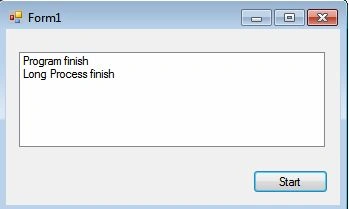
Now, we want to call this long process asynchronously. Here we will use the await keyword.
Abhishek DuppatiPosted Apr 29, 2020, 2:30 AM
In your code System.Threading.Thread.Sleep(5000); "5000 is milliseconds so converting it to seconds would be 5 seconds". But you have mentioned in theory above the code as 5 minutes, please check.
dharmesh parekhPosted Jun 18, 2019, 9:23 AM
It is not about performance but throughput. it increases the amount of requests that can be handled at the same time with the same resources.
Guest UserPosted May 24, 2019, 3:12 AM
Very nice article. I understand now the basics.
Sandip NakhatePosted Mar 7, 2017, 8:03 AM
Its easy to understand...thanx
Anish KumarPosted Feb 11, 2017, 7:05 AM
Nice .
Karthik ElumalaiPosted Jul 27, 2016, 3:53 AM
Good one..:)
Sujeet SinghPosted Aug 18, 2015, 3:07 AM
If we will not write Task.Delay in method and invoke this method with await keyword. It will execute synchronously ....why is it?
shravan kumarPosted Mar 24, 2015, 8:32 AM
really nice.. am beginner but i understand very well... thnk u for posting..
hitesh nirmalPosted Feb 13, 2014, 5:06 AM
nice dear .
SergeyPosted Oct 28, 2013, 11:28 PM
Great article. Thanks. You have one little mistake. You said that program will wait for five minutes, but in code it waits only for five seconds.
Sourav KayalPosted Sep 24, 2013, 12:37 PM
dear Nitin, Thanks.
Ck NitinPosted Sep 23, 2013, 7:22 AM
great Sourav Kaya .... solute to your hard work.