

Introduction
Service Broker is a new feature from SQL Server. Basically, it is an integrated part of the database engine. The Service Broker also supports an asynchronous programming model used in single instances as well as for distributed applications. It also supports queuing and reliable direct asynchronous messaging between SQL Server instances only.
In this article, we learn how to use Service Broker and triggers to capture data changes.
Service Broker in SQL Server
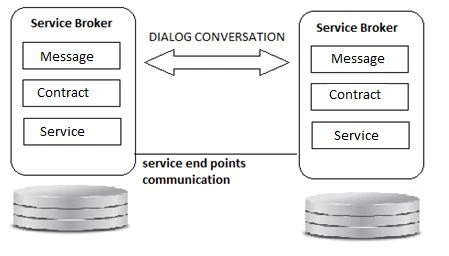
Service Broker is used to create conversations for exchanging messages between two ends, in other words, a source (initiator) and a target. Messages are used to transmit data and trigger processing when a message is received. The target and the initiator can be in the same database or different databases on the same instance of the Database Engine or in separate instances.
The Service Broker communicates with a protocol called "Dialog" that allows us bi-directional communication between two endpoints. The Dialog Protocol specifies the logical steps required for a reliable conversation and ensures that messages are received in the order they were sent.
How to create an asynchronous trigger?
Step 1
Enable the Service Broker on the database.
ALTER DATABASE [Database Name] SET ENABLE_BROKER
Sometimes the query above takes a long time to execute, the problem is that it requires special access to the database. Also, there might be a connection that is using this database with a shared lock on it; even if it is idle, it can block the ALTER DATABASE from completing. To fix the problem use ROLLBACK IMMEDIATE or a NO_WAIT statement at the termination options of ALTER DATABASE.
ALTER DATABASE [Database Name] SET ENABLE_BROKER WITH ROLLBACK IMMEDIATE;
Step 2
Create an audit log table and create a procedure that helps to receive messages from a queue.
CREATE TABLE auditlog
(
            xmlstring xml
)
GO
CREATE PROCEDURE [dbo].[spMessageProcTest]
AS
BEGIN
            DECLARE @message_type varchar(100)
            DECLARE @dialog uniqueidentifier, @message_body XML;
            WHILE (1 = 1)
            BEGIN -- Receive the next available message from the queue
            WAITFOR (
                        RECEIVE TOP(1) @message_type = message_type_name,
                        @message_body = CAST(message_body AS XML),
                        @dialog = conversation_handle
            FROM dbo.TestQueue ), TIMEOUT 500    if (@@ROWCOUNT = 0 OR @message_body IS NULL)
            BEGIN
                        BREAK
            END
            ELSE
                        BEGIN
                                    --process xml message here...
                                    INSERT INTO auditlog values(@message_body)
                        END
            END CONVERSATION @dialog
            END
END
AlexPosted Nov 12, 2013, 1:00 PM
http://www.toolandconcept.com/SnipeDBFramework.htm