

This sample shows how to connect a Windows Phone 8.0 app to Facebook, Google and Microsoft accounts. The main features: Login/Logout and an about page with feedback, share in social networks, review and share by email.
Download C# (19.9 MB)
Introduction
This sample shows how to connect a Windows Phone 8.0 app to Facebook, Google and Microsoft account.
Main Features: Login/Logout and an about page with feedback, share in social networks, review and share by email.
Building the Sample
You only need Visual Studio 2012/Visual Studio 2013 and Windows 8/Windows 8.1, both the RTM version.
This sample requires the installation for Live SDK (Downloads).
Description
This sample shows how to connect a Windows Phone 8.0 app to Facebook, Google and Microsoft accounts.
Main Features
- Login/Logout (for logout I added a workarround to fix the logout providers from the SDKs!)
- An About page with feedback, share in social networks, review and share by email (not important here, but is incluided in code)
Note: This sample uses MVVM Light and Cimbalino Windows Phone Toolkit.
For this sample the following was used:
- Facebook SDK for Windows Phone (Facebook SDK for Windows Phone)
- Google APIs Auth Client and Google APIs OAuth2 Client (Google APIs Auth Client Library and Google APIs OAuth2 Client Library1.6.0-beta)
- Live SDK (onedrive)
For each provider it is necessry to get the app id/client id/client secret in their websites.
For Google go to https://console.developers.google.com/project and create a new project (APIs & auth > credentials).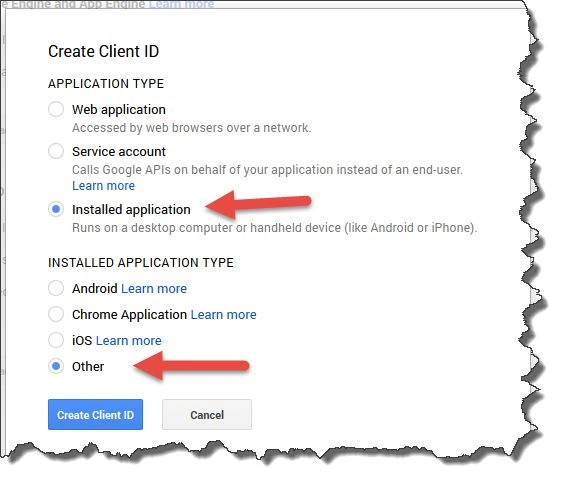
For Facebook go to Facebook Developers and create a new app.
For Live SDK go to Sign in and create one or use an existing app.
Before you start you should change the Constant file to add client ids / client secret / app id, without it the app fails!!
This file is inside the Resource folder.
C#
- /// <summary>
- /// Defines the constants strings used in the app.
- /// </summary>
- public class Constants
- {
- /// <summary>
- /// The facebook app id.
- /// </summary>
- public const string FacebookAppId = "<app id>";
- /// <summary>
- /// The google client identifier.
- /// </summary>
- public const string GoogleClientId = "<client id>";
- /// <summary>
- /// The google token file name.
- /// </summary>
- public const string GoogleTokenFileName = "Google.Apis.Auth.OAuth2.Responses.TokenResponse-user";
- /// <summary>
- /// The google client secret.
- /// </summary>
- public const string GoogleClientSecret = "<client secret>";
- /// <summary>
- /// The microsoft client identifier.
- /// </summary>
- public const string MicrosoftClientId = "<client id>";
- ...
- }
Now let's see how to connect to each provider. For help, I created a SessionService that managed the Login and Logout using a provider value, this is nice because in LoginView I set the buttons to the same command and for each command I set the provider in commandparameter. With it the LoginView and LoginViewModel are clearer and simpler. Another thing is for example if I need to connect to my server to accept the user I can do it in the session manager after the authentication, without adding the code to each provider.
The classes created:
- FacebookService has all code related with authentication with Facebook account
- MicrosoftService has all code related with authentication with Microsoft account
- GoogleService has all code related with authentication with Google account
- SessionService call the methods login or logout for the provide requested
The FacebookService is:
C#
- /// <summary>
- /// Defines the Facebook Service.
- /// </summary>
- public class FacebookService : IFacebookService
- {
- private readonly ILogManager _logManager;
- private readonly FacebookSessionClient _facebookSessionClient;
- /// <summary>
- /// Initializes a new instance of the <see cref="FacebookService"/> class.
- /// </summary>
- /// <param name="logManager">
- /// The log manager.
- /// </param>
- public FacebookService(ILogManager logManager)
- {
- _logManager = logManager;
- _facebookSessionClient = new FacebookSessionClient(Constants.FacebookAppId);
- }
- /// <summary>
- /// The login sync.
- /// </summary>
- /// <returns>
- /// The <see cref="Task"/> object.
- /// </returns>
- public async Task<Session> LoginAsync()
- {
- Exception exception;
- Session sessionToReturn = null;
- try
- {
- var session = await _facebookSessionClient.LoginAsync("user_about_me,read_stream");
- sessionToReturn = new Session
- {
- AccessToken = session.AccessToken,
- Id = session.FacebookId,
- ExpireDate = session.Expires,
- Provider = Constants.FacebookProvider
- };
- return sessionToReturn;
- }
- catch (InvalidOperationException)
- {
- throw;
- }
- catch (Exception ex)
- {
- exception = ex;
- }
- await _logManager.LogAsync(exception);
- return sessionToReturn;
- }
- /// <summary>
- /// Logouts this instance.
- /// </summary>
- public async void Logout()
- {
- Exception exception = null;
- try
- {
- _facebookSessionClient.Logout();
- // clean all cookies from browser, is a workarround
- await new WebBrowser().ClearCookiesAsync();
- }
- catch (Exception ex)
- {
- exception = ex;
- }
- if (exception != null)
- {
- await _logManager.LogAsync(exception);
- }
- }
- }
Note: In logout I added a workarround to clear all cookies in browser, if I don´t this in the first time you can login with account you want but in the next time it will use the account used in last login.
The GoogleService is:
C#
- /// <summary>
- /// The google service.
- /// </summary>
- public class GoogleService : IGoogleService
- {
- private readonly ILogManager _logManager;
- private readonly IStorageService _storageService;
- private UserCredential _credential;
- private Oauth2Service _authService;
- private Userinfoplus _userinfoplus;
- /// <summary>
- /// Initializes a new instance of the <see cref="GoogleService" /> class.
- /// </summary>
- /// <param name="logManager">The log manager.</param>
- /// <param name="storageService">The storage service.</param>
- public GoogleService(ILogManager logManager, IStorageService storageService)
- {
- _logManager = logManager;
- _storageService = storageService;
- }
- /// <summary>
- /// The login async.
- /// </summary>
- /// <returns>
- /// The <see cref="Task"/> object.
- /// </returns>
- public async Task<Session> LoginAsync()
- {
- Exception exception = null;
- try
- {
- // Oauth2Service.Scope.UserinfoEmail
- _credential = await GoogleWebAuthorizationBroker.AuthorizeAsync(new ClientSecrets
- {
- ClientId = Constants.GoogleClientId,
- ClientSecret = Constants.GoogleClientSecret
- }, new[] { Oauth2Service.Scope.UserinfoProfile }, "user", CancellationToken.None);
- var session = new Session
- {
- AccessToken = _credential.Token.AccessToken,
- Provider = Constants.GoogleProvider,
- ExpireDate =
- _credential.Token.ExpiresInSeconds != null
- ? new DateTime(_credential.Token.ExpiresInSeconds.Value)
- : DateTime.Now.AddYears(1),
- Id = string.Empty
- };
- return session;
- }
- catch (TaskCanceledException taskCanceledException)
- {
- throw new InvalidOperationException("Login canceled.", taskCanceledException);
- }
- catch (Exception ex)
- {
- exception = ex;
- }
- await _logManager.LogAsync(exception);
- return null;
- }
- /// <summary>
- /// Gets the user information.
- /// </summary>
- /// <returns>
- /// The user info.
- /// </returns>
- public async Task<Userinfoplus> GetUserInfo()
- {
- _authService = new Oauth2Service(new BaseClientService.Initializer()
- {
- HttpClientInitializer = _credential,
- ApplicationName = AppResources.ApplicationTitle,
- });
- _userinfoplus = await _authService.Userinfo.V2.Me.Get().ExecuteAsync();
- return _userinfoplus;
- }
- /// <summary>
- /// The logout.
- /// </summary>
- public async void Logout()
- {
- await new WebBrowser().ClearCookiesAsync();
- if (_storageService.FileExists(Constants.GoogleTokenFileName))
- {
- _storageService.DeleteFile(Constants.GoogleTokenFileName);
- }
- }
- }
Note: In the logout for the Google provider there isn´t a logout method, the solution is to remove all cookies and remove the file created in the login operation.
The MicrosoftService is:
C#
- /// <summary>
- /// The microsoft service.
- /// </summary>
- public class MicrosoftService : IMicrosoftService
- {
- private readonly ILogManager _logManager;
- private LiveAuthClient _authClient;
- private LiveConnectSession _liveSession;
- /// <summary>
- /// Defines the scopes the application needs.
- /// </summary>
- private static readonly string[] Scopes = { "wl.signin", "wl.basic", "wl.offline_access" };
- /// <summary>
- /// Initializes a new instance of the <see cref="MicrosoftService"/> class.
- /// </summary>
- /// <param name="logManager">
- /// The log manager.
- /// </param>
- public MicrosoftService(ILogManager logManager)
- {
- _logManager = logManager;
- }
- /// <summary>
- /// The login async.
- /// </summary>
- /// <returns>
- /// The <see cref="Task"/> object.
- /// </returns>
- public async Task<Session> LoginAsync()
- {
- Exception exception = null;
- try
- {
- _authClient = new LiveAuthClient(Constants.MicrosoftClientId);
- var loginResult = await _authClient.InitializeAsync(Scopes);
- var result = await _authClient.LoginAsync(Scopes);
- if (result.Status == LiveConnectSessionStatus.Connected)
- {
- _liveSession = loginResult.Session;
- var session = new Session
- {
- AccessToken = result.Session.AccessToken,
- ExpireDate = result.Session.Expires.DateTime,
- Provider = Constants.MicrosoftProvider,
- };
- return session;
- }
- }
- catch (LiveAuthException ex)
- {
- throw new InvalidOperationException("Login canceled.", ex);
- }
- catch (Exception e)
- {
- exception = e;
- }
- await _logManager.LogAsync(exception);
- return null;
- }
- /// <summary>
- /// The logout.
- /// </summary>
- public async void Logout()
- {
- if (_authClient == null)
- {
- _authClient = new LiveAuthClient(Constants.MicrosoftClientId);
- var loginResult = await _authClient.InitializeAsync(Scopes);
- }
- _authClient.Logout();
- }
- }
The SessionService is:
C#
- /// <summary>
- /// The service session.
- /// </summary>
- public class SessionService : ISessionService
- {
- private readonly IApplicationSettingsService _applicationSettings;
- private readonly IFacebookService _facebookService;
- private readonly IMicrosoftService _microsoftService;
- private readonly IGoogleService _googleService;
- private readonly ILogManager _logManager;
- /// <summary>
- /// Initializes a new instance of the <see cref="SessionService" /> class.
- /// </summary>
- /// <param name="applicationSettings">The application settings.</param>
- /// <param name="facebookService">The facebook service.</param>
- /// <param name="microsoftService">The microsoft service.</param>
- /// <param name="googleService">The google service.</param>
- /// <param name="logManager">The log manager.</param>
- public SessionService(IApplicationSettingsService applicationSettings,
- IFacebookService facebookService,
- IMicrosoftService microsoftService,
- IGoogleService googleService, ILogManager logManager)
- {
- _applicationSettings = applicationSettings;
- _facebookService = facebookService;
- _microsoftService = microsoftService;
- _googleService = googleService;
- _logManager = logManager;
- }
- /// <summary>
- /// Gets the session.
- /// </summary>
- /// <returns>The session object.</returns>
- public Session GetSession()
- {
- var expiryValue = DateTime.MinValue;
- string expiryTicks = LoadEncryptedSettingValue("session_expiredate");
- if (!string.IsNullOrWhiteSpace(expiryTicks))
- {
- long expiryTicksValue;
- if (long.TryParse(expiryTicks, out expiryTicksValue))
- {
- expiryValue = new DateTime(expiryTicksValue);
- }
- }
- var session = new Session
- {
- AccessToken = LoadEncryptedSettingValue("session_token"),
- Id = LoadEncryptedSettingValue("session_id"),
- ExpireDate = expiryValue,
- Provider = LoadEncryptedSettingValue("session_provider")
- };
- _applicationSettings.Set(Constants.LoginToken, true);
- _applicationSettings.Save();
- return session;
- }
- /// <summary>
- /// The save session.
- /// </summary>
- /// <param name="session">
- /// The session.
- /// </param>
- private void Save(Session session)
- {
- SaveEncryptedSettingValue("session_token", session.AccessToken);
- SaveEncryptedSettingValue("session_id", session.Id);
- SaveEncryptedSettingValue("session_expiredate", session.ExpireDate.Ticks.ToString(CultureInfo.InvariantCulture));
- SaveEncryptedSettingValue("session_provider", session.Provider);
- _applicationSettings.Set(Constants.LoginToken, true);
- _applicationSettings.Save();
- }
- /// <summary>
- /// The clean session.
- /// </summary>
- private void CleanSession()
- {
- _applicationSettings.Reset("session_token");
- _applicationSettings.Reset("session_id");
- _applicationSettings.Reset("session_expiredate");
- _applicationSettings.Reset("session_provider");
- _applicationSettings.Reset(Constants.LoginToken);
- _applicationSettings.Save();
- }
- /// <summary>
- /// The login async.
- /// </summary>
- /// <param name="provider">
- /// The provider.
- /// </param>
- /// <returns>
- /// The <see cref="Task"/> object.
- /// </returns>
- public async Task<bool> LoginAsync(string provider)
- {
- Exception exception = null;
- try
- {
- Session session = null;
- switch (provider)
- {
- case Constants.FacebookProvider:
- session = await _facebookService.LoginAsync();
- break;
- case Constants.MicrosoftProvider:
- session = await _microsoftService.LoginAsync();
- break;
- case Constants.GoogleProvider:
- session = await _googleService.LoginAsync();
- break;
- }
- if (session != null)
- {
- Save(session);
- }
- return true;
- }
- catch (InvalidOperationException e)
- {
- throw;
- }
- catch (Exception ex)
- {
- exception = ex;
- }
- await _logManager.LogAsync(exception);
- return false;
- }
- /// <summary>
- /// The logout.
- /// </summary>
- public async void Logout()
- {
- Exception exception = null;
- try
- {
- var session = GetSession();
- switch (session.Provider)
- {
- case Constants.FacebookProvider:
- _facebookService.Logout();
- break;
- case Constants.MicrosoftProvider:
- _microsoftService.Logout();
- break;
- case Constants.GoogleProvider:
- _googleService.Logout();
- break;
- }
- CleanSession();
- }
- catch (Exception ex)
- {
- exception = ex;
- }
- if (exception != null)
- {
- await _logManager.LogAsync(exception);
- }
- }
- /// <summary>
- /// Loads an encrypted setting value for a given key.
- /// </summary>
- /// <param name="key">
- /// The key to load.
- /// </param>
- /// <returns>
- /// The value of the key.
- /// </returns>
- private string LoadEncryptedSettingValue(string key)
- {
- string value = null;
- var protectedBytes = _applicationSettings.Get<byte[]>(key);
- if (protectedBytes != null)
- {
- byte[] valueBytes = ProtectedData.Unprotect(protectedBytes, null);
- value = Encoding.UTF8.GetString(valueBytes, 0, valueBytes.Length);
- }
- return value;
- }
- /// <summary>
- /// Saves a setting value against a given key, encrypted.
- /// </summary>
- /// <param name="key">
- /// The key to save against.
- /// </param>
- /// <param name="value">
- /// The value to save against.
- /// </param>
- /// <exception cref="System.ArgumentOutOfRangeException">
- /// The key or value provided is unexpected.
- /// </exception>
- private void SaveEncryptedSettingValue(string key, string value)
- {
- if (!string.IsNullOrWhiteSpace(key) && !string.IsNullOrWhiteSpace(value))
- {
- byte[] valueBytes = Encoding.UTF8.GetBytes(value);
- // Encrypt the value by using the Protect() method.
- byte[] protectedBytes = ProtectedData.Protect(valueBytes, null);
- _applicationSettings.Set(key, protectedBytes);
- _applicationSettings.Save();
- }
- }
- }
Now is time to build the User Interface, and because I am using MVVM, I created a LoginViewModel to bind to the LoginView.
The LoginViewModel is:
C#
- /// <summary>
- /// The login view model.
- /// </summary>
- public class LoginViewModel : ViewModelBase
- {
- private readonly ILogManager _logManager;
- private readonly IMessageBoxService _messageBox;
- private readonly INavigationService _navigationService;
- private readonly ISessionService _sessionService;
- private bool _inProgress;
- /// <summary>
- /// Initializes a new instance of the <see cref="LoginViewModel"/> class.
- /// </summary>
- /// <param name="navigationService">
- /// The navigation service.
- /// </param>
- /// <param name="sessionService">
- /// The session service.
- /// </param>
- /// <param name="messageBox">
- /// The message box.
- /// </param>
- /// <param name="logManager">
- /// The log manager.
- /// </param>
- public LoginViewModel(INavigationService navigationService,
- ISessionService sessionService,
- IMessageBoxService messageBox,
- ILogManager logManager)
- {
- _navigationService = navigationService;
- _sessionService = sessionService;
- _messageBox = messageBox;
- _logManager = logManager;
- LoginCommand = new RelayCommand<string>(LoginAction);
- }
- /// <summary>
- /// Gets or sets a value indicating whether in progress.
- /// </summary>
- /// <value>
- /// The in progress.
- /// </value>
- public bool InProgress
- {
- get { return _inProgress; }
- set { Set(() => InProgress, ref _inProgress, value); }
- }
-
- /// <summary>
- /// Gets the facebook login command.
- /// </summary>
- /// <value>
- /// The facebook login command.
- /// </value>
- public ICommand LoginCommand { get; private set; }
-
- /// <summary>
- /// Facebook's login action.
- /// </summary>
- /// <param name="provider">
- /// The provider.
- /// </param>
- private async void LoginAction(string provider)
- {
- Exception exception = null;
- bool isToShowMessage = false;
- try
- {
- InProgress = true;
- var auth = await _sessionService.LoginAsync(provider);
- if (!auth)
- {
- await _messageBox.ShowAsync(AppResources.LoginView_LoginNotAllowed_Message,
- AppResources.MessageBox_Title,
- new List<string>
- {
- AppResources.Button_OK
- });
- }
- else
- {
- _navigationService.NavigateTo(new Uri(Constants.MainView, UriKind.Relative));
- }
- InProgress = false;
- }
- catch (InvalidOperationException e)
- {
- InProgress = false;
- isToShowMessage = true;
- }
- catch (Exception ex)
- {
- exception = ex;
- }
- if (isToShowMessage)
- {
- await _messageBox.ShowAsync(AppResources.LoginView_AuthFail, AppResources.ApplicationTitle, new List<string> { AppResources.Button_OK });
- }
- if (exception != null)
- {
- await _logManager.LogAsync(exception);
- }
- }
- }
Note: in LoginAction the parameter provider is the value of the CommandParameter received in the LoginCommand, this is set in the login page.
The LoginPage.xaml is:
XAML
- <phone:PhoneApplicationPage x:Class="AuthenticationSample.WP80.Views.LoginView"
- xmlns="http://schemas.microsoft.com/winfx/2006/xaml/presentation"
- xmlns:x="http://schemas.microsoft.com/winfx/2006/xaml"
- xmlns:Command="clr-namespace:GalaSoft.MvvmLight.Command;assembly=GalaSoft.MvvmLight.Extras.WP8"
- xmlns:controls="clr-namespace:Facebook.Client.Controls;assembly=Facebook.Client"
- xmlns:d="http://schemas.microsoft.com/expression/blend/2008"
- xmlns:i="clr-namespace:System.Windows.Interactivity;assembly=System.Windows.Interactivity"
- xmlns:mc="http://schemas.openxmlformats.org/markup-compatibility/2006"
- xmlns:phone="clr-namespace:Microsoft.Phone.Controls;assembly=Microsoft.Phone"
- xmlns:shell="clr-namespace:Microsoft.Phone.Shell;assembly=Microsoft.Phone"
- xmlns:converters="clr-namespace:Cimbalino.Phone.Toolkit.Converters;assembly=Cimbalino.Phone.Toolkit"
- Orientation="Portrait"
- SupportedOrientations="Portrait"
- shell:SystemTray.IsVisible="True"
- mc:Ignorable="d">
- <phone:PhoneApplicationPage.DataContext>
- <Binding Mode="OneWay"
- Path="LoginViewModel"
- Source="{StaticResource Locator}" />
- </phone:PhoneApplicationPage.DataContext>
- <phone:PhoneApplicationPage.Resources>
- <converters:BooleanToVisibilityConverter x:Key="BooleanToVisibilityConverter"/>
- </phone:PhoneApplicationPage.Resources>
- <phone:PhoneApplicationPage.FontFamily>
- <StaticResource ResourceKey="PhoneFontFamilyNormal" />
- </phone:PhoneApplicationPage.FontFamily>
- <phone:PhoneApplicationPage.FontSize>
- <StaticResource ResourceKey="PhoneFontSizeNormal" />
- </phone:PhoneApplicationPage.FontSize>
- <phone:PhoneApplicationPage.Foreground>
- <StaticResource ResourceKey="PhoneForegroundBrush" />
- </phone:PhoneApplicationPage.Foreground>
- <!-- LayoutRoot is the root grid where all page content is placed -->
- <Grid x:Name="LayoutRoot" Background="Transparent">
- <Grid.RowDefinitions>
- <RowDefinition Height="Auto" />
- <RowDefinition Height="*" />
- </Grid.RowDefinitions>
- <!-- TitlePanel contains the name of the application and page title -->
- <StackPanel x:Name="TitlePanel"
- Grid.Row="0"
- Margin="12,17,0,28">
- <TextBlock Margin="12,0"
- Style="{StaticResource PhoneTextNormalStyle}"
- Text="{Binding LocalizedResources.ApplicationTitle,
- Mode=OneWay,
- Source={StaticResource LocalizedStrings}}" />
- <TextBlock Margin="9,-7,0,0"
- Style="{StaticResource PhoneTextTitle1Style}"
- Text="{Binding LocalizedResources.LoginView_Title,
- Mode=OneWay,
- Source={StaticResource LocalizedStrings}}" />
- </StackPanel>
- <!-- ContentPanel - place additional content here -->
- <Grid x:Name="ContentPanel"
- Grid.Row="1"
- Margin="24,0,0,-40">
- <Grid.RowDefinitions>
- <RowDefinition Height="Auto" />
- <RowDefinition Height="Auto" />
- <RowDefinition Height="Auto" />
- <RowDefinition Height="Auto" />
- <RowDefinition Height="Auto" />
- </Grid.RowDefinitions>
- <TextBlock Grid.Row="0"
- Style="{StaticResource PhoneTextTitle2Style}"
- Text="{Binding LocalizedResources.LoginView_UserAccount,
- Mode=OneWay,
- Source={StaticResource LocalizedStrings}}" />
- <Button Grid.Row="1"
- Margin="10"
- Command="{Binding LoginCommand}"
- CommandParameter="facebook"
- Content="Facebook" />
- <Button Grid.Row="2"
- Margin="10"
- Command="{Binding LoginCommand}"
- CommandParameter="microsoft"
- Content="Microsoft" />
- <Button Grid.Row="3"
- Margin="10"
- Command="{Binding LoginCommand}"
- CommandParameter="google"
- Content="Google" />
- </Grid>
- <Grid Visibility="{Binding InProgress, Converter={StaticResource BooleanToVisibilityConverter}}"
- Grid.Row="0"
- Grid.RowSpan="2">
- <Rectangle
- Fill="Black"
- Opacity="0.75" />
- <TextBlock
- HorizontalAlignment="Center"
- VerticalAlignment="Center"
- Text="{Binding LocalizedResources.LoginView_AuthMessage,
- Mode=OneWay,
- Source={StaticResource LocalizedStrings}}" />
- <ProgressBar IsIndeterminate="True" IsEnabled="True" Margin="0,60,0,0"/>
- </Grid>
- </Grid>
- </phone:PhoneApplicationPage>
Login User Interface

Source Code Files
- IFacebookService interface for FacebookService
- IGoogleService interface for GoogleService
- ILogManager interface for LogManager
- IMicrosoftService interface for MicrosoftService
- ISessionProvider interface for all providers interface (common methods)
- ISessionService for SessionService
- Session class for save the information about the session (provider, token, expired date)
- FacebookService class that has all logic about the login / logout using Facebook provider
- GoogleService class that has all logic about the login / logout using Google provider
- MicrosoftService class that has all logic about the login / logout using Microsoft provider
- SessionService class for manage login/logout (it will use all services provides described before)
- LoginViewModel class for binding to LoginView.xaml
- LoginView class that represent the page for login
- MainViewModel class for binding to MainView.xaml
- MainView class that appear after the login is ok
- AboutViewModel class for binding to the AboutView.xaml
- AboutView class that represents the about page
- ViewModelLocator class contains static references to all the view model in application and provides an entry point for the bindings.
Build the Sample
- Start Visual Studio Express 2012 for Windows 8 and select File > Open > Project/Solution.
- Go to the directory in which you unzipped the sample. Go to the directory named for the sample, and double-click the Visual Studio Express 2012 for Windows 8 Solution (.sln) file.
- Press F7 or use Build > Build Solution to build the sample.
Note: you can use Visual Studio 2013 in Windows 8.1.
Run the sample
To debug the app and then run it, press F5 or use Debug > Start Debugging. To run the app without debugging, press Ctrl+F5 or use Debug > Start Without Debugging.
Related Samples
SharadPosted Jul 17, 2015, 3:58 AM
good one...
Vithal WadjePosted Jan 25, 2015, 12:11 AM
nice
Deepak VermaPosted Jun 30, 2014, 1:30 AM
Good article Sara
Prerana TiwariPosted Jun 23, 2014, 11:00 PM
Well explained..........
Bhavik PatelPosted Jun 10, 2014, 10:26 PM
Hey sara. Great shared. you have good article writing skills.. easy to understand...
Sara SilvaPosted Jun 5, 2014, 10:50 AM
Thanks :D
Premkumar EswaramurthiPosted Jun 2, 2014, 2:13 AM
Thanks for sharing this detailed explanation article
Rohatash KumarPosted Jun 2, 2014, 1:06 AM
Thanks for sharing a thoughtful and informative information.
Nimit JoshiPosted Jun 2, 2014, 12:51 AM
Very well explained information.. Easy to understand..
Lakshmanan Sethu SankaranarayanPosted May 31, 2014, 9:50 PM
Wow.Detailed explanation.Good one
Sara SilvaPosted May 31, 2014, 6:12 PM
Thanks! :D
Brij MishraPosted May 31, 2014, 9:06 AM
Very nice and detailed explanation. Thanks for sharing!!
Anil KumarPosted May 31, 2014, 3:40 AM
Very informative and nicely written ! Welcome to C#Corner community :)
Praveen KumarPosted May 30, 2014, 5:33 AM
Welcome Sara. Good to see professionals like you sharing knowledge and expertise with others.
Sara SilvaPosted May 30, 2014, 4:43 AM
Thanks :D
Former memberPosted May 30, 2014, 4:29 AM
very nice article Sara !
Shiju JosephPosted May 30, 2014, 2:08 AM
Good Work !!!
Dinesh BeniwalPosted May 30, 2014, 1:55 AM
Great work, Welcome to the C# Corner Sara.