
How well have your tests exercised your code?
Over the course of this tutorial I plan to demonstrate a number of tools and topics that encompass "testing". I'll be looking at code coverage - how much of our code is "exercised" or used. I'll be looking at tools that can help us with code coverage, name NCover and NCoverExplorer. I'll focus on using NUnit for testing and will demonstrate how we can tie it into the code coverage activity. Finally, I'll be looking how we can integrate all of this good stuff into the Visual Studio IDE using TestDriven.NET.
With that in mind, I will go through the following:
- The creation of a simple class that does something trivial, in this case a calculator (Visual Studio, C#)
- The creation of a simple front-end application that uses the calculator (Visual Studio, C#)
- An examination of code coverage using the front-end application (NCover and NCoverExplorer)
- An examination of code coverage using unit tests (NUnit)
These four topics will demonstrate two things. Firstly, the benefit of using a code coverage tool to help you learn more about your application and the way that it works. Secondly, how that added benefit of a set of unit tests coupled with a code coverage tool can yield increased levels of confidence in your application's testing strategy. Of course, prior to code coverage tools being automated, the simplest form of code coverage was the debugger: even as recently as 1998 I recall laboriously slaving over the Delphi debugger whilst I was "testing" my application. It was worth the toil, the few additional bugs that came to light meant that the application had years of trouble free use. Now, with code coverage integrated into the IDE, and with unit tests sitting side-by-side with the application source code, the time required to run the tests and perform a code coverage analysis is so short, it can be done with every build.
TestDriven.NET
TestDriven.NET provides an integration layer between a number of testing frameworks, such as NUnit, and the IDE. Before TestDriven.NET, we would write our tests, write some code, build everything and then we would fire up a separate application that would run the tests (e.g. the NUnit front-end). Generally this is/was fine as the benefits of test execution greatly outweighed the use of a secondary application. Whilst the NUnit front-end allows us to choose which tests we want to run (as opposed to running all tests), we still find ourselves leaving the IDE and jumping into another application.
So, in addition to integrating NUnit into the Visual Studio IDE, it also provides integration with NCover and NCoverExplorer.
Code Coverage
For the purposes of this tutorial, I am going to do and explain things in a slightly "out of order" fashion. I know that I have mentioned test-driven development already, and by rights we should be developing our application in that fashion. However, I would like to introduce code coverage first. Luckily the example that I plan to use is so simple, it could almost be tested without the need for test-driven development. The example that I plan to use to demonstrate code coverage is that of a simple calculator - I could have been more original, I apologise for my banality!
The Calculator Class
Implementing a simple calculator isn't rocket science, but since I need you to be at least familiar with the code layout, here's the code that I am using:
namespace ClassUnderTest
{
    public class MyCalculator
    {
        public int subtract(int a, int b)
        {
            return a - b;
        }
        public int add(int a, int b)
        {
            return a + b;
        }
        public int divide(int a, int b)
        {
            return a / b;
        }
        public int multiply(int a, int b)
        {
            return a * b;
        }
    }
}
Here's a little front-end WinForms application that makes use of [some] the MyCalculator class.
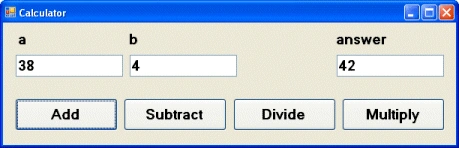
And here's the code behind the WinForms application and the "add" button:
using ClassUnderTest;
namespace CalcApp
{
    public partial class FormMain : Form
    {
        private MyCalculator calc = new MyCalculator();
        public FormMain()
        {
            InitializeComponent();
        }
        private void btnAdd_Click(object sender, EventArgs e)
        {
            int answer;
            int a, b;
            // for demonstration purposes only
            a = System.Convert.ToInt32(tbA.Text);
            b = System.Convert.ToInt32(tbB.Text);
            answer = calc.add(a, b);
            tbAnswer.Text = answer.ToString();
        }
    }
}
So, having compiled CalcApp, we can submit the .exe to NCover. Before we do that, it's probably useful if I introduce NCover.
What is NCover?
NCover is a command-line tool that scans your application's code and records information about which lines of code were executed. NCover uses the "sequence points" that the compiler generates and stores in the .pdb file (debug information) to determine which lines of code are executed and how frequently. Without getting bogged down in detail, a sequence point is essentially a single program state or a line of code.
NCover's command-line syntax is:
Usage: NCover /c [/a ]
/c Command line to launch profiled application.
/a List of assemblies to profile. i.e. "MyAssembly1;MyAssembly2"
/v Enable verbose logging (show instrumented code)
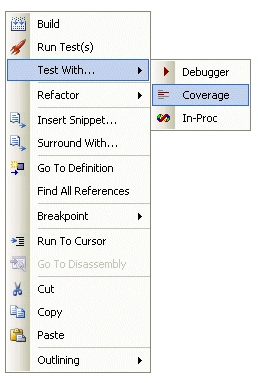
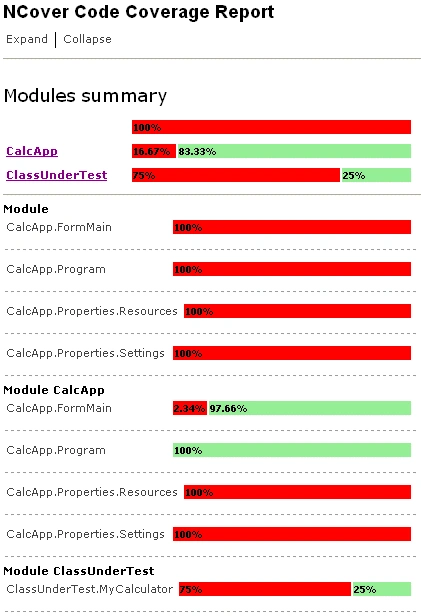
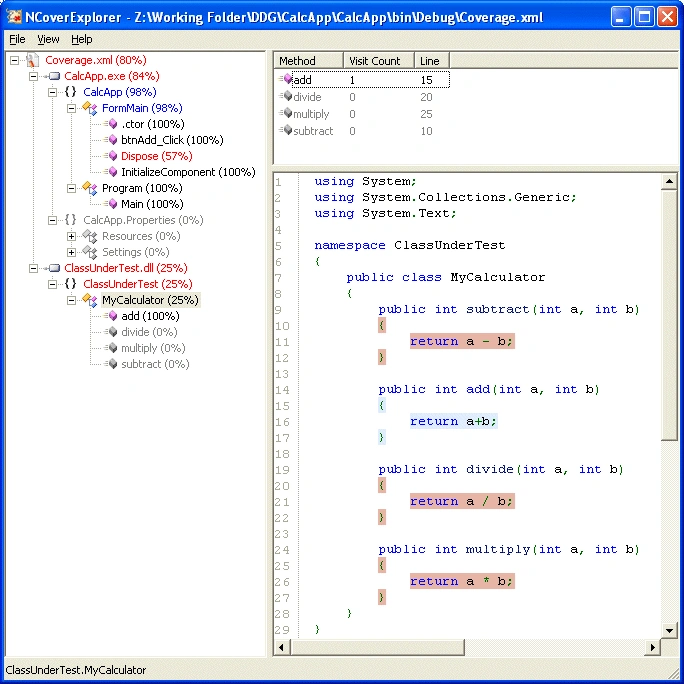
After NCover has analysed your code, it creates two files: coverage.log and coverage.xml.. The .log file contains the events and messages that NCover creates as it analyses your code base. The .xml file is where it all happens: it contains NCover's analysis of your code base. There is a third file, coverage.xsl. It's an XSL stylesheet that takes coverage.xml as its input, allowing it to be displayed in a neat tabular fashion inside Internet Explorer.
Pradeep SahooPosted May 21, 2016, 6:09 PM
good...
Uday WadeditedPosted Jan 10, 2011, 10:59 PMEdited Jan 10, 2011, 10:59 PM
Very good article, every .NET developer and hence tester should read this. Dr. Uday Wad, CellBeans Technologies. Nashik
Murali KotapatiPosted Nov 27, 2006, 6:40 AM
Hi Craig, Need help to utilize NCover to do the code coverage of ASP.NEt Applications. Timely help appreciated. Thanks Murali
Praveen KumarPosted Apr 5, 2006, 8:56 AM
Very good article