

Medallion Architecture Layers
The Medallion Architecture is structured into three layers, each playing a crucial role in the data processing pipeline.
The Medallion Architecture is a smart data organization approach used in lakehouses. It aims to enhance data structure and quality gradually by passing it through layers: Bronze, Silver, and Gold tables. Sometimes called 'multi-hop' architectures, they ensure a smooth flow of data refinement and enrichment.
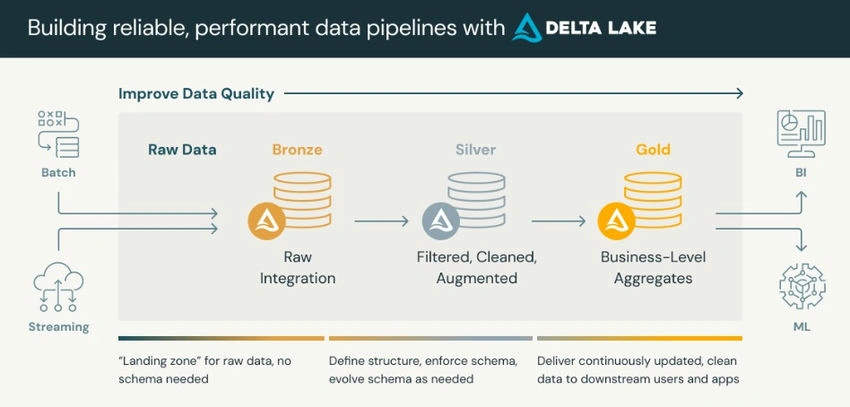
- Bronze Layer (Ingestion Layer): This layer is the entry point for data into the system. It involves ingesting raw data from various sources, such as databases, data lakes, and streaming platforms.
- Silver Layer (Processing Layer): The silver layer is where the raw data is transformed, cleaned, and enriched to make it suitable for analysis. It involves processing tasks like data transformation, normalization, and aggregation.
- Gold Layer (Storage Layer): The gold layer stores the refined and processed data in a structured format, making it readily accessible for analytics and visualization. It typically involves storing data in data lakes, data warehouses, or NoSQL databases.
Real-Time Use Case E-commerce Sales Analysis
Let's consider an e-commerce platform that wants to analyze its sales data in real-time to optimize marketing strategies and inventory management. The Medallion Architecture can efficiently handle this scenario.
- Bronze Layer (Ingestion): Utilize Databricks Autoloader to ingest JSON files from Azure Blob Storage Data Lake Gen2.
- Silver Layer (Processing): Implement data processing pipelines using Apache Spark on Databricks to cleanse, transform, and analyze the incoming sales data.
- Gold Layer (Storage): Store the processed data in a structured format on Azure Blob Storage / Amazon S3 or Unity Catalog for easy accessibility and scalability.
- Analytics and Visualization: Visualize sales trends, customer behavior patterns, and inventory insights using tools like Tableau or custom-built dashboards.
Exploring Databricks Autoloader Feature
Databricks Autoloader is a feature that simplifies data ingestion from cloud storage into Delta Lake tables. It monitors a specified directory for new files and automatically loads them into the Delta table, ensuring data freshness and reliability.
Example
Suppose we have a Delta table named sales_data stored in Databricks Delta Lake, and we want to continuously ingest new sales data files from Azure Blob Storage Delta Lake Gen2.
Processing Sales Data with Apache Spark on Databricks
# Configure Autoloader
spark.conf.set("spark.databricks.delta.autoloader.parallelism", "1000")

# Ingest new JSON data into Delta table from Azure Blob Storage Data Lake Gen2
spark.readStream \
  .format("cloudFiles") \
  .option("cloudFiles.format", "json") \
  .option("cloudFiles.maxFilesPerTrigger", 1000) \
  .option("cloudFiles.connectionString", "DefaultEndpointsProtocol=https;AccountName=<storage_account_name>;AccountKey=<storage_account_key>;EndpointSuffix=core.windows.net") \
  .load("abfss://<container_name>@<storage_account_name>.dfs.core.windows.net/<path>") \
  .writeStream \
  .format("delta") \
  .option("checkpointLocation", "s3://path/to/checkpoint") \
  .start("/mnt/data/sales_data")
In the above example
- We're using the cloud files format with Databricks Autoloader to ingest JSON files from Azure Blob Storage Data Lake Gen2.
- The connection string (cloudFiles.connectionString) is provided to authenticate and access the Azure Blob Storage.
- Adjust <storage_account_name>, <storage_account_key>, <container_name>, and <path> placeholders with your actual Azure Blob Storage details.
- The processed data is written to a Delta table in Azure Databricks.
This setup will continuously monitor the specified Azure Blob Storage Data Lake Gen2 directory for new JSON files and automatically load them into the Delta table in Azure Databricks for processing and transformation.
Join the conversation! Your thoughts help the community grow.