

Introduction
Authentication is used to protect our applications and websites from unauthorized access and also, it restricts the user from accessing the information from tools like Postman and Fiddler. In this article, we will discuss basic authentication, how to call the API method using Postman, and consume the API using jQuery Ajax.
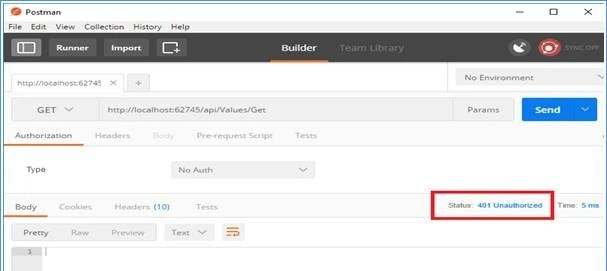
To access the web API method, we have to pass the user credentials in the request header. If we do not pass the user credentials in the request header, then the server returns a 401 (unauthorized) status code indicating the server supports Basic Authentication.
Achieve Basic Authentication
Follow the below steps for Basic Authentication.
Step 1. Let us create a class BasicAuthenticationAttribute which inherits from the AuthorizationFilterAttribute (namespace System.Web.Http.Filters;) and overrides the method OnAuthorization from the base class (AuthorizationFilterAttribute).
The OnAuthorization method has a parameter action context that provides access to the request and response object.
Code
namespace BasicAuthentication
{
    public class BasicAuthenticationAttribute : AuthorizationFilterAttribute
    {
        public override void OnAuthorization(HttpActionContext actionContext)
        {
            base.OnAuthorization(actionContext);
        }
    }
}
Now, we use the actionContext object to check if the request header is null or not. If null, then we return 401(unauthorized) status code; if not null, then we use the request header authorization parameter for authorization and these parameters are formatted as the string “Username: Password” base64-encoded.
Code
public override void OnAuthorization(HttpActionContext actionContext)
{
    if (actionContext.Request.Headers.Authorization != null)
    {
        var authToken = actionContext.Request.Headers.Authorization.Parameter;

        // Decoding authToken we get decode value in 'Username:Password' format
        var decodeauthToken = System.Text.Encoding.UTF8.GetString(
            Convert.FromBase64String(authToken));

        // Splitting decodeauthToken using ':'
        var arrUserNameandPassword = decodeauthToken.Split(':');

        // At 0th position of array we get username and at 1st we get password
        if (IsAuthorizedUser(arrUserNameandPassword[0], arrUserNameandPassword[1]))
        {
            // Setting current principle
            Thread.CurrentPrincipal = new GenericPrincipal(
                new GenericIdentity(arrUserNameandPassword[0]), null);
        }
        else
        {
            actionContext.Response = actionContext.Request
                .CreateResponse(HttpStatusCode.Unauthorized);
        }
    }
    else
    {
        actionContext.Response = actionContext.Request
            .CreateResponse(HttpStatusCode.Unauthorized);
    }
}
Now, we need to decode the base64-encoded value and split by using ‘:’. After the split, we get the username at the 0th position and the password at the 1st position. Then, we pass the username and password to the below method to check whether a user is authorized or not.
Code
public static bool IsAuthorizedUser(string Username, string Password)
{
    // In this method we can handle our database logic here...
    return Username == "bhushan" && Password == "demo";
}
If the above method returns true, then we create a Generic Principle and set it to the current principle. The generic principle has two parameters - GenericIdentity and Roles.
If the methods return false, then we return 401(unauthorized) status code.
We can define BasicAuthenticationAttribute globally, at Controller, and at View. To define the basic authentication, we have to create a controller.
If we want to declare it globally, we will declare it in WebApiConfig.cs.
config.Filters.Add(new BasicAuthenticationAttribute());
Step 2. In this step, let us create a controller and decorate the Get method with BasicAuthentication.
Code
namespace BasicAuthentication.Controllers
{
    public class ValuesController : ApiController
    {
        [BasicAuthentication]
        public string Get()
        {
            return "WebAPI Method Called";
        }
    }
}
When we hit the URL in Postman without adding Basic Authentication in the request header, this will return the 401 Status code.
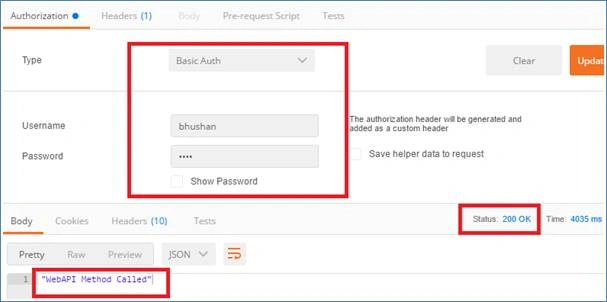
When we add authorization and pass the credentials, it will allow us to access the Get method and return the status 200.
To access the above Web API method using jQuery AJAX, use the following code.
Script
<script type="text/javascript">
    $.ajax({
        type: 'GET',
        url: "api/values/Get",
        datatype: 'json',
        headers: {
            Authorization: 'Basic ' + btoa(username + ':' + password)
        },
        success: function(data) {
            // Handle success response here
        },
        error: function(data) {
            // Handle error response here
        }
    });
</script>
Summary
In this article, we learned how to implement Web authentication using Web API. Authorization is another common functionality in ASP.NET. In the next article, learn how to Implement Authorization using Web API.
RajPosted Dec 24, 2024, 3:07 PM
Thank you so much.
Yugeshan ChettyPosted Jun 10, 2022, 6:39 PM
Fantastic article!! Thanks so much for this. Checked a lot of places to find a way to do some basic auth on my api and one is the best.
andrew cPosted Aug 26, 2021, 1:12 PM
Thanks a heap, this was exactly what I was after and well explained. Cheers!
omar walidPosted Mar 13, 2021, 8:40 AM
Very helpful many thanks
Rehan HaquePosted Nov 27, 2020, 2:46 AM
In step 1 there are two methods with same name and type: "public override void OnAuthorization(HttpActionContext actionContext) " . I have put in the same class 'BasicAuthenticationAttribute' and I am getting error :'already defines a member with same parameter type' . Where is the second 'OnAuthorizzation' method supposed to be ? Please help me with the same . Thanks!
Ahmed RamadanPosted Aug 14, 2020, 4:29 AM
Great explanation <3 <3
Ahmed RamadanPosted Aug 14, 2020, 4:29 AM
Thanks , Alot
Sundaram SubramanianPosted Mar 4, 2020, 10:57 PM
Thanks a lot. Detailed explained
Pankajkumar PatelPosted Aug 12, 2019, 11:29 PM
Good one ...
mohamed tammamPosted Jun 23, 2019, 4:33 PM
Hi bhushan, thanks for your efforts , I've a question here ,i'm new for web api authentication , please would you list all type of authentications (,basic Authentication token base ,??what else )
AliPosted Jun 12, 2019, 6:22 PM
This header will be visible in browser.. anyone who get the token can use to create requests successfully, so it is failing the point of security. any recommendations?
Rajesh WaranPosted May 17, 2019, 2:21 AM
Hi, I have come across some tutorials everyone is using the same class name. Is class name must be BasicAuthenticationAttribute ?
Rajesh WaranPosted May 17, 2019, 1:52 AM
Simple and clear.
priya periyasamyPosted Apr 20, 2019, 6:24 AM
Can you please write an detailed article for the AJAX calling, and please write Example with database logic
jim rockPosted Apr 11, 2019, 2:33 AM
Is every request from client to web api going to contain the following in ajax call, and how is this safe ? I mean one can just see the credential in the source: { Authorization: 'Basic ' + btoa(username + ':' + password) },
Luis Fernando Forero GuzmanPosted Apr 10, 2019, 4:32 PM
Hi, great explanation. Can you share to me the solution also?
Rajeshwari sakharkarPosted Apr 4, 2019, 11:46 PM
Thank you so much
Rajeshwari sakharkarPosted Mar 26, 2019, 8:08 AM
Will you please tell me how to run this code
RJ KumarPosted Mar 20, 2019, 12:12 AM
Any solution?
RJ KumarPosted Mar 20, 2019, 12:11 AM
Not working. that method not calling,iam using mvc 4.5
Arvind SinghPosted Feb 7, 2019, 10:25 PM
Nice and simple.. keep it up....
Shyam kumarPosted Feb 6, 2019, 4:57 AM
Sir ishka link nhi h code download krne ke liye
Sagar PardeshiPosted Dec 25, 2018, 1:55 AM
Good article and good to explore... keep it up
Rushi MehtaPosted Dec 23, 2018, 11:23 PM
Very Nice Article