

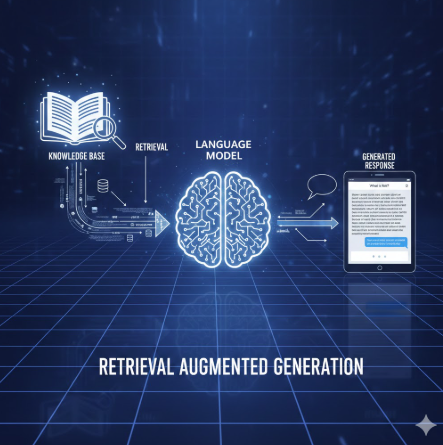
One of the most impactful real-world applications of Vector Databases (VDB) is in the field of education, specifically when paired with the reasoning power of Large Language Models (LLMs). This synergy is made possible through a technique called Retrieval-Augmented Generation (RAG).
What is RAG?
RAG is a framework that enhances an LLM by providing it with specific, relevant context retrieved from an external knowledge base.
While a VDB is excellent at storing and retrieving information based on semantic similarity, it cannot "explain" that information on its own. Conversely, while an LLM is great at reasoning and induction, it often lacks access to specific or private data and can sometimes "hallucinate" (make things up).
By combining them, we create a tool that can retrieve precise data and reformat it into natural, human language.
A Practical Example: The "Hamlet" Tutor
Imagine a student studying William Shakespeare's Hamlet. The play is complex, the language is archaic, and the student needs a tutor to answer specific questions.

Building a "Hamlet Expert" with RAG
With RAG, we can build a specialized "teacher" that can answer any Hamlet-related question based specifically on the text of the play. The idea of building this "Hamlet Expert" is simple and follows a clear workflow.
Step 1: Embedding the Text
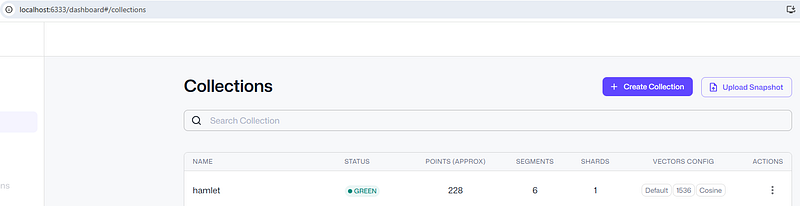
First, we embed the original text of Hamlet into a Vector Database (VDB). For this project, I used a PDF version of the play. The VDB I am using is Qdrant, an open-source tool that can run locally on a laptop.
Step 2: Semantic Search
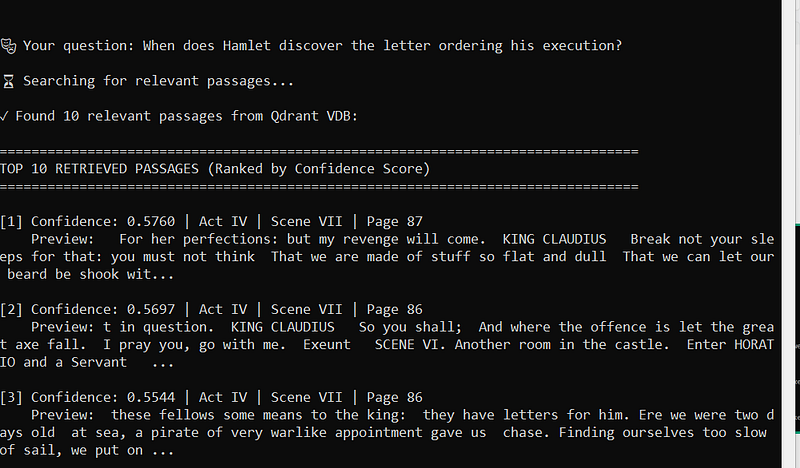
Once the data is stored, we use the VDB's semantic search feature to find answers to a student's question.
Step 3: LLM Generation
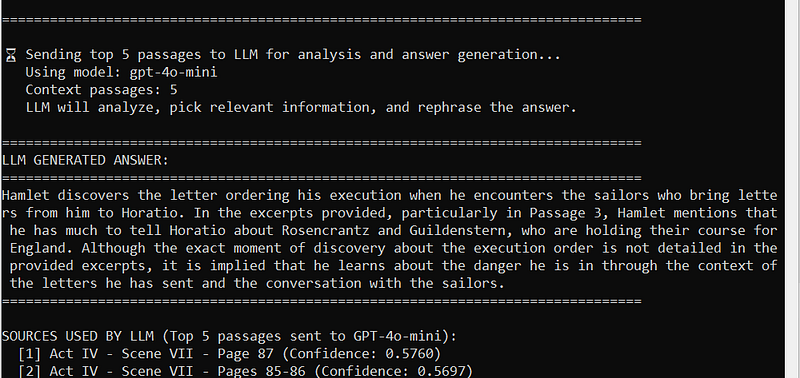
Finally, we pass the Top-N results to the LLM. We provide a specific prompt instructing the LLM to act as a "Hamlet Expert." This ensures the AI uses the retrieved text to provide accurate, scholarly answers as if it were a real teacher.
   #Extract entire text from Hamlet PDF
    pages_data = extract_text_from_pdf(PDF_PATH)
    total_chars = sum(len(page['text']) for page in pages_data)

    #Split the text to chunks
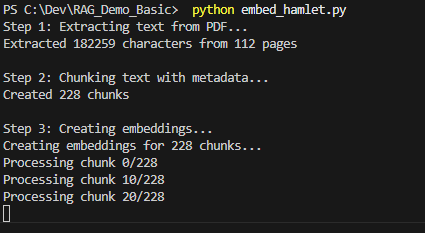
    chunks_with_metadata = chunk_text_with_metadata(pages_data, chunk_size=1000, overlap=200)

    #Perform embedding by chunks
    chunk_texts = [chunk['text'] for chunk in chunks_with_metadata]
    embeddings = create_embeddings(chunk_texts, openai_client)
The Chunking Process: chunk_text_with_metadata()
The chunk_text_with_metadata() method is used to split the entire text into different chunks.
There are two main reasons we perform chunking:
Model Optimization: The entire play is too large for the model to process at once. LLMs generally work best with context windows around 1,000–2,000 characters.
Search Precision: By splitting the play into smaller chunks, the Vector Database can pinpoint specific scenes more accurately, which increases search precision.
Before splitting the text, I also capture the Act and page number for each chunk. This metadata is stored in the VDB alongside the text, allowing the "Hamlet Expert" to provide the exact source for every answer it gives..
def chunk_text_with_metadata(pages_data: List[Dict], chunk_size: int = 1000, overlap: int = 200) -> List[Dict]:
    """Split text into overlapping chunks while preserving page and act/scene metadata."""
    chunks_with_metadata = []
    current_act = None
    current_scene = None

    # Create a continuous text with position markers
    full_text = ""
    char_to_page = []

    for page_data in pages_data:
        page_text = page_data['text']
        page_num = page_data['page_num']

        # Update act/scene tracking
        act, scene = detect_act_scene(page_text)
        if act:
            current_act = act
        if scene:
            current_scene = scene

        # Track character positions to page numbers
        for char in page_text:
            char_to_page.append({
                'page_num': page_num,
                'act': current_act,
                'scene': current_scene
            })

        full_text += page_text + "\n"
        char_to_page.append({
            'page_num': page_num,
            'act': current_act,
            'scene': current_scene
        })
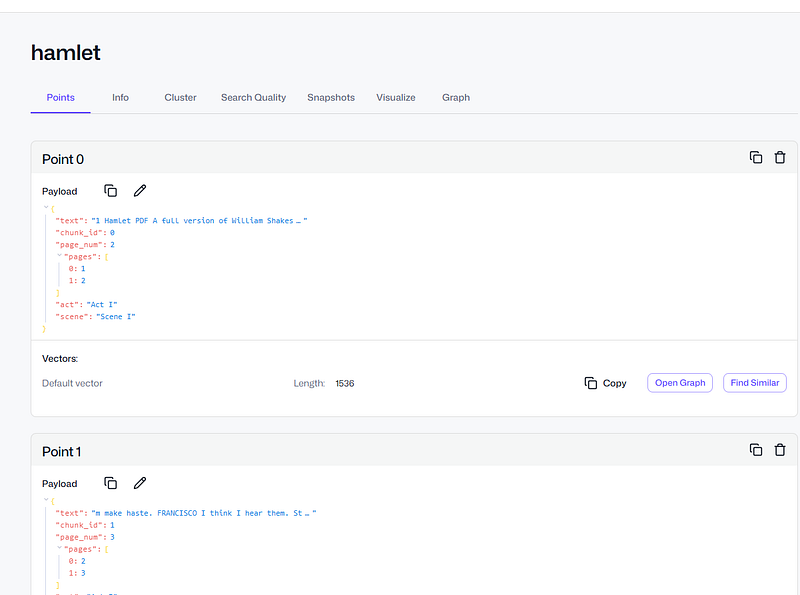
So the data in VDB will look like this:
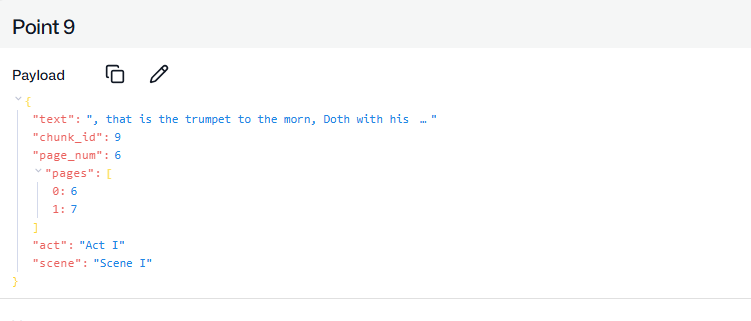
We keep track and page number and act, so this can return to user during answer the question, user can use this info to cross check with the original plays.
We also store overlap text data(200 char in my case) to the VDB, instead of perform hard cut off, like split each chunk to 1000 characters.
while start < text_length:
        end = min(start + chunk_size, text_length)
        chunk_text = full_text[start:end]

        if chunk_text.strip():
            # Get metadata from the middle of the chunk
            mid_pos = min(start + chunk_size // 2, len(char_to_page) - 1)
            metadata = char_to_page[mid_pos]

            # Collect all pages this chunk spans
            chunk_pages = set()
            for i in range(start, min(end, len(char_to_page))):
                chunk_pages.add(char_to_page[i]['page_num'])

            chunks_with_metadata.append({
                'text': chunk_text,
                'page_num': metadata['page_num'],
                'pages': sorted(list(chunk_pages)),
                'act': metadata['act'],
                'scene': metadata['scene']
            })

        start += chunk_size - overlap
Preserving Context with Overlap
When we split the text, we also use a technique called overlap. The reason we perform overlap is to preserve context that might otherwise be lost if we used a "hard cut-off" at a fixed number of characters.
Join the conversation! Your thoughts help the community grow.