

SQL Server Storage Basics: Database Files
Note: All the screenshots are applied to SQL Server 2012 Enterprise Evaluation Edition.
This article will explain about the storage basics in SQL Server. After reading this article we will get to know physical implementation of database in SQL Server. We will explore about the features, work of data files and transaction log files in SQL Server through this article. In case if you missed previous articles you can check them out from the following links:
- Basics of Database Administration in SQL Server: Part 1
- Basics of Database Administration in SQL Server: Part 2
- Basics of Database Administration in SQL Server: Part 3
- Basics of Database Administration in SQL Server: Part 4
1. Introduction
Like every other DBMS software, SQL Server has also its storage engine which we need to know for better understanding of basics. SQL DBA should know well about these storage basics. In this article we will discuss about SQL Server storage engine. SQL Server storage engine has itself a vast topic, one article will not be sufficient for this because it has many things in it that we should know. After thinking a lot how to start this topic, I decided to discuss these basics in bunch of short articles because if I will try to cover all the things in one article it will get lengthy and we will not easily grasp. So let’s move ahead into SQL Server Storage Basics.
2. Physical Database Architecture
Every SQL DBA knows that the data in SQL Server is stored and organized into the logical components such as tables, views, procedures in databases, which a user can view easily but from the point of database administration we will talk here about physical implementation of data in databases. A database is physically implemented as two or more files on disk, which we called primary data files (.mdf), secondary data files (.ndf) and log files (.ldf). For better understanding we can put the following points:

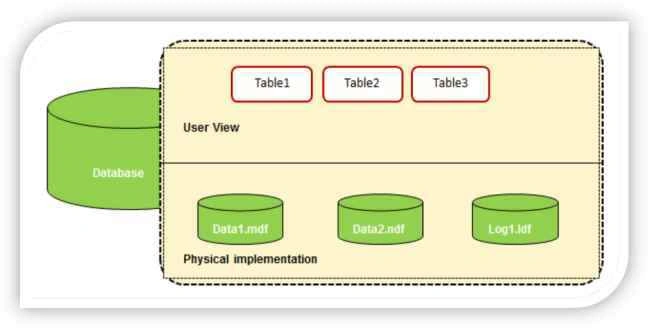
Figure 1: User view & physical implementation of database
3. Storage Basics Explained
3.1 Primary Data Files
- USE [master]
- GO
- ALTER DATABASE [tempdb]
- ADD FILE
- (NAME = N'tempdev_Data06',
- FILENAME = N'C:\Program Files\Microsoft SQL Server\MSSQL11.MSSQLSERVER\MSSQL\DATA\tempdev_Data06.ian',
- SIZE = 100MB, FILEGROWTH = 1024KB)
- GO
- ALTER DATABASE [tempdb]
- ADD FILE
- (NAME = N'tempdev_Data07',
- FILENAME = N'C:\Program Files\Microsoft SQL Server\MSSQL11.MSSQLSERVER\MSSQL\DATA\tempdev_Data07.jim',
- SIZE = 100MB, FILEGROWTH = 1024KB)
- GO
- ALTER DATABASE [tempdb]
- ADD FILE
- (NAME = N'tempdev_Data08',
- FILENAME = N'C:\Program Files\Microsoft SQL Server\MSSQL11.MSSQLSERVER\MSSQL\DATA\tempdev_Data08.cathy',
- SIZE = 100MB, FILEGROWTH = 1024KB)
- GO
- USE [master]
- GO
- ALTER DATABASE [tempdb] MODIFY FILE (NAME=N'templog', NEWNAME= N'tempdev_Log')
- GO
- ALTER DATABASE [tempdb] MODIFY FILE (NAME=N'tempdev', NEWNAME=N'tempdev_Data01')
- GO
- USE [master]
- GO
- ALTER DATABASE [tempdb]
- ADD FILE
- ( NAME = N'tempdev_Data02',
- FILENAME = N'C:\Program Files\Microsoft SQL Server\MSSQL11.MSSQLSERVER\MSSQL\DATA\tempdev_Data02.mdf' ,
- SIZE = 100MB , FILEGROWTH = 1024KB )
- GO
- ALTER DATABASE [tempdb]
- ADD FILE
- ( NAME = N'tempdev_Data03',
- FILENAME = N'C:\Program Files\Microsoft SQL Server\MSSQL11.MSSQLSERVER\MSSQL\DATA\tempdev_Data03.mdf' ,
- SIZE = 100MB , FILEGROWTH = 1024KB )
- GO
- ALTER DATABASE [tempdb]
- ADD FILE
- ( NAME = N'tempdev_Data04',
- FILENAME = N'C:\Program Files\Microsoft SQL Server\MSSQL11.MSSQLSERVER\MSSQL\DATA\tempdev_Data04.mdf' ,
- SIZE = 100MB , FILEGROWTH = 1024KB )
- GO
- ALTER DATABASE [tempdb]
- ADD FILE
- ( NAME = N'tempdev_Data05',
- FILENAME = N'C:\Program Files\Microsoft SQL Server\MSSQL11.MSSQLSERVER\MSSQL\DATA\tempdev_Data05.mdf' ,
- SIZE = 100MB , FILEGROWTH = 1024KB )
- GO
- Use tempdb;
- select name, physical_name from sys.database_files
- USE master
- GO
- ALTER DATABASE [tempdb] MODIFY FILE (NAME=N'tempdev_data01', NEWNAME= N'tempdev_Data10',
- FILENAME = N'C:\Program Files\Microsoft SQL Server\MSSQL11.MSSQLSERVER\MSSQL\DATA\tempdev_Data10.mdf')
- use [tempdb]
- GO
- select name, physical_name from sys.database_files
- GO
- Use tempdb;
- select name, filename from sys.sysdatabases;
3.1.1 What is Primary Data File?
Primary data file is a SQL Server database file which contains the startup information and act as a starting point for any database. It holds user data and all objects such as tables, indexes and stored procedures.
Primary data file is a SQL Server database file which contains the startup information and act as a starting point for any database. It holds user data and all objects such as tables, indexes and stored procedures.
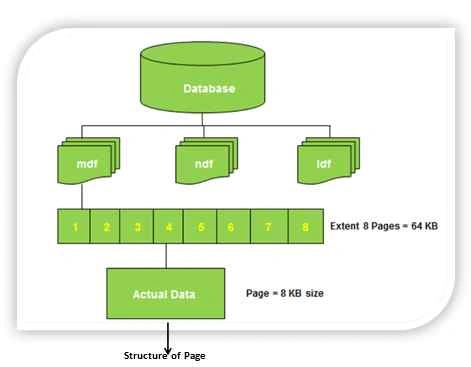
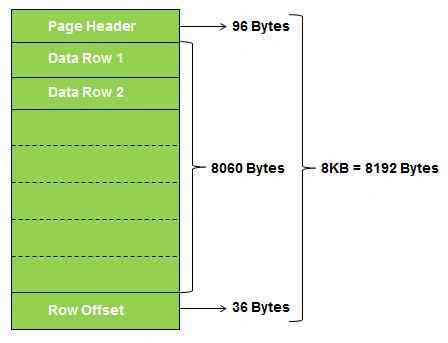
Figure 2: Illustrating physical files, extents, pages and page structure in SQL Server
3.1.2 Extension of Primary Data File
It is recommended that primary data file should have .mdf extension but really you are free to give any extension to it like .abc, .ian, .jim, .cathy, .xyz
The following is the example:
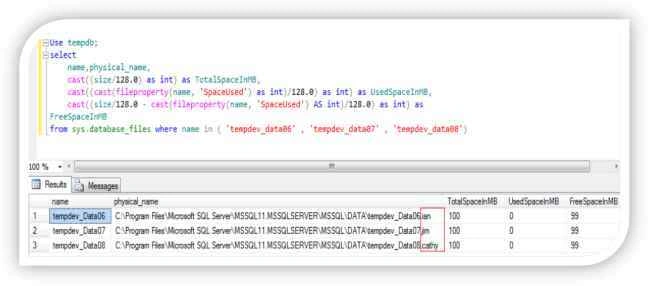
Figure 3: Showing that the data files have different extensions i.e .ian, .jim and .cathy
3.1.3 How many Primary Data Files, a database can have
3.1.3 How many Primary Data Files, a database can have
Every database can only have ONE primary data file (mdf), but do you really agree with this point. Let’s dig it more with some experiments:
Step 1: I changed the name of primary data file and transaction log file with the following query to make it easy to understand:
Step 2: Now I added four more data files: 'tempdev_Data02', 'tempdev_Data03', 'tempdev_Data04'and 'tempdev_Data05' with the following script:
Step 3: Let’s see all the files with the following query:
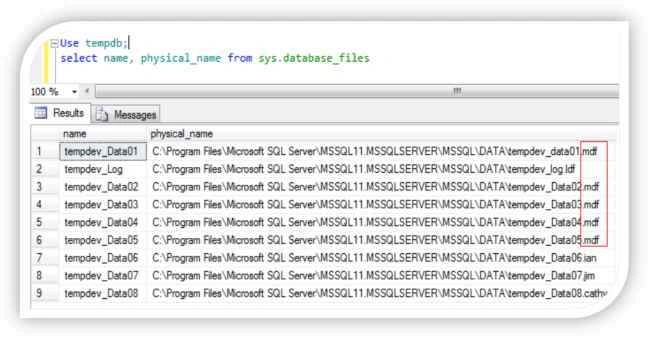
Figure 4: Showing that the data files tempdev_data01, tempdev_data02, tempdev_data03, tempdev_data04, tempdev_data05 having the same extension .mdf
So still the statement “Every database can only have ONE primary data file ( mdf )” is true or something wrong with this statement or the statement is not correct.
The answer lies in the statement which we made in 3.1.2 section: “It is recommended that primary data file should have .mdf extension but really you are free to give any extension to it such as .abc, .ian, .jim, .cathy, .xyz “ what we discussed earlier and the statement “Every database can only have ONE primary data file ( mdf )” is also true because a primary data file is the data file associated with any database when database is created for the very first time, and YES this can only be ONE. Same is true for transaction log file ( .ldf ) and secondary data file ( .ndf )
Here, I want to specify one more thing, suppose we have several mdf files for a particular database & we want to know that which is the main; to uncover it let’s take the above example which is in figure 4, here we have FIVE data files tempdev_data01, tempdev_data02, tempdev_data03, tempdev_data04, tempdev_data05. Now suppose someone changed the name then how we will identify the only ONE primary data file. Let’s take an example:
Step 1: In figure 4 I showed you FIVE mdf files for tempdb database and three data files which have .ian, .jim and .cathy extension. Now I am going to change the name of tempdev_data01.mdf to tempdev_data10.mdf with the following query:

Figure 5: Modifying data file
Step 2: Check the name and physical_name for files in tempdb database with the following query:
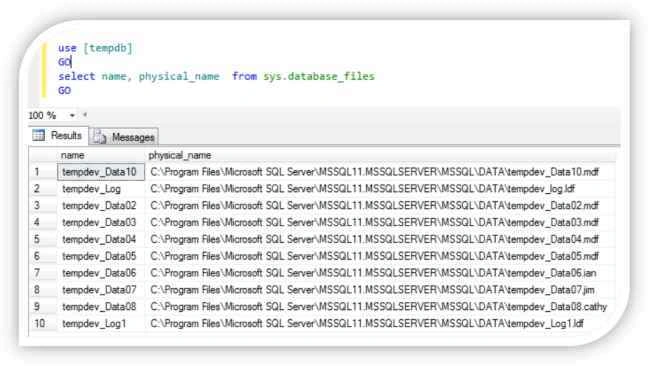
Figure 6: Showing multiple data files with .df extension and some different extension
Now there are again FIVE data files with .mdf extension and THREE data files with other extensions: .jim, .ian and .cathy. So many data files how we find that the only ONE primary data file which we are discussing, because till this discussion we know that the primary data file should be one and only ONE. So let’s find out the only ONE primary data file.
Step 3: To find out one and only ONE primary data file for a database execute the following query:
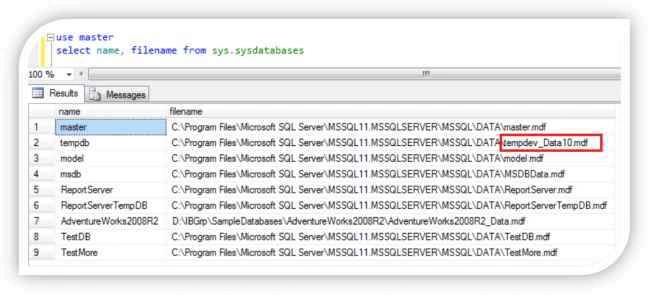
Figure 7: Fetching the name and location of only ONE primary data file
Now it is clearly visible that the only ONE primary data file is tempdev_Data10.mdf. Someone here can ask one question why we use sysdatabases only for query not other query, the answer is simple because the information about the only ONE primary data file is stored in the filename column of the sysdatabases in the master database.
3.1.4 Location of Primary Data Files
The location of the primary data file is stored in the filename column of the sysdatabases in the master database.
When SQL Server starts up database it looks for this file because in this file the information for all databases exists.
Primary data file contains sys.database_files system table which stores information about all other files in a specific database. Here someone can ask you why sys.database_files not sysfiles [sysfiles also give you the information about all files in the database]. So let’s move ahead to know why I said sys.database_files.
sysfiles vs sys.database_files
The compatibility view sysfiles returns one row for every file that is associated with a database.
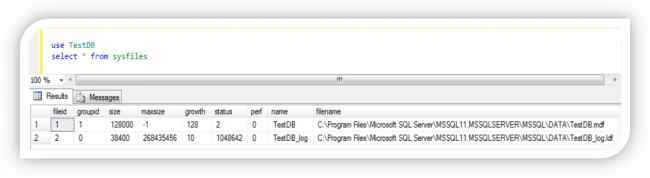
Figure 8: Showing output from sysfiles
The catalog view sys.database_files is the replacement for sysfiles. Like sysfiles, sys.database_files also returns one row for every file that is associated to a database. sys.database_files gives more information than the sysfiles and have more readable output. It gives information about state i.e. ONLINE/OFFLINE, lsn, growth, media etc. Below is the output of sys.database_files split in 3 parts because of space.
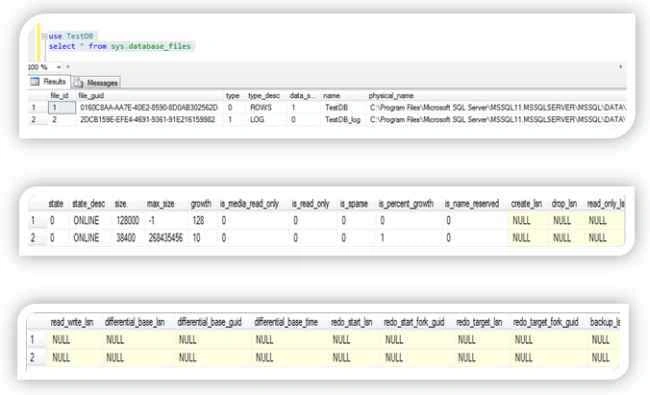
Figure 9: Showing output from sys.database_files
So from the above discussion we can conclude also that the primary data file have pointer to all other files in the specific database.
3.2 Secondary Data Files
- A database can have any number of secondary data files, these files are optional and user-defined. We can use secondary files to spread data across multiple disks.
- Data files other than the primary data file make secondary data files.
- It is not necessary to have secondary data files as these are optional. We can create it depending on the requirement & database environment.
- We can put secondary data files in default filegroup or any other filegroup defined by user.
- .ndf is the recommended extension for secondary data files.
3.3. Transaction Log Files
- use TestDB
- select name, type_desc, physical_name from sys.database_files
3.3.1 What is Transaction Log File?
Transaction log file is a sequential record of transactions which holds the log information that is used to help in disaster recovery scenarios to recover the database.
3.3.2 Extension of Transaction Log File
Recommended extension for log file is .ldf, again it is not mandatory you are free to give any extension to it.
3.3.3 How many Transaction Log Files, a database can have
We can create multiple log files for a database, but there can be only one log file will be active at a time because transactions are written to first file until it will get full. Once it will get full transactions will get written in second file and so on.
3.3.4 Location of Transaction Log Files
Location of transaction log file is stored in sys.database_files, we can use the following query to get the location of transaction log file for a specific database:
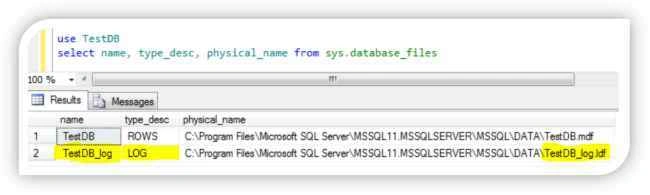
Figure 10: Getting name and location of transaction log files
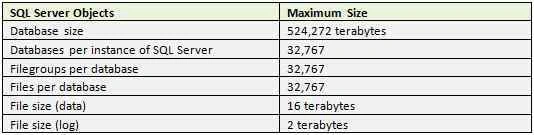
4. Storage Limitation/Capacity of SQL Server
SQL Server database engine has the following storage capacity for different SQL Server objects:
References
- Files and Filegroups Architecture SQL Server 2008 R2. Microsoft Developer Network
- Files and Filegroups Architecture. Technet Microsoft
- Microsoft SQL Server 2000 Unleashed By Ray Rankins, Paul Jensen, Paul Bertucci. Sams Publishing.
- Microsoft SQL Server 2012 Administration: Real-World Skills for MCSA Certification and Beyond
- Maximum Capacity Specifications for SQL Server. Technet Microsoft
Conclusion
This is all about SQL Server database physical files, many more things still need to uncover which you will see probably in coming articles like files and Filegroups, pages, extents, transaction log file in more details. Give your feedback so that in future I can serve you better. To know more about SQL Server Database Administration click on below link:
Happy reading and keep sharing your knowledge.
Ali HacterPosted Oct 16, 2019, 1:02 PM
Good work and very helpful..please write an article about which thing to know to become a junior and senior DBA.
Sharul ChauhanPosted Nov 18, 2016, 1:59 AM
Really helpful content Yashwant Sir.. Thanks alot!
Rupesh KahanePosted Dec 30, 2015, 12:47 PM
good one...
Yashwant VishwakarmaPosted Dec 29, 2015, 6:43 AM
Thank You Sibeesh Venu :)
Sibeesh VenuPosted Dec 29, 2015, 6:41 AM
Nice Share
Ankur MistryPosted Dec 29, 2015, 6:39 AM
Very very helpful, Thank you for sharing.
Raja TPosted Dec 23, 2015, 2:35 AM
Nice Sir, Thanks for sharing
Sumit JoshiPosted Sep 21, 2015, 3:34 AM
Thanks for sharing..
Nilesh JadavPosted Sep 21, 2015, 1:21 AM
Nice one sir!!
Santhakumar MunuswamyPosted Sep 20, 2015, 12:15 PM
Good work. Thanks for sharing
Sibeesh VenuPosted Sep 20, 2015, 7:45 AM
Nice Share
Ankit BansalPosted Sep 20, 2015, 4:34 AM
nice one..thanks for sharing...
Karthikeyan KPosted Sep 20, 2015, 1:24 AM
Thanks for sharing us
Karthikeyan KPosted Sep 20, 2015, 1:24 AM
Excellent sir...Waiting for next part
Saineshwar BageriPosted Sep 20, 2015, 12:57 AM
nice one