

Big Data is not a fad. In fact we’re living at the verge of a revolution that is touching every industry, business and life on this planet. With millions of tweets, iMessages, Live streams, Facebook and Instagram posts….terabytes and petabytes of data is being generated every second and getting “meaningful insight” from this data is quite a challenge since the traditional data bases and data warehouses are not able to handle the processing demands of these Big Data sets that need to be updated frequently or often in real time as in case of stocks, application performance monitoring or user’s online activities. In response to the growing demand for tools and technologies for Big Data Analytics, many organizations turned to NoSQL databases and Hadoop along with some its companions analytics tools including but not limited to YARN, MapReduce, Spark, Hive, Kafka etc.
All these tools and frameworks make up a huge Big Data ecosystem and cannot be covered in a single article. For the sake of this article, my focus is to give you a gentle introduction to Apache Spark and above all, the .Net library for Apache Spark which brings Apache Spark tools into .Net Ecosystem.
We will be covering following topics,
- What is Apache Spark?
- Apache Spark for .Net
- Architecture
- Configuring and testing Apache Spark on windows
- Writing and Executing your first Apache Spark Program
What is Apache Spark?
Apache spark is a general purpose, fast, scalable analytical engine that processes large scale data in a distributed way. It comes with a common interface for multiple languages like Python, Java, Scala, SQL, R and now .Net which means execution engine is not bothered by the language you write your code in.
Why Apache Spark?
Let alone the ease of use, following are some advantages that makes Spark stand out among other analytical tools.
In-Memory Processing
Apache spark makes use of in-memory processing which means no time is spent moving data or processes in or out to disk which makes it faster.
Efficient
Apache Spark is efficient since it caches most of the input data in memory by the Resilient Distributed Dataset (RDD). RDD is a fundamental data structure of Spark and manages transformation as well as distributed processing of data. Each dataset in RDD is partitioned logically and each logical portion may then be computed on different cluster nodes.
Real-Time Processing
Not only batch processing but Apache Spark also supports stream processing which means data can be input and output in real-time.
Adding to the above argument, Apache Spark APIs are readable and easy to understand. It also makes use of lazy evaluation which contributes towards its efficiency. Moreover, there exist rich and always growing developer’s spaces that are constantly contributing and evaluating the technology.
Apache Spark for .Net
Up until the beginning of this year, .Net developers were locked out from big data processing due to lack of .Net support. On April 24th, Microsoft unveiled the project called .Net for Apache Spark.
.Net for Apache Spark makes Apache Spark accessible for .Net developers. It provides high performance .Net APIs using which you can access all aspects of Apache Spark and bring Spark functionality into your apps without having to translate your business logic from .Net to Python/Sacal/Java just for the sake of data analysis.
Ecosystem
Spark consists of various libraries, APIs and databases and provides a whole ecosystem that can handle all sorts of data processing and analysis needs of a team or a company. Following are a few things you can do with Apache Spark.
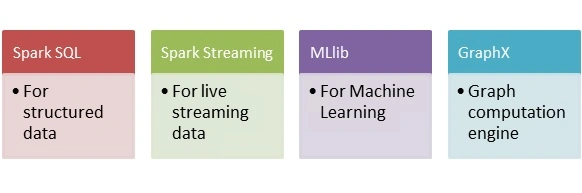
All these modules and libraries stands on top of Apache Spark Core API. Spark Core is the building block of the Spark that is responsible for memory operations, job scheduling, building and manipulating data in RDD etc.
Since we’ve built some understanding of what Apache Spark is and what can it do for us, let’s now take a look at its architecture.
Architecture
Apache Spark follows driver-executor concept. The following figure will make the idea clear.
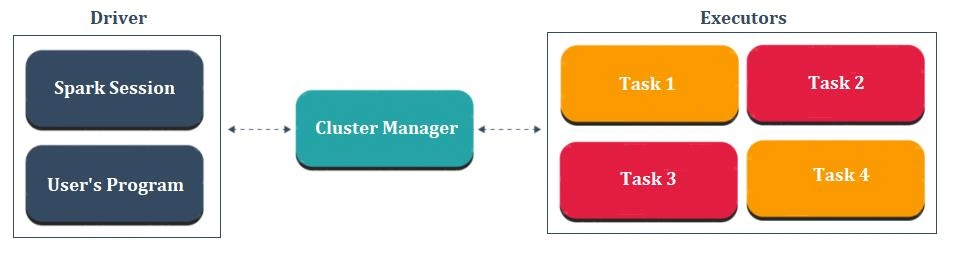
Each spark application consists of a driver and a set of workers or executors managed by cluster manager. The driver consists of user’s program and spark session. Basically, spark session takes the user’s program and divide it into smaller chunks of tasks which are divided among workers or executors. Each executor takes one of those smaller tasks of user’s program and executes it. Cluster Manager is there to manage the overall execution of the program in the sense that it helps diving up the tasks and allocating resources among driver and executors.
Without going any further into theoretical details of how spark works, let’s get our hands dirty and configure and test the spark on our local machine to see how things work.
Setting Up the Environment
.Net implement of Apache Spark still uses Java VM so there isn’t a separate implementation of .Net spark instead it sits on top of Java runtime. Here’s what you’re going to need to run .Net for Apache Spark on your windows machine.
- Java Runtime Environment
It is recommended that you download and install 64 bit JRE version since 32 bit is very limited for spark
- Apache Spark
.Net implementation supports both Spark 2.3 and 2.4 versions. I’ll be proceeding with Spark 2.4. Once you’ve chosen the Spark version from the given link, select the Pre-Built for Apache Hadoop 2.7 or later and then download the tgz. Once it is downloaded, extract it to a known location.
- Hadoop winutils.exe
Once the download is complete, put the winutils.exe file in a folder called bin inside another folder to a known location.
Configuring Environment Variables
Before testing spark, we need to create a few environment variables for SPARK_HOME, HADOOP_HOME and JAVA_HOME. You can either go ahead and add these environment variables to your system manually or you can run the following script to set these environment variables.
- SET SPARK_HOME=c:\spark-2.4.1-bin-hadoop2.7
- SET HADOOP_HOME=c:\hadoop
- SET JAVA_HOME=C:\Program Files\Java\jre1.8.0_231
- SET PATH=%SPARK_HOME%\bin;%HADOOP_HOME%\bin;%JAVA_HOME%\bin;%PATH%
Note here that you’re supposed to provide the location of the extracted Spark directory, winutils.exe and JRE installation. The above script will set the environment variables for you and will also add bin folder from each to the PATH environment variable.
To check everything is successfully set up, check if JRE and spark shell is available. Run the following commands.
- $ Java –version
- $ spark-shell
If you’ve set up all the environment variables correctly then you should get the similar output.
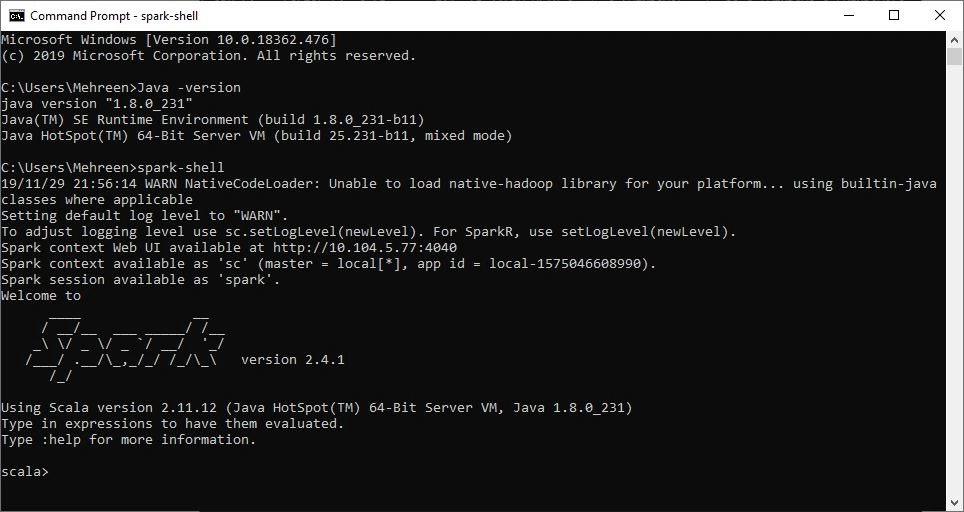
Spark shell allows you to run scala commands to use spark and experiment with data by letting you read and process files.
Note
you can exit Spark-shell by typing :q.
We’ve successfully configured our environment for .Net for Apache Spark. Now we’re ready to create our .Net application for Apache Spark.
Let’s get started…
For the sake of this post, I’ll be creating .Net core console application using Visual Studio 2019. Please note that you can also create .Net runtime application.
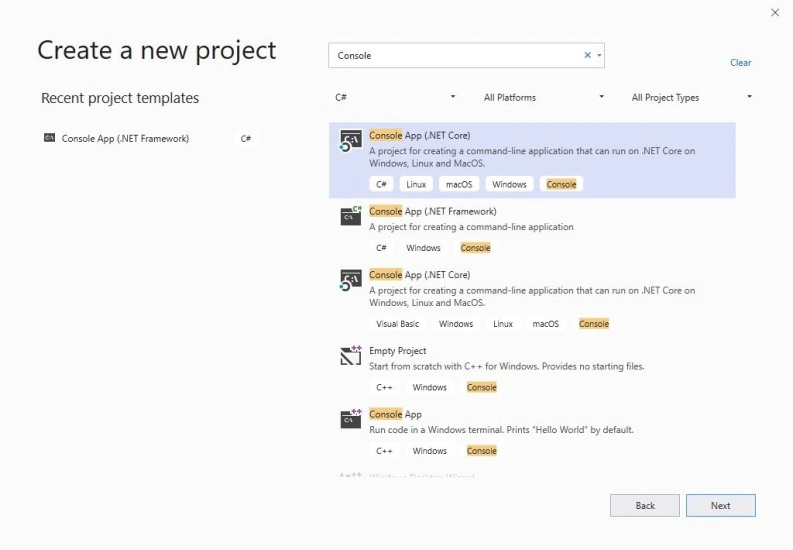
Once Visual Studio is done creating the template, we need to add .Net Spark Nuget package.
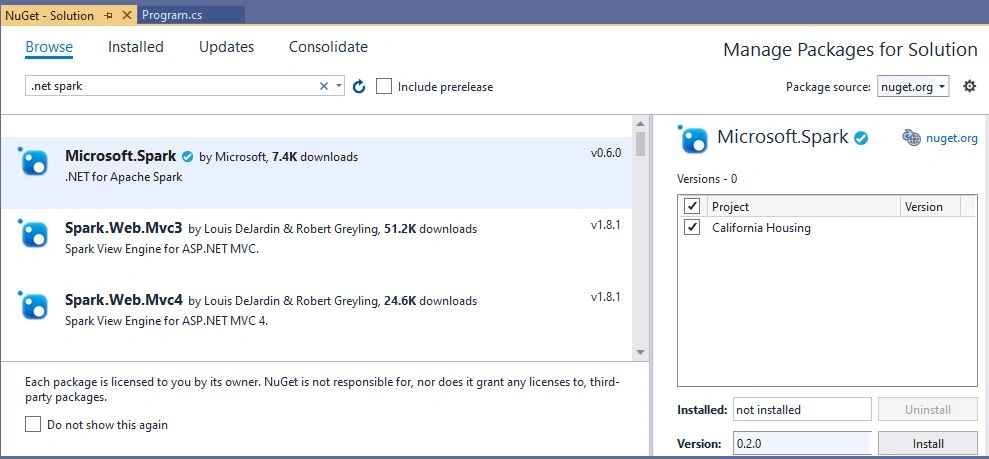
After the Nuget package is added to the project, you’ll see 2 jar files added to the solution. Now we’re in a position to initialize spark session in the program.
- using Microsoft.Spark.Sql;
- namespace California_Housing
- {
- class Program
- {
- static void Main(string[] args)
- {
- SparkSession Spark = SparkSession
- .Builder()
- .GetOrCreate();
- DataFrame df = Spark
- .Read()
- .Option("inferSchema", true)
- .Csv("housing.csv");
- df = df.ToDF("longitude", "latitude", "housing_median_age", "total_rooms", "total_bedrooms", "population", "households", "median_income", "median_house_value", "ocean_proximity");
- df.PrintSchema();
- df.Show();
- }
- }
- }
The above code creates a new SparkSession or get one if already created. The retrieved instance will provide a single entry point and all the necessary APIs to interact with the underlying spark functionality and enables communication with .Net implementation.
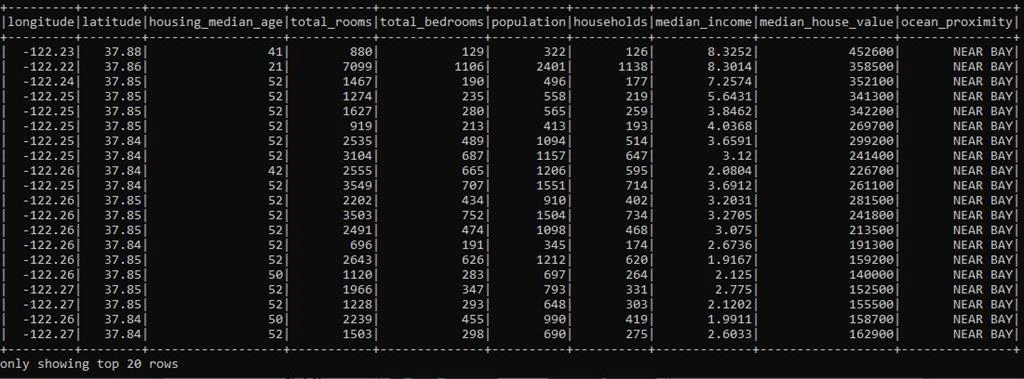
The next step is to load the data that’ll be used by the application. (Here I’m using California Housing data housing.csv). Spark.Read()allows Spark session to read from the CSV file. The data is loaded into DataFrame by automatically inferring the columns. Once the file is read, the schema will be printed and first 20 records will be shown.
The program is pretty simple. Build and try to run you solution and see what happens.
You’ll notice that you cannot simply run this program from inside visual studio. Instead, we first need to run Spark so it could load the .Net driver to execute the program. Apache Spark provides spark-submit tool command to send and execute the .Net core code. Take a look at the following command.
- $ spark-submit --class org.apache.spark.deploy.dotnet.DotnetRunner --master local microsoft-spark-2.4.x-0.x.0.jar dotnet <compiled_dll_filename>
Note here, that we need to provide complied dll file names as parameter to execute our program. Navigate to the Project solution folder e.g. C:\Users\Mehreen\Desktop\California Housing\California Housing and run the following command to execute your program.
- $ spark-submit --class org.apache.spark.deploy.DotnetRunner --master local "bin\Debug\netcoreapp3.0\microsoft-spark-2.4.x-0.2.0.jar" dotnet "bin\Debug\netcoreapp3.0\California Housing.dll"
You’ll get a lot of Java IO exceptions which can be successfully ignored at this stage or you can also stop them. Spark folder contains the conf directory. Append the following lines at the end of log4j.propertiesfile under conf directory to stop these exceptions.
- log4j.logger.org.apache.spark.util.ShutdownHookManager=OFF
- log4j.logger.org.apache.spark.SparkEnv=ERROR
Let’s move to the interesting part and take a look at the PrintSchema()which shows the columns of our csv file along with data type.
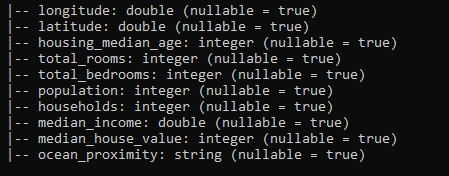
And the displayed rows by Show() method.
What’s going on under the hood?
When creating the application I mentioned that both .Net core and .Net framework can be used to create a Spark program. Why’s that? And what exactly is happening with our .Net Spark code? To answer that question, take a look at the following image and try to make sense of it.
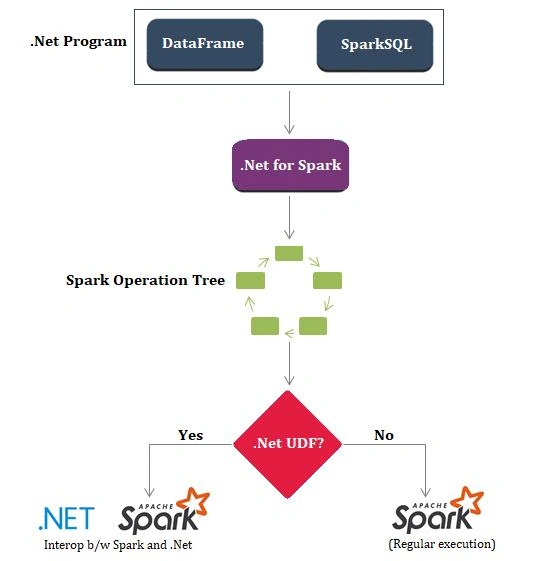
Do you remember the jar files added to the solution when we added Microsoft.Spark Nuget package? The Nuget Package adds .Net driver to the .Net program and ships .Net library as well as two jar files that you saw. The .Net driver is compiled as .Net standard so it doesn’t matter much which you’re using .Net core or .Net runtime; while both of the jar files are used to communicate with the underlying native Scala APIs of Apache Spark and the basic execution remains the same.
What else can be done…
Now that we know how things work under the hood, let’s do some tweaks to our code and see what else can we do.
Dropping unnecessary columns
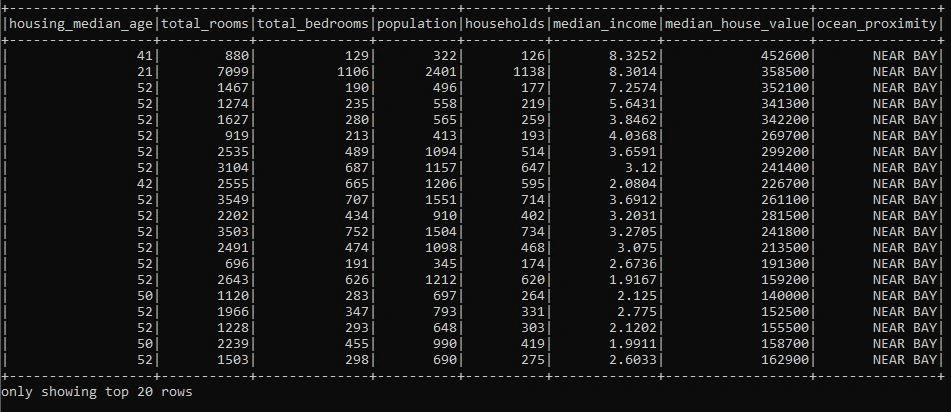
Since we’re dealing with huge amount of data, there might be unnecessary columns. We can simply drop those columns by using Drop()function.
- var CleanedDF = df.Drop("longitude", "latitude");
- CleanedDF.Show();
Data Transformation
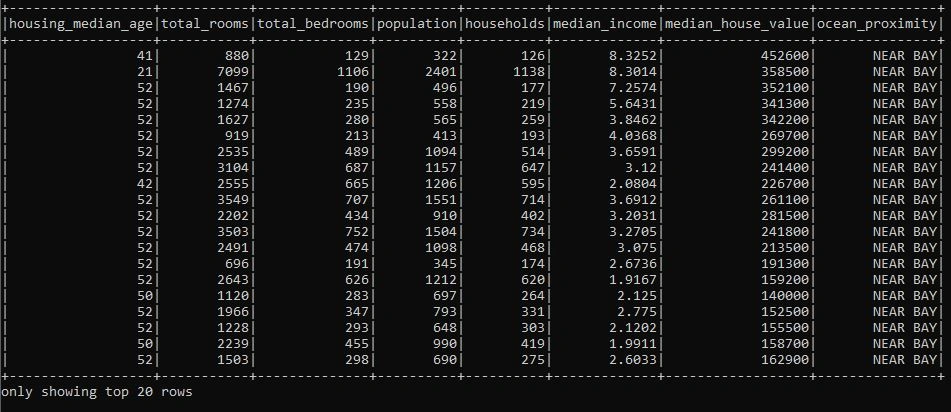
Apache Spark allows you to filter data using columns. For instance, we might be interested in the only the properties near Bay Area. We can use the following Code to filter out the data of properties in the given region.
- var FilteredDF = CleanedDF.Where("ocean_proximity = 'NEAR BAY'");
- FilteredDF.Show();
- Console.WriteLine($"There are {FilteredDF.Count()} properties near Bay Area");
// There are 2290 properties near the Bay Area
Note
The output might look the same here but I would encourage you to try fetching data e.g. INLAND properties and you'll see the difference.
We can also iterate over a column using Select() method i.e. to get the total population of the area.
- var sumDF = CleanedDF.Select(Functions.Sum(CleanedDF.Col("population")));
- var sum = sumDF.Collect().FirstOrDefault().GetAs<int>(0);
- Console.WriteLine($"Total population is: {sum}");
// Total population is: 29421840
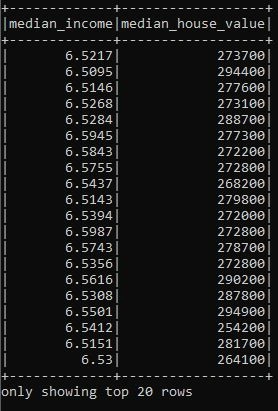
Let’s see another example using Select() and Filter() method where we are interested in getting values that falls in a specific range.
- var SelectedDF = CleanedDF.Select("median_income", "median_house_value")
- .Filter(CleanedDF["median_income"].Between(6.5000, 6.6000) & CleanedDF["median_house_value"].Between(250000, 300000));
- SelectedDF.Show();
The above code will only output the entries that have median_income between 6.5 – 6.6 and median_house_value between 250000 – 300000.
You can also use other functions like GroupBy(), Map() etc but I'll leave that upto you to experiment with.
What’s next?
This article was meant to give you a quick introduction and getting started guide using .Net for Apache Spark. It’s easy to see that .Net implementation brings the full power of Apache Spark for .Net developers. Moreover, you can also write cross platform programs using .Net for Apache Spark. Microsoft is investing a lot in .Net framework. The .Net implementation of Apache Spark can also be used with ML.Net and a lot of complex machine learning tasks can also be performed. Feel free to experiment along.
Sarathlal SaseendranPosted Dec 4, 2019, 10:24 AM
Very good article sister. I am also planning some articles on Spark with .NET. Looking for some real use cases.