

This article shows you how to bind a CheckedListbox of a Windows Forms form using C#, where we will use one CheckedListBox control and on a button click the data is bound to the control.
Initial chamber
Step 1
Open Visual Studio 2010, Go to File, then New, Projects and under Visual C# select Windows.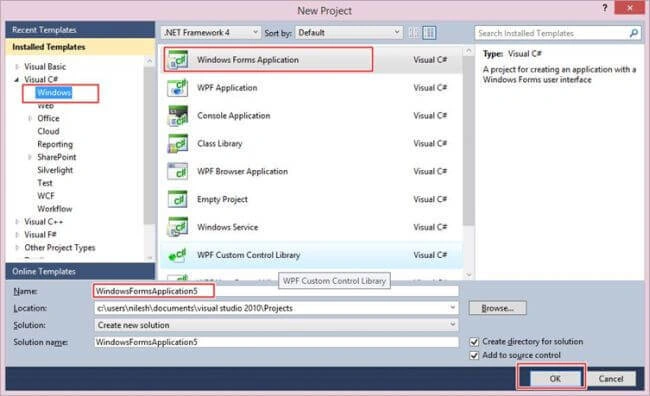
You can change the name of the project and can place your project in a different location too. Then press OK.
Step 2
In Solution Explorer you will get your project, add a Service Based Database. This is added by right-clicking, then selecting Add New Item and selecting Service Based Database.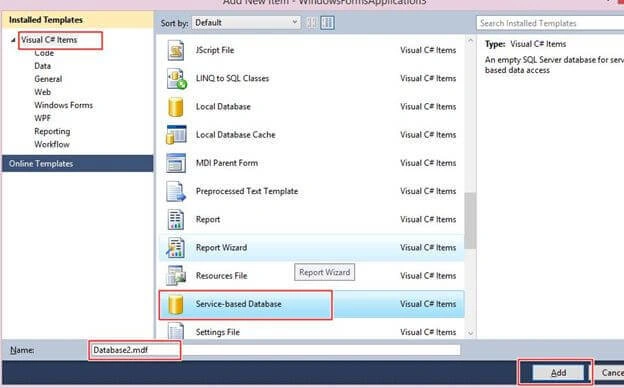
Database chamber
Step 3
Go to your database (database.mdf) and create a table tbl_Data. Go to database.mdf, select Table and Add New table. Design your table as in the following: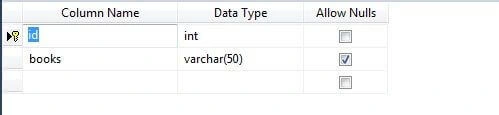
Show tbl_data: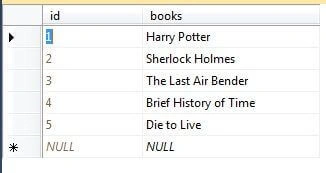
Design chamber
Step 4
Now open your Form1.cs file, where we will create our design for CheckedListBox Binding.
We will drag CheckedListBox from the toolbox to Form1.cs.
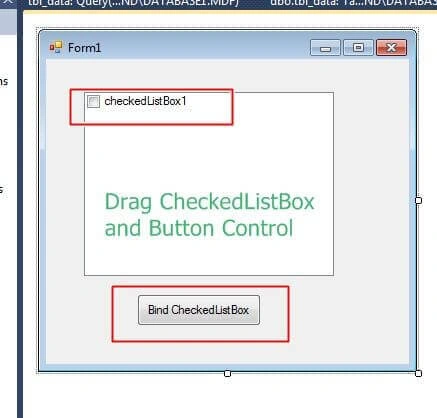
Code chamber
Right-click on the blank part of Form1.cs and View Code. Write the following code and then press F5 to run the project.
- using System;
- using System.Collections.Generic;
- using System.ComponentModel;
- using System.Data;
- using System.Drawing;
- using System.Linq;
- using System.Text;
- using System.Windows.Forms;
- using System.Data.SqlClient;
- namespace CheckBoxBind
- {
- public partial class Form1 : Form
- {
- public Form1()
- {
- InitializeComponent();
- }
- private void button1_Click(object sender, EventArgs e)
- {
- SqlConnection con = new SqlConnection(@"Data Source=.\SQLEXPRESS;AttachDbFilename=|DataDirectory|\Database1.mdf;Integrated Security=True;User Instance=True");
- SqlCommand cmd = new SqlCommand("select * from tbl_data", con);
- SqlDataAdapter sda = new SqlDataAdapter(cmd);
- DataTable dt = new DataTable();
- sda.Fill(dt);
- for (int i = 0; i < dt.Rows.Count; i++)
- {
- checkedListBox1.Items.Add(dt.Rows[i]["books"].ToString());
- }
- }
- }
- }
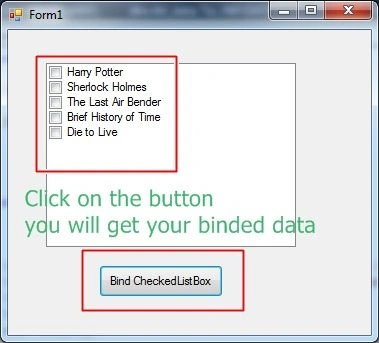
I hope you liked this. Thank you for reading. Have a good day.
Arul RPosted Oct 28, 2015, 5:34 AM
Good one !!!
Yashwanth MuthineniPosted Aug 19, 2015, 6:25 AM
Nice Share
Santhakumar MunuswamyPosted Aug 12, 2015, 3:04 PM
Good Article. Thanks for sharing
Sibeesh VenuPosted Aug 11, 2015, 2:22 AM
Nice Share
Ankit BansalPosted Aug 11, 2015, 12:36 AM
good nilesh...
Pankaj Kumar ChoudharyPosted Aug 10, 2015, 8:49 PM
Nice Explain Nilesh Sir...........
Nipesh JanghelPosted Aug 10, 2015, 11:59 AM
Good!!
Gopi ChandPosted Aug 10, 2015, 9:32 AM
Nice one
Upendra Pratap ShahiPosted Aug 10, 2015, 5:03 AM
nice Nilesh Jadav sir
Vipul MalhotraPosted Aug 10, 2015, 5:01 AM
Nice article
Debasis SahaPosted Aug 10, 2015, 3:34 AM
Good one....
Rajeesh MenothPosted Aug 10, 2015, 3:21 AM
Simple and informative..