

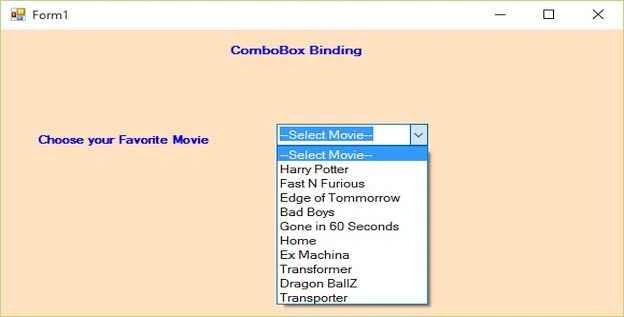
We make one table and bind that data to our ComboBox.
Initial chamber
Step 1: Open Your Visual Studio 2010, Go to File, New, Projects and under Visual C#, go to Windows.
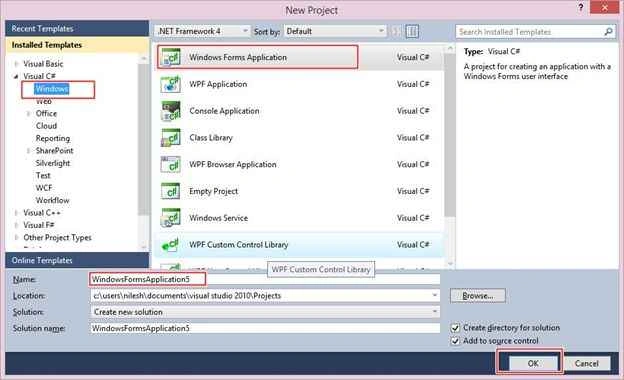
You can change the name of the project and browse your project to different location too. And then press OK.
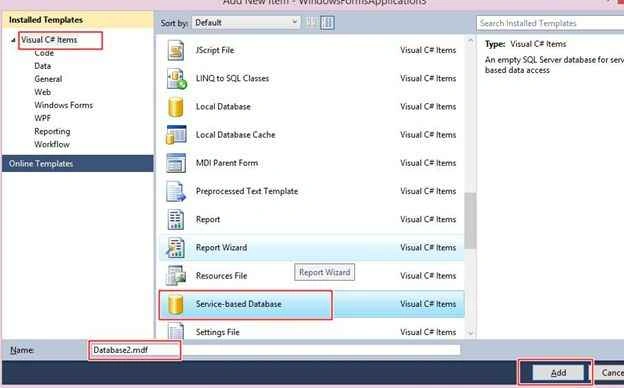
Step 2: In Solution Explorer you get your Project, Add Service Based Database. By going to your Project, Right Click and Add New Item, then Service Based Database.
Database chamber
Step 3: Get to your Database [Database.mdf], we will create a table tbl_Data. Go to the database.mdf, Table and Add New table. Design your table like this following:
Tbl_data:
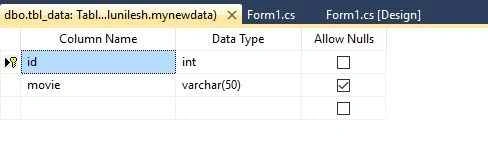
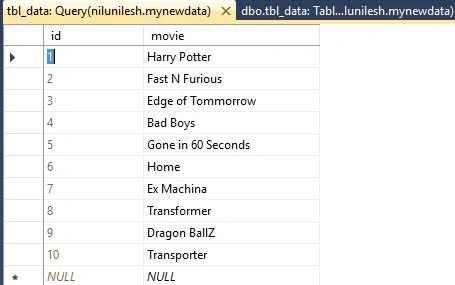
Show tbl_data:
Design chamber
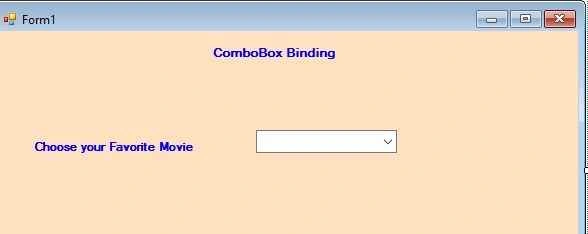
Step 4: Now open your Form1.cs[Design] file, where we create our design for ComboBox Binding.
We will drag ComboBox from the tool box to Form1.cs [Design], you will see your Form look like the following:
Code chamber
Right Click on the blank part of Form1.cs, then View Code. You will see you entered in the code part of the form. Write the following code and then press F5 to run the project.
- using System;
- using System.Collections.Generic;
- using System.ComponentModel;
- using System.Data;
- using System.Drawing;
- using System.Linq;
- using System.Text;
- using System.Windows.Forms;
- using System.Data.SqlClient;
- namespace WindowsFormsApplication1
- {
- public partial class Form1 : Form
- {
- public Form1()
- {
- InitializeComponent();
- refreshdata();
- }
- public void refreshdata()
- {
- DataRow dr;
- SqlConnection con = new SqlConnection(@"Data Source=NiluNilesh;Initial Catalog=mynewdata;Integrated Security=True");
- con.Open();
- SqlCommand cmd = new SqlCommand("select * from tbl_data", con);
- SqlDataAdapter sda = new SqlDataAdapter(cmd);
- DataTable dt = new DataTable();
- sda.Fill(dt);
- dr = dt.NewRow();
- dr.ItemArray = new object[] { 0, "--Select Movie--" };
- dt.Rows.InsertAt(dr, 0);
- comboBox1.ValueMember = "id";
- comboBox1.DisplayMember = "movie";
- comboBox1.DataSource = dt;
- con.Close();
- }
- }
- }
Hope you like this. Thank you for reading. Have a good day.
Jiyaul MustaphaPosted Sep 2, 2019, 1:57 AM
Private void BindVendorDDL() { ddlVendor.Items.Clear(); DataTable dt = new DataTable(); dt = bl.BindCompanyDLL(); if (dt.Rows.Count > 0) { ddlVendor.Text = "--Select--"; for (int i = 0; i < dt.Rows.Count; i++) { ddlVendor.Items.Add(dt.Rows[i]["Vendor_name"].ToString()); } } }
akshay shakyaPosted Jul 25, 2018, 2:49 AM
Awesome. way of explanation
ambati chawlaPosted Jun 26, 2017, 8:08 AM
Will u please keep the properties of all the toolbox events in c-SharpCorner
Ibrahim WasiuPosted May 3, 2017, 9:38 AM
I rily grateful with the solution you share with us. God will crown your effort to success.
Arul RPosted Oct 28, 2015, 5:33 AM
Good one !!!
Santhakumar MunuswamyPosted Sep 22, 2015, 3:07 PM
Nice Article. Thanks for sharing
Karthikeyan KPosted Sep 21, 2015, 11:38 PM
Good one sir...
Vinodh NarayananPosted Sep 21, 2015, 12:51 PM
nice share]
RakeshPosted Sep 21, 2015, 9:55 AM
Good one
Sujeet SumanPosted Sep 21, 2015, 8:37 AM
Good Article
Harshad PansuriyaPosted Sep 21, 2015, 7:11 AM
Nice one
Ankit BansalPosted Sep 21, 2015, 6:14 AM
good one...