

Introduction
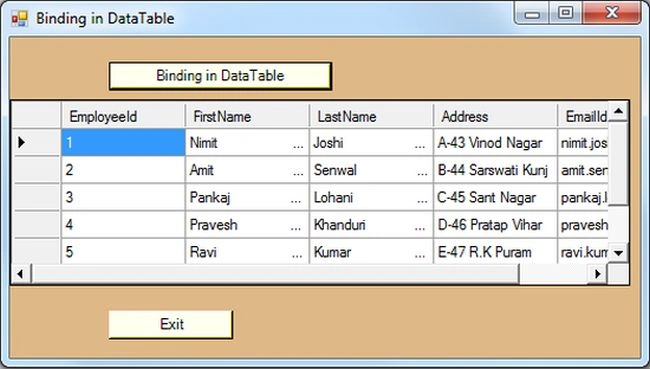
In this article I have explained the DataTable class and the properties and methods of the DataTable class. You will then see how to bind records in a data table from the database in a Windows Forms application. I have used SQL Server 2012 for the database and a Windows Forms form for the front-end.
DataTable
The DataTable class is part of the "System.Data" namespace in the .Net framework. There are many binding controls available in the .NET library that allow you to bind the values to controls. DataTable is one of the important classes; generally you fetch the data from the database and fill the data into the data containers in a DataTable and then bind the data to binding controls, such a DataGridView, DataList and so on. A DataTable is a subset of a table that is represented in memory data. A DataTable object works in a disconnected environment that allows users to create a single table.
Properties
The following are the properties of the DataTable class:
- Columns: Represents all table columns.
- Primary Key: Represents an array of columns that function as the primary key for the table.
- Rows: All rows of the data table.
- TableName: Name of the table.
- Constraints: Represents all table constraints.
Methods
The following are the methods of the DataTable class:
- NewRow: Creates a new row, that is added by the Rows.Add method.
- Clear: Deletes all data table data.
- Clone: Creates a clone of a DataTable, including its schema.
- Copy: Copies a data table, including its schema.
- Reset: Resets a data table to its original state.
- Select: Gets an array of rows based on the criteria.
Create Database and Table in SqlServer
The following is a sample of creating a database and table in SQL Server:
create database Records
use Records
create table EmployeeDetails(
EmployeeId int,
FirstName varchar(max),
LastName varchar(max),Address nvarchar(max),
EmailId nvarchar(max)
)
The following is a sample of inserting values into a database table's fields:
insert into EmployeeDetails values(1,'Nimit','Joshi','A-43 Vinod Nagar','nimit.joshi@gmail.com')
insert into EmployeeDetails values(2,'Amit','Senwal','B-44 Sarswati Kunj','amit.senwal@gmail.com')
insert into EmployeeDetails values(3,'Pankaj','Lohani','C-45 Sant Nagar','pankaj.lohani@gmail.com')
insert into EmployeeDetails values(4,'Pravesh','Khanduri','D-46 Pratap Vihar','pravesh.khanduri@gmail.com')
insert into EmployeeDetails values(5,'Ravi','Kumar','E-47 R.K Puram','ravi.kumar@gmail.com')
insert into EmployeeDetails values(6,'Ainul','Hasan','F-48 South-X','ainul.hasan@gmail.com')
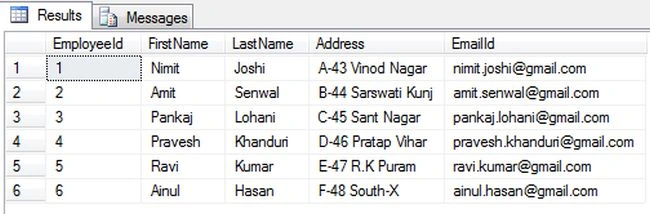
Now write the querty to check the values are inserted as in the following:
select * from EmployeeDetails
Join the conversation! Your thoughts help the community grow.