

In modern microservices architectures, front-end clients—such as Single Page Applications (SPAs), iOS/Android apps, and IoT dashboards—often require data from multiple underlying business domains. When clients interact directly with individual microservices or through a single monolithic API Gateway, performance bottlenecks and tight coupling inevitably emerge.
dynamic enterprise systems solve this friction using the Backend for Frontend (BFF) pattern: an architectural approach where dedicated backend services are built specifically to serve the unique operational, data-shaping, and security requirements of individual client interfaces.
What Is the BFF Pattern?
The BFF pattern introduces an intermediate layer between front-end interfaces and downstream microservices. Rather than forcing web, mobile, and third-party clients to consume a one-size-fits-all API, each client type communicates with its own tailored backend service.
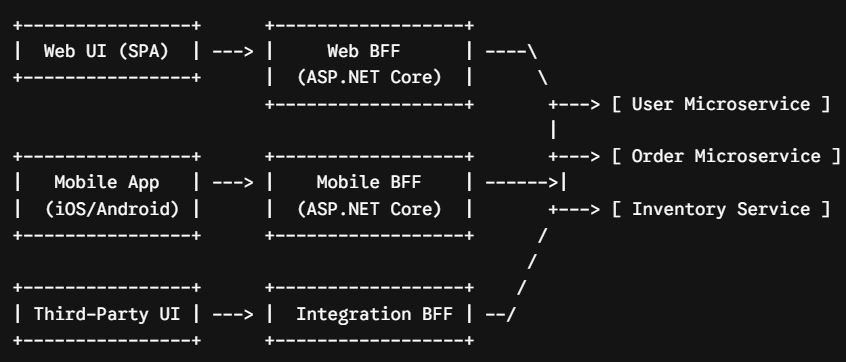
Key Scenarios for BFF in Enterprise Applications
1. API Aggregation and Latency Reduction
A single enterprise dashboard screen—such as a Customer Account Hub—might require data from User Profile, Billing, Notifications, and Activity Log microservices.
Without a BFF, a mobile client must make four separate HTTP calls over cellular networks. With a C# BFF located in the same cloud region as the microservices, the client makes one request. The BFF executes the four downstream calls concurrently over high-speed internal networks, aggregates the payload, and returns a single response.
2. Payload Shaping and Bandwidth Optimization
Mobile devices operating on metered or high-latency networks require lean JSON payloads. Desktop web applications, by contrast, have ample screen real estate and bandwidth to display extended descriptions, nested relationships, and rich metadata.
Each BFF formats the downstream data specifically for its client, trimming unused DTO fields before serialization.
3. Server-Side Security and Token Management
Storing JSON Web Tokens (JWTs) or OAuth refresh tokens in browser storage (localStorage or sessionStorage) exposes enterprise systems to Cross-Site Scripting (XSS) risks.
Using the BFF Security Pattern, the ASP.NET Core BFF manages token acquisition and renewal server-side. The browser client interacts with the BFF using encrypted, HttpOnly, SameSite=Strict cookies. The BFF automatically strips the cookie and injects the corresponding Authorization: Bearer <token> header into downstream requests.
4. Protocol Translation
Internal enterprise microservices frequently communicate over high-performance binary protocols like gRPC or message buses like RabbitMQ/Kafka. Browsers cannot easily communicate with native gRPC or message queues. The BFF acts as an entry point, translating standard REST/JSON client requests into gRPC calls across internal networks.
C# Implementation: Production-Grade BFF Controller
The following ASP.NET Core implementation demonstrates parallel execution, partial error handling (graceful degradation), and DTO shaping for a Mobile BFF.
1. Client-Tailored DTOs
namespace EnterpriseApp.MobileBff.Models;

public record MobileDashboardResponse(
    string UserId,
    string DisplayName,
    decimal AccountBalance,
    List<RecentOrderDto> RecentOrders,
    bool SystemStatusWarning // Set if non-critical services are degraded
);

public record RecentOrderDto(string OrderId, decimal Amount, string Status);
2. Aggregator Controller with Graceful Degradation
using System.Net.Http.Json;
using EnterpriseApp.MobileBff.Models;
using Microsoft.AspNetCore.Mvc;

namespace EnterpriseApp.MobileBff.Controllers;

[ApiController]
[Route("api/mobile/v1/[controller]")]
public class DashboardController : ControllerBase
{
    private readonly IHttpClientFactory _httpClientFactory;
    private readonly ILogger<DashboardController> _logger;

    public DashboardController(IHttpClientFactory httpClientFactory, ILogger<DashboardController> logger)
    {
        _httpClientFactory = httpClientFactory;
        _logger = logger;
    }

    [HttpGet("{userId}")]
    public async Task<IActionResult> GetDashboard(string userId, CancellationToken cancellationToken)
    {
        var userClient = _httpClientFactory.CreateClient("UserService");
        var billingClient = _httpClientFactory.CreateClient("BillingService");
        var orderClient = _httpClientFactory.CreateClient("OrderService");

        // Initiate parallel asynchronous requests
        var userTask = FetchSafelyAsync(() =>
            userClient.GetFromJsonAsync<UserProfileDto>($"api/users/{userId}", cancellationToken), _logger);

        var billingTask = FetchSafelyAsync(() =>
            billingClient.GetFromJsonAsync<BillingAccountDto>($"api/billing/{userId}", cancellationToken), _logger);

        var ordersTask = FetchSafelyAsync(() =>
            orderClient.GetFromJsonAsync<List<OrderDto>>($"api/orders/user/{userId}?limit=3", cancellationToken), _logger);

        // Await all tasks concurrently
        await Task.WhenAll(userTask, billingTask, ordersTask);

        var user = await userTask;
        var billing = await billingTask;
        var orders = await ordersTask;

        // Core business verification: If user profile fails, fail the request
        if (user == null)
        {
            return StatusCode(StatusCodes.Status502BadGateway,
                new { Message = "Core user profile service is currently unavailable." });
        }

        // Non-critical failures degrade gracefully with default fallbacks
        bool isDegraded = billing == null || orders == null;

        var response = new MobileDashboardResponse(
            UserId: user.Id,
            DisplayName: $"{user.FirstName} {user.LastName}",
            AccountBalance: billing?.CurrentBalance ?? 0.00m,
            RecentOrders: orders?.Select(o => new RecentOrderDto(o.Id, o.Total, o.Status)).ToList() ?? new(),
            SystemStatusWarning: isDegraded
        );

        return Ok(response);
    }

    private static async Task<T?> FetchSafelyAsync<T>(Func<Task<T?>> fetchFunc, ILogger logger)
    {
        try
        {
            return await fetchFunc();
        }
        catch (Exception ex)
        {
            logger.LogError(ex, "Downstream microservice call failed in BFF layer.");
            return default;
        }
    }
}
Architectural Resilience and Microservice Failure Modes
In an enterprise BFF, downstream failures must be planned for using structured fault-tolerance policies:
Circuit Breaking and Retries (Polly): Wrap HTTP clients registered in
Program.cswith resilience pipelines (e.g.,Microsoft.Extensions.Http.Resilience) to retry transient network glitches automatically before failing over.Partial Success (HTTP 200 with Fallbacks): If a non-essential service (such as Product Recommendations) fails, return a
200 OKresponse with empty lists or default flags so the UI continues rendering core features.Fail-Fast (HTTP 502/503): If a critical service (such as Identity or Core Payment) fails, abort processing early to preserve backend bandwidth and issue an explicit error status to the client.
When to Adopt the BFF Pattern
| Recommended Use Cases | Anti-Patterns / When to Avoid |
|---|---|
| Distinct web and mobile applications requiring significantly different payload shapes. | Simple applications with a single front-end client interface. |
| SPAs requiring server-side cookie-to-token security translation. | Small development teams where managing additional microservice deployments creates operational strain. |
| High-latency client networks requiring server-side request aggregation (Task.WhenAll). | Architectures where the BFF starts duplicating business logic instead of delegating to core microservices. |
Conclusion
The BFF pattern acts as a dedicated boundary layer in C# enterprise systems, preserving front-end independence, enforcing robust edge security, and ensuring microservice architectures remain performant under scale.
Join the conversation! Your thoughts help the community grow.