

In my previous post in C# Corner, we saw how to get RSS feeds from C# Corner site and display the data in a Blazor project. We saw all the post by an author, all featured posts, all latest posts, and the top read posts.
In this post, we will see the RSS feeds from the C# Corner site with pagination. We will see ten rows at a time on a page and we can have the previous, next, first and last, buttons to navigate the data as our wish. We will provide all the posts by an author, featured articles list, latest posts (all types), latest articles, latest blogs, and top read articles.
- Single Page Application With Blazor And CosmosDB
- Blazor - CRUD Using PostgreSQL And Entity Framework Core
- Blazor - Connect With Amazon DynamoDB Using AWS SDK
- Blazor - Work With Cassandra API In Cosmos DB
- Localization In Blazor App Using Microsoft.JSInterop
- Blazor - Create SPA With Azure Database For MariaDB Server
- Blazor - Connect With Oracle Database In Amazon RDS
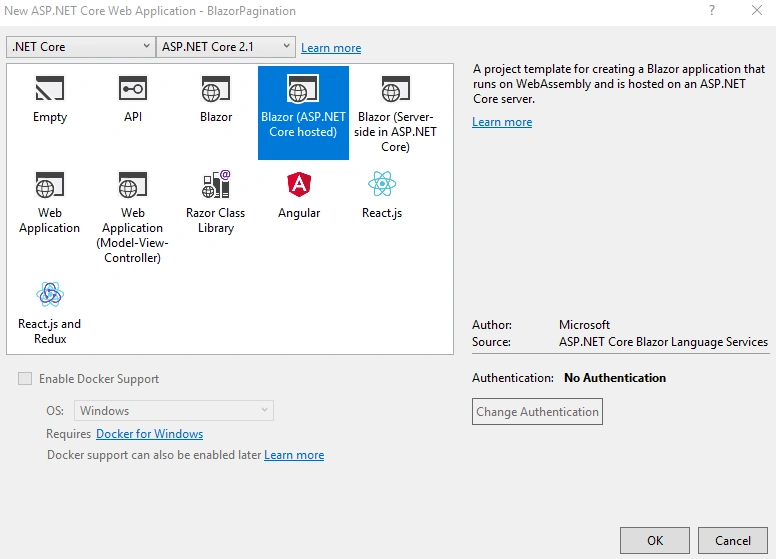
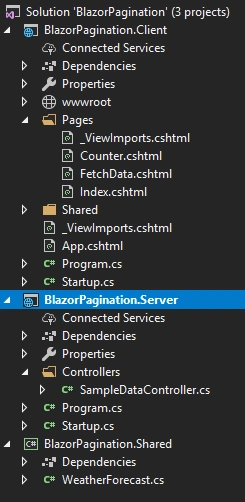
By default, Blazor created many files in these three projects. We can remove all the unwanted files like “Counter.cshtml”, “FetchData.cshtml”, “SurveyPrompt.cshtml” from Client project and “SampleDataController.cs” file from Server project and remove “WeatherForecast.cs” file from shared project too.
- namespace BlazorPagination.Shared.Pagination
- {
- public abstract class PagedResultBase
- {
- public int CurrentPage { get; set; }
- public int PageCount { get; set; }
- public int PageSize { get; set; }
- public int RowCount { get; set; }
- }
- }
This class will be used as base class for other pagination classes. This will contain properties like “CurrentPage”, ”PageCount”, “PageSize” and “RowCount”
- using System.Collections.Generic;
- namespace BlazorPagination.Shared.Pagination
- {
- public class PagedResult<T> : PagedResultBase where T : class
- {
- public IList<T> Results { get; set; }
- public PagedResult()
- {
- Results = new List<T>();
- }
- }
- }
Create a new “Models” folder in “Shared” project and add a “Feed” class file inside this folder. We will add two classes, “AuthorPosts” and “Feed” inside this class file.
- using BlazorPagination.Shared.Pagination;
- using System;
- namespace BlazorPagination.Shared.Models
- {
- public class AuthorPosts
- {
- public string AuthorName { get; set; }
- public PagedResult<Feed> Feeds { get; set; }
- }
- public class Feed
- {
- public string Link { get; set; }
- public string Title { get; set; }
- public string FeedType { get; set; }
- public string Author { get; set; }
- public string Content { get; set; }
- public DateTime PubDate { get; set; }
- public string PublishDate { get; set; }
- public Feed()
- {
- Link = "";
- Title = "";
- FeedType = "";
- Author = "";
- Content = "";
- PubDate = DateTime.Today;
- PublishDate = DateTime.Today.ToString("dd-MMM-yyyy");
- }
- }
- }
We have used above “PagedResult” generic type inside this "AuthorPosts” class.
We can create a new folder “Extensions” inside “Server” project and add a static class “PagedResultExtensions” inside this folder.
- using BlazorPagination.Shared.Pagination;
- using System;
- using System.Collections.Generic;
- using System.Linq;
- namespace BlazorPagination.Server.Extensions
- {
- public static class PagedResultExtensions
- {
- public static PagedResult<T> GetPagedResult<T>(this IEnumerable<T> query, int page, int pageSize) where T : class
- {
- var result = new PagedResult<T>
- {
- CurrentPage = page,
- PageSize = pageSize,
- RowCount = query.Count()
- };
- var pageCount = (double)result.RowCount / pageSize;
- result.PageCount = (int)Math.Ceiling(pageCount);
- var skip = (page - 1) * pageSize;
- result.Results = query.Skip(skip).Take(pageSize).ToList();
- return result;
- }
- }
- }
We have added a static “GetPagedResult” method in this class. We will use this static method as an extension method later in this post.
- readonly CultureInfo culture = new CultureInfo("en-US");
- [Route("allpostsbyauthor/{authorId}/{page}")]
- [HttpGet]
- public AuthorPosts GetPage(int page, string authorId)
- {
- AuthorPosts authorPosts = new AuthorPosts();
- try
- {
- XDocument doc = XDocument.Load("https://www.c-sharpcorner.com/members/" + authorId + "/rss");
- var entries = from item in doc.Root.Descendants().First(i => i.Name.LocalName == "channel").Elements().Where(i =>
- i.Name.LocalName == "item")
- select new Feed
- {
- Content = item.Elements().First(i => i.Name.LocalName == "description").Value,
- Link = (item.Elements().First(i => i.Name.LocalName == "link").Value).StartsWith("/") ? "https://www.c-sharpcorner.com" + item.Elements().First(i => i.Name.LocalName == "link").Value : item.Elements().First(i => i.Name.LocalName == "link").Value,
- PubDate = Convert.ToDateTime(item.Elements().First(i => i.Name.LocalName == "pubDate").Value, culture),
- PublishDate = Convert.ToDateTime(item.Elements().First(i => i.Name.LocalName == "pubDate").Value, culture).ToString("dd-MMM-yyyy"),
- Title = item.Elements().First(i => i.Name.LocalName == "title").Value,
- FeedType = (item.Elements().First(i => i.Name.LocalName == "link").Value).ToLowerInvariant().Contains("blog") ? "Blog" : (item.Elements().First(i => i.Name.LocalName == "link").Value).ToLowerInvariant().Contains("news") ? "News" : "Article",
- Author = item.Elements().First(i => i.Name.LocalName == "author").Value
- };
- authorPosts.AuthorName = entries.FirstOrDefault().Author;
- authorPosts.Feeds = entries.OrderByDescending(o => o.PubDate).GetPagedResult(page, 10);
- return authorPosts;
- }
- catch
- {
- authorPosts.AuthorName = "NOT FOUND!";
- PagedResult<Feed> feeds = new PagedResult<Feed>();
- Feed feed = new Feed();
- authorPosts.Feeds = feeds;
- return authorPosts;
- }
- }
Code for featured articles.
- [Route("featuredarticles/{page}")]
- [HttpGet]
- public PagedResult<Feed> Featured(int page)
- {
- try
- {
- XDocument doc = XDocument.Load("https://www.c-sharpcorner.com/rss/featuredarticles.aspx");
- var entries = from item in doc.Root.Descendants().First(i => i.Name.LocalName == "channel").Elements().Where(i =>
- i.Name.LocalName == "item")
- select new Feed
- {
- Content = item.Elements().First(i => i.Name.LocalName == "description").Value,
- Link = (item.Elements().First(i => i.Name.LocalName == "link").Value).StartsWith("/") ? "https://www.c-sharpcorner.com" + item.Elements().First(i => i.Name.LocalName == "link").Value : item.Elements().First(i => i.Name.LocalName == "link").Value,
- PubDate = Convert.ToDateTime(item.Elements().First(i => i.Name.LocalName == "pubDate").Value, culture),
- PublishDate = Convert.ToDateTime(item.Elements().First(i => i.Name.LocalName == "pubDate").Value, culture).ToString("dd-MMM-yyyy"),
- Title = item.Elements().First(i => i.Name.LocalName == "title").Value,
- FeedType = (item.Elements().First(i => i.Name.LocalName == "link").Value).ToLowerInvariant().Contains("blog") ? "Blog" : (item.Elements().First(i => i.Name.LocalName == "link").Value).ToLowerInvariant().Contains("news") ? "News" : "Article",
- Author = item.Elements().First(i => i.Name.LocalName == "author").Value
- };
- return entries.OrderByDescending(o => o.PubDate).GetPagedResult(page, 10);
- }
- catch
- {
- PagedResult<Feed> feeds = new PagedResult<Feed>();
- return feeds;
- }
- }
Code for latest posts (All Types).
- [Route("latestallposts/{page}")]
- [HttpGet]
- public PagedResult<Feed> LatestAllPosts(int page)
- {
- try
- {
- XDocument doc = XDocument.Load("https://www.c-sharpcorner.com/rss/latestcontentall.aspx");
- var entries = from item in doc.Root.Descendants().First(i => i.Name.LocalName == "channel").Elements().Where(i =>
- i.Name.LocalName == "item")
- select new Feed
- {
- Content = item.Elements().First(i => i.Name.LocalName == "description").Value,
- Link = (item.Elements().First(i => i.Name.LocalName == "link").Value).StartsWith("/") ? "https://www.c-sharpcorner.com" + item.Elements().First(i => i.Name.LocalName == "link").Value : item.Elements().First(i => i.Name.LocalName == "link").Value,
- PubDate = Convert.ToDateTime(item.Elements().First(i => i.Name.LocalName == "pubDate").Value, culture),
- PublishDate = Convert.ToDateTime(item.Elements().First(i => i.Name.LocalName == "pubDate").Value, culture).ToString("dd-MMM-yyyy"),
- Title = item.Elements().First(i => i.Name.LocalName == "title").Value,
- FeedType = (item.Elements().First(i => i.Name.LocalName == "link").Value).ToLowerInvariant().Contains("blog") ? "Blog" : (item.Elements().First(i => i.Name.LocalName == "link").Value).ToLowerInvariant().Contains("news") ? "News" : "Article",
- Author = item.Elements().First(i => i.Name.LocalName == "author").Value
- };
- return entries.OrderByDescending(o => o.PubDate).GetPagedResult(page, 10);
- }
- catch
- {
- PagedResult<Feed> feeds = new PagedResult<Feed>();
- return feeds;
- }
- }
Code for latest articles.
- [Route("latestarticles/{page}")]
- [HttpGet]
- public PagedResult<Feed> LatestArticles(int page)
- {
- try
- {
- XDocument doc = XDocument.Load("https://www.c-sharpcorner.com/rss/latestarticles.aspx");
- var entries = from item in doc.Root.Descendants().First(i => i.Name.LocalName == "channel").Elements().Where(i =>
- i.Name.LocalName == "item")
- select new Feed
- {
- Content = item.Elements().First(i => i.Name.LocalName == "description").Value,
- Link = (item.Elements().First(i => i.Name.LocalName == "link").Value).StartsWith("/") ? "https://www.c-sharpcorner.com" + item.Elements().First(i => i.Name.LocalName == "link").Value : item.Elements().First(i => i.Name.LocalName == "link").Value,
- PubDate = Convert.ToDateTime(item.Elements().First(i => i.Name.LocalName == "pubDate").Value, culture),
- PublishDate = Convert.ToDateTime(item.Elements().First(i => i.Name.LocalName == "pubDate").Value, culture).ToString("dd-MMM-yyyy"),
- Title = item.Elements().First(i => i.Name.LocalName == "title").Value,
- FeedType = "Article",
- Author = item.Elements().First(i => i.Name.LocalName == "author").Value
- };
- return entries.OrderByDescending(o => o.PubDate).GetPagedResult(page, 10);
- }
- catch
- {
- PagedResult<Feed> feeds = new PagedResult<Feed>();
- return feeds;
- }
- }
Code for latest blogs.
- [Route("latestblogs/{page}")]
- [HttpGet]
- public PagedResult<Feed> LatestBlogs(int page)
- {
- try
- {
- XDocument doc = XDocument.Load("https://www.c-sharpcorner.com/rss/blogs.aspx");
- var entries = from item in doc.Root.Descendants().First(i => i.Name.LocalName == "channel").Elements().Where(i =>
- i.Name.LocalName == "item")
- select new Feed
- {
- Content = item.Elements().First(i => i.Name.LocalName == "description").Value,
- Link = (item.Elements().First(i => i.Name.LocalName == "link").Value).StartsWith("/") ? "https://www.c-sharpcorner.com" + item.Elements().First(i => i.Name.LocalName == "link").Value : item.Elements().First(i => i.Name.LocalName == "link").Value,
- PubDate = Convert.ToDateTime(item.Elements().First(i => i.Name.LocalName == "pubDate").Value, culture),
- PublishDate = Convert.ToDateTime(item.Elements().First(i => i.Name.LocalName == "pubDate").Value, culture).ToString("dd-MMM-yyyy"),
- Title = item.Elements().First(i => i.Name.LocalName == "title").Value,
- FeedType = "Article",
- Author = item.Elements().First(i => i.Name.LocalName == "author").Value
- };
- return entries.OrderByDescending(o => o.PubDate).GetPagedResult(page, 10);
- }
- catch
- {
- PagedResult<Feed> feeds = new PagedResult<Feed>();
- return feeds;
- }
- }
Code for the top read posts
- [Route("topreadposts/{page}")]
- [HttpGet]
- public PagedResult<Feed> TopReadPosts(int page)
- {
- try
- {
- XDocument doc = XDocument.Load("https://www.c-sharpcorner.com/rss/toparticles.aspx");
- var entries = from item in doc.Root.Descendants().First(i => i.Name.LocalName == "channel").Elements().Where(i =>
- i.Name.LocalName == "item")
- select new Feed
- {
- Content = item.Elements().First(i => i.Name.LocalName == "description").Value,
- Link = (item.Elements().First(i => i.Name.LocalName == "link").Value).StartsWith("/") ? "https://www.c-sharpcorner.com" + item.Elements().First(i => i.Name.LocalName == "link").Value : item.Elements().First(i => i.Name.LocalName == "link").Value,
- PubDate = Convert.ToDateTime(item.Elements().First(i => i.Name.LocalName == "pubDate").Value, culture),
- PublishDate = Convert.ToDateTime(item.Elements().First(i => i.Name.LocalName == "pubDate").Value, culture).ToString("dd-MMM-yyyy"),
- Title = item.Elements().First(i => i.Name.LocalName == "title").Value,
- FeedType = "Article",
- Author = item.Elements().First(i => i.Name.LocalName == "author").Value
- };
- return entries.GetPagedResult(page, 10);
- }
- catch
- {
- PagedResult<Feed> feeds = new PagedResult<Feed>();
- return feeds;
- }
- }
We can go to “Client” project and add a Pager component inside the “Shared” folder so that, this component can be shared among all other pages in Blazor.
- @using BlazorPagination.Shared.Pagination
- @if (Result != null)
- {
- <div class="row">
- <div class="col-md-8 col-sm-8">
- @if (Result.PageCount > 1)
- {
- <ul class="pagination pull-right">
- <li><button type="button" onclick="@(() => PagerButtonClicked(1))" class="btn">«</button></li>
- @for (var i = StartIndex; i <= FinishIndex; i++)
- {
- var currentIndex = i;
- @if (i == Result.CurrentPage)
- {
- <li><span class="btn">@i</span></li>
- }
- else
- {
- <li><button type="button" onclick="@(() => PagerButtonClicked(currentIndex))" class="btn">@i</button></li>
- }
- }
- <li><button type="button" onclick="@(() => PagerButtonClicked(Result.PageCount))" class="btn">»</button></li>
- </ul>
- }
- </div>
- </div>
- }
- @functions {
- [Parameter]
- protected PagedResultBase Result { get; set; }
- [Parameter]
- protected Action<int> PageChanged { get; set; }
- protected int StartIndex { get; private set; } = 0;
- protected int FinishIndex { get; private set; } = 0;
- protected override void OnParametersSet()
- {
- StartIndex = Math.Max(Result.CurrentPage - 5, 1);
- FinishIndex = Math.Min(Result.CurrentPage + 5, Result.PageCount);
- base.OnParametersSet();
- }
- protected void PagerButtonClicked(int page)
- {
- PageChanged?.Invoke(page);
- }
- }
We can modify the “NavMenu.cshtml” razor file.
- <div class="top-row pl-4 navbar navbar-dark">
- <a class="navbar-brand" href="">Blazor Pagination</a>
- <button class="navbar-toggler" onclick=@ToggleNavMenu>
- <span class="navbar-toggler-icon"></span>
- </button>
- </div>
- <div class=@(collapseNavMenu ? "collapse" : null) onclick=@ToggleNavMenu>
- <ul class="nav flex-column">
- <li class="nav-item px-3">
- <NavLink class="nav-link" href="" Match=NavLinkMatch.All>
- <span class="oi oi-home" aria-hidden="true"></span> Home
- </NavLink>
- </li>
- <li class="nav-item px-3">
- <NavLink class="nav-link" href="/page">
- <span class="oi oi-list-rich" aria-hidden="true"></span> All Posts by an Author
- </NavLink>
- </li>
- <li class="nav-item px-3">
- <NavLink class="nav-link" href="/featuredarticles/1">
- <span class="oi oi-list-rich" aria-hidden="true"></span> Featured Articles
- </NavLink>
- </li>
- <li class="nav-item px-3">
- <NavLink class="nav-link" href="/latestallposts/1">
- <span class="oi oi-list-rich" aria-hidden="true"></span> Latest Posts
- </NavLink>
- </li>
- <li class="nav-item px-3">
- <NavLink class="nav-link" href="/latestarticles/1">
- <span class="oi oi-list-rich" aria-hidden="true"></span> Latest Articles
- </NavLink>
- </li>
- <li class="nav-item px-3">
- <NavLink class="nav-link" href="/latestblogs/1">
- <span class="oi oi-list-rich" aria-hidden="true"></span> Latest Blogs
- </NavLink>
- </li>
- <li class="nav-item px-3">
- <NavLink class="nav-link" href="/topreadposts/1">
- <span class="oi oi-list-rich" aria-hidden="true"></span> Top Read Posts
- </NavLink>
- </li>
- </ul>
- </div>
- @functions {
- bool collapseNavMenu = true;
- void ToggleNavMenu()
- {
- collapseNavMenu = !collapseNavMenu;
- }
- }
AllPostsByAuthor.cshtml
- @using BlazorPagination.Shared.Models
- @using BlazorPagination.Shared.Pagination
- @page "/page"
- @page "/page/{Page}"
- @inject HttpClient Http
- @inject Microsoft.AspNetCore.Blazor.Services.IUriHelper UriHelper
- <h4>C# Corner All Post Details by an Author</h4>
- <input placeholder="Enter Author Id" bind="@authorId" />
- <input type="button" class="btn btn-default" onclick="@(async () => await GetFeeds())" value="Get Posts" />
- <br />
- <br />
- <p><b>@author</b></p>
- @if (feeds == null || feeds.Results.Count == 0)
- {
- if (!pageLoaded && authorId != "" && author != "Invalid Author Id!")
- {
- <p><em>Loading...</em></p>
- }
- }
- else
- {
- if (!author.ToUpperInvariant().Contains("NOT FOUND") && author != "Invalid Author Id!" && authorId != "")
- {
- counter = (feeds.CurrentPage - 1) * 10;
- <table class="table table-striped">
- <thead>
- <tr>
- <th>Sl.No.</th>
- <th>Post Title</th>
- <th>Post Type</th>
- <th>Content</th>
- <th>Publish Date</th>
- </tr>
- </thead>
- <tbody>
- @foreach (var feed in feeds.Results)
- {
- counter++;
- <tr>
- <td>@counter</td>
- <td><NavLink href[email protected] target="_blank">@feed.Title</NavLink></td>
- <td>@feed.FeedType</td>
- <td>@feed.Content</td>
- <td>@feed.PublishDate</td>
- </tr>
- }
- </tbody>
- </table>
- <Pager Result=@feeds PageChanged=@PagerPageChanged />
- }
- }
- @functions{
- PagedResult<Feed> feeds;
- AuthorPosts authorPosts;
- string author;
- int counter;
- string @authorId;
- bool pageLoaded;
- [Parameter]
- protected string Page { get; set; } = "1";
- protected override void OnInit()
- {
- authorId = "";
- pageLoaded = true;
- author = "";
- }
- protected override async Task OnParametersSetAsync()
- {
- await LoadFeeds(int.Parse(Page));
- }
- private async Task GetFeeds()
- {
- feeds = null;
- pageLoaded = false;
- await LoadFeeds(1);
- }
- private async Task LoadFeeds(int page)
- {
- author = "";
- if (!pageLoaded)
- {
- if (authorId != "")
- {
- authorPosts = await Http.GetJsonAsync<AuthorPosts>("/api/feeds/allpostsbyauthor/" + authorId + "/" + page.ToString());
- if (authorPosts != null)
- {
- if (authorPosts.AuthorName.ToUpperInvariant().Contains("NOT FOUND"))
- {
- author = "Invalid Author Id!";
- }
- else
- {
- author = "Author Name : " + authorPosts.AuthorName;
- feeds = authorPosts.Feeds;
- }
- }
- }
- else
- {
- author = "Author Id should not be blank";
- }
- }
- }
- protected void PagerPageChanged(int page)
- {
- feeds = null;
- UriHelper.NavigateTo("/page/" + page);
- }
- }
FeaturedArticles.cshtml
- @using BlazorPagination.Shared.Models
- @using BlazorPagination.Shared.Pagination
- @page "/featuredarticles/{Page}"
- @inject HttpClient Http
- @inject Microsoft.AspNetCore.Blazor.Services.IUriHelper UriHelper
- <h4>C# Corner Featured Articles List</h4>
- @if (feeds == null)
- {
- <p><em>Loading...</em></p>
- }
- else
- {
- counter = (feeds.CurrentPage - 1) * 10;
- <table class="table table-striped">
- <thead>
- <tr>
- <th>Sl.No.</th>
- <th>Post Title</th>
- <th>Post Type</th>
- <th>Content</th>
- <th>Publish Date</th>
- <th>Author</th>
- </tr>
- </thead>
- <tbody>
- @foreach (var feed in feeds.Results)
- {
- counter++;
- <tr>
- <td>@counter</td>
- <td><NavLink href[email protected] target="_blank">@feed.Title</NavLink></td>
- <td>@feed.FeedType</td>
- <td>@feed.Content</td>
- <td>@feed.PublishDate</td>
- <td>@feed.Author</td>
- </tr>
- }
- </tbody>
- </table>
- <Pager Result=@feeds PageChanged=@PagerPageChanged />
- }
- @functions{
- PagedResult<Feed> feeds;
- string author;
- int counter;
- [Parameter]
- protected string Page { get; set; } = "1";
- protected override async Task OnParametersSetAsync()
- {
- await LoadFeeds(int.Parse(Page));
- }
- private async Task LoadFeeds(int page)
- {
- author = "";
- feeds = await Http.GetJsonAsync<PagedResult<Feed>>("/api/feeds/featuredarticles/" + page.ToString());
- }
- protected void PagerPageChanged(int page)
- {
- feeds = null;
- UriHelper.NavigateTo("/featuredarticles/" + page);
- }
- }
LatestAllPosts.cshtml
- @using BlazorPagination.Shared.Models
- @using BlazorPagination.Shared.Pagination
- @page "/latestallposts/{Page}"
- @inject HttpClient Http
- @inject Microsoft.AspNetCore.Blazor.Services.IUriHelper UriHelper
- <h4>C# Corner Latest Posts (All Types) List</h4>
- @if (feeds == null)
- {
- <p><em>Loading...</em></p>
- }
- else
- {
- counter = (feeds.CurrentPage - 1) * 10;
- <table class="table table-striped">
- <thead>
- <tr>
- <th>Sl.No.</th>
- <th>Post Title</th>
- <th>Post Type</th>
- <th>Content</th>
- <th>Publish Date</th>
- <th>Author</th>
- </tr>
- </thead>
- <tbody>
- @foreach (var feed in feeds.Results)
- {
- counter++;
- <tr>
- <td>@counter</td>
- <td><NavLink href[email protected] target="_blank">@feed.Title</NavLink></td>
- <td>@feed.FeedType</td>
- <td>@feed.Content</td>
- <td>@feed.PublishDate</td>
- <td>@feed.Author</td>
- </tr>
- }
- </tbody>
- </table>
- <Pager Result=@feeds PageChanged=@PagerPageChanged />
- }
- @functions{
- PagedResult<Feed> feeds;
- string author;
- int counter;
- [Parameter]
- protected string Page { get; set; } = "1";
- protected override async Task OnParametersSetAsync()
- {
- await LoadFeeds(int.Parse(Page));
- }
- private async Task LoadFeeds(int page)
- {
- author = "";
- feeds = await Http.GetJsonAsync<PagedResult<Feed>>("/api/feeds/latestallposts/" + page.ToString());
- }
- protected void PagerPageChanged(int page)
- {
- feeds = null;
- UriHelper.NavigateTo("/latestallposts/" + page);
- }
- }
LatestArticles.cshtml
- @using BlazorPagination.Shared.Models
- @using BlazorPagination.Shared.Pagination
- @page "/latestarticles/{Page}"
- @inject HttpClient Http
- @inject Microsoft.AspNetCore.Blazor.Services.IUriHelper UriHelper
- <h4>C# Corner Latest <b>Articles</b> List</h4>
- @if (feeds == null)
- {
- <p><em>Loading...</em></p>
- }
- else
- {
- counter = (feeds.CurrentPage - 1) * 10;
- <table class="table table-striped">
- <thead>
- <tr>
- <th>Sl.No.</th>
- <th>Article Title</th>
- <th>Content</th>
- <th>Publish Date</th>
- <th>Author</th>
- </tr>
- </thead>
- <tbody>
- @foreach (var feed in feeds.Results)
- {
- counter++;
- <tr>
- <td>@counter</td>
- <td><NavLink href[email protected] target="_blank">@feed.Title</NavLink></td>
- <td>@feed.Content</td>
- <td>@feed.PublishDate</td>
- <td>@feed.Author</td>
- </tr>
- }
- </tbody>
- </table>
- <Pager Result=@feeds PageChanged=@PagerPageChanged />
- }
- @functions{
- PagedResult<Feed> feeds;
- string author;
- int counter;
- [Parameter]
- protected string Page { get; set; } = "1";
- protected override async Task OnParametersSetAsync()
- {
- await LoadFeeds(int.Parse(Page));
- }
- private async Task LoadFeeds(int page)
- {
- author = "";
- feeds = await Http.GetJsonAsync<PagedResult<Feed>>("/api/feeds/latestarticles/" + page.ToString());
- }
- protected void PagerPageChanged(int page)
- {
- feeds = null;
- UriHelper.NavigateTo("/latestarticles/" + page);
- }
- }
LatestBlogs.cshtml
- @using BlazorPagination.Shared.Models
- @using BlazorPagination.Shared.Pagination
- @page "/latestblogs/{Page}"
- @inject HttpClient Http
- @inject Microsoft.AspNetCore.Blazor.Services.IUriHelper UriHelper
- <h4>C# Corner Latest <b>Blogs</b> List</h4>
- @if (feeds == null)
- {
- <p><em>Loading...</em></p>
- }
- else
- {
- counter = (feeds.CurrentPage - 1) * 10;
- <table class="table table-striped">
- <thead>
- <tr>
- <th>Sl.No.</th>
- <th>Blog Title</th>
- <th>Content</th>
- <th>Publish Date</th>
- <th>Author</th>
- </tr>
- </thead>
- <tbody>
- @foreach (var feed in feeds.Results)
- {
- counter++;
- <tr>
- <td>@counter</td>
- <td><NavLink href[email protected] target="_blank">@feed.Title</NavLink></td>
- <td>@feed.Content</td>
- <td>@feed.PublishDate</td>
- <td>@feed.Author</td>
- </tr>
- }
- </tbody>
- </table>
- <Pager Result=@feeds PageChanged=@PagerPageChanged />
- }
- @functions{
- PagedResult<Feed> feeds;
- string author;
- int counter;
- [Parameter]
- protected string Page { get; set; } = "1";
- protected override async Task OnParametersSetAsync()
- {
- await LoadFeeds(int.Parse(Page));
- }
- private async Task LoadFeeds(int page)
- {
- author = "";
- feeds = await Http.GetJsonAsync<PagedResult<Feed>>("/api/feeds/latestblogs/" + page.ToString());
- }
- protected void PagerPageChanged(int page)
- {
- feeds = null;
- UriHelper.NavigateTo("/latestblogs/" + page);
- }
- }
TopReadPosts.cshtml
- @using BlazorPagination.Shared.Models
- @using BlazorPagination.Shared.Pagination
- @page "/topreadposts/{Page}"
- @inject HttpClient Http
- @inject Microsoft.AspNetCore.Blazor.Services.IUriHelper UriHelper
- <h4>C# Corner Top Read Posts List</h4>
- @if (feeds == null)
- {
- <p><em>Loading...</em></p>
- }
- else
- {
- counter = (feeds.CurrentPage - 1) * 10;
- <table class="table table-striped">
- <thead>
- <tr>
- <th>Sl.No.</th>
- <th>Post Title</th>
- <th>Post Type</th>
- <th>Content</th>
- <th>Publish Date</th>
- <th>Author</th>
- </tr>
- </thead>
- <tbody>
- @foreach (var feed in feeds.Results)
- {
- counter++;
- <tr>
- <td>@counter</td>
- <td><NavLink href[email protected] target="_blank">@feed.Title</NavLink></td>
- <td>@feed.FeedType</td>
- <td>@feed.Content</td>
- <td>@feed.PublishDate</td>
- <td>@feed.Author</td>
- </tr>
- }
- </tbody>
- </table>
- <Pager Result=@feeds PageChanged=@PagerPageChanged />
- }
- @functions{
- PagedResult<Feed> feeds;
- string author;
- int counter;
- [Parameter]
- protected string Page { get; set; } = "1";
- protected override async Task OnParametersSetAsync()
- {
- await LoadFeeds(int.Parse(Page));
- }
- private async Task LoadFeeds(int page)
- {
- author = "";
- feeds = await Http.GetJsonAsync<PagedResult<Feed>>("/api/feeds/topreadposts/" + page.ToString());
- }
- protected void PagerPageChanged(int page)
- {
- feeds = null;
- UriHelper.NavigateTo("/topreadposts/" + page);
- }
- }
We can modify the Index.cshtml as well.
- @page "/"
- <h3>C# Corner RSS Feeds in Blazor with Pagination</h3>
- <hr />
- <p>
- We will see the RSS feeds from C# Corner site with pagination.
- We will see ten rows at a time in a page and we can have the previous,
- next, first and last buttons to navigate the data as our wish.
- We will provide all the posts by an author, featured articles list,
- latest posts (all types), latest articles, latest blogs, and top read articles.
- </p>
We have completed all the coding part. We can run the application now.

You can click the “All Posts by an Author” link and enter author id to get all the post details for an author.
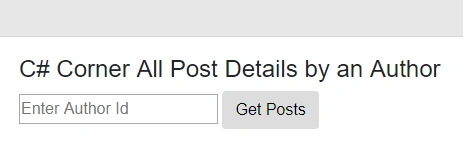

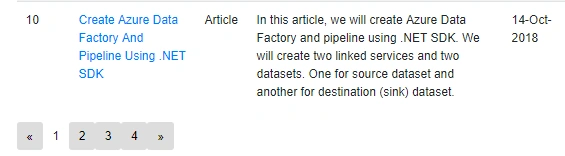

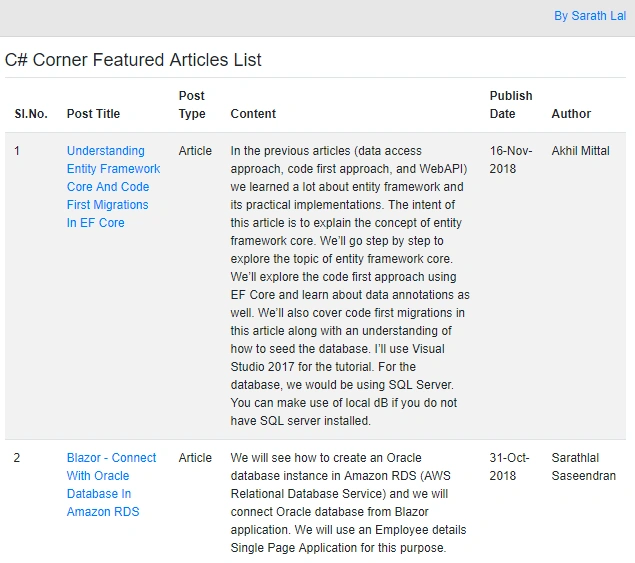
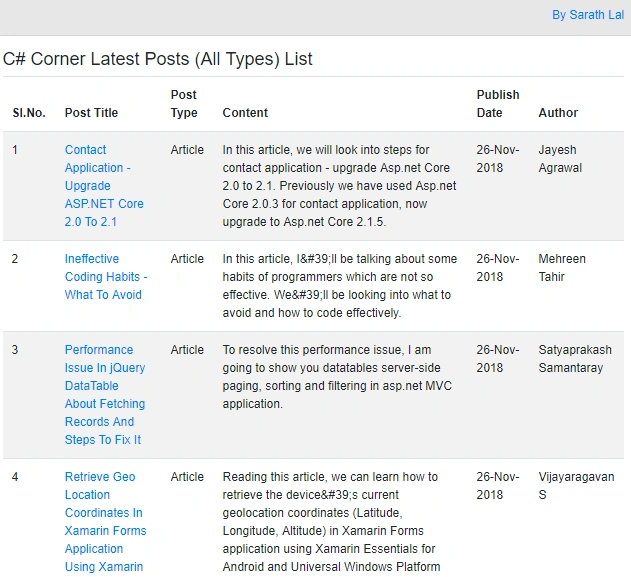
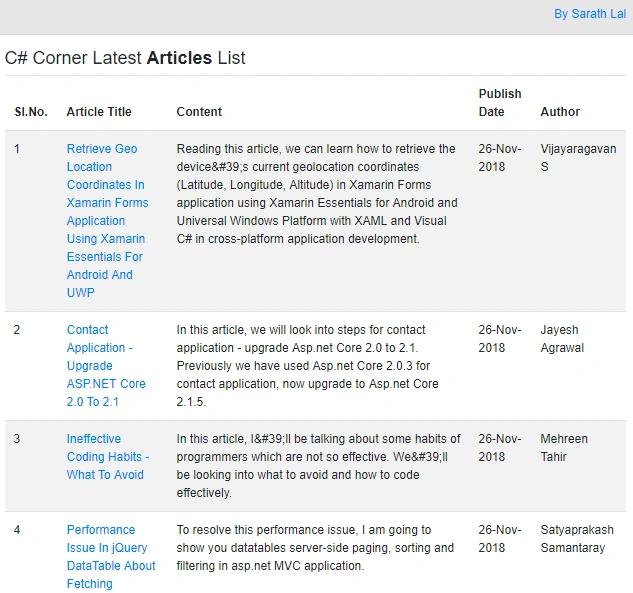

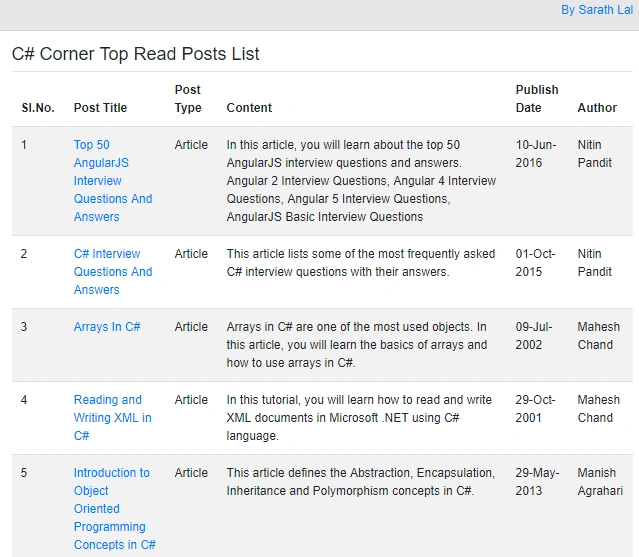
In this post, we have seen pagination in Blazor application. We have created a Pager component for that. We have got data from C# Corner RSS feeds. We have seen all the posts by an author, featured articles list, latest posts (all types), latest articles, latest blogs, and top read posts details.
Tarik AlkathiriPosted Dec 12, 2019, 2:18 AM
Thank you for the excellent article. Could you please upgrade it to the released server side plazor?.
Sundaram SubramanianPosted Dec 31, 2018, 11:25 AM
Eminent ideas boost me to write more. Thanks for sharing each article with different ideas. Good work. Happy to learn from you.
Rajeesh MenothPosted Dec 2, 2018, 9:56 PM
Interesting !! Good Article Sarathlal Saseendran
Abhishek MishraPosted Nov 27, 2018, 10:51 AM
Quiet interesting and nice one :)