

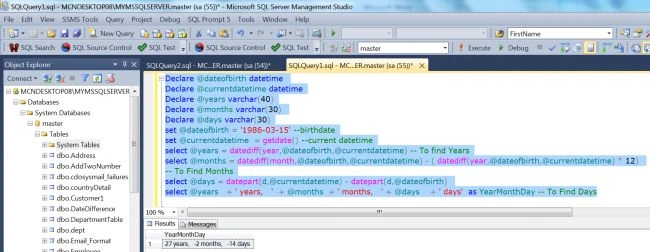
In this article, I would like to show the difference between two dates in years, months and days in SQL Server. In this article, we take an existing date and the current date and using the "GetDate" function to find the years, months and days. The "DATEDIFF" and "Datepart" functions are used to determine years, months and days between two dates. So let's have a look at a practical example of how to calculate age in SQL Server 2012. The example is developed in SQL Server 2012 using the SQL Server Management Studio.
First of all, we will see the use of the "DATEDIFF" and "Datepart" functions.
The DATEDIFF Function
The SQL Server "DATEDIFF" Function is used to calculate the difference between two dates.
Syntax
The syntax of the "DATEDIFF" built-in date function is as follows:
DATEDIFF(Datepart, Startdate, Enddate)
Here, The "Datepart" parameter is the part of the datetime to calculate the difference of. The Datepart can be any of the following:
Ms - Milliseconds
Yy - Year
Qq - Quarter of the Year
Mm - Month
Dy - The Day of the Year
Dd - Day of the Month
Wk - Week
Dw - The Day of the Week
Hh - Hour
Mi - Minute
Ss - Second
DATEDIFF Example
- Declare @dateofbirth datetime
- Declare @currentdatetime datetime
- Declare @years varchar(4)
- set @dateofbirth = '1986-03-15' --Birthdate
- set @currentdatetime = getdate() --Current Datetime
- select @years = datediff(year,@dateofbirth,@currentdatetime)
- select @years + ' years,' as years

The Datepart Function
The SQL Server "Datepart" function returns a portion of a SQL Server Datetime field.
Syntax
The syntax of the "Datepart" built-in date function is as follows :
DATEPART ([Date part], [Datetime])
Here, the <Date part> parameter is the part of the datetime. Datetime is the name of a SQL Server Datetime field and portion is one of the following:

Luan Castro AleixoPosted Aug 4, 2015, 5:48 PM
this code works... http://www.itdeveloperzone.com/2011/06/date-difference-in-years-months-and.html
Eric SmithPosted Aug 3, 2015, 11:36 AM
your code ignores the age of an infant. If you need the correct age, down to the day - look at the solution in Mamadou Doumbia's comment.
Mamadou DoumbiaPosted Oct 14, 2014, 5:29 AM
Here is my code, it also works fine:********************************************* CREATE FUNCTION fnCalculAge(@DOB Datetime) RETURNS nvarchar(50) AS BEGIN DECLARE @tempdate datetime, @years int,@months int, @days int SELECT @tempdate = @DOB SELECT @years = DATEDIFF(YEAR, @tempdate, GETDATE())- CASE WHEN (MONTH(@DOB) > MONTH(GETDATE())) OR (MONTH(@DOB) = MONTH(GETDATE()) AND DAY(@DOB) > DAY(GETDATE())) THEN 1 ELSE 0 END SELECT @tempdate = DATEADD(YEAR,@years,@tempdate) SELECT @months = DATEDIFF(MONTH,@tempdate,GETDATE()) - CASE WHEN DAY(@DOB) > DAY(GETDATE()) THEN 1 ELSE 0 END SELECT @tempdate= DATEADD(MONTH,@months, @tempdate) SELECT @days = DATEDIFF(DAY,@tempdate,GETDATE()) DECLARE @Age nvarchar(60) Set @Age = CAST(@years as nvarchar(4)) + ' years ' + CAST(@months as nvarchar(2)) + ' months and ' + CAST( @days as nvarchar(2)) + ' days.' return @Age END Use like this "SELECT dbo.fnCalculAge ('DOB')--DOB in datetime format. Thanks.
mukul joshiPosted Sep 15, 2014, 7:26 AM
useful article..
Prasanth NavarajPosted Sep 26, 2013, 7:33 AM
Good article, but not working for some case
Rohatash KumarPosted Aug 12, 2013, 3:44 AM
Thanks Baji Sankar.
baji sankarPosted Aug 9, 2013, 1:42 PM
Good article,,,