

CalendarView control looks like the following:
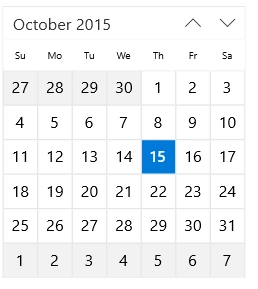
CalendarView control can be declared like this:
- <CalendarView Name="calendarView"/>
With CalendarView, you can pick multiple dates. In CalendarDatePicker control that was not possible.
You only need to assign SelectionMode property to "Multiple":
Using Multiple option selected, you'll be able to pick more than one date:

Here's an example how to get which dates were picked:
- <CalendarView Name="calendarView" CalendarIdentifier="GregorianCalendar" SelectionMode="Multiple"/>
Here's an example how to get which dates were picked:
- public MainPage()
- {
- this.InitializeComponent();
- calendarView.SelectedDatesChanged += (e, f) => {
- f.AddedDates.ToList().ForEach(x => {
- ShowMessage("Added Date: " + x.Date.ToString("dd/MM/yyyy")); });
- f.RemovedDates.ToList().ForEach(x => {
- ShowMessage("Removed Date: " + x.Date.ToString("dd/MM/yyyy")); });
- };
- }
- public async void ShowMessage(string message)
- {
- var msg = new Windows.UI.Popups.MessageDialog(message);
- msg.DefaultCommandIndex = 1;
- await msg.ShowAsync();
- }
Since SelectedDatesChanged event stores which days were added/removed, we can access them easily.
Santhakumar MunuswamyPosted Oct 18, 2015, 2:37 AM
Thanks for sharing
Mukesh KumarPosted Oct 16, 2015, 3:30 AM
Good One, Thanks for sharing
Nilesh JadavPosted Oct 16, 2015, 1:00 AM
Good one
RakeshPosted Oct 16, 2015, 12:52 AM
Nice share.....!! informative
Ankit BansalPosted Oct 16, 2015, 12:29 AM
thanks for sharing..