

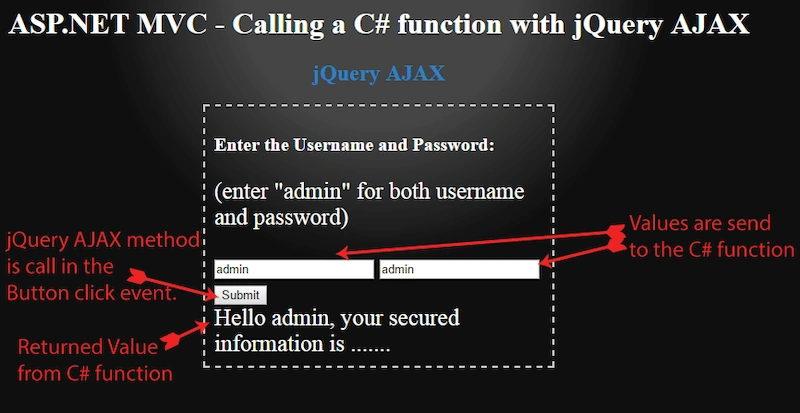
jQuery AJAX method is a very powerful function for doing asynchronous operations from the Web pages. It helps to update parts of a Web page without reloading the whole page. This increases the Website's speed and reduces the load. It can be used with any Web technology like HTML, ASP.NET, ASP.NET MVC, PHP, Ruby or any other.
With jQuery AJAX method, you can create high performance features in our Website. Let me show you how to use this method in ASP.NET MVC page.
ASP.NET MVC Page
To understand the working of jQuery AJAX, I will create a login feature in ASP.NET MVC page. The page will have 2 input controls to enter the username and the password. There will also be a button to submit the two values for checking from the database.
When the username and password are correct, the secured information of the user is shown, else the “wrong username and password” is shown.
The main attraction here is that I will use jQuery AJAX method to check the username and the password. There will be no page reloading during checking.
To start learning jQuery AJAX method, I would suggest you check – jQuery AJAX. Also, look for the syntax and the key-value pairs that can be passed to this method.
The Controller Code
Start with creating a “Controller” in your ASP.NET MVC Application. Now, add a C# function “GetSecuredData” into the controller.
[HttpPost]
public string GetSecuredData(string userName, string password)
{
    string securedInfo = "";
    if ((userName == "admin") && (password == "admin"))
        securedInfo = "Hello admin, your secured information is .......";
    else
        securedInfo = "Wrong username or password, please retry.";
    return securedInfo;
}
Explanation
The C# function given above will be called by jQuery AJAX method. As you can see, this function has 2 parameters, “username” and “password”. In these 2 parameters, it receives the username and the password values. It then checks them and shows the secured information, if they are the correct ones.
You can also change the code given above to include the database operation, where the username and the password are checked against the ones stored in the database.
The View code
Now, create a view for the Controller. This view will contain the two input controls for the username and password. There will be a button, which when clicked will call jQuery AJAX function.
<h3>Enter the Username and Password:</h3>
(enter "admin" for both username and password)
<input type="text" id="usernameInput" placeholder="Username" />
<input type="text" id="passwordInput" placeholder="Password" />
<button id="submit">Submit</button>
<div id="dataDiv"></div>
<script src="https://ajax.googleapis.com/ajax/libs/jquery/3.7.1/jquery.min.js"></script>
<script>
    $(document).ready(function () {
        $("#submit").click(function (e) {
            if ($("#usernameInput").val() == "")
                alert("Username cannot be empty");
            else if ($("#passwordInput").val() == "")
                alert("Password cannot be empty");
            else {
                $.ajax({
                    type: "POST",
                    url: "/Home/GetSecuredData",
                    contentType: "application/json; charset=utf-8",
                    data: '{"userName":"' + $("#usernameInput").val() + '","password":"' + $("#passwordInput").val() + '"}',
                    dataType: "html",
                    success: function (result, status, xhr) {
                        $("#dataDiv").html(result);
                    },
                    error: function (xhr, status, error) {
                        $("#dataDiv").html("Result: " + status + " " + error + " " + xhr.status + " " + xhr.statusText)
                    }
                });
            }
            return false;
        });
    });
</script>
Explanation
The button click event will call jQuery AJAX event. We pass the “controller name/function name” to the URL field. The jQuery AJAX event will call the C# function which gets the username and password values in its parameters.
Finally, in the success function we will show the returned value from the C# function.
That’s all for the code, isn’t it really simple?
Conclusion
I hope, you like this article on jQuery AJAX usage in ASP.NET MVC. Please share your feedback.
Check my other tutorial on C-Sharpcorner - Delete records from GridView without Page Reload using jQuery
Saroj MahantaPosted Oct 4, 2020, 11:34 PM
Thank you very much for the above explanation. I have a doubt. After getting the result value return to the "success" block inside the ajax call, can i put a if statement there. Based on the result value, i want to display the alert box.
veer dwivediPosted Jul 7, 2019, 9:41 AM
I am not getting valuse button on click
veer dwivediPosted Jul 7, 2019, 9:11 AM
[HttpPost] public String SendMailF(string name,string emial,string phone,string message) {}
veer dwivediPosted Jul 7, 2019, 9:11 AM
<script> $(document).ready(function () { $("#btnContactUs").click(function (e) { if ($("#name").val() == "") alert("Username cannot be empty"); else if ($("#email").val() == "") alert("Password cannot be empty"); else { $.ajax({ type: "POST", url: "/Details/SendMailF", contentType: "application/json; charset=utf-8", data: '{"name":"' + $("#name").val() + '","email":"' + $("#email").val() + '"}', dataType: "html", success: function (result, status, xhr) { $("#success_message").html(result); }, error: function (xhr, status, error) { $("#error_message").html("Result: " + status + " " + error + " " + xhr.status + " " + xhr.statusText) } }); } return false; }); }); </script>
veer dwivediPosted Jul 7, 2019, 9:10 AM
I am not getting textbox value:
Malcolm TesterPosted Aug 3, 2018, 5:08 PM
Using Razor pages instead of MVC (controllers), how would this be different? Razor pages don't accept (from what I can tell) a post to a specific function. So using [HttpPost] doesn't work. I just get a 404 error back in the result.
subista maharjanPosted Jul 2, 2018, 5:27 AM
How can we compare username with already existed one?
Glenn WilliamsPosted Mar 7, 2018, 8:49 AM
I'm trying this, but the data is not passing back to the controller. The data is in the script, I get warned if id and or pass is null, but when populated no data is passed to the controller. Thanks.
Anu VPosted Feb 6, 2017, 6:23 AM
Nice article.. Thanks for sharing...
Vishal PrajapatiPosted Feb 5, 2017, 10:58 PM
Nice one...Thanks for sharing..
Maruthi PalllamalliPosted Feb 3, 2017, 12:34 AM
I am asking about response type. What happen to ->> success: function (result, status, xhr) if results as complex type ? We can pass parameters as many types depends on request data types(key:Value, Json, XML, File and Media) not only string.
Maruthi PalllamalliPosted Feb 2, 2017, 6:07 AM
What happen if my c# function having complex type like public [classobject] GetSecuredData(string userName, string password) not as string. Your Ajax function call will receive response or not ?