

Introduction
HttpClient class provides a base class for sending/receiving the HTTP requests/responses from a URL. It is a supported async feature of .NET framework. HttpClient is able to process multiple concurrent requests. It is a layer over HttpWebRequest and HttpWebResponse. All methods with HttpClient are asynchronous.
Example
In this example, I have created a console application.
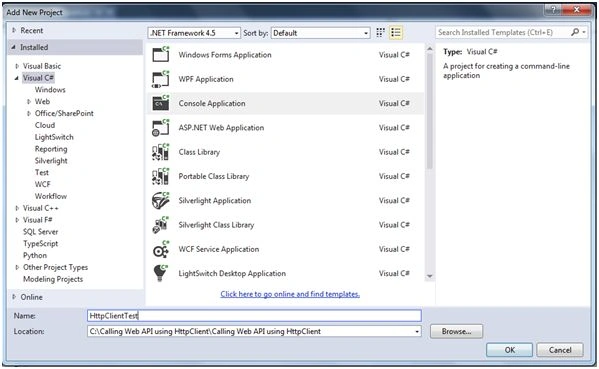
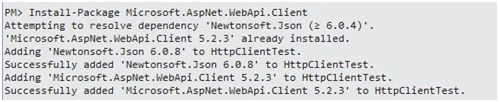
To call Web API methods from the console Application, the first step is to install the required packages, using NuGet Package Manager. The following package needs to be installed in the console Application.
Install-Package Microsoft.AspNet.WebApi.Client
Next step is to create HttpClient object. In the following code snippet, the main function calls private static method "CallWebAPIAsync" and this blocks until CallWebAPIAsync completes the process, using wait function.
static void Main(string[] args)
{
    CallWebAPIAsync()
        .Wait();
}
static asyncTaskCallWebAPIAsync()
{
    using(var client = newHttpClient())
    {
        //Send HTTP requests from here.
    }
}
Afterwards, we have set the base URL for the HTTP request and set the Accept header. In this example, I have set Accept header to "application/json" which tells the Server to send the data into JSON format.
using(var client = newHttpClient())
{
    client.BaseAddress = newUri("http://localhost:55587/");
    client.DefaultRequestHeaders.Accept.Clear();
    client.DefaultRequestHeaders.Accept.Add(newMediaTypeWithQualityHeaderValue("application/json"));
}
HTTP GET Request
Following code is used to send a GET request for department, as shown below:
using(var client = newHttpClient())
{
    client.BaseAddress = newUri("http://localhost:55587/");
    client.DefaultRequestHeaders.Accept.Clear();
    client.DefaultRequestHeaders.Accept.Add(newMediaTypeWithQualityHeaderValue("application/json"));
    //GET Method
    HttpResponseMessage response = awaitclient.GetAsync("api/Department/1");
    if (response.IsSuccessStatusCode)
    {
        Departmentdepartment = awaitresponse.Content.ReadAsAsync < Department > ();
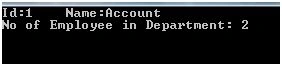
        Console.WriteLine("Id:{0}\tName:{1}", department.DepartmentId, department.DepartmentName);
        Console.WriteLine("No of Employee in Department: {0}", department.Employees.Count);
    }
    else
    {
        Console.WriteLine("Internal server Error");
    }
}
In the code given above, I have used GetAsync method to send HTTP GET request asynchronously. When the execution of this method is finished, it returns HttpResponseMessage, which contains HTTP response. If the response contains success code as response, it means the response body contains the data in the form of JSON. ReadAsAsync method is used to deserialize the JSON object.
HttpClient does not throw any error when HTTP response contains an error code, but it sets the IsSuccessStatusCode property to false. If we want to treat HTTP error codes as exceptions, we can use HttpResponseMessage.EnsureSuccessStatusCode method.
When we run the code, given above, it throws the exception "Internal Server error".

We have to configure the serializer to detect then handle self-referencing loops. The following code needs to be placed in Global.asax.cs in Web API:
GlobalConfiguration.Configuration.Formatters.JsonFormatter.SerializerSettings
.PreserveReferencesHandling =Newtonsoft.Json.PreserveReferencesHandling.All;
HTTP POST request
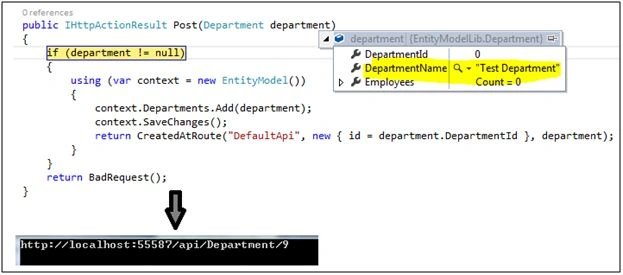
Following code is used to send a POST request for the department:
var department = newDepartment() { DepartmentName = "Test Department" };
HttpResponseMessage response = awaitclient.PostAsJsonAsync("api/Department", department);

if (response.IsSuccessStatusCode)
{
   // Get the URI of the created resource.
   UrireturnUrl = response.Headers.Location;
   Console.WriteLine(returnUrl);
}
In this code, PostAsJsonAsync method serializes the object into JSON format and sends this JSON object in POST request. HttpClient has a built-in method "PostAsXmlAsync" to send XML in POST request. Also, we can use "PostAsync" for any other formatter.
HTTP PUT Request
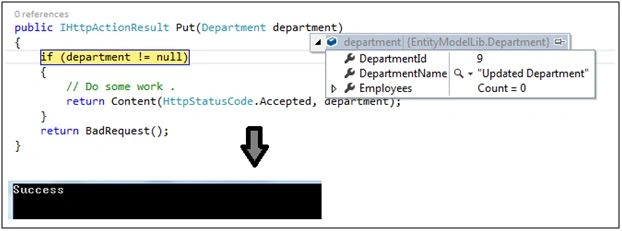
Following code is used to send a PUT request for the department:
//PUT Method
var department = newDepartment() { DepartmentId = 9, DepartmentName = "Updated Department" };
HttpResponseMessage response = awaitclient.PutAsJsonAsync("api/Department", department);
if (response.IsSuccessStatusCode)
{
   Console.WriteLine("Success");
}
Same as POST, HttpClient also supports all three methods: PutAsJsonAsync, PutAsXmlAsync and PutAsync.
HTTP DELETE Request
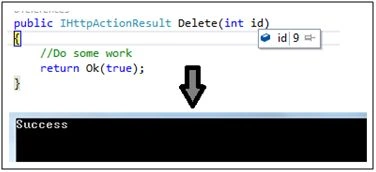
Following code is used to send a DELETE request for the department:
intdepartmentId = 9;
HttpResponseMessage response = awaitclient.DeleteAsync("api/Department/" + departmentId);
if (response.IsSuccessStatusCode)
{
   Console.WriteLine("Success");
}
HttpClient only supports DeleteAsync method because Delete method does not have a request body.
Summary
HttpClient is used to send an HTTP request, using a URL. HttpClient can be used to make Web API requests from the console Application, Winform Application, Web form Application, Windows store Application, etc.
Amit BhattPosted Mar 30, 2023, 10:34 AM
.wait() is not recommended approach. Instead you can use GetAwaiter().GetResult(). Second thing is this is not recommended or best practice to use httpclient. check this article : https://learn.microsoft.com/en-us/dotnet/fundamentals/networking/http/httpclient-guidelines. If you are not using .net core then use static httpclient
Ruwan RatnayakePosted Dec 16, 2022, 7:38 AM
Can we use this with webform application
Tahir AlviPosted Jan 26, 2021, 7:54 AM
Ultimately if for every new use we create a new instance of HttpClient, the performance would be going worst. I think it is better to use the HTTPClient just like a session i.e One per application life cycle.
Tahir AlviPosted Jan 26, 2021, 7:51 AM
Hi, HttpClient is intended to be instantiated once per application, rather than per-use. See https://docs.microsoft.com/en-us/dotnet/api/system.net.http.httpclient?view=net-5.0
Hossein AbtahiPosted May 4, 2020, 1:47 AM
I got the following Msg: HTTP Error 403.14 - Forbidden The Web server is configured to not list the contents of this directory.
pratap nayakPosted Sep 18, 2019, 10:48 PM
Huge performance issue with HttpClient.PostAsync method and it minimum 12 sec to getting results when I called thi
pratap nayakPosted Sep 18, 2019, 10:47 PM
Huge performance issue with HttpClient.PostAsync and pos getting minimum 12 sec to resposo
Vishal ParmarPosted Jun 27, 2019, 8:01 AM
Cannot convert from 'string' to 'System.Net.Http.HttpContent' In a post method
Viknaraj ManogararajahPosted Mar 29, 2019, 11:03 AM
nice article, thank you for sharing
Ken DemmingPosted Dec 3, 2018, 11:41 AM
How about someone creating an example for an ASP.net application?
Sreeprasad ksPosted Dec 1, 2018, 4:38 AM
If multiple APIs are in a queue, how can we apply a delay after each api call. The second api should be called after 5 sec if first api call and so on? Is there any way to achieve this.
RonPosted Nov 26, 2018, 8:45 PM
Excellent sample. Works like a charm. Are you able to make an HTTPS version of it as well? I'm especially interested in how certificates are handled. Thank you!
Farhan AhmedPosted Nov 12, 2018, 7:53 AM
Thank you so much its really helpful content.
Farhan AhmedPosted Nov 12, 2018, 5:53 AM
How do we find whether request is coming from API ? Any technique to find out API request from browser or anything else. This question asked me in interview.
Farhan AhmedPosted Nov 10, 2018, 9:20 AM
I have one question. How do we find whether request is API request?
Heino PlaatjiesPosted May 23, 2018, 4:09 AM
HI, CAN YOU SHARE AN EXAMPLE WITH WINDOWS FORMS APPLICATION.
Arjun DhilodPosted Apr 2, 2018, 3:21 AM
I am new in web api can you explain with example ?
Arjun DhilodPosted Apr 2, 2018, 1:24 AM
How to Call One Web API to another Web API example A1 web Api service call A2 Web Api service.
Arjun DhilodPosted Apr 2, 2018, 1:24 AM
Nice i have one question sir,
Hari BabuPosted Sep 21, 2017, 1:34 AM
HI . i need pass application/json as header for getasync .could you please suggest how to pass Content-Type for getasync method
Debendra DashPosted Jun 28, 2016, 2:10 AM
Nice one..
kalu singh raoPosted Jun 28, 2016, 1:28 AM
Nice...
Vignesh ManiPosted Jun 26, 2016, 4:33 PM
Nice
Guest UserPosted Jun 25, 2016, 10:39 AM
my takeway is async operation from this
Muhammad Aqib ShehzadPosted Jun 25, 2016, 7:54 AM
nice sharing
Prasanna MuraliPosted Jun 25, 2016, 6:41 AM
Nice one..
Debasis SahaPosted Jun 25, 2016, 2:51 AM
Nice one..
Santhakumar MunuswamyPosted Jun 25, 2016, 2:15 AM
Thank you for nice article
Ravi PatelPosted Jun 25, 2016, 1:07 AM
useful for me, thanks a lot sir