I am also using entity framework code first model to get the list of countries and its states.
- Open Visual Studio 2010.
- Create a new ASP.NET MVC 3 or 4 web application and named it as Cascading DropDown for this application.
- Choose Razor as the View engine and click OK.
- Add a Controller in your project and give name as HomeController.
- Create a model class in the Model folder as shown below:
Country:
- public class Country
- {
- public int CountryID { get; set; }
- public string Name { get; set; }
-
- public virtual ICollection<State> States { get; set; }
- }
- public class State
- {
- public int StateID { get; set; }
- public string Name { get; set; }
-
- public int CountryID { get; set; }
- public virtual Country Country { get; set; }
- }
- public class ModelDbContext : DbContext
- {
- public DbSet<Country> Countries { get; set; }
- public DbSet<State> States { get; set; }
- }
Model
In this model class I have created a property CountryID (hold selected value of country), State (hold selected value of state), Countries and States (hold list of available country and its states).
- public class Model
- {
- public int ? CountryID
- {
- get;
- set;
- }
- public int ? StateID
- {
- get;
- set;
- }
- public IEnumerable < Country > Countries
- {
- get;
- set;
- }
- public IEnumerable < State > States
- {
- get;
- set;
- }
- }
Add some sample data in database and initialize it when database has been created:
- public class ModelInitializer: DropCreateDatabaseIfModelChanges < ModelDbContext >
- {
- protected override void Seed(ModelDbContext context)
- {
- var countries = new List < Country >
- {
- new Country
- {
- Name = "India"
- },
- new Country
- {
- Name = "USA"
- },
- new Country
- {
- Name = "South Africa"
- },
- new Country
- {
- Name = "Australlia"
- },
- };
- var states = new List < State >
- {
- new State
- {
- Name = "Delhi", Country = countries.Single(m => m.Name == "India")
- },
- new State
- {
- Name = "Mumbai", Country = countries.Single(m => m.Name == "India")
- },
- new State
- {
- Name = "California", Country = countries.Single(m => m.Name == "USA")
- },
- new State
- {
- Name = "Newyork", Country = countries.Single(m => m.Name == "USA")
- },
- new State
- {
- Name = "Capetown", Country = countries.Single(m => m.Name == "South Africa")
- },
- new State
- {
- Name = "Bolavia", Country = countries.Single(m => m.Name == "South Africa")
- },
- new State
- {
- Name = "Sydney", Country = countries.Single(m => m.Name == "Australlia")
- },
- new State
- {
- Name = "Melbourne", Country = countries.Single(m => m.Name == "Australlia")
- },
- };
- countries.ForEach(m => context.Countries.Add(m));
- states.ForEach(m => context.States.Add(m));
- }
- }
Add a connection string in the web.config file under the configuration tag:
- <connectionStrings>
- <add name="ModelDbContext" connectionString="Data Source=.\SQLEXPRESS; Initial Catalog=CountryDb; Integrated Security=true;" providerName="System.Data.SqlClient"/>
- </connectionStrings>
Modify the Global.asax file as shown below:
- protected void Application_Start()
- {
- Database.SetInitializer(new CascadingDropDown.Models.ModelInitializer());
- AreaRegistration.RegisterAllAreas();
- WebApiConfig.Register(GlobalConfiguration.Configuration);
- FilterConfig.RegisterGlobalFilters(GlobalFilters.Filters);
- RouteConfig.RegisterRoutes(RouteTable.Routes);
- }
Create a HomeController and add the following action methods. In this controller, Index action returns a Model type object to Index view by holding the list of countries from the database. SelectCountry action returns a list of states on the basis of country id.
- ModelDbContext db = new ModelDbContext();
- public ActionResult Index()
- {
- Model model = new Model
- {
- Countries = db.Countries.ToList()
- };
- return View(model);
- }
- [HttpPost]
- public virtual ActionResult SelectCountry(int ? countryid)
- {
- var states = countryid.HasValue ? db.Countries.FirstOrDefault(m => m.CountryID == countryid).States : null;
- Model model = new Model
- {
- CountryID = countryid,
- Countries = db.Countries.ToList(),
- States = states
- };
- if (Request.IsAjaxRequest()) return PartialView("_States", model);
- else return View("Index", model);
- }
Add an Index View and modify this as given below:
- @model CascadingDropDown.Models.Model
- @{
- Layout = null;
- }
-
- <!DOCTYPE html>
- <html>
- <head>
- <meta name="viewport" content="width=device-width" />
- <title>Index</title>
- <script src="@Url.Content("~/Scripts/jquery-1.7.1.min.js")" type="text/javascript"></script>
- <script type="text/javascript">
- $(document).ready(function () {
-
- $('input[type=submit]').hide();
-
- $('#CountryID').change(function () {
- $(this).parents('form').submit();
- return false;
- });
-
- $("form[action$='SelectCountry']").submit(function () {
-
- $.ajax({
- url: $(this).attr('action'),
- type: 'post',
- data: $(this).serialize(),
- success: function (response) {
- $('#states').html(response);
- }
- });
- return false;
- });
- });
- </script>
- </head>
- <body>
- <div>
- @using (Html.BeginForm("SelectCountry", "Home"))
- {
-
- <fieldset>
- <legend>Countries</legend>
- @Html.DropDownListFor(m => m.CountryID, new SelectList(Model.Countries,"CountryID", "Name"), "[Please select a Country]")
-
- <input type="submit" value="Select" />
- </fieldset>
- }
-
- </div>
- <div id="states">
- @Html.Partial("_States", Model)
- </div>
- </body>
- </html>
- @model CascadingDropDown.Models.Model
- <fieldset>
- @if (Model.States != null && Model.States.Count() > 0)
- {
- <legend>States</legend>
- @Html.HiddenFor(m => m.CountryID);
- @Html.DropDownListFor(m => m.StateID, new SelectList(Model.States, "StateID","Name"), "[Please select a state]")
- }
- else
- {
- <legend>No states available</legend>
- }
- </fieldset>
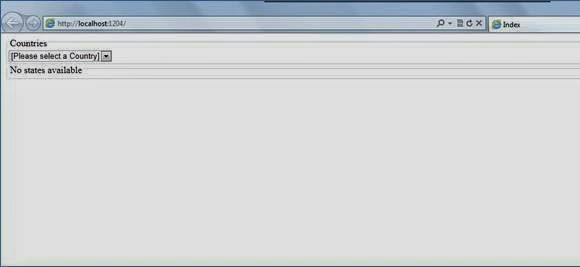
Now run an application. It will something look like below:
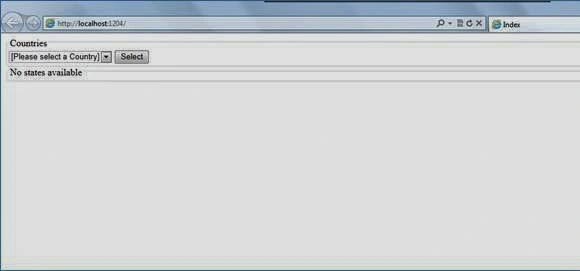
When JavaScript is turned off a select button will also be displayed in the UI in order to populate the states.
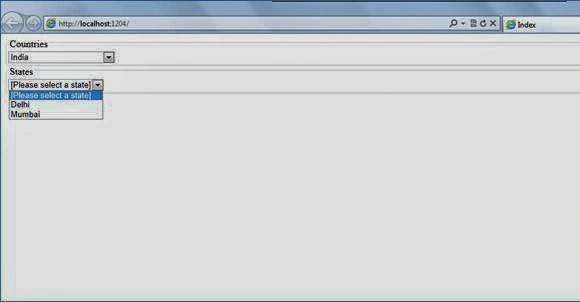
When you select the country, it will populate all states in the state DropDown on the basis of selected country. You can see in the following screenshot.
Thanks for reading this article. You can enter your valuable comments and suggestion to improve this article in the comment box.
Read more articles on ASP.NET:


Rahul Kumar SaxenaPosted Apr 4, 2016, 7:42 AM
Good Show
Manish PandeyPosted Mar 31, 2016, 6:09 AM
good post
Mohammed IbrahimPosted Mar 31, 2016, 3:46 AM
nice
Sibeesh VenuPosted Mar 31, 2016, 2:30 AM
Nice Share
Jaipal ReddyPosted Mar 31, 2016, 12:04 AM
Nice . .
Roshan MulePosted Mar 30, 2016, 2:27 PM
very nice !
Debasis SahaPosted Mar 30, 2016, 9:04 AM
Good One..
Vignesh ManiPosted Mar 30, 2016, 8:42 AM
good one
Manoj KallaPosted Mar 30, 2016, 7:03 AM
Very good and Well written.. keep it up
Karthikeyan KPosted Mar 30, 2016, 6:32 AM
Good one
Karthikeyan KPosted Mar 30, 2016, 6:32 AM
Thanks for sharing
Mohammed IbrahimPosted Mar 30, 2016, 6:25 AM
nice
Saillesh PawarPosted Mar 30, 2016, 6:23 AM
Nice Share