In this post we will discuss how we can check for any unsaved changes in the page by using JQuery. Normally this may need to be implemented in an application where we need to give any alert if any user try to reload the page when there any unsaved changes in the page. I hope you will like this.
Background
I was creating a page where I have some text boxes, so I wanted to give an alert if user try to get away from the page without saving the data entered.
Please read this article in my blog
here.
Using the code
First of all we will create a page and an html table.
- <!DOCTYPE html>
- <html>
- <head>
- <title>Check for any unsaved changes in page</title>
- <script src="jquery-2.0.2.min.js"></script>
- </head>
- <body>
- <table class="table" border="1" style="width: 40%">
- <tr>
- <td>Sibi</td>
- <td>Ajay</td>
- <td>
- <input class="text" type="text" />
- </td>
- </tr>
- <tr>
- <td>Ansu</td>
- <td>Akhil</td>
- <td>
- <input class="text" type="text" />
- </td>
- </tr>
- <tr>
- <td>Shanto</td>
- <td>Libin</td>
- <td>
- <input class="text" type="text" />
- </td>
- </tr>
- </table>
- </body>
- </html>
Now if you run your page, you can see the table.

Check for any unsaved changes in page
No we will create a bool variable which will be true when there is an unsaved data.
What next? We will add call to an existing function when user reloads the page. Sounds good?
- window.onbeforeunload = unloadPage;
As you can see we are calling a function unloadPage, preceding is the function definition.
- function unloadPage() {
- if (unsaved) {
- return "You have unsaved changes on this page.";
- }
- }
Now please run your page and type anything in the text box given, then reload your page.
You will get an alert of "You have unsaved changes on this page." Shall we check that?
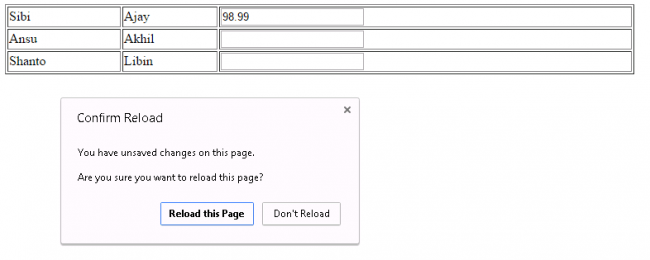
Check for any unsaved changes in page
We have done it finally.
Complete Code
- <!DOCTYPE html>
- <html>
- <head>
- <title>Check for any unsaved changes in page</title>
- <script src="jquery-2.0.2.min.js"></script>
- <script>
- var unsaved = false;
- $(document).on('change', '.table .text', function () {
- unsaved = true;
- });
- $(document).on('mouseover', '.table td', function () {
- $(this).attr('title', $(this).text());
- });
- function unloadPage() {
- if (unsaved) {
- return "You have unsaved changes on this page.";
- }
- }
- window.onbeforeunload = unloadPage;
- </script>
- </head>
- <body>
- <table class="table" border="1" style="width: 40%">
- <tr>
- <td>Sibi</td>
- <td>Ajay</td>
- <td>
- <input class="text" type="text" />
- </td>
- </tr>
- <tr>
- <td>Ansu</td>
- <td>Akhil</td>
- <td>
- <input class="text" type="text" />
- </td>
- </tr>
- <tr>
- <td>Shanto</td>
- <td>Libin</td>
- <td>
- <input class="text" type="text" />
- </td>
- </tr>
- </table>
- </body>
- </html>
Conclusion
Did I miss anything that you may think which is needed? Have you ever faced this requirement in your programming life? Does this article helps you in anyway? I hope you liked this article. Please share me your valuable suggestions and feedback.
Your turn. What do you think?
A blog is not a blog without comments, but do try to stay on topic. If you have a question, then please mention it in the comments section.




Sibeesh VenuPosted Sep 30, 2015, 12:59 AM
Mohammed Ibrahim Thank you
Sibeesh VenuPosted Sep 30, 2015, 12:59 AM
Ankit Bansal Thank you
Mohammed IbrahimPosted Sep 29, 2015, 3:29 PM
nice
Ankit BansalPosted Sep 29, 2015, 7:26 AM
nice..
Sibeesh VenuPosted Sep 29, 2015, 4:38 AM
Harshad Pansuriya Thanks a lot
Harshad PansuriyaPosted Sep 29, 2015, 3:53 AM
Nice One
Sibeesh VenuPosted Sep 29, 2015, 3:22 AM
Vipul Malhotra Thanks a lot
Sibeesh VenuPosted Sep 29, 2015, 3:22 AM
N Vinodh Thanks a lot
Vipul MalhotraPosted Sep 29, 2015, 3:21 AM
nice article
Vinodh NarayananPosted Sep 29, 2015, 3:17 AM
nice share
Sibeesh VenuPosted Sep 29, 2015, 2:34 AM
Humayun Kabir Mamun Thanks a lot
Sibeesh VenuPosted Sep 29, 2015, 2:34 AM
Nilesh Jadav Thanks a lot
Sibeesh VenuPosted Sep 29, 2015, 2:33 AM
Nihal Ahmed Thanks a lot
Sibeesh VenuPosted Sep 29, 2015, 2:33 AM
Rakesh Chavda Thanks a lot
Sibeesh VenuPosted Sep 29, 2015, 2:33 AM
Rajeesh Menoth Thanks a lot
Sibeesh VenuPosted Sep 29, 2015, 2:33 AM
Santhakumar Munuswamy Thanks a lot
Sibeesh VenuPosted Sep 29, 2015, 2:33 AM
Manas Mohapatra Thanks a lot
Sibeesh VenuPosted Sep 29, 2015, 2:33 AM
Pankaj Kumar Choudhary Thanks a lot
Humayun Kabir MamunPosted Sep 29, 2015, 12:49 AM
Nice...
Nilesh JadavPosted Sep 29, 2015, 12:22 AM
Great post
Nihal AhmedPosted Sep 29, 2015, 12:17 AM
nice one sir.
RakeshPosted Sep 28, 2015, 2:22 PM
Good share
Rajeesh MenothPosted Sep 28, 2015, 2:20 PM
Thanks for sharing..Nice One
Santhakumar MunuswamyPosted Sep 28, 2015, 2:09 PM
Good one
Manas MohapatraPosted Sep 28, 2015, 1:43 PM
Informative one..
Pankaj Kumar ChoudharyPosted Sep 28, 2015, 12:59 PM
Simple and useful information..........