

Checkbox and RadioButton inside Dropdownlist
For this requirement in my project, I have searched a lot of sites and finally by the help of some site and with some new ideas I have implemented this requirement. So I decided to share this article.
For implementing a DropDownList with CheckBoxes and DropDownList with RadioButton in ASP.NET we will use the following things-
For this requirement in my project, I have searched a lot of sites and finally by the help of some site and with some new ideas I have implemented this requirement. So I decided to share this article.
For implementing a DropDownList with CheckBoxes and DropDownList with RadioButton in ASP.NET we will use the following things-
- ListBox control
- JQuery Bootstrap Multi-Select Plugin to it.
- Bootstrap JavaScript and CSS files.
Here I am explaining the step by step process on how I have implemented this in my project.
1. Create a new project.
2. Add a webform and a Listbox in the webform.
1. Create a new project.
2. Add a webform and a Listbox in the webform.
- <body>
- <form id="form1" runat="server">
- <div style="margin-left:200px; border:solid; border-color:aqua; width:300px;">
- <table>
- <tr>
- <td>
- <b>Name</b>
- </td>
- </tr>
- <tr>
- <td>
- <asp:TextBox ID="txt_name" runat="server"></asp:TextBox>
- </td>
- </tr>
- <tr>
- <td>
- <b>Select Country:-</b>
- </td>
- </tr>
- <tr>
- <td>
- <asp:ListBox ID="ListBox1" runat="server" SelectionMode="Multiple" Width="200px"></asp:ListBox>
- </td>
- </tr>
- <tr>
- <td>
- <asp:Button runat="server" ID="btn_save" Text="Add" />
- </td>
- </tr>
- </table>
- </div>
- </form>
- </body>
3. I have the following database table structure.
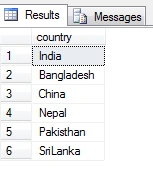
4. Add the following code for dynamically populating the country names from the database.
4. Add the following code for dynamically populating the country names from the database.
- using System;
- using System.Collections.Generic;
- using System.Linq;
- using System.Web;
- using System.Web.UI;
- using System.Web.UI.WebControls;
- using System.Data;
- using System.Data.SqlClient;
- public partial class country: System.Web.UI.Page {
- SqlConnection con = new SqlConnection("Data Source=TUNA-PC;Initial Catalog=Employee;User ID=sa;Password=123");
- SqlDataAdapter da;
- DataTable dt;
- protected void Page_Load(object sender, EventArgs e) {
- if (!IsPostBack) {
- fillListview();
- }
- }
- public void fillListview() {
- da = new SqlDataAdapter("select country from tbl_country", con);
- dt = new DataTable();
- da.Fill(dt);
- ListBox1.DataSource = dt;
- ListBox1.DataTextField = dt.Columns["country"].ToString();
- ListBox1.DataBind();
- }
- }
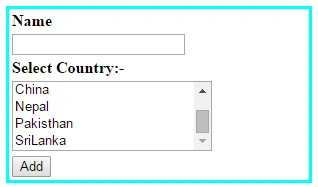
5. To change it to checkbox inside the dropdownlist add the following css and scripts.
- <script type="text/javascript" src="http://ajax.googleapis.com/ajax/libs/jquery/1.8.3/jquery.min.js"></script>
- <link href="http://cdnjs.cloudflare.com/ajax/libs/twitter-bootstrap/3.0.3/css/bootstrap.min.css" rel="stylesheet" type="text/css" />
- <script type="text/javascript" src="http://cdnjs.cloudflare.com/ajax/libs/twitter-bootstrap/3.0.3/js/bootstrap.min.js"></script>
- <link href="http://cdn.rawgit.com/davidstutz/bootstrap-multiselect/master/dist/css/bootstrap-multiselect.css" rel="stylesheet" type="text/css" />
- <script src="http://cdn.rawgit.com/davidstutz/bootstrap-multiselect/master/dist/js/bootstrap-multiselect.js" type="text/javascript"></script>
- <script type="text/javascript">
- $(function() {
- $("#ListBox1").multiselect({
- includeSelectAllOption: true
- });
- });
- </script>
Here it is how it looks like.
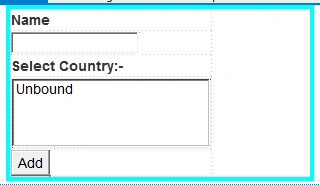
Now when we run the project we got the output like the following screenshot:
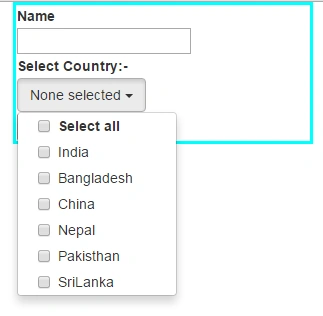
After selecting any of the checkbox.
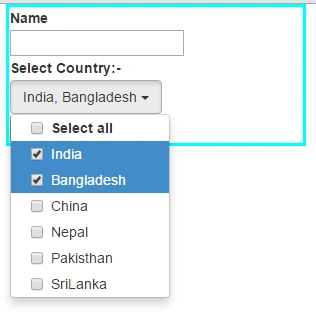
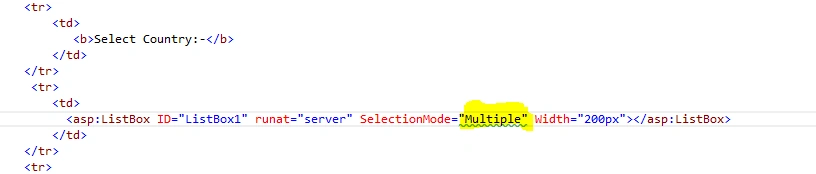
Here we have the checkbox inside listbox because of the following code.
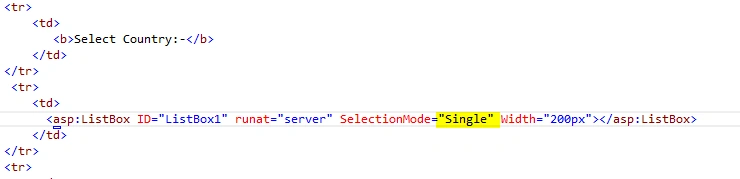
If we want to implement RadioButton inside the listbox, then change the following code with SelectionMode single.
Now when we run the project we got the output like the following screenshot:
After selecting any of the checkbox.
Here we have the checkbox inside listbox because of the following code.
If we want to implement RadioButton inside the listbox, then change the following code with SelectionMode single.
Now after running the code it will give the following output.
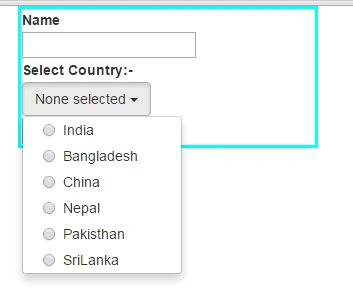
It only allow us to select only one element.
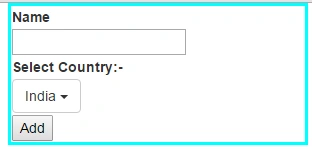
Thus in this way we can dynamically implement CheckBox and RadioButton inside DropDownList.
It only allow us to select only one element.
Thus in this way we can dynamically implement CheckBox and RadioButton inside DropDownList.
Ashok YadavPosted Oct 12, 2017, 7:58 AM
How can i define height with scroll
Santhakumar MunuswamyPosted Oct 18, 2015, 3:05 AM
Good one
Ankit BansalPosted Oct 15, 2015, 12:45 AM
nice..thanks for sharing
Priyaranjan K SPosted Oct 14, 2015, 12:21 PM
Nice Share ...
Harshad PansuriyaPosted Oct 14, 2015, 8:22 AM
Nice one
Humayun Kabir MamunPosted Oct 14, 2015, 3:46 AM
Nice...
Mukesh KumarPosted Oct 14, 2015, 2:43 AM
Great Job
Rajeesh MenothPosted Oct 14, 2015, 2:17 AM
Good One..!!
Nilesh JadavPosted Oct 14, 2015, 2:11 AM
Good share sir !!