

Introduction
First before we get to start working with Color Picker, we need to download the Coding4Fun Toolkit from http://coding4fun.codeplex.com/. Later add Coding4Fun.Phone.Controls.dll as a reference for our newly created project.
Today, in this article let's dicuss another new concept related to Windows Phone 7, whereby communicating with WCF Service to perform some operation.
Question: What is a Color Picker?
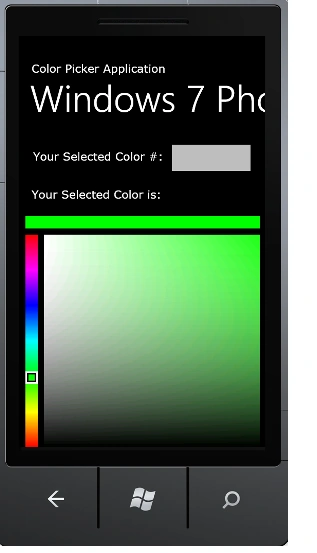
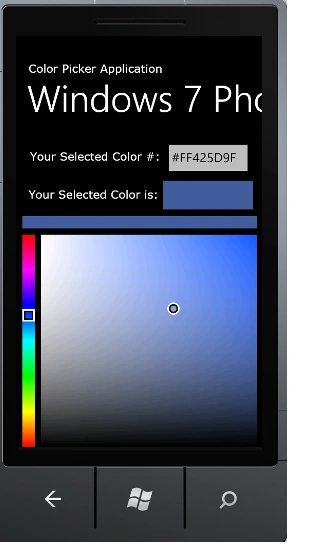
In simple terms "It enables user to choose specific color from color space with slider. Provides rich UI based color chooser ".
Let's get this started off now!!!
Step 1: The complete code for the IService1.cs looks like this:
using System;
using System.Collections.Generic;
using System.Linq;
using System.Runtime.Serialization;
using System.ServiceModel;
using System.ServiceModel.Web;
using System.Text;
using System.Drawing;
using SilverlightApplication1;
namespace Color_WCF
{
// NOTE: You can use the "Rename" command on the "Refactor" menu to change the interface name "IService1"
in both code and config file together.
[ServiceContract]
public interface IService1
{
[OperationContract]
string colorName(string a);
}
}
Step 2: The complete code for the Service1.svc.cs looks like this:
using System;
using System.Collections.Generic;
using System.Linq;
using System.Runtime.Serialization;
using System.ServiceModel;
using System.ServiceModel.Web;
using System.Text;
using System.Drawing;
using SilverlightApplication1;
namespace Color_WCF
{
// NOTE: You can use the "Rename" command on the "Refactor" menu to change the class name "Service1" in code, svc and config file together.
public class Service1 : IService1
{
public string colorName(string a)
{
return a;
}
}
}
Step 3: The complete code for the Web.Config looks like this:
<?xml version="1.0"?>
<configuration>
<system.web>
<compilation debug="true" targetFramework="4.0" />
</system.web>
<system.serviceModel>
<behaviors>
<serviceBehaviors>
<behavior>
<!-- To avoid disclosing metadata information, set the value below to false and remove the metadata endpoint above before deployment -->
<serviceMetadata httpGetEnabled="true"/>
<!-- To receive exception details in faults for debugging purposes, set the value below to true. Set to false
before deployment to avoid disclosing exception information -->
<serviceDebug includeExceptionDetailInFaults="false"/>
</behavior>
</serviceBehaviors>
</behaviors>
<serviceHostingEnvironment multipleSiteBindingsEnabled="true" />
</system.serviceModel>
<system.webServer>
<modules runAllManagedModulesForAllRequests="true"/>
</system.webServer>
</configuration>
Step 4: The complete code for the MainPage.xaml looks like this:
<phone:PhoneApplicationPage x:Class="Color_Picker_Application.MainPage" xmlns="http://schemas.microsoft.com/winfx/2006/xaml/presentation" xmlns:x="http://schemas.microsoft.com/winfx/2006/xaml" xmlns:phone="clr-namespace:Microsoft.Phone.Controls;assembly=Microsoft.Phone" xmlns:shell="clr-namespace:Microsoft.Phone.Shell;assembly=Microsoft.Phone" xmlns:d="http://schemas.microsoft.com/expression/blend/2008" xmlns:mc="http://schemas.openxmlformats.org/markup-compatibility/2006" mc:Ignorable="d" d:DesignWidth="480" d:DesignHeight="768" FontFamily="{StaticResource PhoneFontFamilyNormal}" FontSize="{StaticResource PhoneFontSizeNormal}" Foreground="{StaticResource PhoneForegroundBrush}" SupportedOrientations="Portrait" Orientation="Portrait" shell:SystemTray.IsVisible="True" Loaded="PhoneApplicationPage_Loaded">
Arjun PanwarPosted Mar 11, 2012, 11:49 PM
Thanks for this article.