
Introduction:
In this article I cover the area how to use a COM server in a .NET client. Existing COM components are precious resources to your managed applications. So now let us observe how you can build a .NET Client that uses a COM Server.
The steps involved in the build process are as follows:
-
Write and compile
the unmanaged code.
-
Generate an assembly
containing definitions of the COM types using the tlbimp.exe utility so that
allow the .NET client to interact with the exposed types.
-
Install the assembly in the
global assembly cache. (Optional).
- Write and compile the .NET client code that reference the assembly containing the COM type definitions.
1.Write and compile the
unmanaged code.
Open an ActiveX DLL
project workspace in VB 6.0 and put the below code in code window and name the
project as VBServer and Class to Add.
Public Function Add(ByVal x As Integer, ByVal y As Integer) As Integer
Add = x
+ y
End Function
Finally save your workspace and compile the VBServer to VBServer.dll.
Now let us see the VBServer.dll in the OLE viewer.
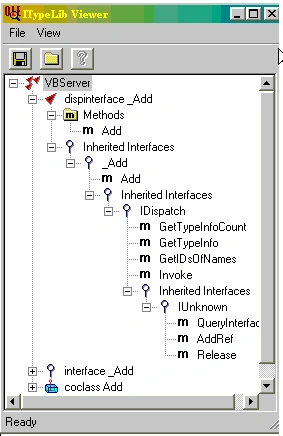
In the OLE/COM Object Viewer we can see the name of default custom interface(Add) as well as a number of other COM interfaces implemented by VB.
2.Importing the Type Library:
The .NET Framework needs metadata for individual COM types at both compile time and run time. Your choice for generating metadata is the Type Library Importer (TlbImp.exe) utility generates an assembly containing metadata. When you carry out this tool on a type library it generates a standard runtime callable wrapper, based on the contents of the type library.
tlbimp VBServer.dll /out:NetClient.dll.
Now we create the NetClient.dll using the Type Library Importer utility.
If you open the NetClient.dll with the ILDasm.exe.In that You notice the _Add interface and Add coclass are mapped as .NET equivalents.

3. Install the assembly in the global assembly cache. (Optional).
To make assembly to be shared among several applications, it must be installed in the global assembly cache (GAC). Use gacutil.exe to install an assembly in the GAC.
gacutil /i NetClient.dll.
4. Write and compile the .NET client code with reference to the assembly.
During
compilation we have to reference the assembly using the compiler /r switch or we
can add reference to the project directly from Visual Studio.NET development
tool.
Even by using Reflection one can use the COM server (Late Binding).I planned to
cover this topic in another article.
csc TestClient.cs /r: NetClient.dll.
The .NET client:(Early
Binding).
namespace Addvbserver
{
using System;
using NetClient;
public class TestClient
{
public static int Main(string[]
args)
{
Add c = new Add();
Console.WriteLine(c.Add(2,2));
return 0;
}
}
}
In the above code You notice that all members of a Add interface are accessed directly from an object instance. If you want to explicitly reference the underlying _Add interface you have to write the code as below.
namespace Addvbserver
{
using System;
using NetClient;
public class Client
{
public static int Main(string[]
args)
{
Add c = new Add();
_Add gg =c;
Console.WriteLine(gg.Add(2,2));
return 0;
}
}
}
Conclusion:
I hope after reading the three parts regarding Interoperability issues one can gain some good knowledge over communication between managed and unmanaged world and vice versa.
Join the conversation! Your thoughts help the community grow.