

This is a series of Security related articles.
- Top 10 Web Application Security Risks
- SQL Injection
- Cross-Site Request Forgery (CSRF)
- Cross-Site Request Forgery (CSRF)
- Cross-Site Scripting (XSS)
- Cross-Frame Scripting (XFS)
- Comparisons among SSRF, CSRF, XSS and XFS --- this article
- CORS (1), Consume .NET Core Web API By MVC in Same Origin
Introduction
This is a summary part of this series of articles with comparison among SSRF, CSRF, XSS, and XFS.
- Introduction
- A - What is SSRF, CSRF, XSS, or XFS
- A-1: SSRF;
- A-2: CSRF;
- A-3: XSS;
- A-4: XFS;
- B - How does SSRF, CSRF, XSS, or XFS Works
- B-1: SSRF: Typical exploitation of a Vulnerability via a Web Server
- B-2: CSRF: Typical exploitation of a Vulnerability via a Web Server
- B-3: XSS: Typical exploitation of a Vulnerability via a User Web Browser
- B-4: XFS: Typical exploitation of a Vulnerability via a Web Browser with iFrame
- C - Typical Way to Introduce a Vulnerability for SSRF, CSRD, XSS, or XFS
- C-1: SSRF;
- C-2: CSRF;
- C-3: XSS;
- C-4: XFS;
A - What is SSRF, CSRF, XSS, XFS
We will ignore the definition of the attach for vulnerabilities, one can check the definitions in the related articles, we just focus on the differences of the attaching mechanisms.
A-1: SSRF
The points are that attacker can
- Access the Server;
- Abuse functionality on the Server.
A-2: CSRF
The points are that attacker can
- Access the Server;
- Change the States on the Server.
A-3: XSS
The points are that attacker can
- Access the Client Web Browser;
- Execute the malicious code on the Browser.
- Access and Control the App's functionality and data
A-4: XFS
The points are that attacker can
- Let the victim be tricked into accessing a malicious web page via his browser;
- Load a third-party page in the HTML frame.
- Steal the victim's data by recording the victim's keystrokes
Summarized as
| Attack Target | Attack Type | |
| SSRF | Server | Abuse Functionality |
| CSRF | Server | Change State |
| XSS | Browser | Control App's Functionality and Data |
| XFS | Browser iFrame | Steal Data by Recording keystrokes |
B - How does SSRF, CSRF, XSS, or XFS Works
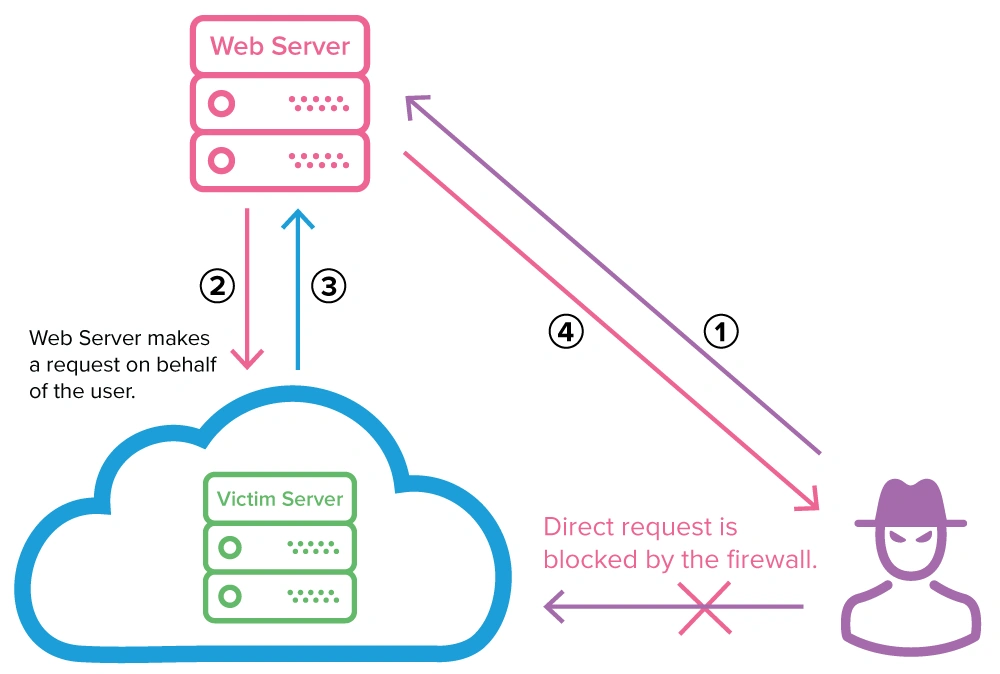
B-1: Typical exploitation of a SSRF Vulnerability via a Web Server
Due to the protection of system firewall, an external attacker can’t use direct requests, instead, they make their attack via a vulnerable web server.
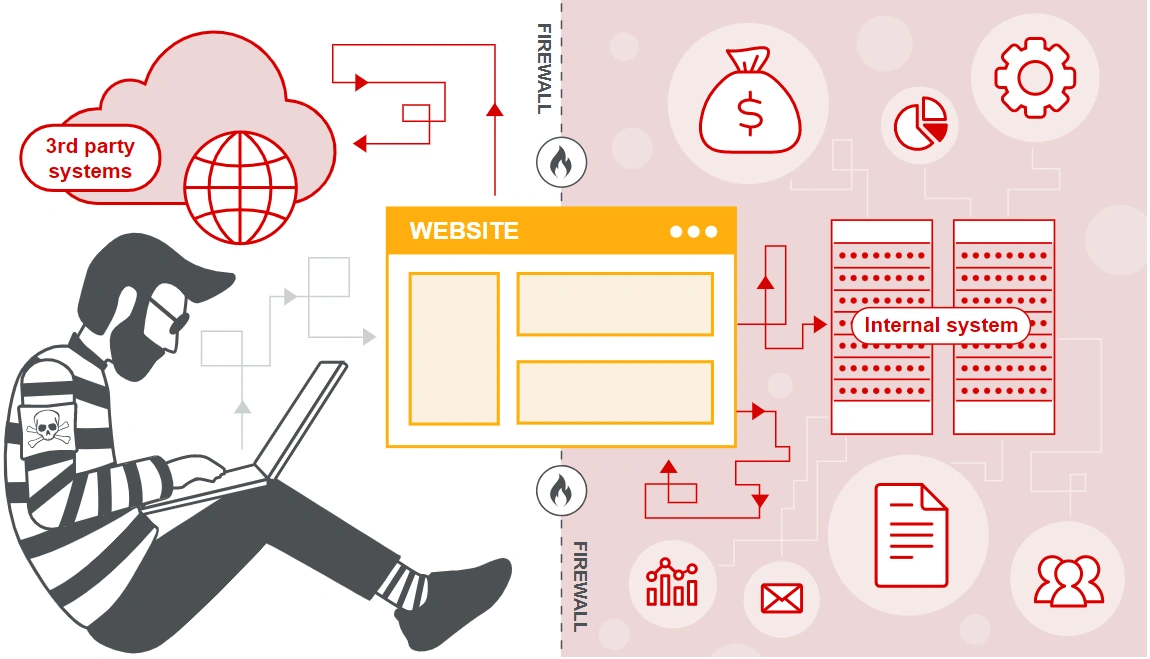
In a typical SSRF attack, the attacker might cause the server to make a connection to internal-only services within the organization's infrastructure. In other cases, they may be able to force the server to connect to arbitrary external systems, potentially leaking sensitive data such as authorization credentials.
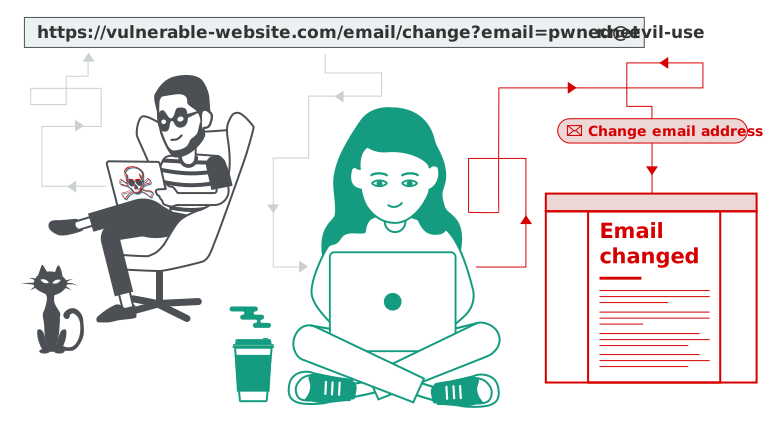
B-2: Typical exploitation of a CSRF Vulnerability via a Web Server
Cross-site request forgery (also known as CSRF) allows an attacker to induce users to perform actions that they do not intend to perform. It allows an attacker to partly circumvent the same origin policy, which is designed to prevent different websites from interfering with each other.
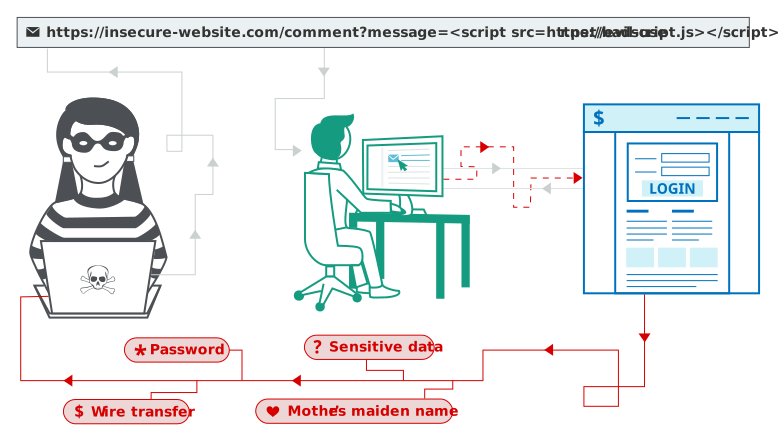
B-3: Typical exploitation of a XSS Vulnerability via a Web Broswer
Cross-site scripting works by manipulating a vulnerable website so that it returns malicious JavaScript to users. When the malicious code executes inside a victim's browser, the attacker can fully compromise their interaction with the application.
B-4: Typical exploitation of a XFS Vulnerability via a User Browser with iFrame
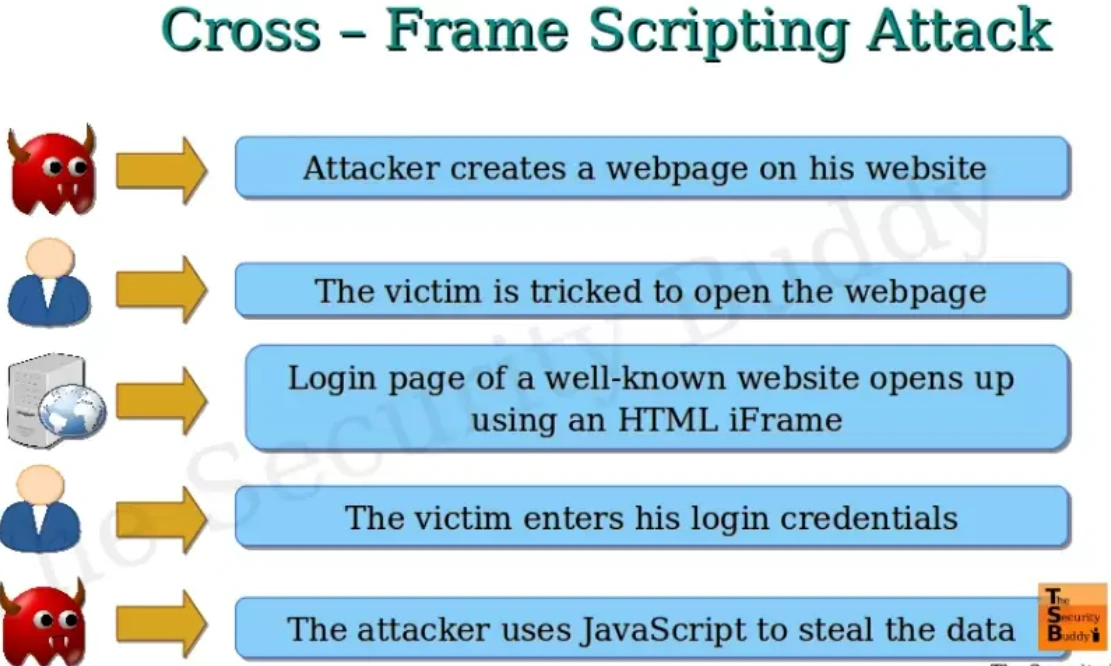
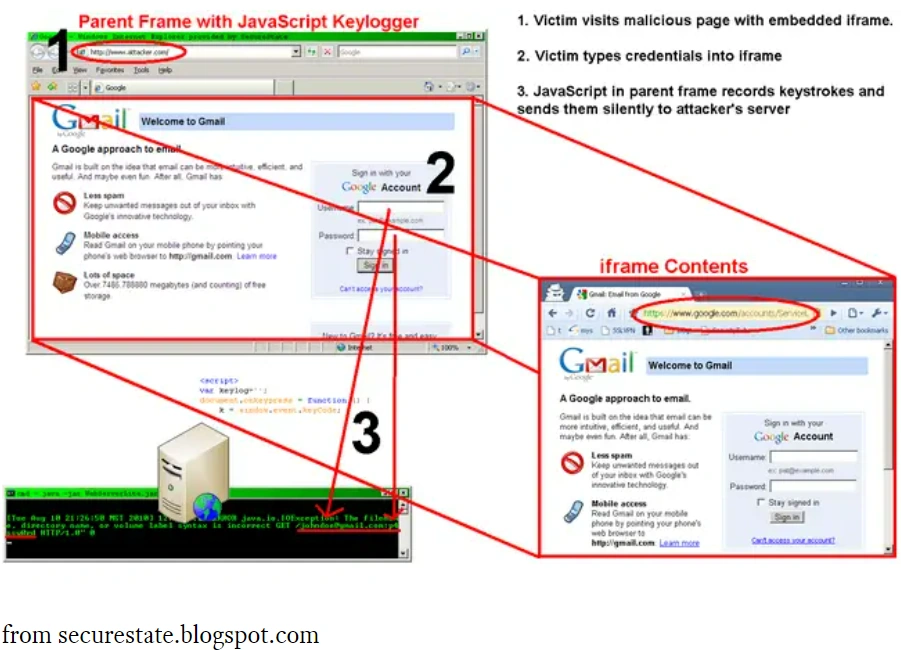
A cross-frame scripting attack starts by embedding a valid webpage into an iframe on a malicious page and tricking the user into visiting a site that the attacker controls, usually as part of a phishing attack. JavaScript is set up on the attacker’s server to listen for user-initiated events, usually keypresses, and the attacker can expand the iframe to cover the entire page for maximum realism.

In combination with a suitable browser bug, this may allow the attacker to obtain login credentials and other sensitive information from the unsuspecting user who is interacting with the framed legitimate site as usual. From this point of view, XFS can be considered a variety of clickjacking.
C - Typical Way to Introduce a Vulnerability
C-1: SSRF
An SSRF vulnerability is introduced when user-controllable data is used to build the target URL. To perform an SSRF attack, an attacker can then change a parameter value in the vulnerable web application to create or control requests from the vulnerable server.
External resources accessed by a web application may include internal services, for example an RSS feed from another website. A developer might use the following URL to retrieve a remote feed:
https://example.com/feed.php?url=externalsite.com/feed/to
If the attacker is able to change the url parameter to localhost (the loopback interface), this may allow them to view local resources hosted on the server, making it vulnerable to server-side request forgery.
C-2: CSRF
For a CSRF attack to be possible, three key conditions must be in place:
- A relevant action. There is an action within the application that the attacker has a reason to induce. This might be a privileged action (such as modifying permissions for other users) or any action on user-specific data (such as changing the user's own password).
- Cookie-based session handling. Performing the action involves issuing one or more HTTP requests, and the application relies solely on session cookies to identify the user who has made the requests. There is no other mechanism in place for tracking sessions or validating user requests.
- No unpredictable request parameters. The requests that perform the action do not contain any parameters whose values the attacker cannot determine or guess. For example, when causing a user to change their password, the function is not vulnerable if an attacker needs to know the value of the
C-3: XSS
XSS attacks are injection attacks that insert malicious script code into a web page processed by a user’s browser. The “cross-site” part means that the attack code has a different origin than the visited site. Normally, this should be impossible due to same-origin policy (SOP) – a fundamental browser security feature that only allows web applications to load scripts that have the same origin.
C-4: XFS
In a typical XFS attack, once the browser user visits the web page controlled by the attacker, the following happens:
- The legitimate page (usually a login page) is opened in an HTML IFRAME element.
- The IFRAME element is maximized to fill the entire page and the frame’s borders are removed so that the unsuspecting user thinks that they are visiting the legitimate site.
- When the victim attempts to log in to the legitimate website or web application, malicious JavaScript outside the IFRAME captures keyboard events (keystrokes) and sends them to the attacker.
Reference
Join the conversation! Your thoughts help the community grow.