Introduction
Session is a feature in ASP.NET Core that enables us to save/store user data. Session stores the data in a dictionary on the Server, and SessionId is used as a key. The SessionId is stored on the client at the cookie. The SessionId cookie is sent with every request. The SessionId cookie is browser-specific and cannot be shared among the browsers. There is no timeout specified for the SessionId cookie, and they are deleted when the browser session ends.
Sessions are of two types: InProc or In-memory and OutProc or Distributed session. If our session is in memory and our application is hosted on a Web-Farm environment, we need to use sticky sessions to tie each session to a specific server. Whereas OutProc sessions do not require sticky sessions, and they are the most preferred way to use sessions in our application.
In my previous article, I talked about InProc or In-memory sessions. In this article, we will learn about OutProc - SQL Server Session state in ASP.NET Core.
Configure SQL Server session state
In the SQL Server Session state, the previous version of ASP.NET requires a number of tables and stored procedures to manage the storage of the session in the SQL server, and this can be configured using the “aspnet_regsql” command or a tool. ASP.NET Core requires only one table. There are multiple ways to generate this storage table. The first is to use the "Microsoft.Extensions.Caching.SqlConfig.Tools" tool. Before we run the commands of these tools, we need to install this tool. To install this tool, we need to add it to project.json and perform the "dotnet restore" command.
Project.json
"tools": {
    "Microsoft.Extensions.Caching.SqlConfig.Tools": "1.0.0-preview2-final"
}
Once this tool is installed for our project, we can execute "sql-cache" command, which generates the required table and an index. The command is in the format given below.
dotnet sql-cache create <connection_string> <schema> <table_name>
Here, I am using SQL Express edition, and the following becomes a full command that generates the table and an index.
dotnet sql-cache create "Data Source=.\SQLExpress;Initial Catalog=Test;Integrated Security=True;" "dbo" "SQLSessions"
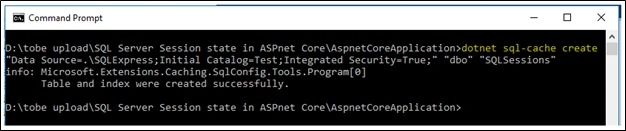
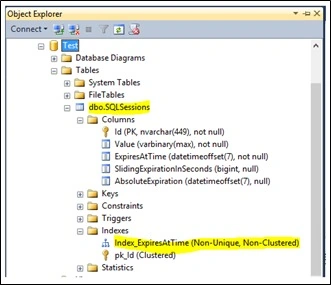
Alternatively, we can create this table and an index manually. The script is given below to create a table and an index.
CREATE TABLE [dbo].[SQLSessions] (
      NOT NULL,
    [Value] [varbinary](max) NOT NULL,
     NOT NULL,
    [SlidingExpirationInSeconds] [bigint] NULL,
     NULL,
    CONSTRAINT [pk_Id] PRIMARY KEY CLUSTERED
    (
        [Id] ASC
    ) WITH (
        PAD_INDEX = OFF,
        STATISTICS_NORECOMPUTE = OFF,
        IGNORE_DUP_KEY = OFF,
        ALLOW_ROW_LOCKS = ON,
        ALLOW_PAGE_LOCKS = ON
    ) ON [PRIMARY]
) ON [PRIMARY] TEXTIMAGE_ON [PRIMARY];

GO

CREATE NONCLUSTERED INDEX [Index_ExpiresAtTime] ON [dbo].[SQLSessions]
(
    [ExpiresAtTime] ASC
) WITH (
    PAD_INDEX = OFF,
    STATISTICS_NORECOMPUTE = OFF,
    SORT_IN_TEMPDB = OFF,
    DROP_EXISTING = OFF,
    ONLINE = OFF,
    ALLOW_ROW_LOCKS = ON,
    ALLOW_PAGE_LOCKS = ON
);
GO
SQL session state internally uses memory cache to enable SQL Server session. We need to add the "Microsoft.Extensions.Caching.SqlServer" dependency along with "Microsoft.AspNet.Session" into the project.json file.
project.json
{
  "version": "1.0.0-*",
  "buildOptions": {
    "preserveCompilationContext": true,
    "debugType": "portable",
    "emitEntryPoint": true
  },
  "tools": {
    "Microsoft.Extensions.Caching.SqlConfig.Tools": "1.0.0-preview2-final"
  },
  "dependencies": {},
  "frameworks": {
    "netcoreapp1.0": {
      "dependencies": {
        "Microsoft.NETCore.App": {
          "type": "platform",
          "version": "1.0.1"
        },
        "Microsoft.AspNetCore.Server.Kestrel": "1.0.0",
        "Microsoft.AspNetCore.Mvc": "1.0.0",
        "Microsoft.AspNetCore.Session": "1.0.0",
        "Microsoft.Extensions.Caching.SqlServer": "1.0.0",
        "Microsoft.Extensions.Configuration.Json": "1.0.0"
      },
      "imports": "dnxcore50"
    }
  }
}
We can add a connection string to the appSetting.json file or put it directly in the ConfigureServices method of the startup class. Following is the definition of ConfigureServices and the Configure method of the startup class.
Startup.cs
using System;
using Microsoft.AspNetCore.Builder;
using Microsoft.AspNetCore.Http;
using Microsoft.Extensions.DependencyInjection;

namespace WebApplication
{
    public class Startup
    {
        public void ConfigureServices(IServiceCollection services)
        {
            services.AddDistributedSqlServerCache(options =>
            {
                options.ConnectionString = @"Data Source=.\SQLExpress;Initial Catalog=Test;Integrated Security=True;";
                options.SchemaName = "dbo";
                options.TableName = "SQLSessions";
            });

            services.AddSession(options =>
            {
                options.CookieName = "Test.Session";
                options.IdleTimeout = TimeSpan.FromMinutes(60);
            });

            services.AddMvc();
        }

        public void Configure(IApplicationBuilder app)
        {
            app.UseSession();
            app.UseMvc();
            app.Run(context =>
            {
                return context.Response.WriteAsync("Hello Readers!");
            });
        }
    }
}
Example
In the example given below, I have set my name into the session in the first request and retrieved the session value in another request.
using Microsoft.AspNetCore.Http;
using Microsoft.AspNetCore.Mvc;
using Microsoft.Extensions.Caching.Distributed;

public class HomeController : Controller
{
    [Route("home/index")]
    public IActionResult Index()
    {
        HttpContext.Session.SetString("name", "Jignesh Trivedi");
        return View();
    }

    [Route("home/GetSessionData")]
    public IActionResult GetSessionData()
    {
        ViewBag.data = HttpContext.Session.GetString("name");
        return View();
    }
}
Output
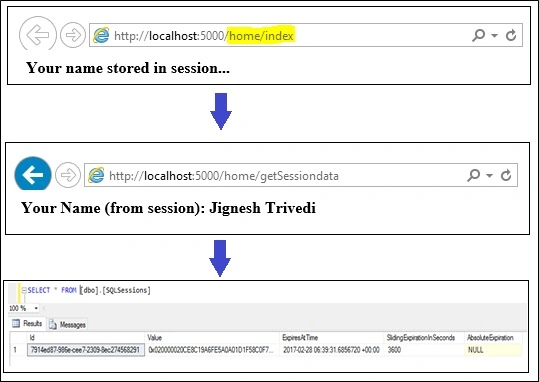
With SQL server state in ASP.NET Core, we can also create and use the session extension methods and we can also store complex objects in the session.
Summary
This article described the steps required to enable SQL Server as a storage mechanism for session state in an ASP.NET Core MVC Application. The usage of SQL server session state is slightly different than the classic ASP.NET Application.


Amer AyyadPosted Nov 7, 2021, 3:00 PM
Thank you for such a great article, I've one question, is there any direct way to get all sessions stored in the database and abandon one of them based on the username for example?
Hrishikesh GalphadePosted Mar 29, 2019, 1:59 AM
Does connection pooling need to set for this? eg Maxo pool and Min pool
Marek MarcinkoPosted Mar 18, 2019, 3:17 AM
Hello, very good article. Do you know about something similar for PostgreSQL?
Hrishikesh GalphadePosted Nov 23, 2018, 6:24 AM
Hi, Its really amazing article but I am facing an issue in ubuntu 16 environment but its working fine on windows. What other thing is required for this issue
NagaPosted Nov 19, 2018, 2:35 PM
Hi JT, nice article. It helped me to implement a similar requirement in our project. When a session expires, will the corresponding record be deleted automatically from database table? Who is responsible to delete the expired sessions records from database? Is there any Microsoft recommended solution to delete the expired sessions records from database? Please share your thoughts or any websites related to this information.
omar hamadPosted Jul 24, 2018, 12:41 AM
Hi JT , how can we logout from the system using options.IdleTimeout = TimeSpan.FromMinutes(60) , i changed it from "FromMinutes" to "FromSeconds" and still not working , any help ?
Abdul RozakPosted Mar 27, 2018, 8:57 PM
Hi JT, How we can get the session value from the SQL server itself? not from local session that stored on the clients computer?
Vishal PrajapatiPosted Mar 2, 2017, 10:35 PM
Nice article...Thanks for sharing..
Nilesh ShahPosted Mar 2, 2017, 11:06 AM
Good article again JT
Joginder BangerPosted Mar 2, 2017, 2:08 AM
Sir Can single table (SQLSessions) hold the information about session. if possible can you share schema of SQLSessions table.