

Introduction
Create "Employees" table in MSSQL database
- USE [SarathlalDB]
- GO
- CREATE TABLE [dbo].[Employees](
- [Id] [nvarchar](50) NOT NULL,
- [Name] [nvarchar](50) NULL,
- [Address] [nvarchar](50) NULL,
- [Gender] [nvarchar](10) NULL,
- [Company] [nvarchar](50) NULL,
- [Designation] [nvarchar](50) NULL,
- CONSTRAINT [PK_Employees] PRIMARY KEY CLUSTERED
- (
- [Id] ASC
- )
- )
- GO
Create a Visual Studio project with MVC and Web API templates
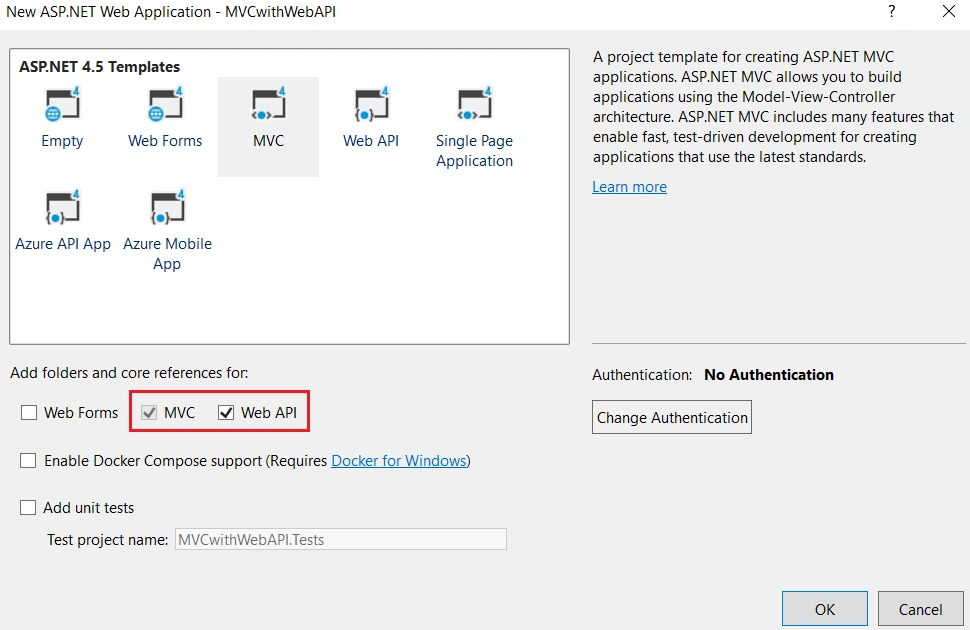
Our new project will be ready in a few moments.
As I mentioned earlier, we are creating an Employee data entry application. Hence, please create an Employee class under “Models” folder.
- namespace MVCwithWebAPI.Models
- {
- public class Employee
- {
- public string Id { get; set; }
- public string Name { get; set; }
- public string Address { get; set; }
- public string Gender { get; set; }
- public string Company { get; set; }
- public string Designation { get; set; }
- }
- }
We can create a “DbContext” class for database connectivity.
The class that derives DbContext is called context class in entity framework. DbContext is an important class in Entity Framework API. It is a bridge between domain or entity classes and the database. DbContext is the primary class that is responsible for interacting with the database.

We can create “SqlDbContext” class and derives DbContext class insides this class.
- using System.Data.Entity;
- namespace MVCwithWebAPI.Models
- {
- public class SqlDbContext : DbContext
- {
- public SqlDbContext() : base("name=SqlConn")
- {
- }
- public DbSet<Employee> Employees { get; set; }
- }
- }
Please note, we have used a connection “SqlConn” in above DbContext class. Hence, we can create the connection string in Web.Config file.

- <connectionStrings>
- <add name="SqlConn"
- connectionString="Data Source=SARATHLALS\SQL2016; Initial Catalog=SarathlalDB; Integrated Security=True; MultipleActiveResultSets=True;"
- providerName="System.Data.SqlClient" />
- </connectionStrings>
We are following the repository pattern in this application. We can create a “IEmployeeRepository” interface and define all the functions there.
- using System.Collections.Generic;
- using System.Threading.Tasks;
- namespace MVCwithWebAPI.Models
- {
- public interface IEmployeeRepository
- {
- Task Add(Employee employee);
- Task Update(Employee employee);
- Task Delete(string id);
- Task<Employee> GetEmployee(string id);
- Task<IEnumerable<Employee>> GetEmployees();
- }
- }
We can implement the exact logic for CRUD actions in “EmployeeRepository” class. We will implement IEmployeeRepository interface in this class.
- using System;
- using System.Collections.Generic;
- using System.Data.Entity;
- using System.Linq;
- using System.Threading.Tasks;
- using System.Web;
- namespace MVCwithWebAPI.Models
- {
- public class EmployeeRepository : IEmployeeRepository
- {
- private readonly SqlDbContext db = new SqlDbContext();
- public async Task Add(Employee employee)
- {
- employee.Id = Guid.NewGuid().ToString();
- db.Employees.Add(employee);
- try
- {
- await db.SaveChangesAsync();
- }
- catch
- {
- throw;
- }
- }
- public async Task<Employee> GetEmployee(string id)
- {
- try
- {
- Employee employee = await db.Employees.FindAsync(id);
- if (employee == null)
- {
- return null;
- }
- return employee;
- }
- catch
- {
- throw;
- }
- }
- public async Task<IEnumerable<Employee>> GetEmployees()
- {
- try
- {
- var employees = await db.Employees.ToListAsync();
- return employees.AsQueryable();
- }
- catch
- {
- throw;
- }
- }
- public async Task Update(Employee employee)
- {
- try
- {
- db.Entry(employee).State = EntityState.Modified;
- await db.SaveChangesAsync();
- }
- catch
- {
- throw;
- }
- }
- public async Task Delete(string id)
- {
- try
- {
- Employee employee = await db.Employees.FindAsync(id);
- db.Employees.Remove(employee);
- await db.SaveChangesAsync();
- }
- catch
- {
- throw;
- }
- }
- private bool EmployeeExists(string id)
- {
- return db.Employees.Count(e => e.Id == id) > 0;
- }
- }
- }
I have implemented all 5 methods (for CRUD) in this class. All are self-explanatory. If you need further clarification on any terms, please feel free to contact me.
- using MVCwithWebAPI.Models;
- using System.Collections.Generic;
- using System.Threading.Tasks;
- using System.Web.Http;
- namespace MVCwithWebAPI.Controllers
- {
- public class EmployeesApiController : ApiController
- {
- private readonly IEmployeeRepository _iEmployeeRepository = new EmployeeRepository();
- [HttpGet]
- [Route("api/Employees/Get")]
- public async Task<IEnumerable<Employee>> Get()
- {
- return await _iEmployeeRepository.GetEmployees();
- }
- [HttpPost]
- [Route("api/Employees/Create")]
- public async Task CreateAsync([FromBody]Employee employee)
- {
- if (ModelState.IsValid)
- {
- await _iEmployeeRepository.Add(employee);
- }
- }
- [HttpGet]
- [Route("api/Employees/Details/{id}")]
- public async Task<Employee> Details(string id)
- {
- var result = await _iEmployeeRepository.GetEmployee(id);
- return result;
- }
- [HttpPut]
- [Route("api/Employees/Edit")]
- public async Task EditAsync([FromBody]Employee employee)
- {
- if (ModelState.IsValid)
- {
- await _iEmployeeRepository.Update(employee);
- }
- }
- [HttpDelete]
- [Route("api/Employees/Delete/{id}")]
- public async Task DeleteConfirmedAsync(string id)
- {
- await _iEmployeeRepository.Delete(id);
- }
- }
- }
All the CRUD actions are derived in this API class. We have created an instance for EmployeeRepository class and with the help of this instance, we have accessed all the methods from EmployeeRepository class in our API class.
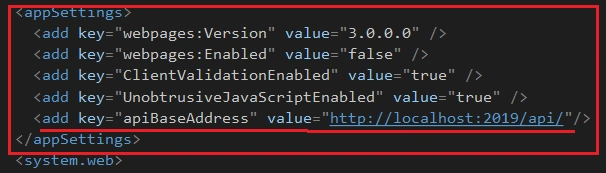
We have named the key as “apiBaseAddress” and gave the project URL as value.
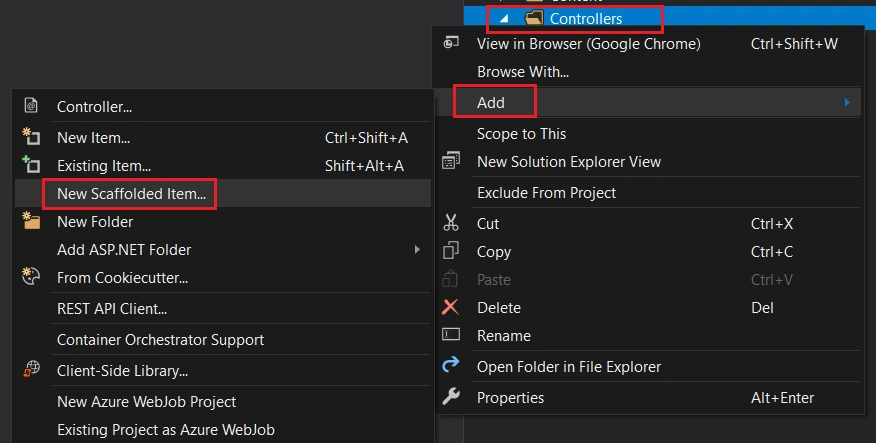
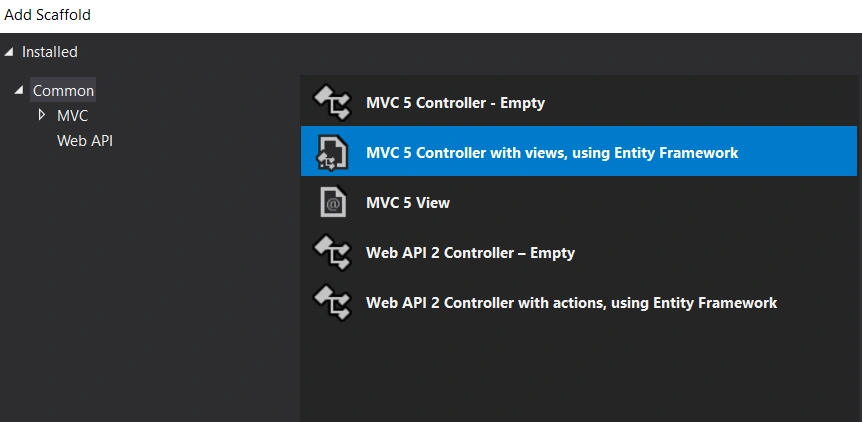
Create the MVC Controller using Scaffolding
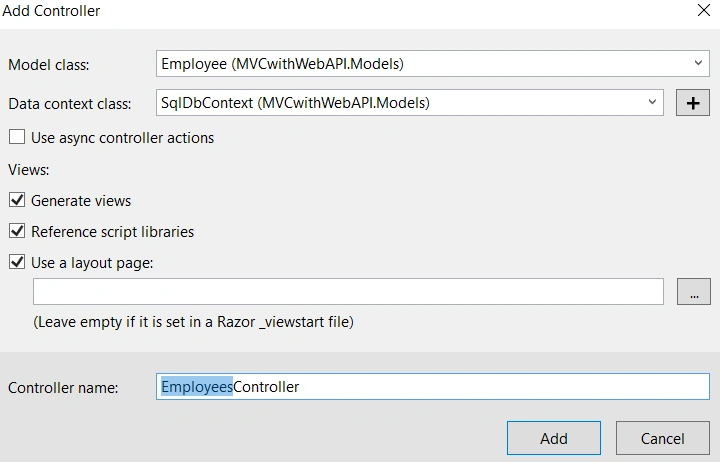
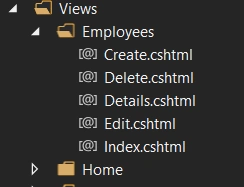
- using MVCwithWebAPI.Models;
- using System;
- using System.Collections.Generic;
- using System.Configuration;
- using System.Linq;
- using System.Net;
- using System.Net.Http;
- using System.Threading.Tasks;
- using System.Web.Mvc;
- namespace MVCwithWebAPI.Controllers
- {
- public class EmployeesController : Controller
- {
- readonly string apiBaseAddress = ConfigurationManager.AppSettings["apiBaseAddress"];
- public async Task<ActionResult> Index()
- {
- IEnumerable<Employee> employees = null;
- using (var client = new HttpClient())
- {
- client.BaseAddress = new Uri(apiBaseAddress);
- var result = await client.GetAsync("employees/get");
- if (result.IsSuccessStatusCode)
- {
- employees = await result.Content.ReadAsAsync<IList<Employee>>();
- }
- else
- {
- employees = Enumerable.Empty<Employee>();
- ModelState.AddModelError(string.Empty, "Server error try after some time.");
- }
- }
- return View(employees);
- }
- public async Task<ActionResult> Details(string id)
- {
- if (id == null)
- {
- return new HttpStatusCodeResult(HttpStatusCode.BadRequest);
- }
- Employee employee = null;
- using (var client = new HttpClient())
- {
- client.BaseAddress = new Uri(apiBaseAddress);
- var result = await client.GetAsync($"employees/details/{id}");
- if (result.IsSuccessStatusCode)
- {
- employee = await result.Content.ReadAsAsync<Employee>();
- }
- else
- {
- ModelState.AddModelError(string.Empty, "Server error try after some time.");
- }
- }
- if (employee == null)
- {
- return HttpNotFound();
- }
- return View(employee);
- }
- public ActionResult Create()
- {
- return View();
- }
- [HttpPost]
- [ValidateAntiForgeryToken]
- public async Task<ActionResult> Create([Bind(Include = "Name,Address,Gender,Company,Designation")] Employee employee)
- {
- if (ModelState.IsValid)
- {
- using (var client = new HttpClient())
- {
- client.BaseAddress = new Uri(apiBaseAddress);
- var response = await client.PostAsJsonAsync("employees/Create", employee);
- if (response.IsSuccessStatusCode)
- {
- return RedirectToAction("Index");
- }
- else
- {
- ModelState.AddModelError(string.Empty, "Server error try after some time.");
- }
- }
- }
- return View(employee);
- }
- public async Task<ActionResult> Edit(string id)
- {
- if (id == null)
- {
- return new HttpStatusCodeResult(HttpStatusCode.BadRequest);
- }
- Employee employee = null;
- using (var client = new HttpClient())
- {
- client.BaseAddress = new Uri(apiBaseAddress);
- var result = await client.GetAsync($"employees/details/{id}");
- if (result.IsSuccessStatusCode)
- {
- employee = await result.Content.ReadAsAsync<Employee>();
- }
- else
- {
- ModelState.AddModelError(string.Empty, "Server error try after some time.");
- }
- }
- if (employee == null)
- {
- return HttpNotFound();
- }
- return View(employee);
- }
- [HttpPost]
- [ValidateAntiForgeryToken]
- public async Task<ActionResult> Edit([Bind(Include = "Id,Name,Address,Gender,Company,Designation")] Employee employee)
- {
- if (ModelState.IsValid)
- {
- using (var client = new HttpClient())
- {
- client.BaseAddress = new Uri(apiBaseAddress);
- var response = await client.PutAsJsonAsync("employees/edit", employee);
- if (response.IsSuccessStatusCode)
- {
- return RedirectToAction("Index");
- }
- else
- {
- ModelState.AddModelError(string.Empty, "Server error try after some time.");
- }
- }
- return RedirectToAction("Index");
- }
- return View(employee);
- }
- public async Task<ActionResult> Delete(string id)
- {
- if (id == null)
- {
- return new HttpStatusCodeResult(HttpStatusCode.BadRequest);
- }
- Employee employee = null;
- using (var client = new HttpClient())
- {
- client.BaseAddress = new Uri(apiBaseAddress);
- var result = await client.GetAsync($"employees/details/{id}");
- if (result.IsSuccessStatusCode)
- {
- employee = await result.Content.ReadAsAsync<Employee>();
- }
- else
- {
- ModelState.AddModelError(string.Empty, "Server error try after some time.");
- }
- }
- if (employee == null)
- {
- return HttpNotFound();
- }
- return View(employee);
- }
- [HttpPost, ActionName("Delete")]
- [ValidateAntiForgeryToken]
- public async Task<ActionResult> DeleteConfirmed(string id)
- {
- using (var client = new HttpClient())
- {
- client.BaseAddress = new Uri(apiBaseAddress);
- var response = await client.DeleteAsync($"employees/delete/{id}");
- if (response.IsSuccessStatusCode)
- {
- return RedirectToAction("Index");
- }
- else
- ModelState.AddModelError(string.Empty, "Server error try after some time.");
- }
- return View();
- }
- }
- }
You can see, we have defined an “apiBaseAddress” variable globally and got the value for apiBaseAddress from Web.Config file. We will use this value in all our controller actions.
- public async Task<ActionResult> Index()
- {
- IEnumerable<Employee> employees = null;
- using (var client = new HttpClient())
- {
- client.BaseAddress = new Uri(apiBaseAddress);
- var result = await client.GetAsync("employees/get");
- if (result.IsSuccessStatusCode)
- {
- employees = await result.Content.ReadAsAsync<IList<Employee>>();
- }
- else
- {
- employees = Enumerable.Empty<Employee>();
- ModelState.AddModelError(string.Empty, "Server error try after some time.");
- }
- }
- return View(employees);
- }
If you look at the index action, you can see, we have declared a “HttpClient” variable and using client.GetAsync method, we have got the employee data result from Web API and store in a “result” variable. We have again read the employee data from this result variable using “ReadAsync” method.
- @model IEnumerable<MVCwithWebAPI.Models.Employee>
- @{
- ViewBag.Title = "Employee List";
- }
- <h3>Employee List</h3>
- <p>
- @Html.ActionLink("New Employee", "Create")
- </p>
- <table class="table">
- <tr>
- <th>
- @Html.DisplayNameFor(model => model.Name)
- </th>
- <th>
- @Html.DisplayNameFor(model => model.Address)
- </th>
- <th>
- @Html.DisplayNameFor(model => model.Gender)
- </th>
- <th>
- @Html.DisplayNameFor(model => model.Company)
- </th>
- <th>
- @Html.DisplayNameFor(model => model.Designation)
- </th>
- <th></th>
- </tr>
- @foreach (var item in Model)
- {
- <tr>
- <td>
- @Html.ActionLink(item.Name, "Details", new { id = item.Id })
- </td>
- <td>
- @Html.DisplayFor(modelItem => item.Address)
- </td>
- <td>
- @Html.DisplayFor(modelItem => item.Gender)
- </td>
- <td>
- @Html.DisplayFor(modelItem => item.Company)
- </td>
- <td>
- @Html.DisplayFor(modelItem => item.Designation)
- </td>
- <td>
- @Html.ActionLink("Edit", "Edit", new { id = item.Id }) |
- @Html.ActionLink("Delete", "Delete", new { id = item.Id })
- </td>
- </tr>
- }
- </table>
We have modified the existing “Index” view. We have removed the “Details” link from this view and instead, we have given a hyperlink in the employee name itself for details.
- @model MVCwithWebAPI.Models.Employee
- @{
- ViewBag.Title = "Create Employee";
- }
- <h3>Create Employee</h3>
- @using (Html.BeginForm())
- {
- @Html.AntiForgeryToken()
- <div class="form-horizontal">
- <hr />
- @Html.ValidationSummary(true, "", new { @class = "text-danger" })
- <div class="form-group">
- @Html.LabelFor(model => model.Name, htmlAttributes: new { @class = "control-label col-md-2" })
- <div class="col-md-10">
- @Html.EditorFor(model => model.Name, new { htmlAttributes = new { @class = "form-control" } })
- @Html.ValidationMessageFor(model => model.Name, "", new { @class = "text-danger" })
- </div>
- </div>
- <div class="form-group">
- @Html.LabelFor(model => model.Address, htmlAttributes: new { @class = "control-label col-md-2" })
- <div class="col-md-10">
- @Html.EditorFor(model => model.Address, new { htmlAttributes = new { @class = "form-control" } })
- @Html.ValidationMessageFor(model => model.Address, "", new { @class = "text-danger" })
- </div>
- </div>
- <div class="form-group">
- @Html.LabelFor(model => model.Gender, htmlAttributes: new { @class = "control-label col-md-2" })
- <div class="col-md-10">
- @Html.EditorFor(model => model.Gender, new { htmlAttributes = new { @class = "form-control" } })
- @Html.ValidationMessageFor(model => model.Gender, "", new { @class = "text-danger" })
- </div>
- </div>
- <div class="form-group">
- @Html.LabelFor(model => model.Company, htmlAttributes: new { @class = "control-label col-md-2" })
- <div class="col-md-10">
- @Html.EditorFor(model => model.Company, new { htmlAttributes = new { @class = "form-control" } })
- @Html.ValidationMessageFor(model => model.Company, "", new { @class = "text-danger" })
- </div>
- </div>
- <div class="form-group">
- @Html.LabelFor(model => model.Designation, htmlAttributes: new { @class = "control-label col-md-2" })
- <div class="col-md-10">
- @Html.EditorFor(model => model.Designation, new { htmlAttributes = new { @class = "form-control" } })
- @Html.ValidationMessageFor(model => model.Designation, "", new { @class = "text-danger" })
- </div>
- </div>
- <div class="form-group">
- <div class="col-md-offset-2 col-md-10">
- <input type="submit" value="Create" class="btn btn-default" />
- </div>
- </div>
- </div>
- }
- <div>
- @Html.ActionLink("Back to List", "Index")
- </div>
- @section Scripts {
- @Scripts.Render("~/bundles/jqueryval")
- }
We can run the application now. The landing page looks like the below screenshot.
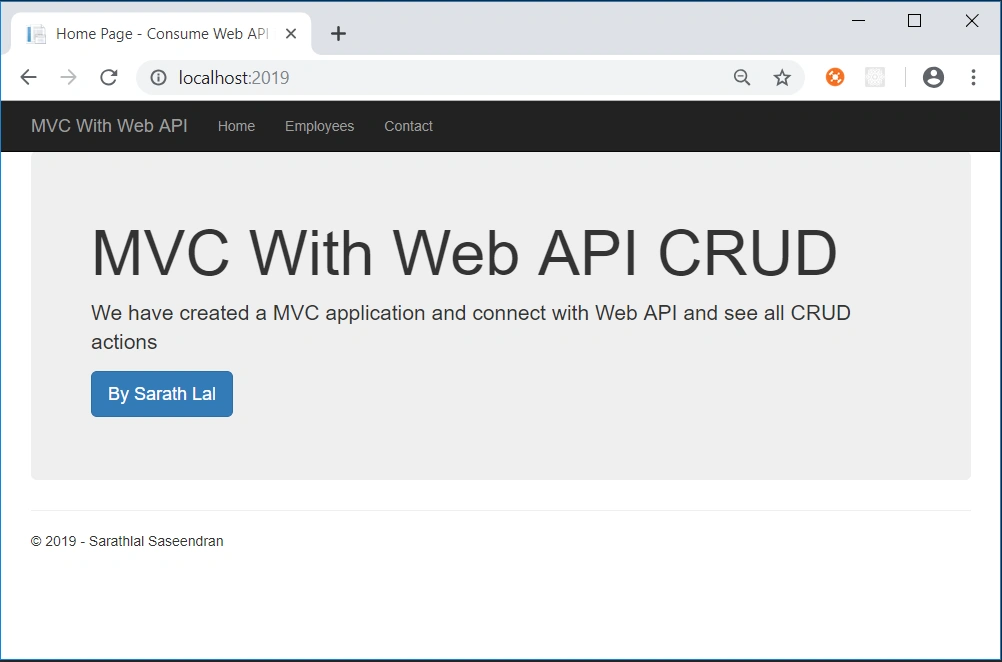
We can click the “Employees” link and click the “New Employee” link to create a new employee.
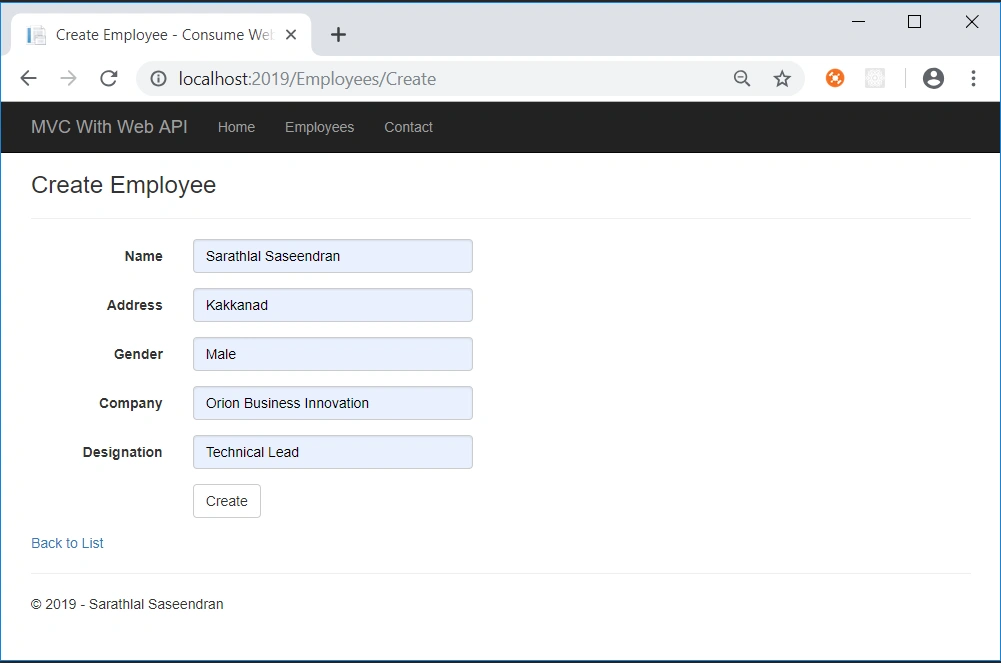
I have given my own details in the above screen.
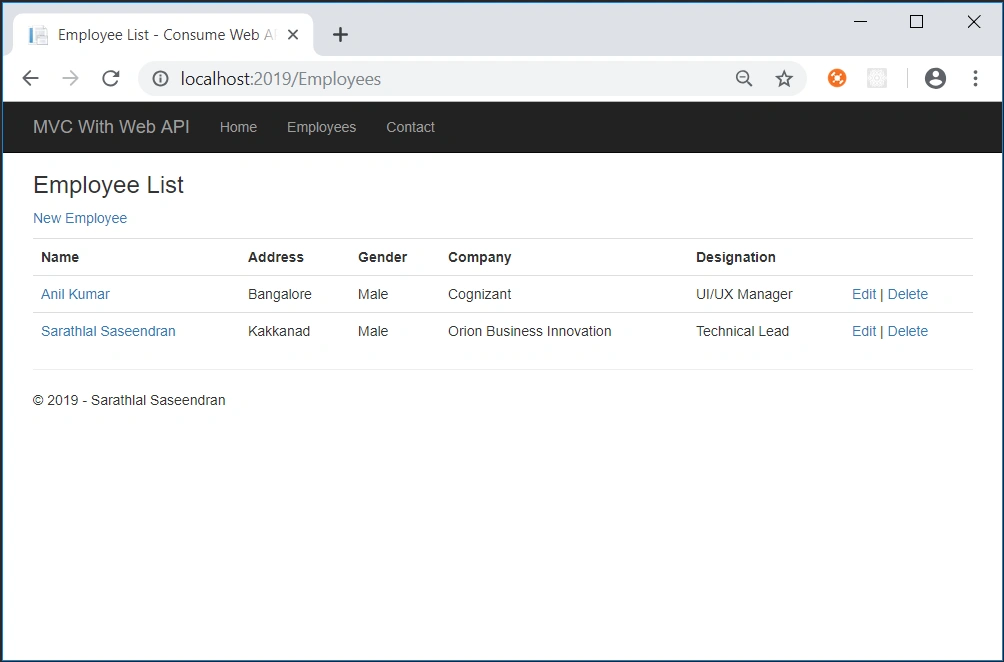
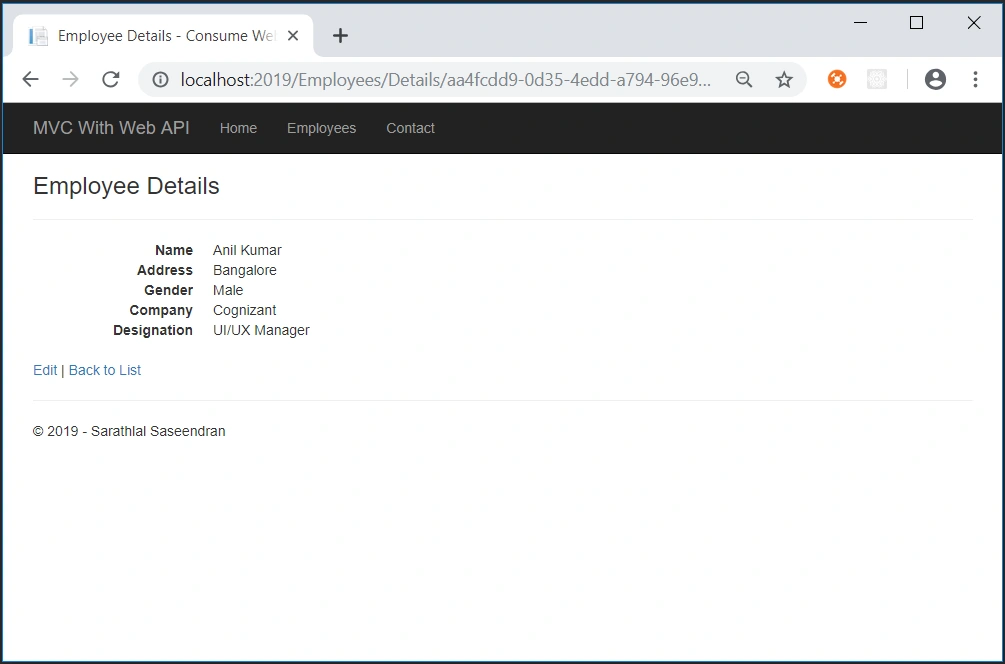
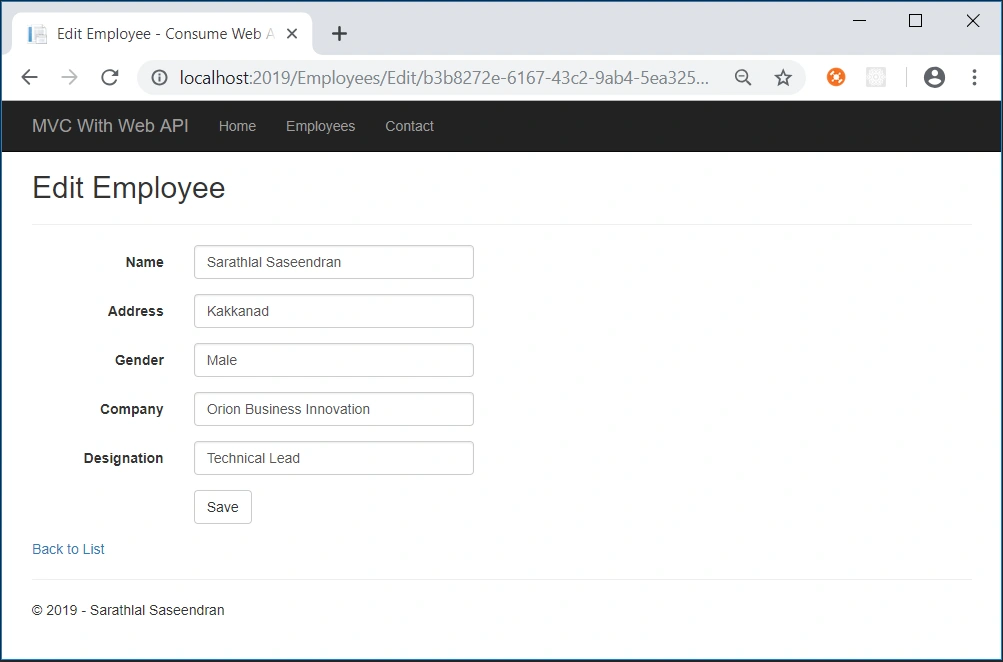
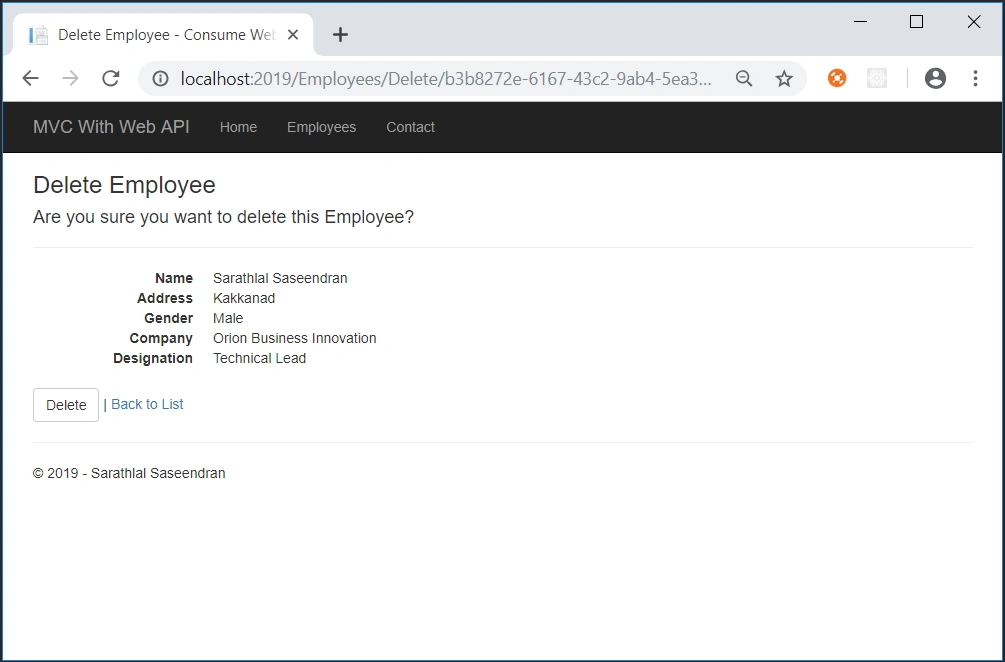
We have successfully seen all the CRUD actions with this application.
sonali gaikwadPosted Jun 12, 2021, 1:25 PM
I am getting this error "the non-generic method 'httpcontent.readasstringasync()' cannot be used with type arguments"
Neomi SonyPosted Jun 3, 2021, 1:45 PM
I am getting error when I open Employee page after deploying it on Azure, could please guide me on the steps to correct it
Haja MainudeenPosted Dec 11, 2020, 6:23 AM
This is my error response : {StatusCode: 500, ReasonPhrase: 'Internal Server Error', Version: 1.1, Content: System.Net.Http.StreamContent, Headers:{ Pragma: no-cache X-SourceFiles: =?UTF-8?B?YzpcdXNlcnNcYWRtaW5cZG9jdW1lbnRzXHZpc3VhbCBzdHVkaW8gMjAxNVxQcm9qZWN0c1xXZWJBcGlUZXN0TXZjXFdlYkFwaVRlc3RNdmNcYXBpXGVtcGxveWVlc1xDcmVhdGU=?= Cache-Control: no-cache Date: Fri, 11 Dec 2020 12:07:52 GMT Server: Microsoft-IIS/10.0 X-AspNet-Version: 4.0.30319 X-Powered-By: ASP.NET Content-Length: 8926 Content-Type: application/json; charset=utf-8 Expires: -1 }}
Haja MainudeenPosted Dec 11, 2020, 6:01 AM
Hello sir, I got 500 internal server when i create button is clicked, can u help me to solve
yashu b uPosted Apr 21, 2020, 6:36 AM
Good one ! Thanks a lot
maideen kaderPosted Nov 19, 2019, 4:00 AM
I have system.string type error. My table is ID with auto increment and primary key. If i define int, it will throw error. pls advice me how to eliminate error. Tq
Chittaranjan SwainPosted Sep 22, 2019, 3:16 AM
Nice One......
Thryshika TMPosted Aug 12, 2019, 5:09 AM
Where is the table name mapped in the code. For ex, i have named my table as tblEmployees, where should i change in the code?
Ravishankar NPosted Mar 18, 2019, 11:45 AM
Bookmarked ! Good one for starters!
Shovon PramanikPosted Mar 18, 2019, 1:47 AM
Very Good for Beginners....!!
Navin RaiPosted Mar 15, 2019, 12:45 AM
I have one doubt, don't we need to dispose dbcontext ? Please explain.
Jignesh KumarPosted Mar 14, 2019, 11:28 AM
Nice article with easy to understand crud operation