

In continuation of my previous article on injecting services in controller, this time I am writing on how to inject services directly in MVC View.
In order to achieve this, a new keyword @inject is used. So, let's get started.
- Create a new project - Create a new project using ASP.NET Web Application template as in the following:

- Add Service Interface - Create an interface named IGUIDService under Services folder as shown below:
- public interface IGUIDService
- {
- string GenerateGUID();
- }
- Add Service Implementation - Create a class named GUIDService under Services folder and provide the implementation of IGUIDService interface as shown below:
- public class GUIDService : IGUIDService
- {
- public string GenerateGUID()
- {
- return ("Generated GUID is: " + Guid.NewGuid()).ToString();
- }
- }
- Add a Controller - The next task is to add a Controller named GUIDController by right clicking on Controllers folder as shown below:

- Add a View - Before adding a View, create a folder under Views folder. Now add a View by right clicking on GUID folder as shown below:
 Once file is added, inject service inside View as:Below is the complete code for displaying GUID on View:
- @inject IGUIDService guidService
- @using CustomTagHelper.Services;
- @inject IGUIDService guidService
- <p>@guidService.GenerateGUID()</p>
- Register Service - The last step is to register the service in the ConfigureServices method of Startup class as shown below:
- public void ConfigureServices(IServiceCollection services)
- {
- ...
- ...
- services.AddTransient<IGUIDService,GUIDService>();
- }
Everything is set. Now run your application and you will be able to see GUID on browser as:
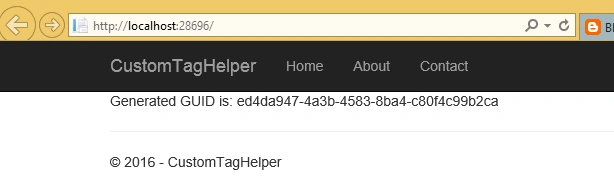
Hope you got an idea on how to inject services in MVC View in ASP.NET Core 1.0.
Hope you got an idea on how to inject services in MVC View in ASP.NET Core 1.0.
Read more articles on ASP.NET Core:
Arjun DhilodPosted Aug 2, 2016, 2:55 AM
Shweta how can add "Add Service Interface" can you explain in brief sorry to ask stupid question but i am new in MVC
Santhakumar MunuswamyPosted Feb 12, 2016, 11:13 PM
Thanks for nice share