

This blog is for those who would like to use Tag Helpers over old Razor/HTML helpers. Tag Helpers, another new feature of ASP.NET Core.
Let’s quickly have a look at it.
What are Tag Helpers
As per ASP.NET documentation:
"Tag Helpers enable server-side code to participate in creating and rendering HTML elements in Razor files".
Tag Helpers are somewhat similar to HTML Helpers/Razor Helpers introduced in previous version of ASP.NET MVC but those helpers were not that easy to understand for web designers because of inline C# method calls. As web designers are more inclined towards HTML, a simple and comfortable approach was required. Fortunately, ASP.NET Core 1.0 provided that. Now one need not to use HTML Helpers to build cshtml forms. Means when you had to write this:

Now you can write this:

As you can see above format is very easy to understand as it is purely a HTML syntax.
How Tag Helpers work?
When you create a new ASP.NET web application in Visual Studio, it adds Microsoft.AspNet.Tooling.Razor to the project.json file. This is the package that adds Tag Helper tooling and enables intelli Sense in Visual Studio. In order to make our Razor views aware of Tag Helpers, a special file named _ViewImports.cshtml is used. This file is stored in Views folder. By default this file will be there. By any chance if file is not there, then create and add the following line in it:

Pre-defined Tag Helpers
ASP.NET Core 1.0 includes a list of pre-defined Tag Helpers:
- Anchor: Generates hyperlink
- Input: Generates input elements
- Select: Generates dropdownlist
- Cache: Manages partial page caching
- Form: Generates form element
- Script: Processes script tag
- Link: Processes link element
- Label: Outputs label element
- Option: Targets individual options in a list
- TextArea: Processes text area tag
- Environment: Controls rendering of content
- ValidationMessage: Generates validation error
- ValidationSummary: Provides validation summary message
I’ll try to brief about all above Tag Helpers in coming posts. Now what if existing tags doesn't fulfill our need? In that case, we have to go ahead and invent something else. Should we proceed to create Tag Helper based on our requirement?
Creating Custom Tag Helpers
As part of this article, we will create a new Tag Helper for appreciating someone. Our tag will be <appreciate>. For example:
- <appreciate person-name-for-appreciation="shweta"></appreciate>
- <label>Great Work, Shweta</label>
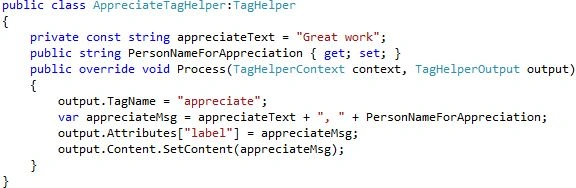
Note: It is not mandatory to suffix TagHelper in class name. It is just a good practice.
To make this Tag Helper available to all Razor views, we have to add addTagHelper directive to _ViewImports.cshtml file as:
- @addTagHelper "*,CustomTagHelper"
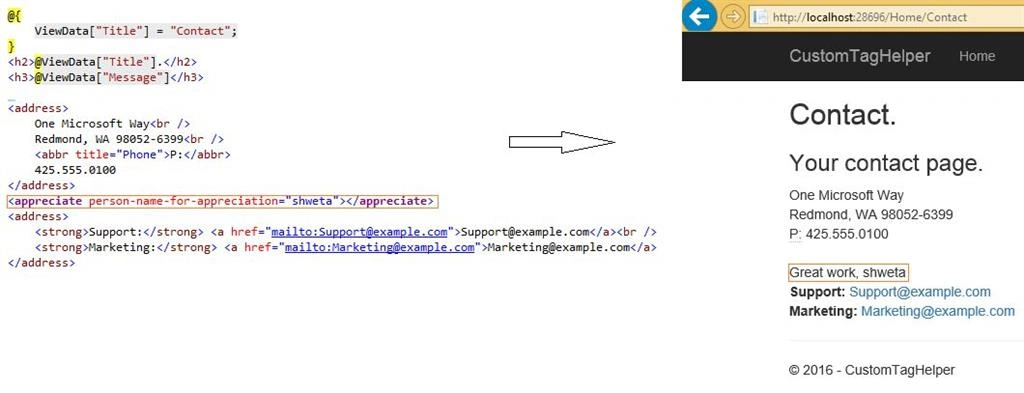
Next step is to update our views. Let’s go ahead and append below line in view:
- <appreciate person-name-for-appreciation="shweta"></appreciate>
Run your application and you will find that appreciate Tag Helper is replaced with your label markup with output as:
Hope you enjoyed this new feature.
Join the conversation! Your thoughts help the community grow.