

We will discuss ContentChild and ContentChildren decorators in angular and their practical implementation.
Overview
- Content Child and Content Children are used to getting the reference of the projected content.
- Projected content means the content that the component receives from the parent component.
Implementation
Let’s start with practical implementation
App Component TypeScript File
import { Component } from '@angular/core';

@Component({
  selector: 'app-root',
  templateUrl: './app.component.html',
  styleUrls: ['./app.component.css']
})
export class AppComponent {
  title = 'ContentChildAndConetntChildrenDemo';

  student1 = [
    {'Id' : 1, 'Name': 'Piysuh Deshmukh', 'Address': 'Pune', 'Age': 26}
  ]

  student2 = [
    {'Id' : 2, 'Name': 'Vivek Patil', 'Address': 'Nashik', 'Age': 28}
  ]

  student3 = [
    {'Id' : 2, 'Name': 'Rajeshwar Ahire', 'Address': 'Mumbai', 'Age': 25}
  ]

}
Line 11:21 – We can see three student arrays that we declared inside the app component. Now, we will pass this array to the student detail component using the Input decorator.
If you don’t have any idea about Input decorators, check my blog related to that.
App Component HTML File
<nav class="navbar navbar-light bg-light" style="padding: 30px;margin: 40px; justify-content:center">
  <span class="navbar-brand mb-0 h1">Angular Demo</span>
</nav>

<app-studentsdetail [students]="student1">
<h5 #color>Student Internship Project: ABC</h5>
<h5>Student Contact No: 1111567890</h5>
</app-studentsdetail>

<app-studentsdetail [students]="student2">
  <h5 #color>Student Internship Project: PQR</h5>
  <h5>Student Contact No: 2222567890</h5>
</app-studentsdetail>

<app-studentsdetail [students]="student3">
  <h5 #color>Student Internship Project: XYZ</h5>
  <h5>Student Contact No: 3333567890</h5>
</app-studentsdetail>
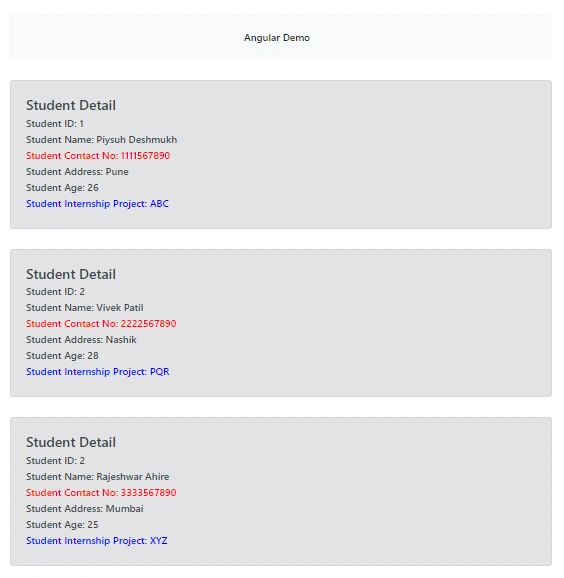
- In the above file, we rendered students’ detail component three times and passed students’ array inside each selector. We reused the student component using content projection.
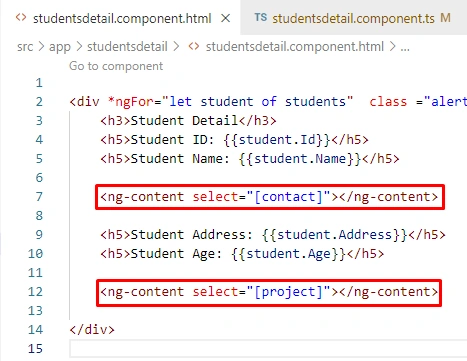
- We also put some HTML content inside each selector that we will display inside the student details component by using ng-content directives. So, if we pass content like this using ng-content, then that DOM element we can access using only the content child, and that’s not possible by using the ViewChild decorator.
- Also, we used one template reference variable in the first heading of each selector and named it a color with a hash sign. We can access that DOM element inside the student component using this reference variable. Also, access and change a few DOM properties related to that.
Student’s detail component
Students Detail Component TypeScript File
import { AfterContentInit, Component, ContentChild, ElementRef, Input } from '@angular/core';

@Component({
  selector: 'app-studentsdetail',
  templateUrl: './studentsdetail.component.html',
  styleUrls: ['./studentsdetail.component.css']
})
export class StudentsdetailComponent implements AfterContentInit {

  @Input() students! : any

  //Content Child
  @ContentChild("color") contentColor!  : ElementRef

  ngAfterContentInit(): void {

    //Content Child
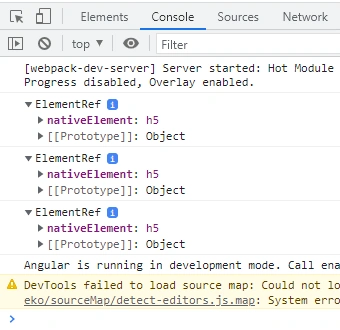
    console.log(this.contentColor);
    this.contentColor.nativeElement.setAttribute('style','color: blue')
  }

}



Join the conversation! Your thoughts help the community grow.