

Introduction
What is a greenhouse?
- Green house is a glass-based structure or roof made of transparent material. In this greenhouse, we can plant vegetables and flowers naturally. There are installations, heating, cooling, lighting, etc. with which we can monitor the greenhouse by the computer to optimize the conditions for plant growth.
 Figure1 - GreenHouse.
Parts Of Lists
- Arduino Uno
- Relays
- DHT11 Sensor [Temperature+Humidity sensor]
- LCD
- Hook Wires
- Bread Board.
Parts Explanation
Relay
- A relay is simply an act as the switch, so we can use the relay as the electrical appliances for the circuit.
 Figure2 - Relay Box
DHT11 Sensor
DHT11 is a known combination of temperature sensors and humidity sensors.
Temperature sensor
- It is used to measure the amount of heat energy or even coldness.
- It may be used to detect the analog and digital output.
Humidity sensor
- It is a sensor, which is used to sense and measure the percentage of the humidity in the air.
- It can also measure air temperature.
- Humidity sensor is used for capacitive measurement.
- These voltages are the changes, which are converted into a digital reading.
 Figure3 - DHT11 Sensor.
LCD Display
- LCD is Liquid Crystal Display (LCD).
- It can have a flat-panel or an electronic display.
- It is used in the hospital, showrooms, buses, railway stations, airports, etc.
 Figure4 - LCD Display.
Connection
Step 1
DTH11 Sensor To Arduino Uno
- Connect the V to the 5v of the Arduino Uno.
- Connect the G to the Gnd of the Arduino UNO.
- Connect the S to any input pin of the digital side as u like.
Step 2
LCD Display to Arduino Uno
- Fix the LCD in the 16 to 2 on the bread board.
- The 16 pin to the Gnd
- The 15 pin to the Vcc
- The 14 pin to the Digital pin 02
- The 13 pin to the Digital pin 03
- The 12 pin to the Digital pin 04
- The 11 pin to the Digital pin 05
- The 01 pin to the Gnd.
- The 02 pin to the Vcc.
- The 03 pin to the potentiometer.
- The 04 pin to the Digital pin 07.
- The 05 pin to the Gnd.
- The 06 pin to the Digital pin 06.
Programming
- #include "DHT.h"
- #define DHTPIN 2
- //#define DHTTYPE DHT11 // DHT 11
- #define DHTTYPE DHT22 // DHT 22 (AM2302)
- //#define DHTTYPE DHT21 // DHT 21 (AM2301)
- void setup() {
- Serial.begin(9600);
- Serial.println("DHTxx test!");
- dht.begin();
- }
- void loop() {
- // Wait a few seconds between measurements.
- delay(2000);
- float h = dht.readHumidity();
- // Read temperature as Celsius
- float t = dht.readTemperature();
- // Read temperature as Fahrenheit
- float f = dht.readTemperature(true);
- if (isnan(h) || isnan(t) || isnan(f)) {
- Serial.println("Failed to read from DHT sensor!");
- return;
- }
- float hi = dht.computeHeatIndex(f, h);
- Serial.print("Humidity: ");
- Serial.print(h);
- Serial.print(" %\t");
- Serial.print("Temperature: ");
- Serial.print(t);
- Serial.print(" *C ");
- Serial.print(f);
- Serial.print(" *F\t");
- Serial.print("Heat index: ");
- Serial.print(hi);
- Serial.println(" *F");
- }
Explanation
- In this article, I explained the control of the green house effect in the Arduino Uno. It will detect the temperature at the greenhouse in the LCD display. From this, we can monitor the temperature by using the DTH11 sensor in the greenhouse, if the temperature and humidity are not in good condition, it will display in the LCD display.
Output
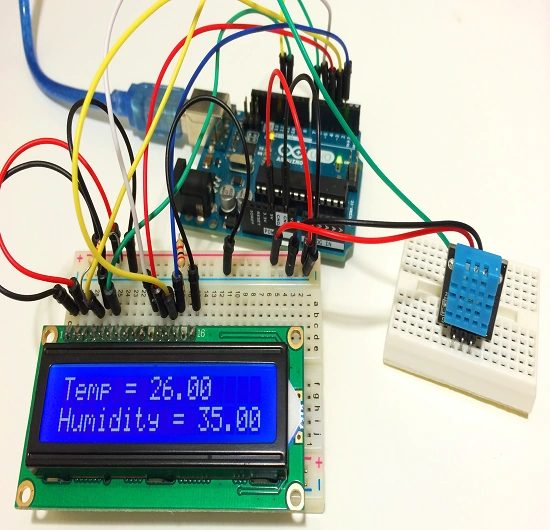
Figure5 - LCD Display
Hadshana KamalanathanPosted Jul 21, 2018, 8:02 PM
Good noe...
Munish APosted Apr 7, 2018, 2:12 AM
Nice article, really amazing application of technology....
Anu VPosted Feb 13, 2017, 11:11 PM
Thanks for sharing.. Nice article..